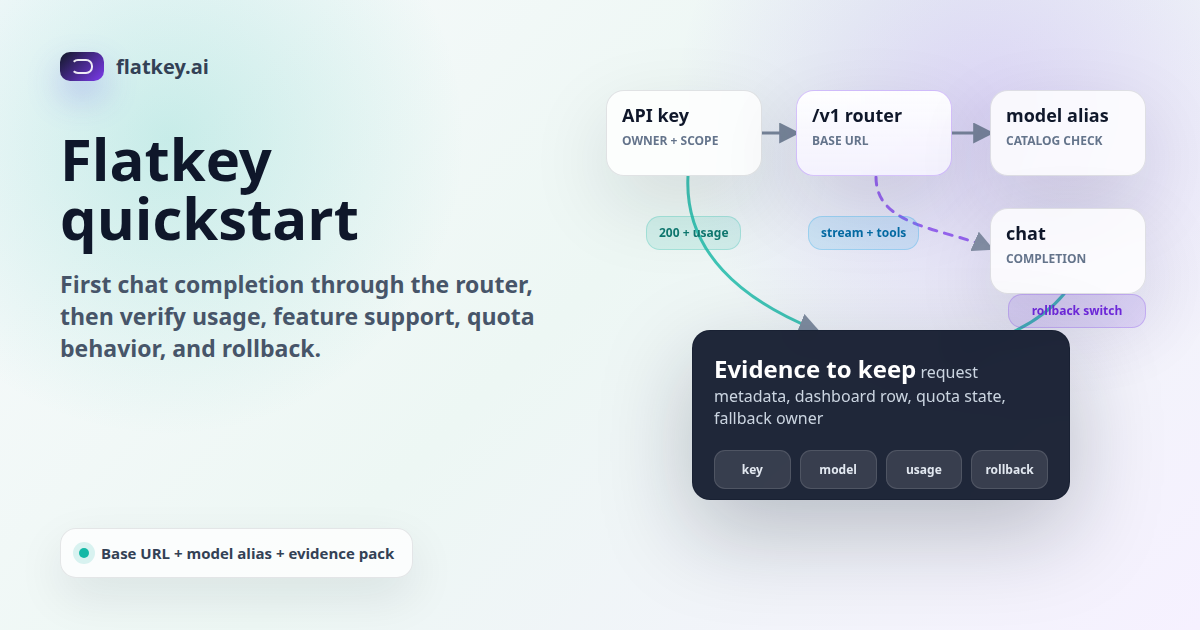
Flatkey quickstart work should prove more than a single 200 OK. The first chat completion through https://router.flatkey.ai/v1 should confirm the credential, base URL, model alias, response shape, usage record, quota behavior, and rollback path before a production service depends on the route.
This guide was prepared on June 25, 2026 from Flatkey public pages, a no-token router check, and OpenAI Chat Completions API evidence. The code snippets are templates. No live Flatkey API key was available for this draft, so run the smoke tests with your own key, selected model, dashboard, and current Flatkey console settings.
Endpoint note: this Flatkey quickstart uses https://router.flatkey.ai/v1 because that is the assigned router endpoint. Flatkey's live public navigation and setup surfaces may also show a console base URL. Use the router URL for this quickstart, then confirm the base URL shown in your current Flatkey console before production rollout.
Quick Answer: Flatkey Quickstart
The shortest safe Flatkey quickstart is: get a Flatkey key, choose one current model alias from the catalog, set FLATKEY_BASE_URL=https://router.flatkey.ai/v1, run a tiny chat completion, save the response metadata, verify the usage row, test streaming and tools if your app uses them, and keep the old provider URL as a rollback variable until the launch review is complete.
| Step | Pass Condition | Evidence To Save |
|---|---|---|
| Get a key | The key is scoped to one app, owner, and environment. | Key name, owner, environment, rotation owner, and launch ticket. |
| Pick a model alias | The alias appears in the current Flatkey catalog and is enabled for your key or group. | Model alias, catalog row, endpoint family, group, and checked date. |
| Set the router base URL | The SDK reads https://router.flatkey.ai/v1 from configuration, not hardcoded source. |
Environment variables, pull request, old base URL, and rollback variable. |
| Run first chat completion | The response includes assistant content, model metadata, and usage or equivalent billing evidence. | Payload, timestamp, response ID or request ID if exposed, model, and usage object. |
| Verify dashboard usage | The test appears under the expected key, model, endpoint, and time window. | Usage row, cost or token fields, quota state, and reviewer sign-off. |
| Test app-specific features | Streaming, tools, JSON output, retries, or timeouts behave the way your app expects. | Feature matrix, failure modes, and fallback decision. |
Before You Run The First Request
A Flatkey quickstart should start with configuration, not code edits scattered across the application. Put the key, base URL, model alias, timeout, and rollback URL into environment variables so a reviewer can inspect the migration in one place.
export FLATKEY_API_KEY="fk_live_or_test_key_here"
export FLATKEY_BASE_URL="https://router.flatkey.ai/v1"
export FLATKEY_MODEL="model-alias-from-current-flatkey-catalog"

# Keep this until the rollout is stable.
export PREVIOUS_AI_BASE_URL="https://previous-provider.example/v1"
Flatkey's public homepage positions the product around model access, routing, billing, usage analytics, and operational controls for production AI teams. The pricing page is the current place to review model names, vendors, endpoint types, groups, and pricing context before selecting a model alias. Treat catalog rows as a starting point, not proof that every feature is enabled for your account.
Run The First Chat Completion With curl
Start the Flatkey quickstart with curl because it removes SDK defaults from the first test. Keep the prompt tiny, avoid customer data, and print the raw JSON so you can inspect the response shape.
curl -sS "$FLATKEY_BASE_URL/chat/completions" \
  -H "Authorization: Bearer $FLATKEY_API_KEY" \
  -H "Content-Type: application/json" \
  -d '{
    "model": "'"$FLATKEY_MODEL"'",
    "messages": [
      { "role": "system", "content": "Return one short sentence." },
      { "role": "user", "content": "Flatkey router smoke test." }
    ],
    "temperature": 0
  }'
A pass means the request reached the router, authenticated, selected the model alias, and returned a chat-completion-style response. It does not yet prove streaming, tools, quota controls, fallback, or production reliability.
Run The Flatkey Quickstart With The OpenAI SDK
After curl passes, repeat the Flatkey quickstart through the SDK your app actually uses. OpenAI-compatible migration normally changes the API key, the base URL, and the model name while leaving most chat-completion call sites intact. Official OpenAI API material documents the /v1/chat/completions request shape with model, messages, normal responses, streamed chunks, tools, tool_choice, and usage objects; use that as the compatibility surface to test, not as a guarantee that every optional feature is enabled on every Flatkey route.
Python Template
import os
from openai import OpenAI

client = OpenAI(
    api_key=os.environ["FLATKEY_API_KEY"],
    base_url=os.environ["FLATKEY_BASE_URL"],
)

response = client.chat.completions.create(
    model=os.environ["FLATKEY_MODEL"],
    messages=[
        {"role": "system", "content": "Return one short sentence."},
        {"role": "user", "content": "Flatkey router smoke test."},
    ],
    temperature=0,
)

print(response.choices[0].message.content)
print("model:", response.model)
print("usage:", response.usage)
Node.js Template
import OpenAI from "openai";

const client = new OpenAI({
  apiKey: process.env.FLATKEY_API_KEY,
  baseURL: process.env.FLATKEY_BASE_URL,
});

const response = await client.chat.completions.create({
  model: process.env.FLATKEY_MODEL,
  messages: [
    { role: "system", content: "Return one short sentence." },
    { role: "user", content: "Flatkey router smoke test." },
  ],
  temperature: 0,
});

console.log(response.choices[0]?.message?.content);
console.log({ model: response.model, usage: response.usage });
What To Inspect After The First Response
The response body is only half of the Flatkey quickstart. Platform and finance reviewers need proof that the request is observable and billable in the expected place.
| Field Or Signal | Why It Matters | Action If Missing |
|---|---|---|
| Assistant message | Confirms the chat path returned usable output. | Check model alias, route support, auth, and request body. |
| Model name | Shows which alias or upstream model handled the test. | Compare response metadata with the selected catalog row. |
| Usage fields | Supports cost review, quota checks, and billing reconciliation. | Find the dashboard usage record before moving forward. |
| Request ID or trace handle | Gives support and platform teams a lookup key for incidents. | Record any response headers, gateway IDs, or dashboard IDs available. |
| Latency and timeout | Shows whether the first response fits the app's user-facing budget. | Set explicit SDK timeouts and retry rules before production. |
| Dashboard row | Confirms the request maps to the intended key, owner, model, and cost center. | Pause rollout until attribution is clear. |
Smoke Tests To Add Before Production
Most Flatkey quickstart failures appear after the first non-streaming call. Add these checks if your product uses streaming UIs, agents, structured output, or strict cost controls.
| Smoke Test | Template | Pass Condition |
|---|---|---|
| Streaming | Set stream: true with the same model alias. |
Chunks arrive, the stream closes cleanly, and the app handles timeout and partial output. |
| Tools | Send one small function schema with tool_choice: "auto". |
The model returns a valid tool call or a clear unsupported-feature result. |
| Known-bad alias | Send one request with a deliberately invalid model alias in staging. | The app logs a useful error and does not retry forever. |
| Quota or budget guardrail | Use a low-risk environment to confirm the account's current quota behavior. | The team knows whether requests are blocked, warned, or routed when limits are reached. |
| Rollback | Switch AI_BASE_URL back to the previous provider in staging. |
Traffic can move back with one config change and no code deploy. |
Streaming Template
const stream = await client.chat.completions.create({
  model: process.env.FLATKEY_MODEL,
  messages: [{ role: "user", content: "Stream five short words." }],
  stream: true,
});

let chunks = 0;
for await (const chunk of stream) {
  chunks += 1;
  process.stdout.write(chunk.choices?.[0]?.delta?.content ?? "");
}

console.log("\nchunks:", chunks);
Tool-Call Template
const toolResponse = await client.chat.completions.create({
  model: process.env.FLATKEY_MODEL,
  messages: [{ role: "user", content: "Record the review city as Austin." }],
  tools: [
    {
      type: "function",
      function: {
        name: "record_review_city",
        description: "Record a city for a Flatkey quickstart tool-call smoke test.",
        parameters: {
          type: "object",
          properties: {
            city: { type: "string" }
          },
          required: ["city"]
        }
      }
    }
  ],
  tool_choice: "auto"
});

console.log(JSON.stringify(toolResponse.choices?.[0]?.message, null, 2));
Rollback Checklist
A clean Flatkey quickstart ends with a rollback path. Keep the previous provider base URL, model alias, and key available until usage attribution, cost review, and feature tests are complete.
| Rollback Item | Owner | Decision Trigger |
|---|---|---|
AI_BASE_URL can switch back to the previous provider. |
Platform engineering | Auth, route, latency, or error-rate regression. |
| Previous model alias remains configured. | Application team | Flatkey model alias does not match quality or feature expectations. |
| Usage reviewer knows where to compare records. | Finance or ops | Cost, token, or key attribution cannot be reconciled. |
| Support has a request ID or dashboard lookup path. | On-call owner | Incident review requires route-level evidence. |
Internal Links For The Next Migration Step
After the first Flatkey quickstart passes, use the OpenAI-compatible API migration guide to review broader SDK cutover work, the LLM API gateway architecture guide to align routing and fallback ownership, and the Flatkey pricing catalog to check current model rows before expanding coverage. When the smoke test is ready for a real key, get a key and keep the evidence table attached to the rollout ticket.
Bottom Line
The useful outcome of a Flatkey quickstart is not just a chat answer. It is a small evidence pack: router base URL, model alias, response shape, usage row, feature checks, quota decision, and rollback switch. If those are documented, your first chat completion through router.flatkey.ai/v1 becomes a controlled migration step instead of an isolated demo.
FAQ
What base URL should I use for this Flatkey quickstart?
Use https://router.flatkey.ai/v1 for this guide. For production rollout, confirm the base URL shown in your current Flatkey console because public setup surfaces can change.
Can I use the OpenAI SDK with Flatkey?
Use the OpenAI SDK only for OpenAI-compatible Flatkey routes and models that your account has enabled. Change the API key, base URL, and model alias, then test the response shape your app depends on.
Is one successful chat completion enough?
No. A first response proves one request path. You still need usage attribution, quota behavior, streaming or tool support if used, error handling, and rollback evidence.
Should I hardcode router.flatkey.ai/v1?
No. Put it in configuration as FLATKEY_BASE_URL or an equivalent environment variable so you can update the endpoint or roll back without a code deploy.
Does this quickstart prove every Flatkey model works?
No. It proves the selected key, endpoint, and model alias in your account. Repeat the smoke tests for every model alias and feature set before production traffic.