Updated: September 14, 2026
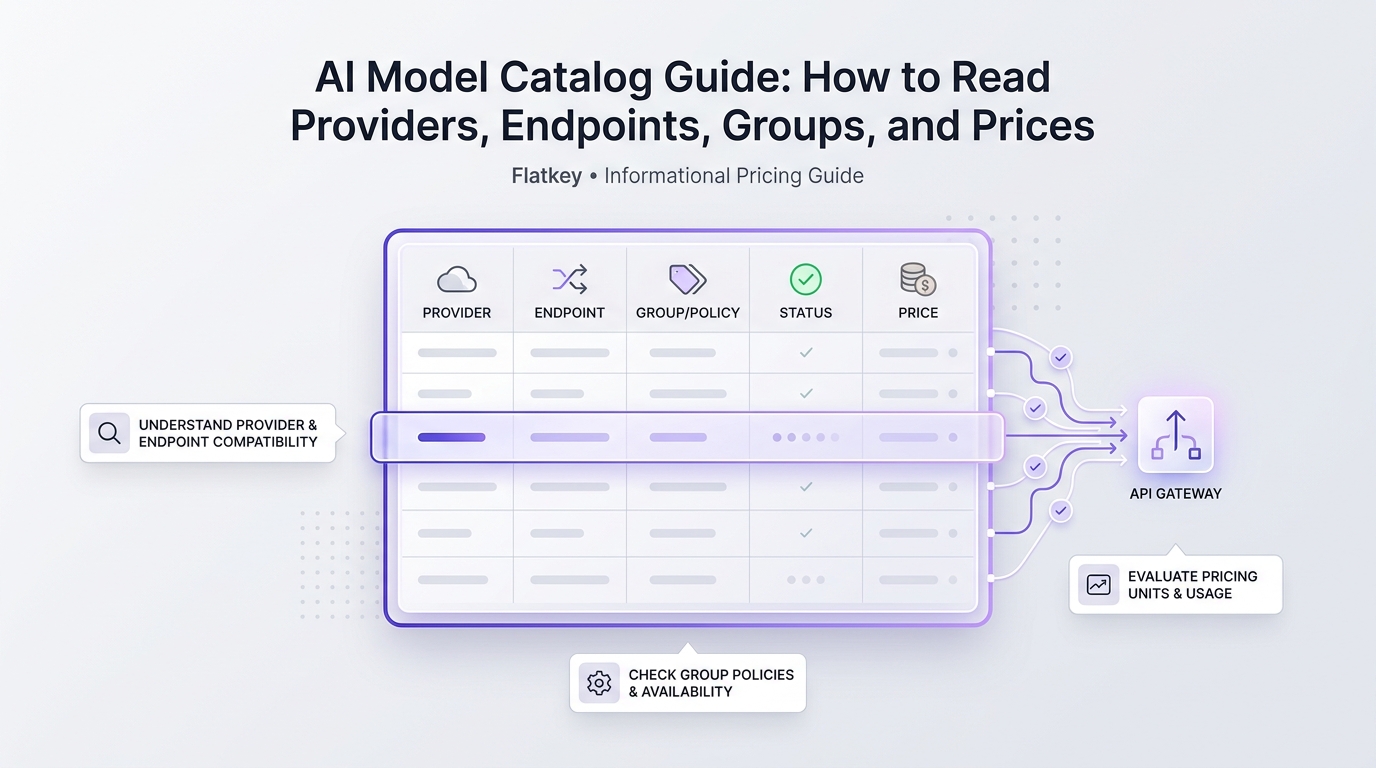
An AI Model Catalog Guide: How to Read Providers, Endpoints, Groups, and Prices is useful because model catalogs now do more than list names. A production catalog is a routing surface. It tells product, engineering, and finance which provider owns the route, which API shape is supported, which group or plan can call it, what unit is billed, and whether the model is healthy enough for real traffic.
The expensive mistake is reading a catalog like a leaderboard. A row with a famous model name can still be wrong for your workload if the endpoint shape does not match your SDK, the billing unit is not comparable, the route is limited to a group you do not use, or the availability status is not production-ready.
This AI model catalog guide gives product teams a practical way to read a model catalog before selecting, testing, or routing traffic through any AI API gateway. It uses Flatkey's public model directory and docs as the working example, but the checklist applies to direct provider catalogs, gateway catalogs, and internal platform catalogs.
Quick Answer: How To Read An AI Model Catalog
Read an AI model catalog in this order:
- Provider: who operates the upstream model or route.
- Model ID: the exact string your application must send.
- Endpoint support: which API shape the route accepts, such as OpenAI-compatible chat, Responses, Anthropic, Gemini, image, video, embeddings, or a native route.
- Group or plan: which account group, route group, quota group, or billing plan can use the row.
- Availability status: whether the route is live, degraded, unknown, preview, early access, deprecated, or coming soon.
- Pricing unit: whether billing is per 1M input/output tokens, cached tokens, image, second, request, character, minute, or another unit.
- Usage evidence: whether your test request appears in logs with the expected model, status, token counts, route, key, and cost.
The short answer in this AI Model Catalog Guide: How to Read Providers, Endpoints, Groups, and Prices is: do not pick a model from the price column alone. Pick it after the provider, endpoint, group, status, price unit, and usage-log evidence all agree with your workload.
Current Flatkey Model Catalog Snapshot
Flatkey's current docs describe one OpenAI-compatible base URL, https://router.flatkey.ai/v1, plus API endpoints for chat completions, Responses, embeddings, image generation, video tasks, and model listing. The /v1/models endpoint returns model IDs and providers in OpenAI-compatible format, while the public Model Directory is the live place to inspect pricing, health, endpoint support, and model detail pages.
On September 14, 2026, the Flatkey public model directory exposed row fields that are directly relevant to catalog review:
| Catalog field | What it tells you | Example values observed in the public directory |
|---|---|---|
model_name |
The string or model row you need to test. | gpt-5.6-sol, deepseek-v4-pro, seedance-2.5, gemini-3-flash-preview, claude-sonnet-5 |
vendor_name |
The provider or catalog owner behind the route. | OpenAI, DeepSeek, ByteDance, Google, Anthropic, Flatkey catalog |
supported_endpoint_types |
Which request shape the model can accept. | openai, openai-response, anthropic, gemini, openai-video, video |
availability_status |
Whether the route currently appears usable. | available, unknown_failure |
display_pricing.billing_kind |
The price unit family. | token, per_second, request |
enable_groups / group pricing |
Which route or commercial group can call the row and how its price is adjusted. | Grouped route entries such as plg in the public page data |
Treat this snapshot as evidence of how the catalog is structured, not as a permanent pricing table. Flatkey's reference docs explicitly point readers back to flatkey.ai/models, flatkey.ai/pricing, and flatkey.ai/status so model rows, pricing, and health can update without a docs release.
Read Providers Before You Read Model Names
Provider is the first field because a model name alone does not tell you where traffic goes, what contract applies, or which operational limits matter.
Use the provider field to answer:
| Question | Why it matters |
|---|---|
| Is this route operated by the original model provider, a gateway, an inference cloud, or an internal proxy? | It changes support, pricing, logging, data handling, and incident ownership. |
| Does the row represent an official endpoint or a re-served model? | Product teams need to know whether behavior should match the provider's official API. |
| Are there multiple rows with similar names from different providers? | A qwen, deepseek, gemini, or claude label can hide regional, compatibility, or plan differences. |
| Which provider should finance reconcile against? | The billing unit and list-price reference may come from the provider, while the invoice may come from the gateway. |
For Flatkey, the approved positioning is one key, one balance, and official model access across providers such as OpenAI, Anthropic, Google, DeepSeek, Alibaba, Z.ai, Moonshot, and ByteDance. That makes provider transparency especially important. If a catalog row does not make the provider and route class clear, ask for clarification before approving the row for production.
Read Endpoints As Contracts, Not Labels
Endpoint support is a contract between your application and the route. It decides whether your current client, request body, streaming handler, tool-call parser, and usage-accounting logic can work without a rewrite.
Flatkey's REST docs list these public API endpoints:
| Endpoint | Typical use |
|---|---|
/v1/chat/completions |
OpenAI-compatible chat and text generation |
/v1/responses |
Responses-style stateful or tool-capable workflows for compatible models |
/v1/embeddings |
Vector embeddings |
/v1/images/generations |
Image generation |
/v1/videos |
Video-generation task creation |
/v1/videos/{task_id} |
Video task polling |
/v1/videos/{task_id}/content |
Completed video download |
/v1/models |
Account-available model list |
A catalog row that says openai is not the same as a row that says anthropic, gemini, openai-response, openai-video, or video. A model may support more than one endpoint family, but you still need to test the exact path your application will use.
For this AI model catalog guide, use the endpoint field to write a short compatibility contract:
catalog_endpoint_contract:
  workload: support_ticket_summary
  model_id: selected-model-id
  provider: provider-name
  endpoint_type: openai
  base_url: https://router.flatkey.ai/v1
  endpoint_path: /v1/chat/completions
  required_features:
    - streaming
    - tool_calls
    - structured_json
    - usage_fields
  pass_condition:
    - existing_sdk_initializes
    - response_parser_accepts_output
    - usage_log_matches_model
    - fallback_policy_is_documented
If one item in that contract fails, the model may still be useful, but it is not a drop-in route for that workload.
Read Groups As Route And Cost Policy
Groups are easy to skip because they look like internal platform labels. Do not skip them. A group can decide who can use a route, which price multiplier applies, which key is allowed, which quota is consumed, and which fallback pool is available.
In a gateway catalog, groups often represent one or more of these policies:
| Group meaning | What to verify |
|---|---|
| Commercial plan | Does this account or team have access to the price shown? |
| Route pool | Which upstream channel class or provider account handles traffic? |
| Product environment | Is this route approved for dev, staging, production, or a specific customer? |
| Budget scope | Which key, team, workspace, or customer budget is charged? |
| Allowlist | Is the model allowed for regulated data, public features, or agent autonomy? |
| Fallback family | Can this group fall back to another route without breaking quality or policy? |
Flatkey's product positioning includes sub-key governance, budgets, model allowlists, usage logs, and a shared balance. That means the catalog row and the usage dashboard should agree. If a product manager approves a model in the catalog but the production key is not in the right group, engineering will discover the problem as a 403, 429, fallback miss, or billing surprise.
Read Prices By Unit Before Comparing Rows
Price is the most misread model-catalog field. An AI model catalog guide should force every price into its real unit before anyone compares it.
Do not compare these units as if they were the same:
| Price unit | Common workload | Catalog review risk |
|---|---|---|
| Input tokens | Prompt-heavy chat, summarization, retrieval-augmented generation | Long prompts and retrieved context can dominate cost. |
| Output tokens | Reasoning, writing, code generation, extraction | Long completions can dominate cost even when input looks cheap. |
| Cached input tokens | Reused system prompts, prompt caching, context caching | Cache-hit and cache-miss rates must be measured separately. |
| Image output tokens or per-image price | Image generation and editing | Resolution, quality, reference images, retries, and acceptance rate change true cost. |
| Per second | Video generation and some media routes | Duration and failed/edited clips matter more than request count. |
| Per request | Search, tools, image utilities, enrichment, custom APIs | Request success rate and retry policy decide final cost. |
| Per minute or character | Speech, transcription, text-to-speech, OCR-like workflows | Channel count, language, add-ons, and batch mode may change cost. |
Provider pricing pages also use different naming. OpenAI, Anthropic, Google Gemini, and DeepSeek all separate some combination of input, output, cached input, cache read/write, or cache-hit/cache-miss pricing in their current public pricing documentation. That is why a catalog review should store the live source URL and review date instead of copying one permanent price into a roadmap ticket.
Use this normalized formula:
accepted_workload_cost =
  (primary_attempt_cost
   + retry_cost
   + fallback_cost
   + cached_or_uncached_delta
   + media_or_tool_addons)
  / accepted_outputs
Then add the decision context:
production_cost_decision =
  accepted_workload_cost
  + latency_penalty
  + manual_review_cost
  + incident_risk
  + data_policy_constraints
That second line is why the cheapest price cell is rarely the final answer.
Read Status Before Production Traffic
Availability status should be a gate, not a footnote. A model can look perfect on provider, endpoint, and price, but still be the wrong production choice if it is preview-only, degraded, region-limited, deprecated, missing from your account, or failing health checks.
Use these status classes:
| Status class | What to do |
|---|---|
| Available and tested | Candidate for controlled rollout after usage-log verification. |
| Available but untested | Run a smoke test before assigning production traffic. |
| Preview, beta, early access, or limited | Use for experiments unless product explicitly accepts lifecycle risk. |
| Degraded or high latency | Keep as non-default or fallback only if the workload tolerates it. |
| Unknown failure | Treat as blocked until the route is verified. |
| Deprecated or shutdown scheduled | Do not start new work unless there is a short migration reason. |
| Coming soon | Do not include in launch commitments. |
Flatkey's docs point model health checks to the live status page. For a production decision, the status field should be saved with the date, model ID, endpoint type, key or group, and one real request ID.
A Flatkey Workflow For Catalog Review
Use this workflow whenever a product team asks whether a model from the catalog is safe to use.
- Open the Flatkey Model Directory.
- Search the exact model ID, not just the provider name.
- Record provider, endpoint support, availability status, pricing unit, group access, and current review date.
- Open Flatkey pricing and the relevant provider pricing page.
- Write the normalized cost unit: per 1M input tokens, output tokens, cached tokens, image, second, request, or another unit.
- Run a low-risk smoke test through the intended
base_url, endpoint path, and model ID. - Confirm the request appears in Flatkey usage logs with the expected model, key, status, token counts or media unit, and cost.
- Define fallback rules before sending real users: trigger, retry count, allowed fallback models, quality gate, and logging fields.
- Review the catalog record with product, engineering, finance, and security before defaulting the route.
The important part is step 7. A catalog row is a promise. A usage-log row is evidence that the promise matched your account, key, group, and workload.
Template: AI Model Catalog Review Record
Copy this template into an internal launch doc:
ai_model_catalog_review:
  review_date: 2026-09-14
  reviewer: product_owner_or_platform_owner
  workload: customer_support_summary
  business_owner: support_product
  environment: staging
  catalog:
    catalog_url: https://flatkey.ai/models
    model_id: selected-model-id
    provider: provider-name
    endpoint_types:
      - openai
    group_or_plan: approved-group
    availability_status: available
    pricing_unit: per_1m_input_and_output_tokens
  compatibility:
    base_url: https://router.flatkey.ai/v1
    endpoint_path: /v1/chat/completions
    sdk: openai-python
    streaming_required: true
    tool_calls_required: false
    structured_output_required: true
  cost:
    provider_pricing_url: provider-pricing-page
    flatkey_pricing_url: https://flatkey.ai/pricing
    cost_formula: accepted_workload_cost
    cache_assumption: measured_not_assumed
  evidence:
    smoke_test_request_id: req_example
    usage_log_verified: true
    output_parser_passed: true
    p95_latency_ms: measured
    fallback_tested: false
  decision:
    status: approve_for_limited_rollout
    rollout_limit: 5_percent_of_traffic
    fallback_route: selected-fallback-model
    next_review_date: 2026-09-21
This template keeps the AI Model Catalog Guide: How to Read Providers, Endpoints, Groups, and Prices practical. The output is not a preference list. It is an auditable decision record.
Common AI Model Catalog Mistakes
Mistake 1: Treating provider and model family as the same field
Provider is the upstream owner or route owner. Model family is a naming group. They are related, but they are not interchangeable. Record both.
Mistake 2: Assuming OpenAI-compatible means every endpoint works
OpenAI-compatible setup can reduce migration work, but it does not prove every endpoint, streaming event, tool-call shape, usage field, or media parameter works for every model. Test the exact endpoint family in the catalog row.
Mistake 3: Comparing token price to media price
Per-token, per-image, per-second, and per-request billing should not be collapsed into one price column. Normalize to cost per accepted output for the workload.
Mistake 4: Ignoring groups until rollout
If the production key is not allowed to call the group you approved, the catalog decision is incomplete. Validate group access with the key that will actually ship.
Mistake 5: Copying a price row without a review date
Provider and gateway prices can change. Save the source URL, review date, model ID, pricing unit, and the usage-log evidence from a test request.
Mistake 6: Shipping on catalog status alone
Catalog status should trigger the smoke test. It should not replace the smoke test. Production approval needs at least one request through the same key, endpoint, model, and group.
When A Unified AI Model Catalog Helps Most
A unified model catalog helps most when a team has more than one of these problems:
- Multiple provider keys are scattered across services, agents, and environments.
- Product wants to compare text, image, video, embedding, and tool routes in one workflow.
- Finance wants request-level cost evidence instead of separate provider invoices.
- Platform engineering needs fallback rules, health checks, and model allowlists.
- Security needs to know which route handled which workload.
- Teams need to move from one model to another without rewriting every client.
Flatkey is positioned for this pattern: one API key, one OpenAI-compatible router, a live model directory, usage logs, model/tool access through one balance, and operational controls for teams. That does not remove due diligence. It gives the team one place to perform it.
FAQ
What is an AI model catalog?
An AI model catalog is a searchable list of model routes and their metadata: model ID, provider, supported endpoints, pricing unit, availability, groups or plans, and sometimes context window, modality, health, limits, and usage links.
Why does the provider field matter?
The provider field tells you who owns the upstream model or route. It affects support, pricing references, limits, lifecycle notices, region behavior, data handling, and incident response.
What does endpoint support mean in a model catalog?
Endpoint support tells you which API shape a model row accepts. For example, a row may support OpenAI-compatible chat, Responses, Anthropic-compatible requests, Gemini-native requests, image generation, video generation, or embeddings. Your SDK and parser must match the endpoint you choose.
Are groups the same as pricing tiers?
Sometimes, but not always. Groups can represent commercial plans, route pools, access policies, key scopes, budget scopes, or fallback families. Treat groups as route policy until the platform owner confirms the exact meaning.
How should teams compare model prices?
Compare model prices by workload, not by raw catalog row. Normalize input tokens, output tokens, cached tokens, images, seconds, requests, retries, fallback attempts, and accepted outputs into one cost formula.
Should I trust a model catalog row without testing?
No. A catalog row is a useful starting point, but production approval should include one smoke test through the exact key, base URL, endpoint, model ID, and group you plan to use.
How does Flatkey help with model catalog review?
Flatkey gives teams one place to inspect model rows, route through an OpenAI-compatible base URL, compare live pricing surfaces, check model health, and review usage logs. That makes catalog decisions easier to audit across product, engineering, and finance.
Final Catalog Review Step
The final step in an AI Model Catalog Guide: How to Read Providers, Endpoints, Groups, and Prices is not choosing a model. It is proving the route.
Before launch, your team should be able to show:
- The exact model ID and provider.
- The endpoint type and SDK path.
- The group or plan that grants access.
- The current pricing unit and source URL.
- The availability status and review date.
- A smoke-test request ID.
- A usage-log row showing model, key, status, tokens or media unit, and cost.
- A fallback and rollback rule.
If those fields are complete, the catalog is doing its job. If they are missing, the model decision is still a guess.