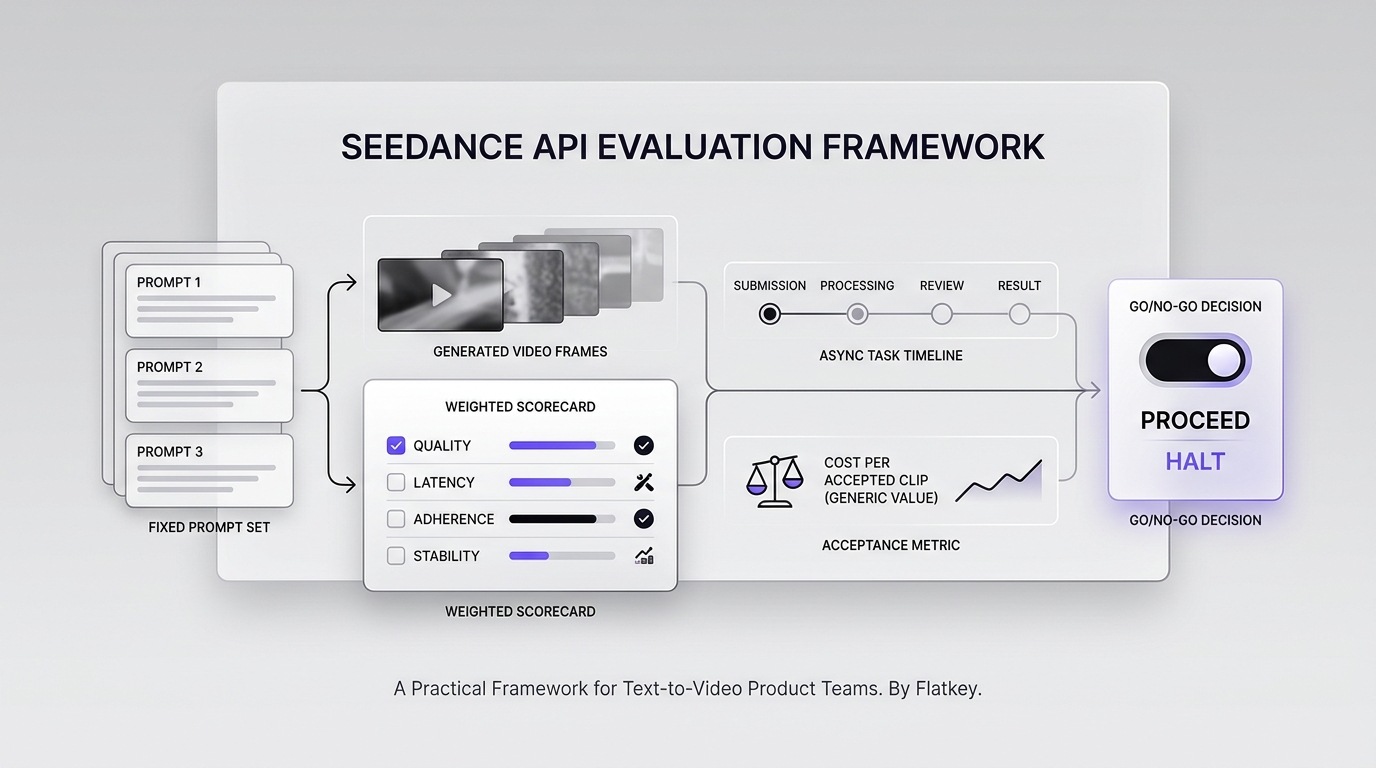
A Seedance API evaluation should answer a product question, not just produce an impressive demo clip. The real decision is whether your team can turn prompts and reference media into acceptable video assets at a predictable quality, latency, safety, and cost.
As of September 11, 2026, Flatkey's live seedance-2.5 model page describes a ByteDance video route for text-to-video and image-to-video generation, with public metadata showing usage-based per-second pricing. The current request pattern is asynchronous: create a video task with POST /v1/video/generations, keep the returned task ID, and poll GET /v1/videos/{task_id} until the job reaches a terminal state.
That API contract is straightforward. Designing a useful Seedance API evaluation is harder. This guide gives product managers and engineering leads a repeatable test set, a weighted scorecard, an accepted-clip cost metric, and a five-day rollout plan.
Quick answer: what should a Seedance API evaluation measure?
Evaluate the API across six gates:
- Capability fit: Can it produce the scenes, motion, framing, and reference consistency your product requires?
- Repeatability: Does the same prompt family produce usable results across multiple runs?
- Workflow fit: Can your application handle asynchronous tasks, polling, timeouts, storage, and retries cleanly?
- User-experience fit: Can you set honest expectations for waiting, progress, regeneration, and failure?
- Safety fit: Can your product prevent disallowed inputs and review outputs before distribution?
- Unit-economics fit: What does one accepted clip cost after failed jobs and rejected outputs are included?
Do not approve a provider based on one cherry-picked generation. A useful Seedance API evaluation uses a fixed prompt set, repeated runs, blind scoring, and the same acceptance rules for every candidate model.
Start with the current Seedance API contract
Flatkey's current seedance-2.5 model page frames the route as a text/image-to-video model and documents the video task pattern product teams need to evaluate. The page's example creates a five-second, 1080p task:
curl -X POST https://router.flatkey.ai/v1/video/generations \
  -H "Authorization: Bearer $FLATKEY_API_KEY" \
  -H "Content-Type: application/json" \
  -d '{
    "model": "seedance-2.5",
    "content": [
      {
        "type": "text",
        "text": "A paper airplane flying over a neon city at dusk"
      }
    ],
    "resolution": "1080p",
    "duration": 5
  }'
Then poll the task using the returned ID:
curl https://router.flatkey.ai/v1/videos/TASK_ID \
  -H "Authorization: Bearer $FLATKEY_API_KEY"
Check the live Seedance 2.5 model page before implementation because availability, request fields, health signals, and commercial terms can change.
If your team has not verified its key and base URL yet, complete the existing Seedance API quickstart first. Use this article after connectivity works and the product team is ready to judge whether the route fits a real use case.
Define an evaluation contract before generating clips
The highest-leverage step in a Seedance API evaluation is agreeing on the acceptance contract before anyone sees results. Otherwise, stakeholders tend to reward whichever clip looks most cinematic and quietly change their standards between runs.
Write down these fields:
| Field | Product-team decision |
|---|---|
| Target workflow | Social creative, product motion, storyboarding, game concept, ad variation, or another defined job |
| Input mode | Text-to-video, image-to-video, or both |
| Output requirement | Duration, resolution, aspect ratio, framing, and delivery format |
| Required motion | Camera movement, object movement, character movement, or mostly static composition |
| Reference requirement | None, loose style reference, or strict subject/product consistency |
| Acceptable wait | Maximum time before the user should see a result or a clear failure state |
| Safety boundary | Disallowed prompts, restricted subjects, review steps, and publication rules |
| Acceptance owner | The role that makes the final usable/not-usable decision |
| Budget unit | Cost per generated second, completed task, accepted clip, or published asset |
The acceptance owner should be close to the final workflow. A growth creative lead may accept a clip that a product-rendering team rejects because the product shape changed. One universal quality score cannot represent every use case.
Build a 24-prompt Seedance API test set
A practical test set is large enough to expose failure patterns but small enough to repeat when a route, prompt template, or model changes. Start with 24 prompts across six groups.
| Prompt group | Prompts | What it tests |
|---|---|---|
| Simple subject motion | 4 | Basic motion, object integrity, and clean backgrounds |
| Camera and composition | 4 | Pan, tracking, close-up, wide shot, and framing adherence |
| Multi-element interaction | 4 | Spatial relationships, collisions, occlusion, and temporal consistency |
| Product or brand-like objects | 4 | Shape stability, material appearance, and reference sensitivity |
| Stylized creative scenes | 4 | Art direction, lighting, atmosphere, and prompt interpretation |
| Deliberate edge cases | 4 | Dense instructions, unusual motion, ambiguous prompts, and safety boundaries |
Run each prompt at least three times when budget permits. One run tests possibility; repeated runs test whether your product can rely on the behavior.
Keep prompts provider-neutral. Avoid prompt syntax that only one model understands unless the feature itself is part of the evaluation. Save the prompt, request parameters, task ID, timestamps, terminal status, output URL, and reviewer scores for every run.
ByteDance's public Seedance research emphasizes dimensions such as instruction following, motion quality, temporal consistency, multi-shot storytelling, and visual quality. Those are useful evaluation categories, but your team should translate them into observable product requirements rather than copy a research benchmark directly.
Use a weighted Seedance API evaluation scorecard
The following scorecard works as a starting point for general text-to-video products. Change the weights before testing if your use case has different priorities.
| Dimension | Weight | Reviewer question |
|---|---|---|
| Prompt and instruction adherence | 20 | Did the clip follow the requested subject, action, setting, and camera direction? |
| Motion quality | 20 | Is movement natural enough for the intended product workflow? |
| Temporal consistency | 15 | Do objects, backgrounds, and visual identities remain coherent over time? |
| Composition and visual quality | 10 | Is the framing, lighting, detail, and overall presentation usable? |
| Reference consistency | 10 | When an image is supplied, does the result preserve the required subject or product traits? |
| Time to usable result | 10 | Does the full wait, including retries, fit the user experience? |
| Completion reliability | 5 | How often do tasks complete without transport, provider, or output failures? |
| Safety and reviewability | 5 | Can unsafe or unsuitable requests and outputs be detected before publication? |
| Cost per accepted clip | 5 | Is the real cost sustainable after rejected outputs are counted? |
Score each quality dimension from 1 to 5, multiply by its weight, and normalize the result to 100. Keep operational metrics such as latency and completion rate directly measured rather than scored from memory.
For a fair Seedance API evaluation, reviewers should not know which provider produced each clip when you compare multiple models. Randomize filenames, remove provider metadata from the review sheet, and reveal the model only after scoring is complete.
Measure cost per accepted clip, not cost per generation
The most useful video-generation cost metric is:
cost per accepted clip = total generation spend / accepted clips
If 30 tasks cost $60 and only 12 outputs pass review, the effective cost is $5 per accepted clip—not $2 per generation.
Also track:
acceptance rate = accepted clips / completed clips

completion rate = completed clips / submitted tasks

cost per published asset = total generation spend / assets actually published
This prevents a cheap but inconsistent route from looking better than a more expensive route that produces usable outputs more often. It also connects model evaluation to the team's actual creative or product throughput.
Flatkey currently presents seedance-2.5 as usage-based, per-second pricing. Use the live model directory, Seedance 2.5 model page, and pricing page for current commercial information instead of copying a static number into a planning spreadsheet.
Normalize the asynchronous workflow behind one adapter
Your product should not expose provider-specific task states throughout the codebase. Put the Seedance API behind a small video-generation adapter and normalize the lifecycle.
type VideoJobState =
  | "queued"
  | "processing"
  | "succeeded"
  | "failed"
  | "expired";

type VideoJob = {
  id: string;
  state: VideoJobState;
  outputUrl?: string;
  errorCode?: string;
  submittedAt: string;
  completedAt?: string;
};

interface VideoGenerationAdapter {
  create(input: {
    prompt: string;
    imageUrl?: string;
    duration: number;
    resolution: string;
  }): Promise<VideoJob>;

  get(jobId: string): Promise<VideoJob>;
}
The adapter should preserve the provider task ID, raw terminal status, request parameters, and usage data for debugging. The rest of the product should depend on normalized states.
This boundary makes the Seedance API evaluation more honest. You can compare the quality and operations of Seedance with another video route without rewriting your product flow. It also gives you a controlled place to implement polling intervals, timeout budgets, retry rules, webhook verification, and migration logic.
For a deeper implementation pattern, see the guide to a stable OpenAI-compatible base URL for Seedance API teams. Before launch, run the separate Seedance API production checklist for queue durability, idempotency, storage, and incident controls.
Map API behavior to the product experience
An asynchronous video route creates user-experience decisions that a synchronous text endpoint does not.
Waiting state
Show that the request was accepted and provide a durable job reference. Do not imply that a video is almost finished unless the API exposes trustworthy progress.
Timeout state
Separate a slow task from a failed task. A client timeout should not automatically create a second billable generation. Continue checking the original task before allowing a retry.
Regeneration
Let users change one variable at a time—prompt, reference image, duration, or resolution—so teams can learn why a result improved or regressed.
Output review
Store the prompt and parameters next to the clip. Provide an internal review state before a generated asset can move into a public or customer-facing workflow.
Failure language
Translate provider failures into actionable product messages: unsupported input, safety rejection, temporary capacity, expired asset, or retryable service error. Preserve the raw code for support and engineering.
Include these UX states in the Seedance API evaluation. A model can produce excellent clips and still be a poor product fit if its latency and failure behavior cannot be communicated cleanly.
Add safety and content review to the evaluation
Text-to-video inputs and outputs should pass through product-specific controls. At minimum:
- validate input media type, size, and origin;
- reject obviously disallowed or unsupported requests before creating a paid task;
- record who submitted the request and which policy version applied;
- scan or review completed outputs before public distribution;
- define retention and deletion rules for prompts, references, and generated files;
- prevent a temporary signed URL from becoming the product's permanent asset record.
Do not assume a provider's safety layer equals your product policy. Your application remains responsible for deciding what users may request and what generated content may be stored, shown, or published.
Run a five-day product-team evaluation
Day 1: lock the contract
Choose the workflow, acceptance owner, 24 prompts, parameters, score weights, and maximum budget. Verify current access, health state, request fields, and per-second pricing on the Seedance 2.5 model page.
Day 2: implement the adapter
Create tasks, persist task IDs, poll safely, normalize states, and store outputs. Confirm that an interrupted client session does not lose the job.
Day 3: generate the fixed test set
Run the same prompt set under controlled parameters. Record every request, including failures and outputs that reviewers immediately reject.
Day 4: score blindly
Have at least two reviewers score the clips independently. Calculate acceptance rate, completion rate, p50 and p95 time to terminal state, weighted quality score, and cost per accepted clip.
Day 5: decide and document
Approve one of four outcomes:
- Proceed to limited beta for the tested workflow.
- Proceed with restrictions on prompt types, duration, reference inputs, or user groups.
- Continue evaluation with revised prompts or a larger sample.
- Do not proceed because quality, operations, safety, or unit economics miss the agreed threshold.
This five-day structure keeps a Seedance API evaluation from turning into an open-ended creative experiment.
Example go/no-go thresholds
Set thresholds before testing. A hypothetical product team might require:
| Metric | Example threshold |
|---|---|
| Weighted quality score | At least 78/100 |
| Acceptance rate | At least 60% |
| Completion rate | At least 97% |
| p95 time to terminal state | Within the product's stated wait window |
| Critical safety failures | Zero |
| Cost per accepted clip | Within the approved workflow budget |
| Reference-breaking failures | Below the use-case-specific limit |
These are examples, not universal benchmarks. A storyboard tool can tolerate lower fidelity than an automated product-ad workflow. The value comes from precommitting to measurable thresholds.
What makes this evaluation reusable?
Version the prompt set, scorecard, adapter, and result dataset together. When access changes or a new Seedance route becomes available, rerun the same package.
Keep these artifacts:
- prompt-set version;
- request schema version;
- model and route ID;
- generation parameters;
- raw task lifecycle timestamps;
- reviewer IDs and blind scores;
- acceptance decision and rejection reason;
- cost and usage record;
- policy version;
- final go/no-go decision.
That turns the Seedance API evaluation into a durable model-operations asset instead of a one-time launch document. The same structure also supports broader multimodal model routing when your product compares video, image, audio, and language models behind one access layer.
Final recommendation
Use the Seedance API when it passes your workflow's acceptance contract—not because one generated clip looks impressive. Verify the current route, test a fixed prompt set, score outputs blindly, include failures in unit economics, and keep the async lifecycle behind an adapter.
For Flatkey users, the practical sequence is:
- verify the key and router with the Seedance API quickstart;
- confirm current
seedance-2.5access, request fields, health state, and pricing on the live model page; - run the scorecard in this guide;
- complete the production checklist before customer rollout.
A disciplined Seedance API evaluation gives product, engineering, creative, safety, and finance teams one shared answer: whether the route can reliably produce acceptable video for the workflow you actually plan to ship.
FAQ
Is Seedance API synchronous or asynchronous?
Flatkey's current seedance-2.5 example uses an asynchronous workflow. The application creates a video task, stores the returned task ID, and polls the video task endpoint for completion.
What is the most important Seedance API evaluation metric?
For most product teams, it is cost per accepted clip because that metric includes both generation spend and output usability. Pair it with acceptance rate, completion rate, latency, and a weighted quality score.
How many prompts should a product team test?
Twenty-four prompts across six behavior groups is a practical starting point. Run each prompt multiple times when budget permits so the evaluation measures repeatability rather than possibility.
Should reviewers know which model produced each clip?
No, not when comparing providers or model versions. Blind review reduces brand preference and confirmation bias.
Does Seedance 2.5 support image-to-video?
Flatkey's live model page currently lists seedance-2.5 as a text/image-to-video ByteDance route. Confirm the current route, fields, and pricing before implementation.
Should a product retry a timed-out video request automatically?
Not by creating a new task immediately. First check the existing task ID. A client timeout does not prove the provider task failed, and an automatic resubmission can create duplicate work and spend.
When is a Seedance API evaluation complete?
It is complete when the team has measured quality, repeatability, completion reliability, time to usable output, safety handling, and cost per accepted clip against thresholds agreed before testing.