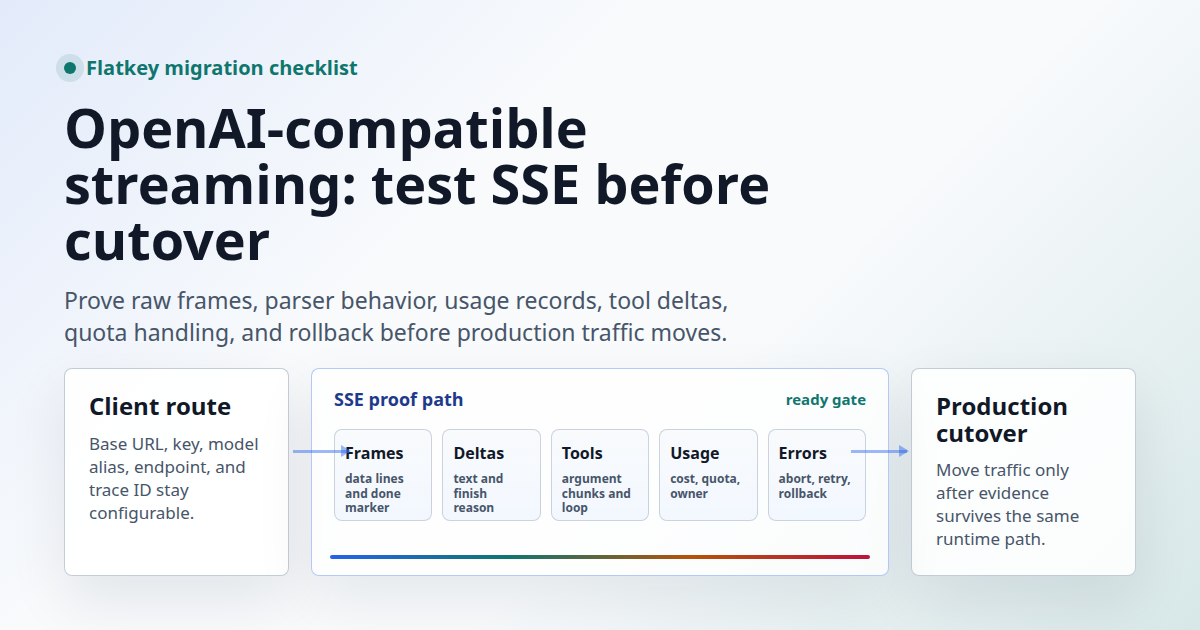
OpenAI-compatible streaming should be tested as a transport contract before you move production traffic. A normal JSON response only proves the key, base URL, model alias, and one request body. Streaming adds another layer: server-sent event framing, incremental deltas, final usage, tool-call argument chunks, timeout behavior, cancellation, proxy buffering, quota signals, and rollback.
This migration guide is for developers, AI product teams, platform engineers, automation builders, finance operators, and procurement reviewers evaluating Flatkey for OpenAI-shaped streaming workloads. It was prepared on June 27, 2026 from official OpenAI API documentation and live Flatkey public pages. The code snippets are templates. No live Flatkey API key was available in this task, so run each check with your own key, selected model alias, current Flatkey console base URL, and staging traffic path.
Quick Answer: OpenAI-Compatible Streaming Readiness
An OpenAI-compatible streaming route is ready for a production cutover only after your actual client can consume the same stream shape it will see in production. For Chat Completions, that means POST /v1/chat/completions with stream: true, a text/event-stream response, chat.completion.chunk objects, parseable choices[].delta payloads, a terminal finish_reason, the data: [DONE] marker, and usage handling that works even when the stream is cancelled.
| Gate | Evidence To Save | Blocker If Missing |
|---|---|---|
| Route and model alias | Base URL, endpoint, model alias, HTTP status, response headers, and request ID. | You proved only a non-streaming request or the wrong endpoint family. |
| SSE framing | Raw frames with data: lines, JSON chunks, and final [DONE]. |
Your proxy or SDK may buffer, rewrite, or close the stream. |
| Delta parsing | Accumulated text, role delta, finish reason, and empty final-choice behavior. | The UI may show blank output or miss the final state. |
| Usage and billing review | Usage chunk when available, Flatkey request record, model alias, endpoint family, and owner. | Finance cannot explain spend after traffic moves. |
| Rollback | Previous base URL, previous key, model mapping, config toggle, and rollback trigger. | An incident requires a code change instead of a configuration change. |
What Current Sources Support
OpenAI's current Chat Completions API reference says a streamed Chat Completions request returns a sequence of chat completion chunk objects. The same official reference describes streaming with server-sent events when stream is set to true. Its streaming-event reference also notes that stream_options: {"include_usage": true} can produce an empty-choice final chunk containing usage, but that interrupted or cancelled streams may not deliver the final usage chunk.
Flatkey's live homepage on June 27, 2026 positioned flatkey.ai as one API gateway for production AI teams and said it unifies model access, routing, billing, usage analytics, and operational controls. The page showed a public example request to https://console.flatkey.ai/v1/chat/completions and described keeping OpenAI-compatible clients pointed at the same base URL while comparing providers and switching models.
Flatkey's live pricing page on June 27, 2026 published an AI-readable pricing summary for 599 AI models across 23 providers. The same page exposed an endpoint map with openai at /v1/chat/completions and openai-response at /v1/responses. Treat those as dated public catalog facts, not proof that every model alias, tool mode, account quota, or streaming path is available in your account.
Start With A Non-Streaming Control
The first OpenAI-compatible streaming check should not stream. Run one ordinary Chat Completions request so you can separate route/model problems from SSE problems.
export FLATKEY_BASE_URL="https://console.flatkey.ai/v1" # confirm in your console
export FLATKEY_API_KEY="sk-fk-..."
export FLATKEY_CHAT_MODEL="your-chat-model-alias"

curl -sS "$FLATKEY_BASE_URL/chat/completions" \
  -H "Authorization: Bearer $FLATKEY_API_KEY" \
  -H "Content-Type: application/json" \
  -H "X-Client-Request-Id: flatkey-nonstream-$(date +%s)" \
  -d '{
    "model": "'"$FLATKEY_CHAT_MODEL"'",
    "messages": [
      {"role": "system", "content": "Answer in one sentence."},
      {"role": "user", "content": "Return one migration control result."}
    ]
  }'
Save the HTTP status, response ID, model string, choices[0].message.content, finish_reason, usage object, request timestamp, and the key or project owner you will use to find the request in Flatkey. If this request fails, do not debug SSE yet.
Run A Raw SSE Smoke Test
Once the control passes, test OpenAI-compatible streaming without hiding the wire format behind your app framework. This curl command keeps the connection open with -N and saves the raw stream for review.
TRACE_ID="flatkey-stream-$(date +%s)"

curl -N -sS "$FLATKEY_BASE_URL/chat/completions" \
  -H "Authorization: Bearer $FLATKEY_API_KEY" \
  -H "Content-Type: application/json" \
  -H "Accept: text/event-stream" \
  -H "X-Client-Request-Id: $TRACE_ID" \
  -d '{
    "model": "'"$FLATKEY_CHAT_MODEL"'",
    "messages": [
      {"role": "system", "content": "Stream concise migration checks."},
      {"role": "user", "content": "Send four short SSE test checks."}
    ],
    "stream": true,
    "stream_options": {"include_usage": true}
  }' | tee "flatkey-stream-$TRACE_ID.sse"
Look for data: lines containing JSON chunks, not one delayed JSON blob. Confirm that chunks share a completion ID, that the object type is a stream chunk, that deltas arrive before the final frame, that a terminal finish_reason appears, and that the stream ends with data: [DONE]. If include_usage is supported by the selected route, save the final usage chunk, but do not make your billing reconciliation depend only on that chunk because interrupted streams may miss it.
Parse The Stream With Your Own Consumer
A raw curl pass is necessary but not enough. Your production service still has to parse OpenAI-compatible streaming frames correctly. This Node template checks content type, splits SSE frames, accumulates text deltas, records finish reason, and handles the final usage chunk when present.
const baseURL = requiredEnv("FLATKEY_BASE_URL");
const apiKey = requiredEnv("FLATKEY_API_KEY");
const model = requiredEnv("FLATKEY_CHAT_MODEL");

function requiredEnv(name) {
  const value = process.env[name];
  if (!value) throw new Error(`Missing ${name}`);
  return value;
}

const response = await fetch(`${baseURL}/chat/completions`, {
  method: "POST",
  headers: {
    Authorization: `Bearer ${apiKey}`,
    "Content-Type": "application/json",
    Accept: "text/event-stream",
    "X-Client-Request-Id": `flatkey-node-stream-${Date.now()}`,
  },
  body: JSON.stringify({
    model,
    messages: [
      { role: "system", content: "Stream concise migration checks." },
      { role: "user", content: "Send four short SSE test checks." },
    ],
    stream: true,
    stream_options: { include_usage: true },
  }),
});

if (!response.ok) {
  throw new Error(`HTTP ${response.status}: ${await response.text()}`);
}

const contentType = response.headers.get("content-type") || "";
if (!contentType.includes("text/event-stream")) {
  throw new Error(`Expected text/event-stream, received ${contentType}`);
}

const decoder = new TextDecoder();
let buffer = "";
let chunks = 0;
let text = "";
let finishReason = null;
let finalUsage = null;
let done = false;

for await (const rawChunk of response.body) {
  buffer += decoder.decode(rawChunk, { stream: true });

  let boundary;
  while ((boundary = buffer.indexOf("\n\n")) !== -1) {
    const frame = buffer.slice(0, boundary);
    buffer = buffer.slice(boundary + 2);

    for (const line of frame.split("\n")) {
      if (!line.startsWith("data:")) continue;

      const data = line.slice(5).trimStart();
      if (data === "[DONE]") {
        done = true;
        continue;
      }

      const event = JSON.parse(data);
      chunks += 1;

      const choice = event.choices?.[0];
      if (choice?.delta?.content) text += choice.delta.content;
      if (choice?.finish_reason) finishReason = choice.finish_reason;
      if (event.usage) finalUsage = event.usage;
    }
  }
}

console.log({ chunks, done, finishReason, finalUsage, text });

if (!done) throw new Error("Stream ended without data: [DONE]");
if (!finishReason) throw new Error("Stream ended without finish_reason");
Run the parser in the same environment that will carry production traffic: local app, API route, serverless function, worker, job runner, browser bridge, queue consumer, or agent runtime. A stream that works in curl can still fail if a framework buffers the response, strips SSE headers, retries a partially consumed stream, or closes idle connections too aggressively.
Test Tool Calls As Streaming Deltas
If your app streams tool calls, your OpenAI-compatible streaming test must include a tool request. Chat Completions streams tool-call arguments incrementally, so your parser needs to assemble argument fragments before executing the tool. Do not treat the first visible text delta as proof that tool streaming works.
| Tool-Streaming Check | What To Capture | Cutover Risk |
|---|---|---|
| Tool schema accepted | Request body, selected model alias, status, and first tool-call chunk. | Some aliases may support text streaming but not the tool path you use. |
| Argument chunks assemble | Tool call ID, function name, argument fragments, final parsed JSON, and finish reason. | Your agent may execute malformed partial arguments. |
| Tool loop completes | Follow-up request with tool result and final assistant answer. | The model can request a tool but the app cannot finish the round trip. |
| No-tool path still works | A prompt where the model should answer directly without tool calls. | The parser assumes every stream includes tool-call deltas. |
Include failure paths: malformed tool arguments, tool dependency timeout, tool-call limit reached, stream cancelled after a partial tool call, and retry after a stream interruption. Record whether the same model alias and endpoint family appear in Flatkey's usage records for both text-only and tool-call streams.
Check Proxies, Browsers, And Serverless Edges
Many OpenAI-compatible streaming cutovers fail outside the model provider. The API can send valid SSE, but your own stack can still buffer it. Test every hop that will sit between the model route and the user.
| Hop | Question | Evidence |
|---|---|---|
| Backend proxy | Does it forward text/event-stream without compression or buffering surprises? |
First-token timing and chunk timestamps before and after the proxy. |
| Serverless route | Does the runtime support long-lived streaming responses at your timeout settings? | Duration, timeout, memory, and cancellation logs. |
| Browser client | Does the browser parser handle partial UTF-8, reconnect decisions, and aborts? | Abort test, page navigation test, and visible output timing. |
| Observability | Can operators connect the stream to request owner, model alias, route, and cost? | Trace ID, Flatkey usage row, app logs, and alert link. |
Use a stable client trace ID for every staging run. OpenAI's API overview recommends request ID logging for production troubleshooting and documents a client-supplied X-Client-Request-Id header for supported endpoints. Even when a gateway or provider uses different response headers, your own trace ID makes Flatkey, app logs, and incident notes easier to reconcile.
Do Not Mix Chat And Responses Streaming Tests
OpenAI-compatible streaming can refer to more than one OpenAI API surface. Chat Completions streaming and Responses streaming are not the same shape. Chat Completions uses chat.completion.chunk objects and choices[].delta; Responses streaming uses typed events such as response output text deltas and completion events. If you plan to use both /v1/chat/completions and /v1/responses, create two separate cutover gates.
Flatkey's pricing page exposed both the openai endpoint family at /v1/chat/completions and the openai-response endpoint family at /v1/responses on June 27, 2026. Use that as a catalog starting point only. Test the exact route, model alias, stream parser, tool mode, and usage record you will run in production.
Provider And Local Runtime Notes
Teams searching for OpenAI-compatible streaming often compare OpenAI, DeepSeek, Groq, vLLM, Qwen-compatible routes, or other OpenAI-shaped backends. The common mistake is treating "compatible" as a promise that every streaming edge case is identical. Use each provider or runtime's current official documentation to confirm base URL, supported endpoint, model name, streaming flag, tool support, and usage behavior, then run the same smoke tests.
| Backend Type | What To Verify | Why It Matters |
|---|---|---|
| Hosted OpenAI-compatible provider | Base URL, auth header, model alias, stream flag, usage chunk policy, and tool-call streaming. | Text deltas may work while tool or usage behavior differs. |
| Self-hosted vLLM or similar runtime | OpenAI-compatible server version, enabled model, tokenizer behavior, max context, and chunk shape. | The runtime can be OpenAI-shaped while still differing by version and served model. |
| Gateway route through Flatkey | Flatkey catalog alias, endpoint family, usage row, quota behavior, and fallback plan. | Operations and finance need gateway-level evidence, not just provider-level success. |
Production Cutover Checklist
Use this checklist after staging tests pass and before the OpenAI-compatible streaming route receives real user traffic.
| Checklist Item | Pass Condition | Stop If |
|---|---|---|
| Config isolation | Base URL, key, model alias, and endpoint family are environment configuration. | A rollback requires source-code edits. |
| Raw SSE proof | Saved raw stream includes multiple JSON chunks and data: [DONE]. |
The response arrives as one buffered blob. |
| Parser proof | Your production parser accumulates text, finish reason, usage when available, and errors. | Only curl has been tested. |
| Tool proof | Tool-call argument chunks assemble and a full tool loop completes. | Your workload uses tools but only text streaming has been tested. |
| Cancellation proof | User aborts, network disconnects, and server timeouts are logged clearly. | Partial streams leave jobs, tools, or UI state hanging. |
| Usage proof | Flatkey usage records can be found by trace ID, key, model alias, endpoint, and timestamp. | No one can map a stream to spend or quota. |
| Rollback proof | Previous provider route is available behind a config toggle. | Incident response depends on a rushed deployment. |
Common Failure Modes
| Symptom | Likely Cause | Fix |
|---|---|---|
| HTTP 404 or route mismatch | Base URL is missing /v1, uses an old host, or points to the wrong endpoint family. |
Copy the current Flatkey console value and test $FLATKEY_BASE_URL/chat/completions. |
| Stream appears only at the end | A proxy, framework, or CDN is buffering SSE. | Measure chunk timestamps at each hop and disable buffering where your stack allows it. |
| Blank first token in UI | The first chunk may set role or metadata instead of content. | Handle role deltas, empty deltas, and later content deltas separately. |
| No usage object | include_usage is unsupported, omitted, or the stream was interrupted before the final usage chunk. |
Use Flatkey request records and app-side trace IDs for reconciliation. |
| Tool arguments fail to parse | The parser executed partial argument chunks. | Assemble tool-call fragments by index or ID before parsing JSON. |
| Retry duplicates side effects | The app retries after partial tool execution without idempotency controls. | Make tool calls idempotent and log completion state before retrying. |
FAQ
What is OpenAI-compatible streaming?
OpenAI-compatible streaming means an API route accepts OpenAI-shaped streaming requests and returns OpenAI-shaped stream events for the endpoint you use. For Chat Completions, that usually means stream: true, SSE framing, chat.completion.chunk objects, delta payloads, finish reason, and a terminal [DONE] marker.
Is a non-streaming success enough before cutover?
No. A non-streaming success proves the base request path, but it does not prove SSE framing, proxy behavior, chunk parsing, cancellation, tool-call deltas, final usage handling, or UI rendering.
Should I require stream_options.include_usage?
Use it when the selected OpenAI-compatible route supports it, but do not depend on it as your only usage source. OpenAI's reference notes that final usage may not arrive if a stream is interrupted or cancelled. Match the stream to Flatkey usage records for operational review.
Do Chat Completions and Responses stream the same way?
No. Chat Completions and Responses use different stream shapes. If you are also migrating Responses workloads, test /v1/responses separately with a Responses-specific parser and checklist.
When should I move production traffic?
Move production traffic only after the OpenAI-compatible streaming route passes raw SSE, production parser, tool-call, usage, quota, cancellation, observability, and rollback checks for the exact Flatkey model aliases and runtime path you will use.
Bottom Line
OpenAI-compatible streaming is not proven by a single streamed sentence. It is proven by repeatable evidence that the route, model alias, SSE framing, parser, tools, usage records, quotas, error behavior, cancellation, and rollback work through the same path that will carry production traffic. Start with a non-streaming control, save the raw SSE frames, run your production parser, check Flatkey usage records, and keep the previous route available until the cutover has clean evidence.
For the broader base URL pattern, read the OpenAI-compatible API migration guide. For gateway design review, use the LLM API gateway architecture guide. When you are ready to compare current catalog entries, review Flatkey pricing and get a key.