
AI API invoices are easy to approve when every workload uses one provider, one unit, and one payment method. That is not how AI product teams operate for long. A support copilot may use input tokens, output tokens, cached tokens, and retries. A creative workflow may add image units or video seconds. A coding agent may call models and tools through several routes. Finance sees recharge records and invoices; engineering sees request logs.
AI API Invoice Reconciliation: Match Usage, Pricing Units, and Recharge Records is the monthly process that turns those separate views into one auditable close. The goal is not to re-price every request by hand. The goal is to prove that usage rows, pricing-unit rules, balance movement, recharge records, credits, taxes, and invoice totals explain each other.
Flatkey is built for this kind of review: one key, one balance, one invoice, 300+ official models, 1,000+ pay-per-call tools, per-request ledger visibility, sub-key budgets, model allowlists, and invoices in 48 hours. This guide shows product, platform, operations, and finance teams how to run the reconciliation loop without slowing model experiments. It also gives you a practical AI API billing reconciliation pattern for teams that already have an AI API usage ledger but still struggle to match AI API recharge records and AI API pricing units at month-end.
Quick Answer
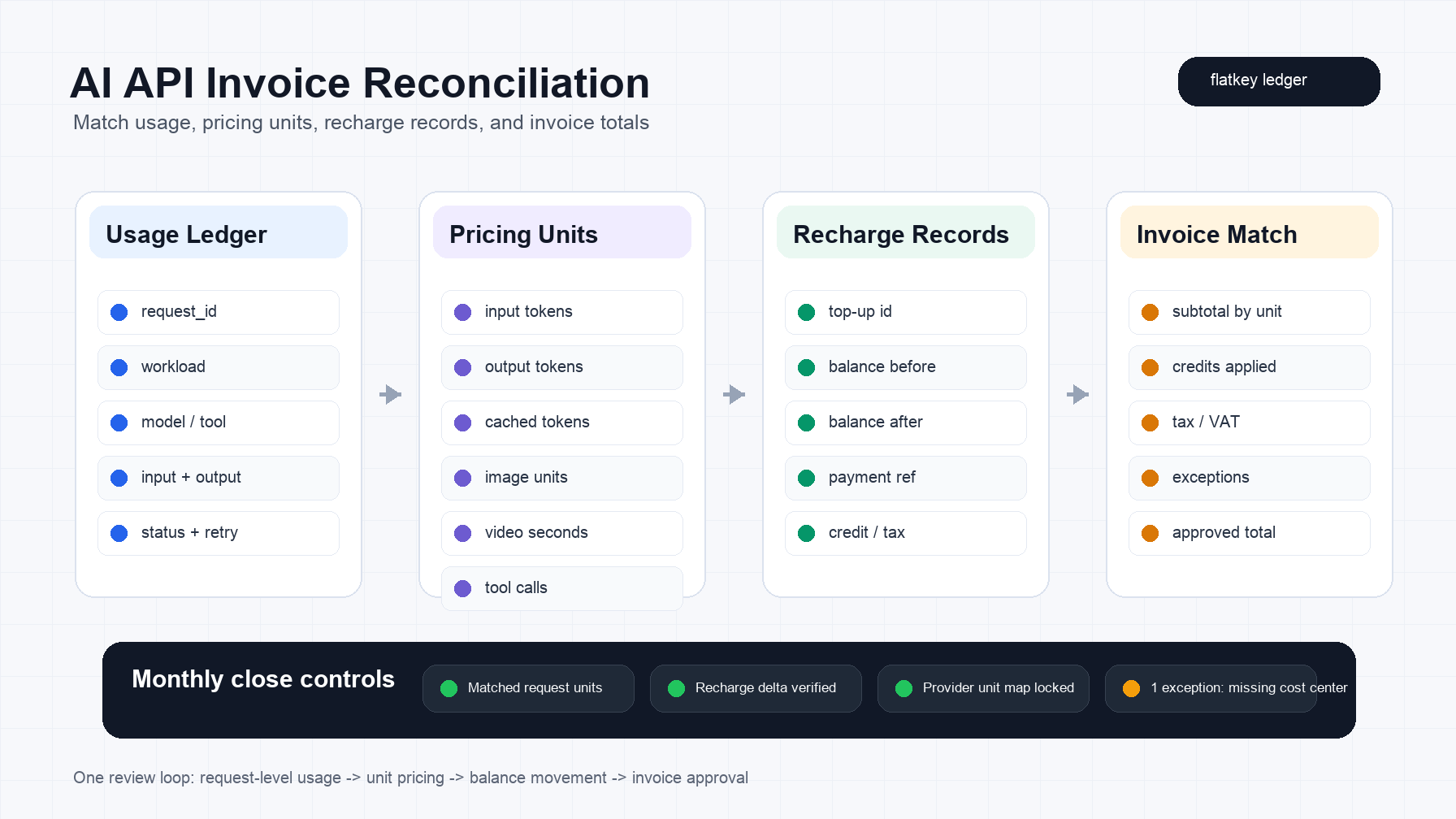
For AI API Invoice Reconciliation: Match Usage, Pricing Units, and Recharge Records, reconcile four tables together:
| Table | Owner | What must match |
|---|---|---|
| Usage ledger | Platform and product | Request ID, workload, model or tool, input units, output units, cache units, status, retries, accepted result |
| Pricing-unit map | Platform and finance | Unit type, source provider, model or tool, rate source, rounding rule, effective date |
| Recharge records | Finance | Top-up amount, balance before and after, payment reference, credit, tax, owner |
| Invoice | Finance and operations | Subtotals by unit, credits, tax or VAT, exceptions, approved total |
The practical close rule is simple:
approved_invoice_total =
  matched_usage_cost
  + taxes_or_vat
  - credits
  +/- approved_adjustments
If those numbers do not reconcile, do not start with a provider complaint. Start with the unit map. Most AI billing mismatches come from classifying usage under the wrong unit, missing cache behavior, mixing evaluation traffic with production traffic, treating failed or retried calls inconsistently, or approving a recharge without matching the balance movement.
Why AI API Invoice Reconciliation Breaks
Traditional SaaS reconciliation usually matches seats, subscription periods, and payment records. AI API reconciliation has more moving parts.
Token models may price input and output differently. Some providers expose cached-input or prompt-caching units. Batch processing may carry different economics than synchronous calls. Image, video, speech, embeddings, reranking, browser actions, enrichment tools, and agent tool calls may each use their own unit. A single product feature can touch several of those units in one user session.
That makes provider-level invoice totals too blunt for product teams. A monthly total can tell finance that spend went up. It cannot explain whether the increase came from user growth, a model upgrade, longer outputs, a cache miss, video generation, a retry loop, or a one-time evaluation run.
The reconciliation job is to preserve that context from request to invoice.
The Four Records To Match
1. Usage Ledger
The usage ledger is the source of operational truth. Each row should describe what happened, not only what it cost.
At minimum, keep these fields:
| Field | Why it matters |
|---|---|
request_id |
Lets engineering trace one charge back to one request or job |
timestamp |
Aligns usage to billing period and pricing effective date |
team and workload |
Supports cost allocation and owner review |
environment |
Separates production, staging, evaluation, and internal automation |
model_or_tool |
Identifies the route or paid tool used |
unit_type |
Prevents token, image, video, and tool units from being mixed |
input_units and output_units |
Separates differently priced units |
cache_units |
Captures cached-read or cache-write behavior when relevant |
status and retry_count |
Explains failed calls, retry storms, and duplicated spend |
accepted_result |
Connects cost to business output rather than raw usage |
cost_center |
Gives finance a chargeback or showback key |
Do not wait until month-end to add these fields. If cost center, environment, workload, or owner are missing at request time, finance will rebuild context from Slack messages later.
2. Pricing-Unit Map
The pricing-unit map translates raw usage into billable units. This is where many AI API invoice mismatches start.
Use a table like this:
| Unit class | Examples | Reconciliation risk |
|---|---|---|
| Text input | Prompt tokens, long context, system instructions | Long prompts and retrieved context can grow quietly |
| Text output | Completion tokens, reasoning output, structured JSON | Verbose output can dominate cost even when input is stable |
| Cached input | Cache reads, cache writes, prompt caching | Cache misses or changed prefixes can shift expected cost |
| Batch | Offline batch jobs, evaluation sweeps | Usage may land in a different period than the trigger event |
| Images | Generated images, edits, previews | Unit definitions vary by provider and model |
| Video | Seconds, clips, frames, resolution tiers | Small workflow changes can change unit count materially |
| Audio and speech | Transcription, speech generation, audio tokens | Duration and modality can be billed differently from text |
| Tools | Search, browser, enrichment, social, scraper, media actions | Tool calls often look like workflow spend, not model spend |
For volatile model prices, do not hardcode rates into the close process. Store the source URL, source checked date, model or tool ID, unit label, effective date, rounding rule, and owner approval. Then update the pricing-unit map as part of the close.
3. Recharge Records
Recharge records explain balance movement. They should not be treated as a substitute for usage.
For prepaid systems, a recharge proves that money entered the account. It does not prove which workload spent it. For invoiced systems, a payment record proves settlement. It does not prove that the invoice total was allocated correctly.
Track:
- Top-up ID or payment reference.
- Payer or billing owner.
- Balance before and after recharge.
- Currency.
- Credit or promotional adjustment.
- Tax, VAT, or fapiao requirement.
- Linked invoice or receipt.
- Approval owner.
The key control is balance delta:
ending_balance =
  starting_balance
  + approved_recharges
  + approved_credits
  - matched_usage_cost
  - taxes_or_fees_when_applicable
If the balance delta fails, isolate whether the issue is missing usage, missing recharge, wrong currency, tax treatment, a credit, a refund, or a timing difference.
4. Invoice
The invoice is the approval document, not the evidence system. It should summarize what the ledger and recharge records already explain.
A reviewable AI API invoice should include:
| Invoice section | Evidence to attach |
|---|---|
| Total usage cost | Usage ledger subtotal by workload and unit type |
| Credits and adjustments | Credit note, support ticket, committed-spend rule, or provider adjustment |
| Tax or VAT | Billing profile, invoice jurisdiction, tax ID, fapiao or VAT field |
| Recharge or payment | Top-up record, card or wire reference, balance movement |
| Exceptions | Owner, reason, impact, and next action |
Do not approve an invoice because the top-line total "looks close." Approve it because every material difference has an owner and an explanation.
A Monthly AI API Invoice Reconciliation Workflow
Run this workflow before month-end close, and keep it light enough that product teams can participate.
Step 1: Freeze The Source Period
Set the billing window in UTC and in the finance calendar timezone. Then freeze the input set:
period:
  usage_start_utc: 2026-09-01T00:00:00Z
  usage_end_utc: 2026-10-01T00:00:00Z
  finance_month: 2026-09
  source_locked_at: 2026-10-02T12:00:00Z
This prevents a rolling dashboard from changing while finance is reviewing the invoice.
Step 2: Export Usage By Workload And Unit
Group requests by workload first, provider second. Provider-only reports hide the product context that finance needs.
Use this export shape:
period,team,workload,environment,model_or_tool,unit_type,units,cost_usd,accepted_results,retries,failed_calls,cost_center
2026-09,customer-platform,support-copilot,production,primary-support-route,input_tokens,184200000,92.10,48120,329,41,cs-ops
2026-09,customer-platform,support-copilot,production,primary-support-route,output_tokens,49600000,248.00,48120,329,41,cs-ops
2026-09,growth,research-agent,production,web-enrichment-tool,successful_tool_calls,8720,174.40,3180,92,13,gtm
If a row has usage but no owner, treat it as an exception. Unknown ownership is not just a finance nuisance; it is a governance failure.
Step 3: Verify Pricing Units Before Totals
Before checking dollar totals, check unit classification:
| Check | Question |
|---|---|
| Model ID | Does the ledger model match the pricing source model? |
| Unit label | Is the row input, output, cached input, image, video, audio, or tool usage? |
| Effective date | Was the rate valid during the request period? |
| Cache behavior | Are cache writes and cache reads separated when the provider prices them differently? |
| Batch behavior | Are batch jobs separated from synchronous calls when their economics differ? |
| Failed calls | Are failed Flatkey-side calls, provider-side failures, and user-cancelled calls treated consistently? |
| Rounding | Is the invoice rounding rule documented? |
Only then compare totals.
Step 4: Match Recharge Records To Balance Movement
For each recharge or payment record, confirm:
- The payment reference exists.
- The amount and currency match the billing profile.
- The balance movement matches the recharge amount after credits or fees.
- The recharge lands in the same period or is marked as a timing difference.
- The invoice or receipt is attached.
Prepaid balances are useful because they make spend limits tangible. They still need a reconciliation record. Without it, teams know cash entered the account but not which product behavior consumed it.
Step 5: Build The Exception Queue
Keep the exception queue small and specific.
| Exception type | Likely cause | Owner |
|---|---|---|
| Missing cost center | New key, route, or job launched without tags | Operations |
| Unit mismatch | Cache, batch, image, video, or tool usage mapped incorrectly | Platform |
| Timing mismatch | Batch job or recharge posted outside expected period | Finance |
| Retry spike | Upstream instability, client retry loop, or missing backoff | Engineering |
| Failed-call dispute | Failure class not separated clearly enough | Platform and vendor owner |
| Invoice tax mismatch | Billing profile, VAT, or fapiao data incomplete | Finance |
Each exception should have a due date and a rule change. If the same exception appears next month, the process did not actually improve.
Pricing-Unit Controls For Multi-Model Teams
Product teams often start reconciliation from model price tables. That is the wrong first move. Start from the unit taxonomy.
OpenAI, Anthropic, and Gemini all publish pricing and usage documentation, but their unit surfaces are not identical. Current official documentation includes concepts such as input, output, cached or prompt-caching units, batch behavior, and modality-specific pricing. The exact rates can change, so use the official provider page as the rate source and your internal unit map as the approval record.
The control question is:
Can we explain every material invoice subtotal using the same unit labels
that product and platform teams use in the usage ledger?
If the answer is no, fix the unit labels before arguing over totals.
Where Flatkey Fits
Flatkey helps when invoice reconciliation is hard because the AI stack is fragmented.
Use Flatkey when:
- Product teams need one key across official model endpoints instead of separate provider keys in every app, agent, or repo.
- Finance wants one balance and one invoice across model and tool spend.
- Operations needs sub-key budgets, model allowlists, alerts, and ledger review.
- Platform teams need request-level visibility into input, output, and cached tokens.
- Agent builders need pay-per-call tools on the same billing surface as model calls.
- Finance needs invoices quickly, with VAT or fapiao support where applicable.
Flatkey does not remove the need for a monthly close. It makes the close easier by moving usage, balance, and invoice evidence into the same operating layer. That gives finance fewer dashboards to reconcile and gives product teams a clearer way to defend useful spend.
For related setup work, use the AI API spend management operating model, the AI gateway pricing guide, the AI model price comparison worksheet, and the pricing unit checklist.
Copyable Reconciliation Checklist
Use this checklist for the monthly review.
| Control | Pass condition |
|---|---|
| Period lock | Usage window, invoice period, and finance month are fixed |
| Owner coverage | Every production row has team, workload, environment, and cost center |
| Unit map | Every billed unit maps to a source-backed unit definition |
| Pricing source | Every rate links to an official source and source checked date |
| Recharge match | Recharges explain balance movement and link to payment references |
| Credits | Credits, refunds, and adjustments have evidence |
| Failed calls | Failed-call treatment is separated by failure class |
| Retries | Retry spikes are reviewed against workload logs |
| Invoice total | Usage, tax, credits, and adjustments reconcile to the invoice |
| Exceptions | Every unresolved difference has owner, reason, impact, and due date |
The best target is not "zero questions." The best target is no anonymous variance.
Official References To Verify During Close
Use live sources during each close because pricing and unit definitions change.
| Source | What to verify |
|---|---|
| Flatkey pricing | Current plans, recharge and billing surface, and live product terms |
| Flatkey models | Current model availability and route labels |
| OpenAI API pricing | Current model rates and unit labels |
| OpenAI usage API reference | Usage reporting fields available for direct OpenAI usage |
| Anthropic pricing | Model pricing, prompt caching, and batch pricing references |
| Anthropic Admin usage and cost API | Cost and usage reporting available in Anthropic admin tooling |
| Gemini API pricing | Current Gemini unit and model pricing references |
| FinOps allocation guidance | Allocation, tagging, showback, and chargeback discipline |
| FOCUS cost and usage specification | Standardized cost and usage data concepts for finance review |
Do not paste volatile provider rates into a policy document and forget them. Store the source checked date and make pricing verification part of the close.
FAQ
What is AI API invoice reconciliation?
AI API invoice reconciliation is the process of matching request-level usage, pricing units, recharge records, credits, taxes, balance movement, and invoice totals so finance and product teams can approve AI spend with evidence.
Why are pricing units important for AI API invoices?
Pricing units matter because AI APIs do not always bill one simple unit. A workload may include input tokens, output tokens, cached units, batch jobs, images, video seconds, audio, or tool calls. If the unit is wrong, the invoice comparison will be wrong even when the raw usage export is complete.
What should be in an AI API usage ledger?
An AI API usage ledger should include request ID, timestamp, team, workload, environment, model or tool, unit type, input units, output units, cache units, status, retry count, cost center, cost, and accepted-result status. Those fields make AI API billing reconciliation possible without asking finance to inspect every request.
How should teams reconcile recharge records?
Match AI API recharge records to a payment reference, billing owner, currency, balance-before value, balance-after value, credits, taxes, and the invoice or receipt. Then compare the balance delta against matched usage cost and approved adjustments.
Should finance review every request?
No. Finance should review summarized usage by workload, unit type, cost center, recharge, credit, and exception. Platform teams should keep the request-level ledger so any material variance can be traced when needed.
How does Flatkey help with AI API Invoice Reconciliation: Match Usage, Pricing Units, and Recharge Records?
Flatkey gives teams one key, one balance, one invoice, per-request ledger visibility, sub-key budgets, model allowlists, and access to official models and pay-per-call tools. That makes it easier to connect usage evidence, recharge records, and invoice approval in one monthly workflow.
Bottom Line
AI API Invoice Reconciliation: Match Usage, Pricing Units, and Recharge Records is how AI product teams keep finance trust while model and tool usage changes quickly.
Do the work in this order: lock the period, export usage by workload and unit, verify the pricing-unit map, match recharge records to balance movement, approve invoice totals, and close exceptions with owners. Flatkey helps by consolidating model and tool spend into one operational layer so the ledger, balance, and invoice tell the same story.


