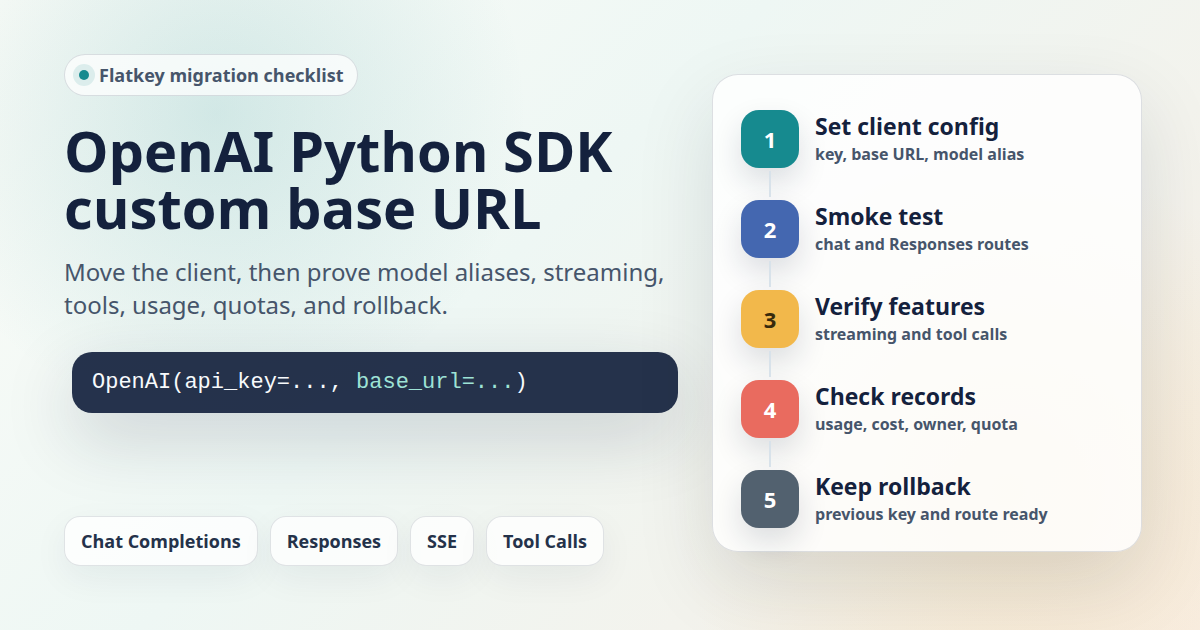
OpenAI Python SDK custom base URL migrations look simple until the first production check fails. One line can move a client from the default OpenAI endpoint to a gateway, but a safe migration also proves model aliases, streaming, tools, usage records, quotas, and rollback before real traffic moves.
This checklist is for developers and platform teams moving Python workloads to Flatkey or another OpenAI-compatible gateway. It was prepared on June 27, 2026 from the current OpenAI Python SDK source, OpenAI API reference evidence, and live Flatkey public pages. The code snippets are templates. No live Flatkey API key was available in this task, so run each smoke test with your own key, selected model, and the current base URL shown in your Flatkey console.
Quick Answer: OpenAI Python SDK Custom Base URL
For the current OpenAI Python SDK client style, set the base_url when you create the client, keep the key and model in environment variables, and treat the base URL as a deployment setting rather than a hardcoded provider constant.
import os
from openai import OpenAI

client = OpenAI(
    api_key=os.environ["FLATKEY_API_KEY"],
    base_url=os.environ["FLATKEY_BASE_URL"],  # Example: https://console.flatkey.ai/v1
)

response = client.chat.completions.create(
    model=os.environ["FLATKEY_MODEL"],
    messages=[
        {"role": "user", "content": "Reply with one short migration check."}
    ],
)

print(response.choices[0].message.content)
print("model:", response.model)
print("usage:", response.usage)
That is the code change. The rest of the OpenAI Python SDK custom base URL migration is the evidence you collect around it.
What Changed In The Current Flatkey Evidence
Do not rely on older notes for the Flatkey host. On June 27, 2026, the Flatkey homepage described Flatkey as one API gateway for production AI teams and showed a public example endpoint at https://console.flatkey.ai/v1/chat/completions. The same live check also found older router.flatkey.ai text in public page copy, so the article deliberately uses FLATKEY_BASE_URL and tells readers to copy the current base URL from the console or current setup instructions on migration day.
The June 27 pricing page said the site had 599 enabled models across 23 providers and exposed endpoint families for OpenAI-style chat, OpenAI Responses, Anthropic messages, image generation, and video generation. Treat those as dated catalog and page evidence only. They do not prove that a specific model alias, account, route, streaming path, or tool call will succeed in your workspace.
Before You Change The Base URL
A clean OpenAI Python SDK custom base URL cutover starts by separating four values that often get mixed together: API key, base URL, model alias, and usage owner. Keep each one independently configurable so the same code can run against staging, Flatkey, or the previous provider without another deploy.
| Item | Decision To Record | Why It Matters |
|---|---|---|
| API key | Use a Flatkey key scoped to the environment or app workflow. | Usage, cost, and rollback are much easier to audit when test traffic is not mixed with unrelated workloads. |
| Base URL | Copy the current value from Flatkey console or current setup docs. | Base URL examples can change; hardcoding old hosts is a common migration failure. |
| Model alias | Select the exact Flatkey model alias and endpoint family. | A gateway can expose many aliases; a successful request to one model does not approve all models. |
| Usage owner | Attach environment, service, team, and customer-safe metadata where your stack supports it. | Finance and platform reviewers need to tie spend back to a real workflow. |
| Rollback target | Keep the prior provider key and base URL available behind configuration until launch proof is complete. | Rollback should be a config change, not an emergency code rewrite. |
Use An Explicit Client Instead Of A Global Override
The OpenAI Python SDK source supports a constructor-level base_url and also reads OPENAI_BASE_URL when no constructor value is supplied. For most migrations, the explicit client is safer because it limits the OpenAI Python SDK custom base URL change to one integration path.
import os
from openai import OpenAI

flatkey_client = OpenAI(
    api_key=os.environ["FLATKEY_API_KEY"],
    base_url=os.environ["FLATKEY_BASE_URL"],
)

direct_openai_client = OpenAI(
    api_key=os.environ["OPENAI_API_KEY"],
)
Use OPENAI_BASE_URL only when every OpenAI SDK client in that process should use the same gateway. If your worker has mixed direct-provider and gateway traffic, a global environment override can silently move more requests than you intended.
Chat Completions Smoke Test
Start the OpenAI Python SDK custom base URL test with the smallest non-streaming chat completion your production app can interpret. The goal is not to benchmark quality. The goal is to prove authentication, route shape, selected model alias, response parsing, usage fields, and observability.
import os
from openai import OpenAI

client = OpenAI(
    api_key=os.environ["FLATKEY_API_KEY"],
    base_url=os.environ["FLATKEY_BASE_URL"],
)

completion = client.chat.completions.create(
    model=os.environ["FLATKEY_MODEL"],
    messages=[
        {"role": "system", "content": "Answer in one sentence."},
        {"role": "user", "content": "What should this migration verify first?"},
    ],
)

print("id:", completion.id)
print("model:", completion.model)
print("finish_reason:", completion.choices[0].finish_reason)
print("content:", completion.choices[0].message.content)
print("usage:", completion.usage)
| Evidence | Pass Condition | Failure Signal |
|---|---|---|
| HTTP result | The SDK call completes without auth, route, or schema errors. | 401 or 403 points to key scope; 404 often points to a missing /v1 or wrong route; 400 can point to unsupported model or parameters. |
| Model | The response model or gateway record matches the intended alias or routed model. | The request may be hitting a fallback or a different provider path than expected. |
| Usage | Token or cost-relevant fields appear in the SDK response and Flatkey usage view. | A successful response with no usage record is not ready for production cost tracking. |
| Traceability | You can match timestamp, key, route, model, and owner in Flatkey. | Finance and incident review will not be able to reconcile the request later. |
Responses API Smoke Test
OpenAI's API reference positions Responses as the newer endpoint for new projects, while Chat Completions remains common in existing apps. Flatkey's June 27 pricing page exposed an OpenAI Responses endpoint family, so include a separate Responses test if your app uses client.responses.create or plans to migrate there.
import os
from openai import OpenAI

client = OpenAI(
    api_key=os.environ["FLATKEY_API_KEY"],
    base_url=os.environ["FLATKEY_BASE_URL"],
)

response = client.responses.create(
    model=os.environ["FLATKEY_RESPONSES_MODEL"],
    input="Return one sentence about base URL migration testing.",
)

print("id:", response.id)
print("status:", response.status)
print("output_text:", response.output_text)
print("usage:", response.usage)
Keep the Chat Completions and Responses checks separate. Passing one endpoint does not prove the other endpoint family, model alias, request schema, or usage accounting path.
Streaming Check
Streaming failures often appear only after the basic OpenAI Python SDK custom base URL check has passed. Test streaming in the same runtime that powers the real UI or worker, not only in a local script.
import os
from openai import OpenAI

client = OpenAI(
    api_key=os.environ["FLATKEY_API_KEY"],
    base_url=os.environ["FLATKEY_BASE_URL"],
)

stream = client.chat.completions.create(
    model=os.environ["FLATKEY_MODEL"],
    messages=[{"role": "user", "content": "Stream three short words."}],
    stream=True,
)

for chunk in stream:
    delta = chunk.choices[0].delta.content
    if delta:
        print(delta, end="", flush=True)
print()
Record whether the stream starts, emits incremental chunks, closes cleanly, handles timeouts, and leaves a usable usage or billing record in the gateway. If your app depends on final usage in streamed responses, verify how your selected endpoint and SDK version expose it.
Tool Calling Check
If your application uses function calling, do not assume an OpenAI Python SDK custom base URL change preserves tool behavior. Send one small tool schema and verify both the SDK response and the gateway record.
import os
from openai import OpenAI

client = OpenAI(
    api_key=os.environ["FLATKEY_API_KEY"],
    base_url=os.environ["FLATKEY_BASE_URL"],
)

completion = client.chat.completions.create(
    model=os.environ["FLATKEY_MODEL"],
    messages=[
        {"role": "user", "content": "Use the tool for account flatkey-demo."}
    ],
    tools=[
        {
            "type": "function",
            "function": {
                "name": "lookup_account_status",
                "description": "Return account status for a test account.",
                "parameters": {
                    "type": "object",
                    "properties": {
                        "account_id": {"type": "string"}
                    },
                    "required": ["account_id"],
                    "additionalProperties": False,
                },
            },
        }
    ],
    tool_choice="auto",
)

message = completion.choices[0].message
print("tool_calls:", message.tool_calls)
print("usage:", completion.usage)
Approve the migration only after you confirm the model supports the tool pattern your app uses, tool arguments parse correctly, and the app's tool execution loop still handles no-tool, single-tool, and error paths.
Usage, Quota, And Billing Checks
A gateway migration is not done when the SDK returns text. A production-ready OpenAI Python SDK custom base URL change also needs proof that spend and ownership are visible.
| Check | What To Match | Launch Gate |
|---|---|---|
| Usage row | Key, model, endpoint family, timestamp, token or request unit, and status. | One request can be found without guessing. |
| Cost estimate | Gateway cost unit and pricing family for the selected model. | Finance can reconcile the test against expected model pricing. |
| Owner | Environment, app, team, workflow, or safe customer grouping. | Spend can be attributed before traffic scales. |
| Quota or alert | Expected threshold behavior for staging and production keys. | The team knows what happens when a limit is hit. |
| Error record | Wrong key, wrong model, timeout, unsupported tool, and stream interruption. | Operational dashboards show failures in a way humans can triage. |
Flatkey's public homepage positions the product around unified model access, routing, billing, usage analytics, and operational controls. That supports the migration checklist, but it does not prove a specific account export schema. Verify your own dashboard, billing view, and alerts before production launch.
Rollback Plan
The safest rollback is a configuration swap. Keep the previous provider settings beside the Flatkey settings until the OpenAI Python SDK custom base URL migration has passed normal, streaming, tools, usage, quota, and cost checks.
# Flatkey path
export AI_API_KEY="$FLATKEY_API_KEY"
export AI_BASE_URL="$FLATKEY_BASE_URL"
export AI_MODEL="$FLATKEY_MODEL"

# Rollback path
export AI_API_KEY="$PREVIOUS_PROVIDER_API_KEY"
export AI_BASE_URL="$PREVIOUS_PROVIDER_BASE_URL"
export AI_MODEL="$PREVIOUS_PROVIDER_MODEL"
Document the exact conditions that trigger rollback: unsupported model alias, broken streaming, bad tool behavior, missing usage row, unexpected cost unit, quota behavior you cannot explain, or error rates above the launch threshold.
Migration Checklist
| Step | Owner | Done When |
|---|---|---|
| Pick the endpoint family | Platform engineer | Chat Completions, Responses, or another route is explicitly selected for each workload. |
| Copy the current Flatkey base URL | Developer | The value comes from the live Flatkey console or current setup page, not old notes. |
| Create an explicit SDK client | Developer | OpenAI(api_key=..., base_url=...) is isolated to the intended integration path. |
| Run the non-streaming smoke test | Developer | Response content, model, finish reason, and usage are captured. |
| Run the streaming test | Developer | Chunks arrive incrementally and stream close/error behavior is understood. |
| Run the tool-calling test | Developer | Tool calls, arguments, no-tool paths, and app execution loop are verified. |
| Check Flatkey usage | Ops or finance reviewer | The test request is visible with enough fields to attribute cost and route behavior. |
| Check quotas and alerts | Platform owner | Expected limit behavior and notification path are documented. |
| Prepare rollback | Release owner | Previous provider key, base URL, and model are still available behind configuration. |
Common Failure Modes
| Symptom | Likely Cause | Fix |
|---|---|---|
| 404 from the SDK | The base URL is missing /v1, uses an old host, or points to the wrong endpoint family. |
Copy the current base URL again and test the exact route shown by the console or setup page. |
| 401 or 403 | Wrong key, expired key, missing account access, or environment variable mix-up. | Print only the key source name, not the secret, and verify the Flatkey key in the console. |
| 400 unsupported model | The model alias is not available for the endpoint family or account. | Choose a supported model from the current catalog and rerun the smoke test. |
| Streaming works locally but not in production | Proxy, timeout, worker, or UI code handles SSE differently. | Run the stream check in the production-like path and record timeout behavior. |
| Tool call missing | The selected model or route does not support the same tool behavior. | Test the exact model alias with your simplest function schema before approving it. |
| No usage row | Wrong key, delayed reporting, missing metadata, or a dashboard filter mismatch. | Match timestamp, model, route, and key; do not scale traffic until attribution is clear. |
FAQ
What is the OpenAI Python SDK custom base URL setting?
The OpenAI Python SDK custom base URL setting is the base_url value you pass to the OpenAI client, or the OPENAI_BASE_URL environment variable when you want the SDK to use a non-default API endpoint.
Should I use OPENAI_BASE_URL or constructor-level base_url?
Use constructor-level base_url when only one client or workload should move. Use OPENAI_BASE_URL only when every OpenAI SDK client in the process should use the same gateway endpoint.
Which Flatkey base URL should I use?
Use the current base URL shown in the Flatkey console or current setup instructions. On June 27, 2026, the public homepage showed https://console.flatkey.ai/v1/chat/completions, but this article keeps snippets on FLATKEY_BASE_URL because production migrations should verify the live value.
Is changing the base URL enough?
No. A safe OpenAI Python SDK custom base URL migration also verifies model aliases, streaming, tools, usage records, quota behavior, cost visibility, error handling, and rollback.
Can I test Responses and Chat Completions with the same checklist?
Use the same migration discipline, but run separate smoke tests. Passing Chat Completions does not prove Responses, and passing Responses does not prove Chat Completions.
Bottom Line
An OpenAI Python SDK custom base URL migration should be boring by the time it reaches production. Put the key, base URL, and model behind configuration; use an explicit SDK client; test normal chat, Responses if needed, streaming, and tools; confirm Flatkey usage and quota behavior; then keep rollback available until engineering, operations, and finance all have the evidence they need.
For the broader SDK cutover pattern, read the OpenAI-compatible API migration guide. For gateway architecture review, use the LLM API gateway architecture guide. When you are ready to test with the current catalog, check Flatkey pricing and get a key.