DeepSeek V4 Pro vs Flash: Which Model Fits Your API Workflow?
If you are comparing DeepSeek V4 Pro vs Flash for an API workload, the answer is no longer just "Pro for quality, Flash for cost." After the DeepSeek-V4.1-Flash release, Flash is the cheaper, higher-concurrency, vision-capable route. V4 Pro is still the route to test when a workflow needs stronger long-context reasoning, complex coding-agent output, or a higher accepted-result rate.
As of October 11, 2026, DeepSeek's pricing page lists deepseek-flash as DeepSeek-V4.1-Flash and deepseek-v4-pro as DeepSeek-V4-Pro-0813. Both routes support a 1M-token context window, a maximum output of 384K tokens, OpenAI-format API access, Anthropic-format API access, tool calls, JSON output, the Responses API, and thinking mode. The sharp differences are price, concurrency, and vision support: Flash is cheaper, has a higher listed concurrency limit, and supports vision; Pro costs more, has lower listed concurrency, and does not support vision.
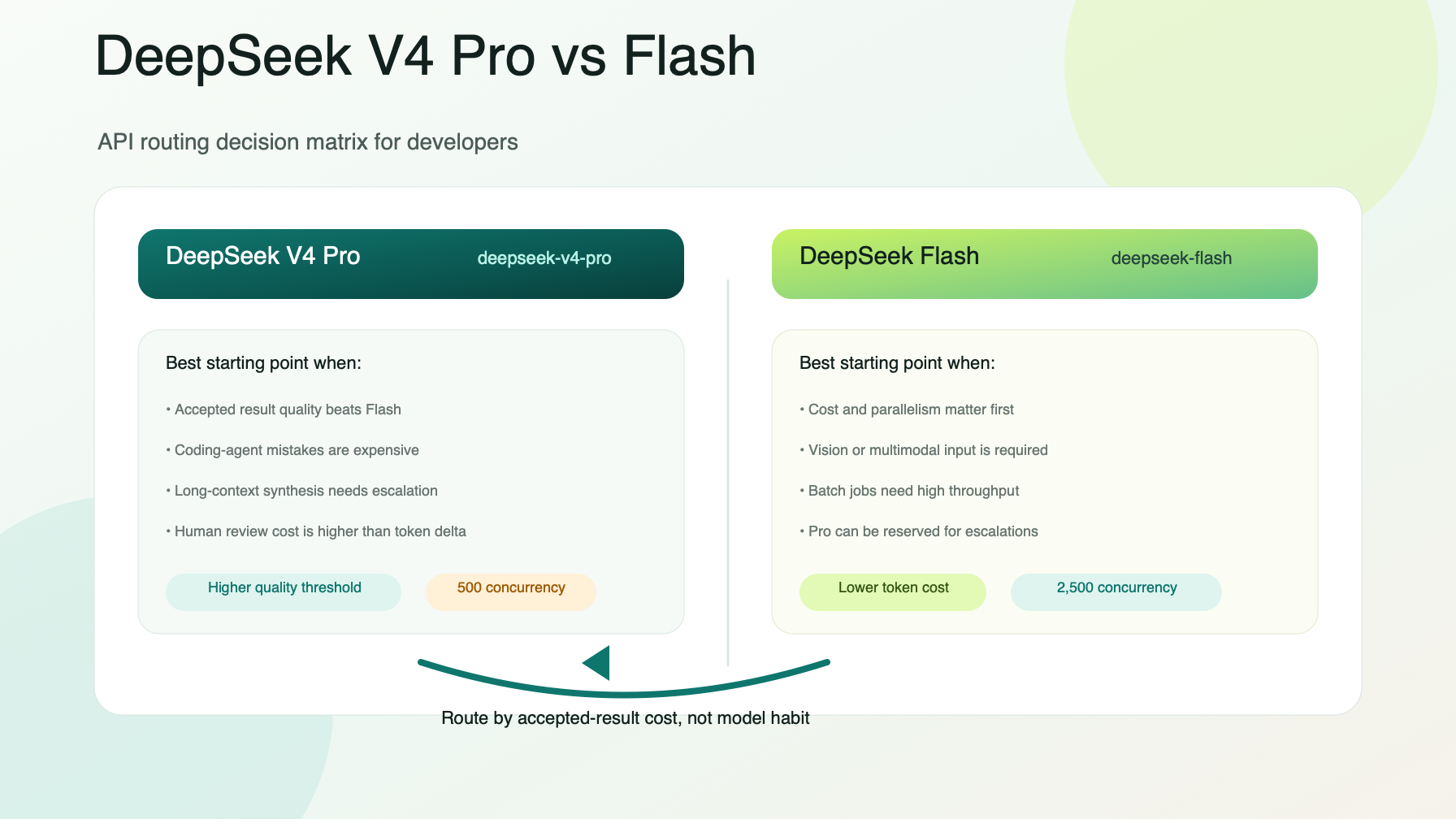
The practical rule for DeepSeek V4 Pro vs Flash is simple: default to Flash for cheap, parallel, multimodal, or good-enough traffic; promote to Pro only when real evaluation data shows that Pro improves the accepted answer enough to justify the extra cost.
DeepSeek V4 Pro vs Flash: the quick answer
Use this table before you run a benchmark:
| Workflow requirement | Better starting route | Why |
|---|---|---|
| Lowest token cost for high-volume text tasks | deepseek-flash |
Flash has lower cache-hit, cache-miss, and output-token prices. |
| Vision input or multimodal understanding | deepseek-flash |
DeepSeek lists vision support for Flash and not for V4 Pro. |
| Many parallel requests | deepseek-flash |
DeepSeek lists a 2,500 concurrency limit for Flash versus 500 for Pro. |
| Complex coding-agent task with expensive mistakes | Test deepseek-v4-pro against Flash |
Pro may be worth it if it improves accepted patches, plans, or reviews. |
| Long-context synthesis where quality matters more than unit cost | Test deepseek-v4-pro |
Both routes list 1M context, so the decision should come from output quality and acceptance rate. |
| Batch evals, repository scans, or nightly jobs | Start with Flash, escalate hard cases to Pro | Flash lowers the baseline bill; Pro can be reserved for failures or difficult segments. |
| Procurement or finance comparison | Test both with peak/off-peak and cache buckets | The same model can cost twice as much during peak windows. |
In other words, the best DeepSeek V4 Pro vs Flash decision is a routing policy, not a permanent model preference. A production team should decide where Flash is allowed, where Pro is allowed, and which metrics can promote or demote a route.
What changed after DeepSeek-V4.1-Flash
DeepSeek's September 10, 2026 update says DeepSeek-V4.1-Flash is the latest Flash model, with native multimodal visual understanding. It also says the model name to call the latest route is deepseek-flash. The legacy names deepseek-v4-flash and deepseek-v4-flash-vision-exp are temporarily accepted for compatibility, but they are served by DeepSeek-V4.1-Flash and billed at Flash pricing.
That matters because older DeepSeek V4 Pro vs Flash comparisons may still frame Flash as the earlier V4 Flash route or as a transition before September 14, 2026. That framing is stale. DeepSeek's update page says DeepSeek continues to provide V4 Pro API service after September 14, 2026 with the billing method unchanged, while Flash has moved to the V4.1 route.
For current integrations, use these model names unless your provider route documents a different alias:
Pro route:   deepseek-v4-pro
Flash route: deepseek-flash
Legacy aliases still accepted by DeepSeek: deepseek-v4-flash, deepseek-v4-flash-vision-exp
If your application, agent, or gateway still has deepseek-v4-flash hardcoded, treat that as a migration task. It may still work today, but deepseek-flash is the clearer current model name.
Current model and pricing comparison
DeepSeek prices both routes per 1 million tokens, with separate prices for cache-hit input, cache-miss input, and output tokens. It also uses peak and off-peak rates. Peak hours are 01:00-04:00 and 06:00-10:00 UTC, Monday through Friday, excluding Chinese public holidays. All other hours are off-peak.
| Attribute | deepseek-v4-pro |
deepseek-flash |
|---|---|---|
| Listed model version | DeepSeek-V4-Pro-0813 | DeepSeek-V4.1-Flash |
| Context length | 1M tokens | 1M tokens |
| Maximum output | 384K tokens | 384K tokens |
| OpenAI-format API | Supported | Supported |
| Anthropic-format API | Supported | Supported |
| Thinking mode | Supported | Supported |
| JSON output | Supported | Supported |
| Tool calls | Supported | Supported |
| Responses API | Supported | Supported |
| FIM completion | Non-thinking mode only | Non-thinking mode only |
| Vision | Not supported | Supported |
| Listed concurrency limit | 500 | 2,500 |
Current token prices:
| Pricing unit | deepseek-v4-pro off-peak / peak |
deepseek-flash off-peak / peak |
|---|---|---|
| Cache-hit input, per 1M tokens | $0.022 / $0.044 | $0.003 / $0.006 |
| Cache-miss input, per 1M tokens | $0.66 / $1.32 | $0.15 / $0.30 |
| Output, per 1M tokens | $1.98 / $3.96 | $0.60 / $1.20 |
That price table changes the DeepSeek V4 Pro vs Flash conversation. Flash is not a small discount. At current official rates, Pro output tokens cost 3.3x as much as Flash output tokens, Pro cache-miss input costs 4.4x as much as Flash cache-miss input, and Pro cache-hit input costs about 7.3x as much as Flash cache-hit input.
Those ratios do not prove Flash is better for every job. They prove that Pro needs a measurable quality reason.
Cost is not just the token rate
The simplest DeepSeek V4 Pro vs Flash cost formula is:
request_cost =
  cache_hit_input_tokens / 1,000,000 * cache_hit_price
+ cache_miss_input_tokens / 1,000,000 * cache_miss_price
+ output_tokens / 1,000,000 * output_price
For production planning, split that formula by:
- Peak versus off-peak traffic.
- Cache-hit input versus cache-miss input.
- Output length.
- Retry count.
- Accepted result rate.
- Fallback calls.
- Team, environment, and customer ownership.
A cheap model can become expensive if it retries often or generates long rejected answers. A premium model can be cheaper per accepted result if it completes the task in fewer attempts and with less human correction. That is why DeepSeek V4 Pro vs Flash should be evaluated on cost per accepted task, not only price per token.
Use the adjacent DeepSeek V4 Pro API pricing worksheet when you need peak/off-peak math, cache buckets, and cost controls in more detail.
When DeepSeek V4 Pro is worth testing
Start a Pro test when a bad answer costs more than the token delta. Good candidates include:
- Coding-agent changes where an incorrect patch burns review time or breaks CI.
- Long-context architecture reviews that need consistent synthesis across many files.
- Complex tool-using agents where a weak plan triggers multiple expensive retries.
- Procurement, legal, compliance, or finance summaries that need human sign-off.
- High-value product flows where the accepted answer rate matters more than raw generation cost.
The right test is not "Does Pro sound smarter?" The right test is:
incremental_value =
  accepted_result_rate_lift
- extra_token_cost
- extra_latency_or_queueing_cost
- extra_operational_complexity
If Pro produces a meaningfully higher accepted-result rate, keep it for that route. If Flash gets close enough, route the default traffic to Flash and reserve Pro for escalations.
When DeepSeek Flash should be the default
Flash should be the first route for many production workflows:
- High-volume classification, extraction, summarization, and transformation jobs.
- Vision or multimodal input.
- Agent pre-checks, draft plans, file triage, and lightweight code review.
- Background evaluations where many requests run in parallel.
- Cost-sensitive product features with clear acceptance tests.
- Workflows where a second-pass escalation to Pro is acceptable.
Flash is also the better default when you are still exploring a prompt design. If the prompt is unstable, you do not yet know cache-hit behavior, output length, or failure rate. Starting with Flash limits early spend while you collect enough data to justify a Pro route.
A production routing policy for DeepSeek V4 Pro vs Flash
Use a policy like this before exposing either route broadly:
deepseek_routes:
  default_text:
    primary_model: deepseek-flash
    max_output_tokens: 4000
    escalation_model: deepseek-v4-pro
    escalation_rules:
      - low_confidence_result
      - failed_acceptance_check
      - complex_code_review
  vision_or_multimodal:
    primary_model: deepseek-flash
    pro_allowed: false
    reason: DeepSeek lists vision support for Flash, not V4 Pro.
  long_context_agent:
    primary_model: deepseek-v4-pro
    fallback_model: deepseek-flash
    approval_required: true
    budget_review: weekly
  batch_eval:
    primary_model: deepseek-flash
    schedule: off_peak_preferred
    sample_pro_comparison: 5_percent
Then measure the route with a short ledger:
| Ledger field | Why it matters |
|---|---|
route_name |
Separates chat, coding agent, eval, extraction, and batch workloads. |
model |
Shows where Pro and Flash are actually used. |
input_tokens_cache_hit |
Pro and Flash both become cheaper when prefixes are reused. |
input_tokens_cache_miss |
Cache misses are much more expensive than cache hits. |
output_tokens |
Output is often the dominant cost in agent workloads. |
peak_bucket |
DeepSeek peak rates are double off-peak rates. |
retry_count |
Reliability issues multiply cost. |
accepted_result |
The real comparison metric is accepted work, not generated text. |
fallback_used |
Fallback improves reliability but can duplicate token spend. |
team_id or customer_id |
Needed for showback, quotas, and invoice review. |
Flatkey is useful when this policy spans more than one provider or more than one application. With one API key, one balance, one invoice, and a usage ledger across official model routes, teams can compare DeepSeek V4 Pro vs Flash beside OpenAI, Claude, Gemini, Qwen, GLM, and other routes without scattering provider keys across every repo.
OpenAI-compatible setup through Flatkey
If your app already uses the OpenAI SDK shape, keep the code path stable and move the model decision into configuration.
import OpenAI from "openai";

const client = new OpenAI({
  apiKey: process.env.FLATKEY_API_KEY,
  baseURL: "https://router.flatkey.ai/v1",
});

const model = process.env.DEEPSEEK_MODEL || "deepseek-flash";

const response = await client.chat.completions.create({
  model,
  messages: [
    {
      role: "user",
      content: "Review this release note and return the three highest-risk changes.",
    },
  ],
  max_tokens: 4000,
});
For rollout, use environment-specific model names:
DEEPSEEK_MODEL_DEV=deepseek-flash
DEEPSEEK_MODEL_STAGING=deepseek-flash
DEEPSEEK_MODEL_PROD_DEFAULT=deepseek-flash
DEEPSEEK_MODEL_PROD_ESCALATION=deepseek-v4-pro
That setup keeps DeepSeek V4 Pro vs Flash from becoming a code change. You can run canaries, compare accepted-result cost, and switch routes by policy instead of redeploying every integration.
Evaluation checklist
Before you pick a winner, run the same prompt set through both models:
- Include real production prompts, not only benchmark-style examples.
- Separate text-only and vision/multimodal cases.
- Track peak and off-peak buckets.
- Measure cache-hit and cache-miss input tokens separately.
- Cap output tokens before the test starts.
- Count retries and fallback calls.
- Grade accepted results with the same rubric.
- Compare cost per accepted result, not only token price.
- Keep a route canary for model ID, latency, and output-shape changes.
- Re-check DeepSeek's pricing page before moving high-volume traffic.
If the test shows similar accepted-result quality, choose Flash. If Pro materially reduces rejected work, escalations, or human cleanup, keep Pro for that route and use Flash for the rest.
Internal links for deeper planning
- Use DeepSeek API pricing for broader provider comparison.
- Use DeepSeek V4 Pro API pricing for Pro-specific peak, off-peak, and cache math.
- Use how to compare AI model prices when building a cross-provider worksheet.
- Use AI gateway pricing when you need gateway fee and routing-policy context.
- Use AI API spend management for finance review, quotas, and ledger operations.
- Use prompt caching workflow when repeated prefixes drive token cost.
Official source references
Current facts in this article were checked against:
- DeepSeek Models & Pricing: https://api-docs.deepseek.com/quick_start/pricing
- DeepSeek Change Log: https://api-docs.deepseek.com/updates
- Flatkey project positioning and marketing strategy from the Flatkey knowledge base.
Always re-check the official DeepSeek pricing page before a high-volume launch. Model names, retirement windows, pricing, concurrency limits, and feature support can change.
FAQ
Is DeepSeek V4 Pro better than Flash?
Not universally. DeepSeek V4 Pro may be the better route for complex reasoning, long-context synthesis, and expensive coding-agent decisions. DeepSeek Flash is the better starting route for cheaper high-volume work, vision tasks, and parallel jobs. The useful DeepSeek V4 Pro vs Flash metric is cost per accepted result.
Which model name should I use for Flash?
Use deepseek-flash for the current DeepSeek-V4.1-Flash route. DeepSeek says the older deepseek-v4-flash and deepseek-v4-flash-vision-exp names are temporarily accepted for compatibility, but they are served by V4.1 Flash and billed at Flash pricing.
Does DeepSeek V4 Pro support vision?
DeepSeek's current pricing table lists vision support for deepseek-flash and says vision is not supported for deepseek-v4-pro.
Why does peak pricing matter in DeepSeek V4 Pro vs Flash?
DeepSeek lists peak rates at double the off-peak rates. If batch jobs, evals, repository scans, or agent reviews can move outside peak windows, scheduling can materially change the bill.
Should I migrate from deepseek-v4-flash to deepseek-flash?
Yes, use deepseek-flash for new integrations. The older name may still route for compatibility, but current documentation points to deepseek-flash as the model name for V4.1 Flash.
How does Flatkey help with DeepSeek V4 Pro vs Flash routing?
Flatkey lets teams route official models through one key, one balance, one invoice, and a shared usage ledger. That makes it easier to test DeepSeek V4 Pro vs Flash, compare cost per accepted result, set quotas, and keep routing policy out of application code.