
Best GPU for LLM Training: Scale, Memory, Networking, and Budget
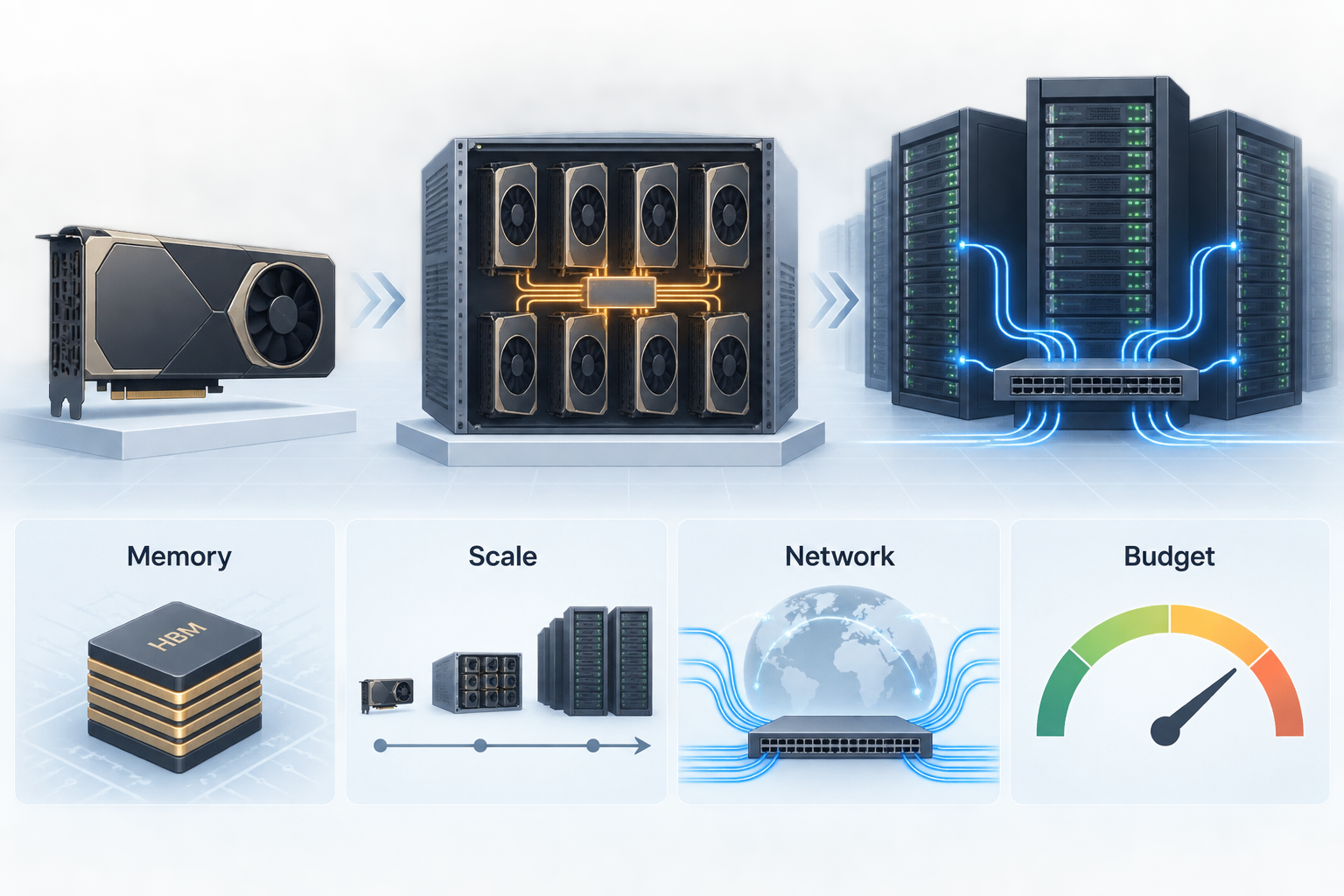
The best GPU for LLM training in 2026 is not a single SKU. It depends on the training job. For a LoRA or QLoRA adapter, the best GPU for LLM training is often the cheapest card that fits the model, data loader, and batch size. For full fine-tuning a 70B model, the answer moves toward H100, H200, or B200 systems with high-bandwidth memory and fast intra-node links. For pretraining or continued pretraining across nodes, the GPU matters less than the full cluster: NVLink or NVSwitch inside the node, InfiniBand or equivalent RDMA between nodes, checkpoint storage, scheduler maturity, and capacity guarantees.
This guide gives a practical answer to the question "which GPU performs best for LLM training?" by separating four decisions:
- Scale: adapter tuning, full fine-tuning, continued pretraining, or foundation-model pretraining.
- Memory: whether the model, optimizer states, activations, and batch size fit with headroom.
- Networking: whether your job is single-GPU, single-node multi-GPU, or multi-node.
- Budget: whether your bottleneck is raw $/GPU-hour, reserved cluster access, queue time, or engineering time.
If you only need application outputs and do not need to own checkpoints, a model API can be a better baseline than rented GPUs. Flatkey is a unified, OpenAI-compatible model gateway for routing across many AI models with one key and one bill. Use that as the comparison point before you reserve expensive training infrastructure.
Quick Answer: Best GPU for LLM Training by Workload
| Workload | Practical best GPU choice | Why it fits | What to avoid |
|---|---|---|---|
| Prompt tuning, LoRA, QLoRA on 7B-13B models | RTX 4090, RTX 6000 Ada, L40S, A100 40GB/80GB, H100 PCIe when cheap | Low cost, enough VRAM for adapters, fast iteration | Paying for an 8-GPU H100 node when one card fits |
| LoRA or QLoRA on 32B-70B models | A100 80GB, H100 80GB, H200 141GB, B200 180GB | More VRAM reduces sharding and offload complexity | Consumer cards without ECC/support for long jobs |
| Full fine-tuning 7B-34B | 4-8x H100 SXM/H200/B200, sometimes A100 80GB for budget jobs | Memory, tensor cores, and NVLink/NVSwitch matter | PCIe-only multi-GPU nodes for communication-heavy training |
| Full fine-tuning 70B+ | 8x H100 SXM, 8x H200, 8x B200, or managed clusters | Needs distributed training, high memory, fast collectives | Comparing only per-GPU hourly price |
| Continued pretraining or foundation model training | Large H100/H200/B200 clusters with proven InfiniBand/RDMA, checkpoint storage, Slurm/Kubernetes/Ray maturity | Cluster reliability and networking dominate | Spot-only capacity unless the job is fully checkpoint-tolerant |
| Budget experiments before training | Model API baseline through Flatkey, then small LoRA run if needed | Avoids renting GPUs before you know the model/data target | Starting with GPU rental because it feels more flexible |
The short rule: choose H200 or B200 when memory headroom and fewer shards save engineering time; choose H100 when availability and price-performance are better; choose A100 or L40S only when the workload fits and the savings are material.
Why There Is No Universal Best GPU for Training LLMs
Search results often rank GPUs by TFLOPS or memory size. That is useful, but incomplete. LLM training spends time on matrix math, memory movement, gradient synchronization, optimizer state handling, checkpoint I/O, and input pipeline stalls. A GPU with excellent tensor performance can underperform if the job is starved by PCIe topology, slow storage, weak network, or poor data loading.
For the best GPU for LLM training, start with the training method:
- LoRA/QLoRA: you update a small number of adapter parameters. Memory pressure is much lower than full fine-tuning, so a cheaper GPU may win.
- Full fine-tuning: you update all model weights. Optimizer states, gradients, activations, and checkpoint memory make GPU memory the first constraint.
- Continued pretraining: you train for many tokens over many nodes. Network, failure recovery, data throughput, and checkpoint strategy become as important as GPU choice.
- Pretraining from scratch: you are buying a training system, not a GPU. The best answer is a validated cluster with enough capacity, storage, operations, and support.
DeepSpeed ZeRO explains the core memory problem clearly: ZeRO partitions optimizer states, gradients, and parameters across data-parallel processes instead of replicating them. That helps fit larger models, but it also increases communication and system complexity. NVIDIA NCCL collectives such as all-reduce, all-gather, and reduce-scatter are the communication primitives that show up once your training job spans multiple GPUs.
GPU Memory: The First Filter
GPU memory decides whether training is simple, sharded, offloaded, or impossible.
For inference, the rough memory anchor is weights plus KV cache. For training, add:
- Trainable weights
- Gradients
- Optimizer states
- Activations
- Temporary buffers
- Framework overhead
- Checkpoint and restart headroom
The most useful sizing question is not "Can the model weights fit?" It is:
Can the model, training method, sequence length, microbatch, optimizer state, and activation strategy fit with enough headroom to avoid constant OOM debugging?
Use this decision path:
- Estimate model weight memory: parameters x bytes per parameter.
- Add optimizer and gradient overhead for full fine-tuning.
- Add activation memory based on sequence length, layers, batch size, and checkpointing.
- Add 15-30% operational headroom.
- If the result barely fits, move up a GPU tier or reduce the training method to adapters.
NVIDIA lists H200 SXM with 141GB HBM3e and 4.8TB/s memory bandwidth, while H100 SXM commonly appears with 80GB HBM3 and lower bandwidth. NVIDIA DGX B200 systems aggregate 1,440GB total GPU memory across eight Blackwell GPUs, implying 180GB per GPU in that system class. Those numbers matter because memory headroom can reduce tensor parallelism, CPU/NVMe offload, and checkpoint gymnastics.
GPU Shortlist: H100, H200, B200, A100, L40S
| GPU family | Best fit for LLM training | Strength | Caution |
|---|---|---|---|
| NVIDIA B200 / Blackwell systems | New large-memory training clusters, high-end fine-tuning, workloads that can use Blackwell software paths | 180GB-class memory in DGX B200 systems, high aggregate bandwidth, newer tensor formats | Availability, reservation terms, and software maturity must be checked per provider |
| NVIDIA H200 | Memory-constrained fine-tuning and training where H100 works but sharding is painful | 141GB HBM3e and 4.8TB/s memory bandwidth | Often priced above H100; not always the better value if memory is not the bottleneck |
| NVIDIA H100 SXM | Default serious LLM training choice when capacity is available | Strong ecosystem, FP8 Transformer Engine, NVLink/NVSwitch systems, broad cloud support | 80GB memory can force more shards for very large models |
| NVIDIA H100 PCIe / H100 NVL | Smaller training jobs, adapter tuning, or constrained data centers | Better availability in some clouds; H100 NVL can help with paired-GPU memory needs | PCIe topology can limit multi-GPU training compared with SXM/NVSwitch nodes |
| NVIDIA A100 80GB | Budget fine-tuning, older but stable stacks, non-frontier experiments | Mature, often cheaper, enough memory for many jobs | Lower performance and older interconnect generation than H100/H200/B200 |
| NVIDIA L40S / RTX PRO / workstation GPUs | Adapter tuning, experiments, model debugging, synthetic data pipelines | Lower hourly cost, useful for iteration | Not ideal for large distributed training; check ECC, topology, and support |
For the best GPU for LLM training 2026 planning, do not start with the newest card. Start with the smallest validated system that meets your memory and scaling target. If the job is adapter tuning, a cheaper GPU can beat a premium GPU on accepted-output cost. If the job is multi-node full fine-tuning, a cheap PCIe card can become expensive once communication overhead and failed runs are included.
Networking: When the Node Matters More Than the GPU
A single GPU job mainly cares about VRAM, memory bandwidth, and local storage. An 8-GPU node cares about GPU-to-GPU communication. A multi-node job cares about the network fabric.
Inside the node, look for:
- NVLink bandwidth per GPU
- NVSwitch or equivalent all-to-all fabric
- GPU topology visibility
- NCCL performance
- PCIe bottlenecks
- Local NVMe for staging and checkpoints
Across nodes, look for:
- InfiniBand or Ethernet/RDMA design
- GPUDirect RDMA support where relevant
- NCCL test results, not just vendor claims
- Cluster placement guarantees
- Checkpoint storage throughput
- Failure and preemption handling
AWS states that P5, P5e, and P5en instances can provide up to 3,200Gbps of EFA networking and are deployed in EC2 UltraClusters. Microsoft describes ND H100 v5 as starting with eight H100 GPUs and scaling to thousands of GPUs with 3.2Tbps of interconnect bandwidth per VM and 400Gbps NVIDIA Quantum-2 CX7 InfiniBand per GPU. Google Cloud lists GPU machine families including A3, A3 Ultra, A4, and newer Blackwell-related families in its Compute Engine GPU documentation.
The takeaway: for multi-node training, "what is the best GPU cloud for LLM training" becomes a cluster procurement question. Ask for NCCL all-reduce bandwidth, all-gather bandwidth, job placement rules, storage benchmark numbers, and support response time.
Budget: Compare Cost per Finished Checkpoint, Not GPU-Hour
GPU-hour pricing is easy to compare and easy to misuse. The right budget unit is:
cost per successful checkpoint =
  GPU hours consumed
  + storage and snapshot cost
  + data egress or ingest cost
  + orchestration and observability cost
  + engineer time spent recovering failed runs
  - value of reusable checkpoints and evals
Use dated price snapshots, because public rates move. As of October 13, 2026, public GPU cloud pricing pages showed examples such as Runpod listing on-demand H100 PCIe, H100 SXM, H200, B200, and B300 rates; Lambda publishing H100 and B200 instance and cluster pricing; CoreWeave publishing on-demand GPU pricing with several high-end NVIDIA options; Nebius publishing an NVIDIA GPU pricing page; and Crusoe publishing on-demand, spot, and reserved GPU pricing options. Treat these as starting points, not a permanent ranking.
| Budget situation | Better buying pattern |
|---|---|
| One-off adapter experiment | On-demand single GPU or small pod |
| Repeat LoRA jobs | Reserved lower-cost GPUs that fit memory |
| 70B full fine-tune | Reserved 8-GPU nodes with support and checkpoint storage |
| Multi-node continued pretraining | Committed cluster capacity with strict placement and network guarantees |
| Fault-tolerant sweeps | Spot/preemptible only if checkpointing is proven |
| Unclear ROI | Model API baseline through Flatkey before renting GPUs |
The best GPU cloud providers for LLM training are the ones that give you enough usable capacity at the right topology, not simply the cheapest published hourly line. For training, a lower hourly rate can lose if the provider cannot place GPUs together, storage stalls checkpoints, or support cannot resolve NCCL failures quickly.
Cloud Provider Fit: What to Use Each For
| Provider type | Good fit | Buyer questions |
|---|---|---|
| Hyperscalers such as AWS, Google Cloud, and Azure | Enterprise procurement, managed security, large account support, regional compliance | Which GPU families are available in your target region? Can you reserve a full cluster? What network and storage benchmark evidence is available? |
| GPU-specialist clouds such as CoreWeave, Lambda, Crusoe, Nebius, and similar providers | Fast access to H100/H200/B200-class capacity, simpler GPU-centric pricing, AI-focused support | Is capacity actually available now? Are nodes colocated? What are interruption policies? Are support engineers familiar with NCCL, Slurm, Kubernetes, Ray, and training frameworks? |
| Marketplace and pod providers such as Runpod | Experiments, burst workloads, smaller teams, lower-cost single GPU access | Is the environment secure enough for your data? Is networking suitable for multi-node training? Are GPUs dedicated, community, or secure cloud? |
| Model/API route through Flatkey | When you need results, evals, routing, or production app calls rather than checkpoint ownership | Can an API baseline replace the training run? Which model quality and cost target must a self-trained model beat? |
For "what is the best GPU cloud for LLM training," use a two-step answer:
- Choose the hardware class that fits the workload.
- Choose the provider that can deliver that hardware with the right topology, storage, support, and commercial terms.
Decision Matrix: Choose the Best GPU for LLM Training
| If your main constraint is... | Prefer... | Reason |
|---|---|---|
| Fit a larger model without extreme sharding | H200 or B200 | More HBM per GPU can simplify the job |
| Known-good ecosystem and broad availability | H100 SXM | Strong software, broad provider support, good training baseline |
| Lowest cost for adapter tuning | A100, L40S, RTX-class cards, or discounted H100 PCIe | Adapter jobs often do not need premium cluster topology |
| Multi-node scale | H100/H200/B200 clusters with validated RDMA/InfiniBand and NCCL results | Networking determines scaling efficiency |
| Fast experimentation before committing | Flatkey model API baseline plus small GPU runs | Avoids reserving GPUs before the target is validated |
| Enterprise procurement | Hyperscaler or contracted GPU cloud | Commitments, compliance, support, and regional controls matter |
Benchmark Plan Before You Commit
Before reserving expensive capacity, run this benchmark sequence:
- Single-GPU memory fit test: load the model, tokenizer, dataset batch, optimizer, and training method.
- Microbatch sweep: test sequence length, gradient accumulation, activation checkpointing, and mixed precision.
- 8-GPU node test: run NCCL tests and a short training step benchmark.
- Checkpoint test: write and restore checkpoints under real load.
- Multi-node test: measure all-reduce/all-gather behavior at the planned node count.
- Failure drill: kill one worker or simulate preemption, then verify recovery.
- Cost-per-checkpoint calculation: estimate the cost of one validated checkpoint, not one idle GPU-hour.
Record:
- tokens/sec or samples/sec
- MFU or GPU utilization
- step-time variance
- NCCL bandwidth
- checkpoint write and restore time
- data loader throughput
- failed-job recovery time
- total cost to successful checkpoint
If a provider cannot support this benchmark before a large commitment, treat that as a procurement risk.
Common Mistakes
Mistake 1: Buying the most expensive GPU before sizing memory
If LoRA fits on a cheaper GPU, premium H200 or B200 capacity may not improve the metric that matters. Spend the savings on more experiments, better evals, or cleaner data.
Mistake 2: Comparing H100 PCIe and H100 SXM as if topology did not matter
For single-GPU runs, PCIe can be fine. For multi-GPU training, SXM, NVLink, and NVSwitch topology can change scaling efficiency. See Flatkey's guide to H100 SXM vs PCIe for the details.
Mistake 3: Ignoring memory overhead
Weights are only part of training memory. Optimizer states, gradients, activations, and temporary buffers can dominate. Use the LLM GPU memory requirements worksheet before choosing a GPU.
Mistake 4: Treating spot as free savings
Spot can work for checkpoint-heavy sweeps. It is dangerous for long full fine-tunes without reliable checkpointing and restart automation.
Mistake 5: Training when API routing is enough
If your product needs reliable outputs, not custom checkpoints, compare GPU rental against a model API baseline first. Flatkey lets teams use one OpenAI-compatible endpoint across many models, which can be faster than owning a training stack.
Source Checklist
Use these sources to verify the current facts before purchase:
- NVIDIA H100 Tensor Core GPU
- NVIDIA H200 GPU
- NVIDIA DGX B200
- NVIDIA NCCL collective operations
- DeepSpeed ZeRO documentation
- AWS EC2 P5 instances
- Google Cloud GPU machine types
- Azure ND H100 v5 series
- CoreWeave cloud pricing
- Lambda GPU cloud pricing
- Runpod pricing
- Nebius GPU pricing
- Crusoe Cloud pricing
Frequently Asked Questions
What is the best GPU for LLM training?
The best GPU for LLM training depends on the job. H100 SXM is the safest default for serious fine-tuning, H200 is better when memory headroom matters, B200 is attractive for new high-end clusters, and A100/L40S/RTX-class GPUs can be the best budget choice for adapter tuning.
Which GPU performs best for LLM training?
For large full fine-tuning and pretraining, B200 and H200-class systems can outperform older GPUs when the software stack and cluster are mature. For many practical teams, H100 remains the best performance-risk balance because capacity, libraries, and cloud support are widely available.
What is the best GPU cloud for LLM training?
The best GPU cloud for LLM training is the provider that can place the right GPUs together with the right network and storage. Hyperscalers fit enterprise procurement and compliance. GPU-specialist clouds often fit faster access to H100/H200/B200 capacity. Pod-style providers fit experiments and smaller jobs.
Is B200 always better than H100 for LLM training?
No. B200 has a newer architecture and more memory in systems such as DGX B200, but H100 can still be the better choice when it is cheaper, available sooner, and already validated for your framework.
Is H200 better than H100 for fine-tuning?
H200 is better when the larger 141GB memory pool or higher memory bandwidth reduces sharding, offload, or batch-size compromises. If the job fits comfortably on H100, H100 may deliver better budget efficiency.
Can I train an LLM on consumer GPUs?
You can fine-tune small models or adapters on consumer GPUs, especially with quantization. For long-running production training, check ECC memory, driver support, cooling, storage, and failure recovery. Consumer GPUs are usually not the best GPU for LLM training at cluster scale.
Should I rent GPUs or use a model API?
Rent GPUs when you need checkpoint ownership, custom weights, proprietary training data, or offline control. Use a model API when the goal is product output quality, routing, evaluation, or cost control. Flatkey is useful as the API baseline before committing to GPU training.
Bottom Line
The best GPU for LLM training is the smallest reliable system that fits your training method and finishes the job predictably. For 2026 planning:
- Use H100 SXM as the default serious training baseline.
- Move to H200 when memory headroom reduces complexity.
- Consider B200 for new high-end clusters where availability and software maturity check out.
- Use A100, L40S, or RTX-class GPUs for budget adapter tuning and experiments.
- Compare every training plan against a Flatkey model API baseline before you reserve GPUs.
That approach answers the real buying question: not "which GPU looks best on paper," but "which setup reaches a successful checkpoint at the lowest risk-adjusted cost?"


