OpenAI API Alternatives in 2026: Migration Guide
OpenAI API alternatives include direct model providers, OpenAI-compatible multi-provider gateways, self-hosted proxies, and cloud-native AI platforms. The right choice depends on whether you need lower operating cost, provider diversity, native features, regional controls, or a simpler migration path.
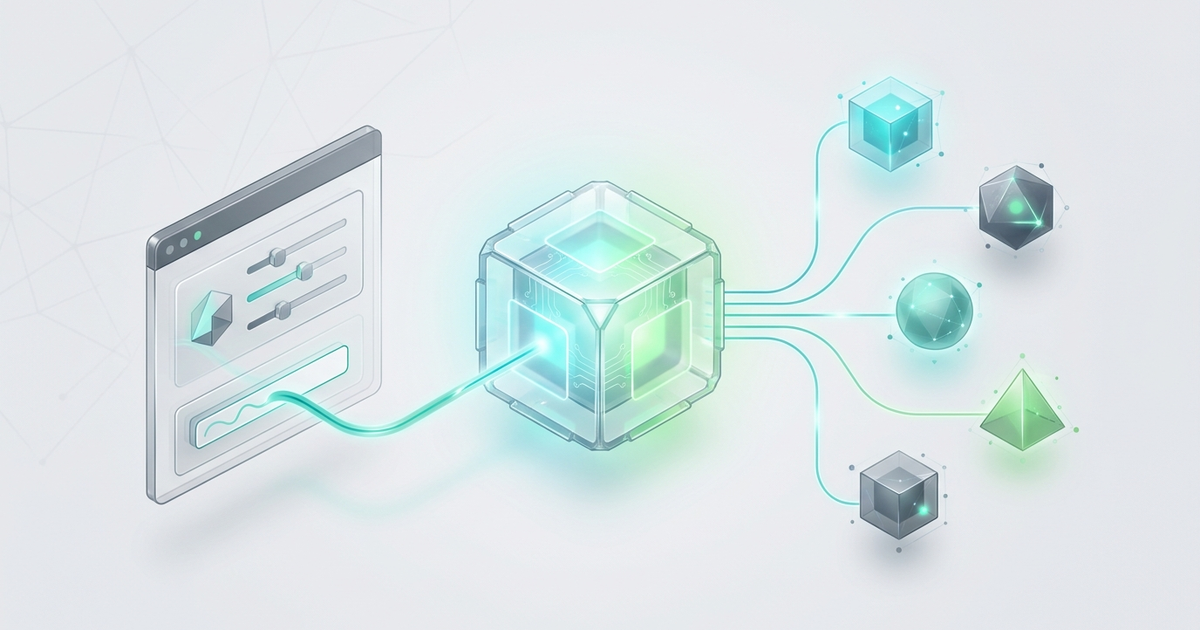
An OpenAI API alternative is not just another model endpoint. In 2026, the useful alternative is usually a control layer: one compatible client, one place to route model calls, one billing view, and a clear rollback path if a provider, model, region, or price point stops fitting your workload.
That distinction matters because most teams do not leave OpenAI for one reason. They look for an OpenAI API alternative when one of these things becomes painful:
- A workload needs a model that is not available in the current OpenAI account or region.
- A product team wants to compare OpenAI, Claude, Gemini, Qwen, DeepSeek, image models, or video models without rewriting integrations.
- Finance wants one usage ledger instead of scattered provider invoices.
- An agent workflow needs fallback routing when a single upstream fails or slows down.
- A team wants OpenAI-compatible SDK ergonomics while keeping model choice flexible.
This guide shows a practical way to use an OpenAI API alternative without turning a simple API integration into a fragile provider migration project.
The quick answer
Use an OpenAI API alternative in this order:
- Keep your OpenAI SDK-compatible request shape stable.
- Move provider-specific settings into environment variables.
- Change the
base_urlto a compatible gateway or alternate provider endpoint. - Run a small smoke-test suite across your real prompts.
- Add model policy, fallback rules, budget limits, and usage review before production traffic moves.
- Keep a direct-provider rollback path until the new route proves stable.
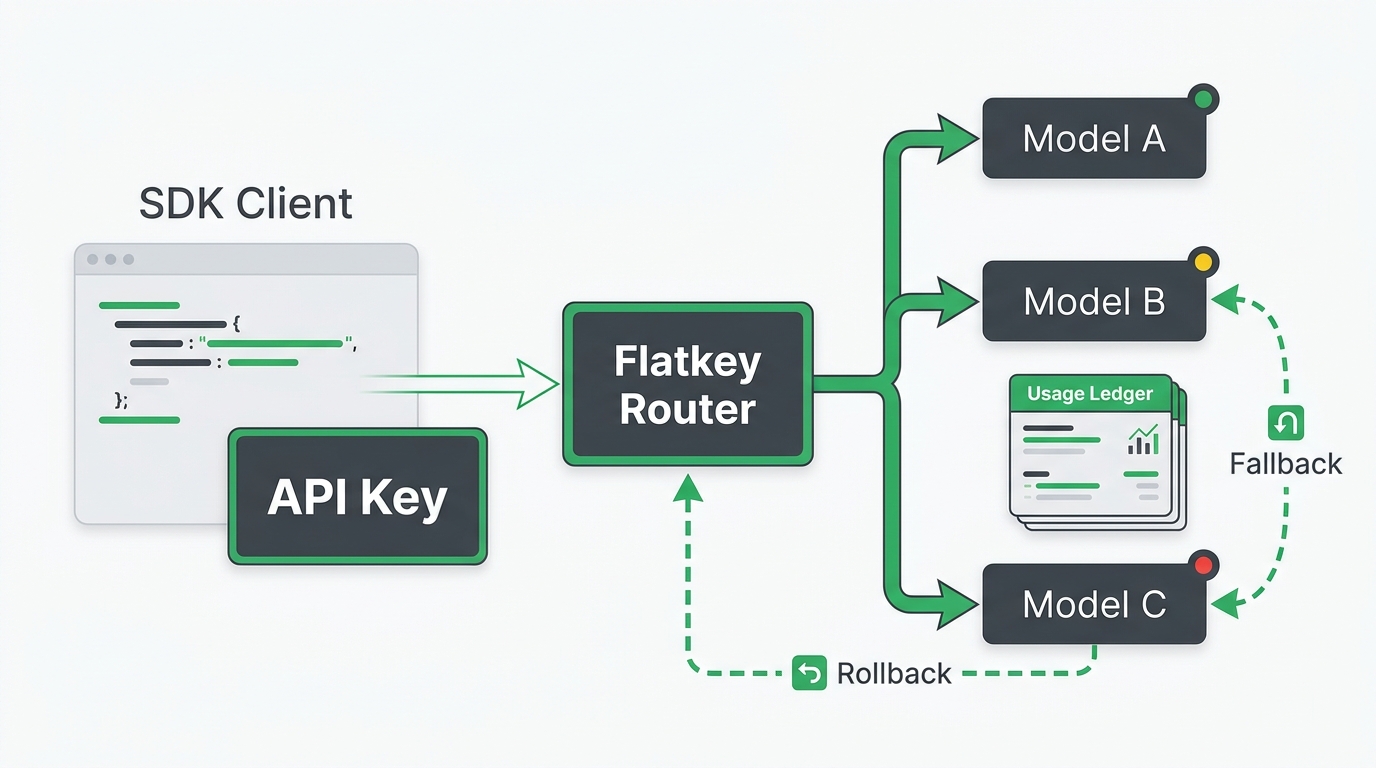
With Flatkey, the core idea is the same: configure one API key and the OpenAI-compatible Flatkey router endpoint, then choose models by request. Flatkey positions the platform around one prepaid balance, 300+ official models, 1,000+ pay-per-call tools, usage logs, automatic failover, and a single invoice layer for teams that want less provider sprawl. If you want the short first-call path, start with the Flatkey API quickstart and keep this migration checklist open beside it.
When an OpenAI API alternative is worth using
Do not switch just because an alternative exists. Switch when the control benefit is bigger than the migration cost.
| Situation | Better fit | Why |
|---|---|---|
| You use only one OpenAI model, have predictable usage, and do not need other providers | Direct OpenAI API | The simplest path is still the lowest operational overhead. |
| You need several text, image, video, or embedding models in one product | OpenAI-compatible gateway | You can keep one integration shape while testing and routing across providers. |
| You run coding agents, research agents, enrichment workflows, or multimodal pipelines | Gateway with routing and ledger | The workflow usually needs model choice, tools, cost visibility, and fallback. |
| You need full control over proxy logic, custom auth, or internal policy enforcement | Self-hosted proxy such as LiteLLM | You own the control plane, but you also own hosting and maintenance. |
| You are optimizing one specialized open-source model workload at scale | Direct inference provider | Dedicated inference clouds can be a better fit for tuned, high-volume workloads. |
The mistake is treating every OpenAI API alternative as a model quality comparison. For production teams, the real question is usually: where should the control plane live?
Choose your alternative type first
There are four common ways to replace or supplement a direct OpenAI integration.
| Alternative type | Examples | Best for | Watch out for |
|---|---|---|---|
| Direct model provider | Anthropic, Google Gemini, Mistral, DeepSeek, Qwen | Teams that know exactly which provider they want | Different SDKs, billing, limits, auth, and response shapes |
| OpenAI-compatible gateway | Flatkey, OpenRouter-style routers | Teams that want one SDK-compatible path across many models | Need to validate routing, logging, fallback, and billing behavior |
| Inference cloud | Together AI-style inference platforms | Open-source model workloads and performance tuning | May focus on a narrower model class or deployment pattern |
| Self-hosted proxy | LiteLLM-style proxy | Internal platform teams that need custom control | You operate the proxy, config, uptime, secrets, and observability |
Flatkey fits the OpenAI-compatible gateway pattern. That makes it useful when you want an OpenAI API alternative that behaves like an integration layer, not a one-for-one model swap.
Step 1: Inventory your current OpenAI usage
Before changing any code, list the exact API behaviors your app depends on.
| What to inventory | Questions to answer |
|---|---|
| Endpoints | Are you using chat completions, Responses API, embeddings, images, audio, batch, files, or function/tool calls? |
| Models | Which model IDs are hardcoded? Which are configurable? |
| Prompts | Which prompts are revenue-critical, latency-sensitive, or expensive? |
| Response parsing | Do you parse free text, JSON mode, tool calls, usage fields, streaming chunks, or image URLs? |
| Reliability | What retries, timeouts, fallback paths, and error handling exist today? |
| Cost controls | Do you track input tokens, output tokens, cached tokens, per-request cost, user, workspace, and environment? |
| Compliance | Do you need data retention settings, audit logs, sub-keys, invoices, allowlists, or vendor review? |
This inventory decides whether your OpenAI API alternative can be a base_url change or needs a proper migration.
Step 2: Move provider settings into environment variables
The safest migration is reversible. Start by moving API key, base URL, and model ID into environment variables.
OPENAI_API_KEY="sk-your-current-key"
OPENAI_BASE_URL="https://api.openai.com/v1"
OPENAI_MODEL="your-current-openai-model"
Then initialize your client from configuration.
import os
from openai import OpenAI

client = OpenAI(
    api_key=os.environ["OPENAI_API_KEY"],
    base_url=os.environ.get("OPENAI_BASE_URL", "https://api.openai.com/v1"),
)

response = client.responses.create(
    model=os.environ["OPENAI_MODEL"],
    input="Summarize the support ticket in one paragraph."
)

print(response.output_text)
This step is not glamorous, but it is what lets you test an OpenAI API alternative without editing business logic every time you compare providers.
Step 3: Point the SDK at an OpenAI-compatible gateway
For a gateway-style OpenAI API alternative, the basic migration pattern is:
OPENAI_API_KEY="fk-your-flatkey-key"
OPENAI_BASE_URL="https://router.flatkey.ai/v1"
OPENAI_MODEL="provider-or-model-id-you-want-to-test"
Then run the same client code. Your first request should be boring: one short prompt, one known model, no streaming, no tools, no JSON parser, and no production traffic.
curl https://router.flatkey.ai/v1/chat/completions \
  -H "Authorization: Bearer $OPENAI_API_KEY" \
  -H "Content-Type: application/json" \
  -d '{
    "model": "your-selected-model",
    "messages": [
      {"role": "user", "content": "Return a three-item checklist for API migration."}
    ]
  }'
Use the smallest possible request first because you are testing the path, not the model. Once auth, routing, and response parsing work, test the prompts that matter.
For more background on this category, see Flatkey's guide to OpenAI-compatible API gateway migration and the broader unified AI API workflow.
Step 4: Run a compatibility smoke test
Create a small test set before you compare models. A good smoke test for an OpenAI API alternative includes:
| Test | Pass condition |
|---|---|
| Plain text completion | Response returns expected text field and no parser errors. |
| Structured output | JSON parses under your existing schema or your parser fails gracefully. |
| Tool/function call | Tool names and arguments arrive in the shape your app expects. |
| Streaming | Your UI or worker handles chunks, final events, errors, and retries. |
| Long context | The request stays within context limits and does not silently truncate critical input. |
| Refusal/safety case | Your product handles refusal or policy responses without breaking UX. |
| Usage accounting | Request logs show model, input tokens, output tokens, status, cost, user, and environment. |
| Timeout and retry | Slow or failed requests follow your retry and fallback policy. |
Run this against your current OpenAI route and the candidate alternative. Do not use demo prompts only. Use real prompts from the parts of your product where quality, latency, and cost affect the user.
Step 5: Compare alternatives with a decision matrix
A useful OpenAI API alternative comparison is not "which model sounds better in a sample answer?" Use a matrix that covers engineering, finance, and operations.
| Criteria | What to check | Why it matters |
|---|---|---|
| API compatibility | SDK, endpoint, streaming, tool calls, structured output, embeddings, images | Compatibility decides migration cost. |
| Model coverage | Text, reasoning, code, image, video, embeddings, rerank, speech | Coverage decides how often you need another provider. |
| Routing controls | Manual model selection, fallback, retries, health checks, failover | Routing decides production resilience. |
| Cost visibility | Per-request usage, token ledger, model price visibility, export | Finance cannot manage what it cannot see. |
| Governance | Sub-keys, budgets, allowlists, environment separation, audit logs | Teams need control once usage spreads across agents and apps. |
| Trust | Official endpoints, provider transparency, status page, retention policy | Model routing is infrastructure, so trust is part of the product. |
| Rollback | Can you return to direct OpenAI quickly? | A migration without rollback is an outage risk. |
Flatkey's strongest fit is the middle of this matrix: teams that want an OpenAI API alternative with OpenAI-compatible setup, one key, shared balance, model/tool breadth, request-level visibility, and failover as the AI usage footprint expands. You can compare available options in the model directory and check usage-based economics on the pricing page.
Step 6: Add fallback before full production traffic
Fallback should be explicit. Do not rely on hope or a vague "try another model" comment in code.
Define:
- Primary model for the workload.
- Allowed fallback models.
- Which errors trigger fallback.
- Maximum retry count.
- Latency threshold before failover.
- Whether fallback may use a cheaper, faster, or more expensive model.
- How users and logs show that fallback happened.
Example policy:
{
  "workload": "support_ticket_summary",
  "primary_model": "preferred-fast-text-model",
  "fallback_models": ["secondary-fast-text-model", "premium-reasoning-model"],
  "fallback_on": ["rate_limit", "timeout", "upstream_5xx"],
  "max_attempts": 2,
  "log_fields": ["request_id", "user_id", "model", "fallback_reason", "cost"]
}
An OpenAI API alternative is much more valuable when it can make fallback observable. If a request used a secondary route, you should be able to see why, how much it cost, and whether quality changed.
Step 7: Migrate one workload, not the whole product
Pick one contained workload first. Good candidates:
- Internal summarization.
- Low-risk content classification.
- Research enrichment.
- Coding agent experiments.
- Draft generation with human review.
- Batch back-office workflows.
Avoid starting with checkout, compliance review, medical/legal content, security automation, or anything where a bad answer creates immediate user harm.
For the first production slice, route a small percentage of traffic through the OpenAI API alternative and compare:
- Success rate.
- P50, P95, and timeout rate.
- Cost per successful request.
- Parser failure rate.
- Human review acceptance rate.
- Fallback rate.
- User-visible complaint rate.
Keep the old route available until the new route wins on the metrics that matter for that workload.
Step 8: Make billing and usage review part of the rollout
Many teams switch to an OpenAI API alternative because usage has become difficult to explain. The rollout should include a weekly review of:
| Metric | Why to review it |
|---|---|
| Spend by app, workspace, user, and environment | Finds runaway test jobs and unowned workloads. |
| Spend by model | Shows whether fallback or experiments are changing cost. |
| Failed calls | Separates app bugs, upstream failures, and user errors. |
| Cached tokens | Shows whether prompt caching is actually being used. |
| Tool calls | Matters when agents use search, browser, enrichment, or media tools. |
| Invoice owner | Prevents provider-by-provider billing drift. |
Flatkey is designed around this consolidation angle: one prepaid balance, one bill, one invoice, and a usage ledger for model and tool calls. That is especially useful when the alternative API is being used by agents, scripts, internal apps, and production services at the same time. For a deeper architecture view, read the AI API gateway architecture guide and the AI routing API tools evaluation framework.
A 30-minute OpenAI API alternative migration checklist
Use this before you move real users.
- Inventory current endpoints, models, prompts, parsers, usage fields, and retry logic.
- Move API key, base URL, and model ID into environment variables.
- Run one plain text request through the candidate endpoint.
- Run your compatibility smoke test against real prompts.
- Confirm streaming, tool calls, structured output, and long-context behavior if your app uses them.
- Confirm usage logs show request status, model, cost, and owner.
- Define primary model, fallback models, fallback triggers, retry limit, and rollback route.
- Move one low-risk workload first.
- Compare cost per successful request, latency, failure rate, fallback rate, and parser failures.
- Keep direct OpenAI access available until the new route is proven.
Common mistakes
Mistake 1: Changing model and integration at the same time
If you change the model, SDK path, response parser, and prompt in one pull request, you will not know what caused a regression. First prove the OpenAI API alternative can carry the existing shape. Then compare models.
Mistake 2: Ignoring usage logs
A successful response is not enough. You need to know which model answered, how many tokens were used, what it cost, whether fallback happened, and who owns the request.
Mistake 3: Treating fallback as a model list
Fallback is a policy. A list of allowed models is only one part of it. You also need triggers, limits, logging, and quality review.
Mistake 4: Migrating every workload at once
An OpenAI API alternative should make model choice safer, not make deployment risk bigger. Migrate the least risky workload first and expand only when the numbers support it.
Frequently asked questions
What is the easiest OpenAI API alternative to test?
The easiest OpenAI API alternative to test is usually an OpenAI-compatible gateway because you can keep the same SDK shape and change the API key, base URL, and model ID. Flatkey follows this pattern with the https://router.flatkey.ai/v1 endpoint.
Is an OpenAI-compatible API identical to the OpenAI API?
No. Compatibility can cover common request and response patterns, but teams still need to test streaming, structured output, tool calls, usage fields, model IDs, rate-limit behavior, and error handling. Treat compatibility as a migration accelerator, not a promise that every edge case behaves identically.
Should I replace OpenAI completely?
Not at first. Keep direct OpenAI access as a rollback path while you test the OpenAI API alternative on a contained workload. The goal is optionality and control, not a risky overnight replacement.
When should I use Flatkey instead of direct provider accounts?
Use Flatkey when you want one key across many official models and tools, OpenAI-compatible setup, shared billing, usage visibility, and routing controls. Use direct provider accounts when you only need one provider and want the simplest possible vendor path.
What should I measure after switching?
Measure success rate, latency, timeout rate, parser failures, fallback rate, cost per successful request, model mix, owner, environment, and user-visible quality. Those metrics tell you whether the OpenAI API alternative is actually improving the system.
Official docs to keep open
Keep the docs close while you test:
- OpenAI quickstart for the current official SDK setup path.
- OpenAI Responses API reference for the request shape used in the Python example above.
- OpenAI rate limits guide for quota and retry behavior.
- Flatkey quickstart for the router endpoint and first-call setup.
- OpenRouter quickstart, Together AI OpenAI compatibility, LiteLLM docs, and Cloudflare AI Gateway docs if you are comparing gateway, inference-cloud, and proxy patterns.
The bottom line
The right OpenAI API alternative in 2026 is not just the provider with the longest model list. It is the route that lets your team test models, control spend, observe usage, recover from upstream issues, and keep the application code understandable.
Start with a reversible base_url migration, prove compatibility with real prompts, add fallback and usage review, then expand workload by workload.
Flatkey is built for that pattern: one key, one balance, one OpenAI-compatible router, and one operational view across model and tool calls. If your team is comparing an OpenAI API alternative because provider sprawl has become the problem, start by testing one workload through Flatkey and measure the route before you move the rest.