How to Use a Unified AI API in 2026
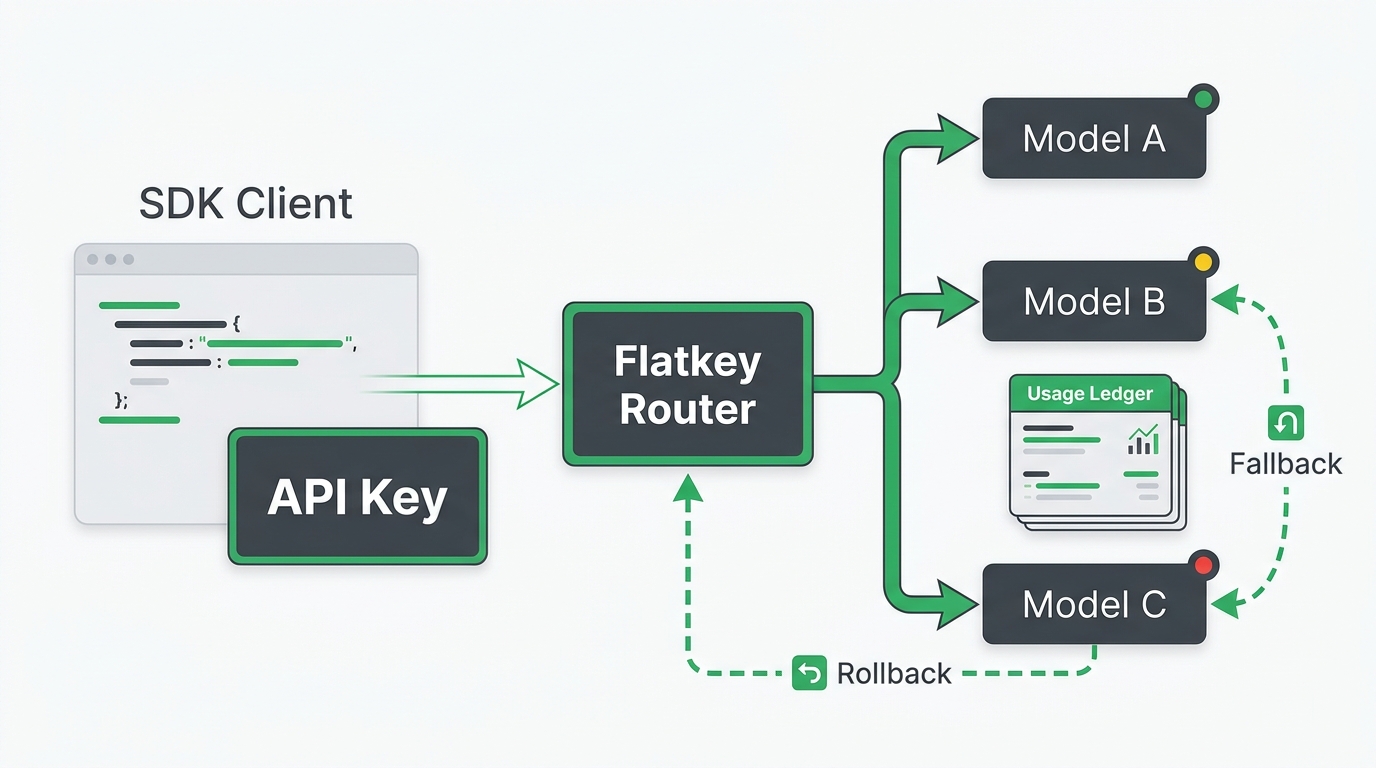
A unified AI API lets your application call multiple AI model providers through one access layer instead of wiring every provider separately. In 2026, that usually means one API key, one OpenAI-compatible base URL, one model catalog, and one place to review usage, cost, and failures.
That sounds simple, but the implementation details matter. A unified AI API is useful only if it keeps your current SDK workflow intact, makes model switching safer, and gives engineering and finance the same view of what happened after each request.
This guide shows a practical rollout path: set up the key, point an OpenAI-compatible client at a unified endpoint, choose a model, run a first request, verify the usage log, then decide what should move behind the unified layer and what should stay direct with a provider.
Quick Answer: The Unified AI API Workflow
Use a unified AI API when your team needs to test or run several models without creating a new integration, billing trail, and key-management process for each provider.
The basic workflow is:
- Create one API key for the unified gateway.
- Store it as an environment variable.
- Set your client base URL to the gateway endpoint.
- Send a normal chat, responses, embeddings, image, or video request.
- Choose the model with the
modelparameter. - Check usage logs for tokens, model, cost, status, and latency.
- Add fallback, quota, and routing rules only after the first path is observable.
For Flatkey, the OpenAI-compatible REST base URL is:
https://router.flatkey.ai/v1The important point is not that every model behaves identically. The important point is that your application gets one reviewable integration surface while still choosing the right model for each workload.
When a Unified AI API Makes Sense
A unified AI API is strongest when your team already feels the overhead of provider sprawl.
Use one when:
| Situation | Why a unified AI API helps |
|---|---|
| You test GPT, Claude, Gemini, DeepSeek, Qwen, or image/video models in the same product | Model changes can happen behind one integration layer. |
| You already use the OpenAI SDK shape | Migration can start with a base URL and key change rather than a full rewrite. |
| Finance asks for one usage and billing view | Requests can be reviewed from one dashboard instead of several provider consoles. |
| Platform needs per-environment keys and quotas | Key ownership, spend caps, and route rules can be centralized. |
| Reliability matters across providers | Fallback and health checks can be handled as an operations policy instead of ad hoc code. |
Keep direct provider accounts when a workflow depends on a provider-native feature that the unified gateway does not expose, when procurement requires a direct contract, or when your product genuinely uses only one provider.
Step 1: Pick the Workload Before You Pick the Provider
Do not begin by asking, "Which model is best?" Begin by writing down the workload.
Use a small table like this:
| Workload | User-facing risk | Model candidates | Must verify |
|---|---|---|---|
| Customer support answer | Incorrect policy explanation | Fast chat model, reasoning model | Accuracy, latency, cost per resolved ticket |
| Code review assistant | Missed bug or noisy feedback | Coding model, reasoning model | Bug catch rate, edit quality, fallback behavior |
| Product image generation | Poor creative output | Image generation model | Cost per accepted image, prompt controls, moderation path |
| Research agent | Slow or incomplete answer | Reasoning model plus tools | Tool access, traceability, timeout handling |
This step prevents the most common unified AI API mistake: treating the gateway as a random model picker. A good implementation still maps workloads to owners, quality checks, and fallback rules.
Step 2: Create and Store the API Key
Create the key in the gateway console and store it outside source control.
For Flatkey, create a key in the console and store it as FLATKEY_API_KEY:
export FLATKEY_API_KEY="sk-fk-your-key"Use separate keys for development, staging, and production. That gives you cleaner logs and safer revocation if a key leaks.
Recommended key naming:
| Environment | Example key name | Purpose |
|---|---|---|
| Development | dev-local-ai-tests | Local testing with low spend limits |
| Staging | staging-model-routing | Pre-production validation |
| Production | prod-customer-chat | Live user traffic |
| Agent workflow | prod-research-agent | Autonomous or scheduled agent calls |
A unified AI API should reduce credential sprawl, not hide it. Keep key ownership explicit.
Step 3: Make the First Request with cURL
Start with cURL before changing your app. It proves the key, endpoint, model ID, and request shape work independently from your framework.
curl https://router.flatkey.ai/v1/chat/completions \
  -H "Content-Type: application/json" \
  -H "Authorization: Bearer $FLATKEY_API_KEY" \
  -d '{
    "model": "gpt-4o-mini",
    "messages": [
      {
        "role": "user",
        "content": "Write one sentence explaining what a unified AI API does."
      }
    ],
    "max_tokens": 120
  }'
Before using a model in production, confirm the exact model ID in the current model directory or API model list. Model availability, aliases, pricing, and supported endpoints can change quickly across the AI market.
Step 4: Switch the OpenAI SDK Base URL
Many teams can test a unified AI API with the OpenAI Python or Node.js SDK they already use. The core migration is the API key plus the base URL.
Python:
import os
from openai import OpenAI

client = OpenAI(
    api_key=os.environ["FLATKEY_API_KEY"],
    base_url="https://router.flatkey.ai/v1",
)

response = client.chat.completions.create(
    model="gpt-4o-mini",
    messages=[
        {"role": "user", "content": "Summarize this product feedback in three bullets."}
    ],
    max_tokens=300,
)

print(response.choices[0].message.content)
Node.js:
import OpenAI from "openai";

const client = new OpenAI({
  apiKey: process.env.FLATKEY_API_KEY,
  baseURL: "https://router.flatkey.ai/v1",
});

const response = await client.chat.completions.create({
  model: "gpt-4o-mini",
  messages: [
    { role: "user", content: "Summarize this product feedback in three bullets." },
  ],
  max_tokens: 300,
});

console.log(response.choices[0].message.content);
The goal is not to remove all provider differences. The goal is to keep the application wrapper stable while model choice moves into a controlled parameter.
Step 5: Choose Models with a Policy, Not a Guess
A unified AI API makes model switching easier. That can help or hurt depending on whether you define selection rules.
Use a simple policy table:
| Route | Primary model | Backup model | Approval rule |
|---|---|---|---|
support_summary | Fast low-cost chat model | Larger reasoning model | Product owner can change after QA sample passes |
code_review | Coding-focused model | General reasoning model | Engineering lead approval required |
image_creative | Image model | No automatic fallback | Creative lead approves output quality |
research_agent | Reasoning model | Lower-latency model | Ops approval required if fallback changes answer depth |
The model name should never be a magic string scattered across the codebase. Put it in configuration, associate it with a workload, and log both the requested model and the final model used.
Step 6: Verify Usage Logs After the First Call
Do not call the migration complete when the API returns 200. Check the usage and cost trail.
For Flatkey, the Usage dashboard shows request-level fields such as timestamp, model, input tokens, output tokens, deducted cost, API key, and status. After your first request, verify:
| Check | What you should see |
|---|---|
| Model | The model ID you requested or the final routed model |
| Tokens | Input and output token counts |
| Cost | The amount deducted from balance for that request |
| Key | The environment key used by the request |
| Status | Success, error, or rate-limit state |
| Latency | Whether the first test is within your expected range |
This is where a unified AI API becomes operationally useful. Product, engineering, and finance can inspect the same request trail instead of reconciling screenshots from several provider dashboards.
Step 7: Add Fallback Only After You Can Measure It
Fallback is not automatically good. It is good when it recovers requests without lowering answer quality, breaking policy, or hiding cost.
Before enabling fallback, define:
| Question | Why it matters |
|---|---|
| Which errors trigger fallback? | Rate limit, timeout, provider outage, and content-policy failures are different events. |
| Which model is allowed as backup? | A fallback model may change quality, latency, cost, or compliance posture. |
| Who approves the route? | Fallback policy is a production behavior, not just a developer convenience. |
| What gets logged? | You need requested model, final model, retry count, final status, tokens, cost, and latency. |
| What is the rollback plan? | If fallback causes poor responses, you need a fast way to disable it. |
Open-source and commercial router documentation often emphasizes routing, provider order, load balancing, and fallback behavior. Those features matter, but your rollout should measure accepted output rate, cost per accepted output, p95 latency, and fallback mismatch rate.
Step 8: Keep Direct Provider Exceptions
The best unified AI API rollout still allows exceptions.
Use direct provider access when:
- a model-specific feature is not exposed by the unified layer
- the provider requires a native request format for a launch-critical feature
- procurement, compliance, or data-residency policy requires a direct path
- a team needs provider-native logs or controls for a regulated workflow
- the unified path fails your quality, latency, or cost acceptance test
This makes the architecture credible. The unified layer becomes the default for repeatable multi-model work, not a forced abstraction for every possible request.
Implementation Checklist
Use this checklist before moving a workload behind a unified AI API:
- Workload owner is named.
- Primary model and backup model are documented.
- API key is stored in a secrets manager or environment variable.
- Development, staging, and production keys are separated.
- Base URL is configured in one client wrapper.
- Model ID is configuration-driven, not hardcoded across files.
- First cURL request succeeds.
- SDK request succeeds in staging.
- Usage logs show model, tokens, cost, key, status, and latency.
- Cost per accepted output is measured against the direct provider path.
- Fallback behavior is tested with a non-production failure case.
- Rollback plan is documented.
What to Measure in the First 30 Days
The first month should answer whether the unified AI API improves operations, not just whether requests run.
Track:
| Metric | Why it matters |
|---|---|
| Accepted output rate | Measures usable responses, not only successful HTTP calls |
| Cost per accepted output | Normalizes price against quality and retries |
| p95 latency by workload | Prevents one route from hiding slow user experience |
| Fallback recovery rate | Shows whether fallback actually saves requests |
| Fallback mismatch rate | Catches backup responses that pass technically but fail quality |
| Key-level spend by environment | Separates development experiments from production usage |
| Time to add a new model | Measures whether the unified layer reduces operational friction |
If those metrics improve, expand the unified layer to another workload. If they do not, keep the direct provider path for that workflow and use the result as a constraint for the next test.
Flatkey Fit: One Key, One Base URL, One Review Surface
Flatkey is built for teams that want to use one key and one OpenAI-compatible base URL across many model and tool workflows. Current Flatkey documentation describes REST API access at https://router.flatkey.ai/v1, Bearer authentication, OpenAI SDK compatibility, model selection through the model parameter, and usage logs for model, token, latency, cost, key, and status review.
That makes Flatkey a practical fit when your team wants the unified AI API workflow without rewriting every request wrapper. Start with one staging workload, validate the exact model in the current model directory, check the usage log, and then decide whether routing, fallback, quotas, or team controls should come next.
For adjacent implementation details, read the Flatkey API quickstart, the OpenAI-compatible API gateway migration checklist, and the AI routing API tools evaluation framework.
FAQ
What is a unified AI API?
A unified AI API is one access layer for calling multiple supported AI models or tools through shared authentication, endpoint configuration, model selection, and usage review.
Is a unified AI API the same as an AI API gateway?
They overlap. An AI API gateway usually emphasizes routing, controls, fallback, and observability. A unified AI API emphasizes one integration surface across multiple models or providers. Many products combine both.
Can I use a unified AI API with the OpenAI SDK?
Yes, when the gateway exposes an OpenAI-compatible API. In that case, you typically set the API key, change the SDK base URL, and choose the target model with the model parameter.
Does a unified AI API remove provider-specific differences?
No. Model behavior, context limits, supported parameters, latency, pricing, and policy behavior can still differ. A unified AI API reduces integration and operations overhead, but you still need workload-specific QA.
When should I not use a unified AI API?
Avoid moving a workflow behind a unified layer when it depends on provider-native features, strict direct-provider procurement, specialized compliance controls, or single-provider optimizations that the gateway cannot expose.
Conclusion
A unified AI API is useful in 2026 when it gives your team a cleaner way to run multiple AI models, control keys, inspect usage, and change routes without rewriting application code. The safest rollout is narrow: pick one workload, switch the base URL in staging, verify the request trail, measure quality and cost, then expand only where the unified layer clearly reduces operational work.
If you are evaluating Flatkey for this workflow, start with the model directory, the pricing page, and the API quickstart, then run one staging request through https://router.flatkey.ai/v1 before changing production traffic.