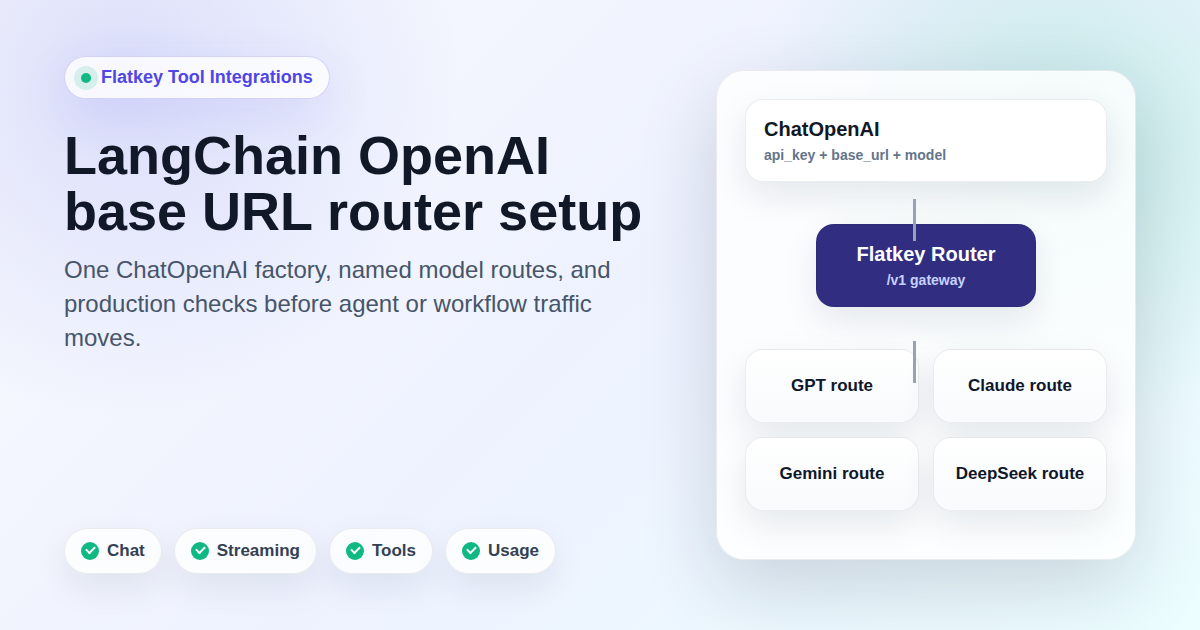
LangChain OpenAI base URL setup is usually shown as one constructor argument. That is useful, but it is not enough for a production router. If you point LangChain's ChatOpenAI class at Flatkey, you also need to prove the model alias, endpoint family, streaming behavior, tool behavior, usage record, quota path, and rollback route before traffic moves.
This guide is for developers, platform teams, automation builders, and AI product teams that want one OpenAI-compatible access layer for GPT, Claude, Gemini, DeepSeek, and other model families while keeping the LangChain ChatOpenAI interface. It was prepared on June 28, 2026 from current LangChain documentation, official OpenAI API schema evidence, and live Flatkey public pages. The snippets are templates. No live Flatkey API key was available in this task, so run the checks with your own key, the current Flatkey console base URL, and model aliases that are enabled for your account.
Quick Answer: LangChain OpenAI Base URL
Set the LangChain OpenAI base URL with ChatOpenAI(base_url=...). Keep the key, base URL, and model alias in environment variables so a router migration is visible in configuration instead of being hardcoded into chains, agents, or background jobs.
export FLATKEY_API_KEY="fk_your_key"
export FLATKEY_BASE_URL="https://console.flatkey.ai/v1" # Copy the current value from Flatkey
export FLATKEY_MODEL="your-flatkey-model-alias"
import os
from langchain_openai import ChatOpenAI
def required_env(name):
value = os.environ.get(name)
if not value:
raise RuntimeError(f"Missing {name}")
return value
llm = ChatOpenAI(
model=required_env("FLATKEY_MODEL"),
api_key=required_env("FLATKEY_API_KEY"),
base_url=required_env("FLATKEY_BASE_URL"),
temperature=0,
timeout=20,
max_retries=1,
)
response = llm.invoke([
("system", "Reply in one short sentence."),
("human", "Run a LangChain router smoke test."),
])
print(response.content)
print(response.response_metadata)
print(response.usage_metadata)That is the minimum code path. The production question is whether the LangChain OpenAI base URL value points to the right Flatkey route, sends the right model alias, preserves the features your workflow uses, and leaves enough evidence for operations and finance reviewers.
What The Current Docs Support
LangChain's current Python docs for ChatOpenAI show the langchain-openai package, OPENAI_API_KEY setup, ChatOpenAI(...) instantiation, bind_tools, streaming usage metadata, and Responses API behavior. The same docs say base_url can be passed explicitly, and that environment resolution checks an explicit base_url or openai_api_base first, then OPENAI_API_BASE, then the underlying SDK's OPENAI_BASE_URL.
The most important caveat is also in the LangChain docs: ChatOpenAI targets official OpenAI API specifications. Non-standard fields added by third-party providers are not preserved. For a LangChain OpenAI base URL setup through a multi-model router, treat OpenAI-compatible chat, tools, streaming, and Responses features as things to test. Do not assume every provider-native field survives because one normal prompt returned text.
Flatkey's live homepage on June 28, 2026 positioned the product as one API gateway for production AI teams and described unified model access, routing, billing, usage analytics, and operational controls. It showed a public example request path at https://console.flatkey.ai/v1/chat/completions. The pricing page showed an AI-readable summary with 599 AI models across 23 providers and an endpoint map including OpenAI-style chat completions, OpenAI Responses, Anthropic messages, image generation, and video generation. Treat those as dated public catalog facts, not proof that every route, model, or feature is enabled in your account.
Constructor Value Or Environment Variable?
For most migrations, pass the LangChain OpenAI base URL explicitly in the ChatOpenAI constructor. That keeps the change scoped to one model factory. Use the global environment variable path only when every ChatOpenAI instance in the process should route through the same gateway.
| Pattern | Use When | Risk To Manage |
|---|---|---|
ChatOpenAI(base_url=...) |
You are moving one service, one chain, or one agent workflow to Flatkey. | Requires a shared factory so teams do not copy inconsistent setup blocks. |
OPENAI_API_BASE |
LangChain should read the router URL at initialization without constructor wiring. | Can affect more clients than intended if several workers share the same process environment. |
OPENAI_BASE_URL |
You intentionally want the underlying OpenAI SDK client to read the route. | LangChain leaves streaming usage defaults off for non-OpenAI endpoints, so usage tests must be explicit. |
A clean LangChain OpenAI base URL migration usually starts with a single factory like this:
import os
from langchain_openai import ChatOpenAI


def required_env(name):
    value = os.environ.get(name)
    if not value:
        raise RuntimeError(f"Missing {name}")
    return value


def flatkey_chat_model(model_env="FLATKEY_MODEL"):
    return ChatOpenAI(
        model=required_env(model_env),
        api_key=required_env("FLATKEY_API_KEY"),
        base_url=required_env("FLATKEY_BASE_URL"),
        temperature=0,
        timeout=20,
        max_retries=1,
    )
Build The Multi-Model Router Map
Flatkey gives the router layer, but your app still needs a routing map. Avoid scattering model names across prompt files, chain constructors, queues, and agent tools. Put each workload behind a named route and keep the selected Flatkey model alias in environment variables.
MODEL_ROUTES = {
    "support_triage": "FLATKEY_SUPPORT_MODEL",
    "workflow_planning": "FLATKEY_PLANNING_MODEL",
    "code_review": "FLATKEY_CODE_MODEL",
    "fallback": "FLATKEY_FALLBACK_MODEL",
}


def llm_for(route_name):
    if route_name not in MODEL_ROUTES:
        raise ValueError(f"Unknown route: {route_name}")
    return flatkey_chat_model(MODEL_ROUTES[route_name])


triage_llm = llm_for("support_triage")
planning_llm = llm_for("workflow_planning")
The model names behind those route variables can represent GPT, Claude, Gemini, DeepSeek, or another model family when the selected Flatkey alias and endpoint family support the request. That distinction matters. A LangChain OpenAI base URL change proves transport only after you test the actual alias, feature, and endpoint family your workflow sends.
Smoke Test The Basic Chat Path
Start with a non-streaming invoke call. This proves authentication, URL shape, model alias, response parsing, response metadata, and usage metadata before you test streaming or tools.
llm = flatkey_chat_model("FLATKEY_MODEL")

result = llm.invoke([
    ("system", "Answer in one sentence."),
    ("human", "What should this LangChain migration verify first?"),
])

print("content:", result.content)
print("response_metadata:", result.response_metadata)
print("usage_metadata:", result.usage_metadata)
Approve the first LangChain OpenAI base URL check only if the returned content, model metadata, finish status, request metadata, and usage metadata are visible enough for your application and reviewers. If the prompt succeeds but usage cannot be matched in Flatkey, the migration is not ready.
Test Streaming And Usage Separately
Streaming is not just a display feature. It touches proxies, serverless timeouts, cancellation, UI event loops, and token accounting. LangChain's docs say streaming token usage is not returned by default by OpenAI Chat Completions and that ChatOpenAI can recover token counts by setting stream_usage=True. They also note that when OPENAI_BASE_URL is set, the default is left off because many non-OpenAI endpoints do not support streaming token usage.
streaming_llm = ChatOpenAI(
    model=required_env("FLATKEY_MODEL"),
    api_key=required_env("FLATKEY_API_KEY"),
    base_url=required_env("FLATKEY_BASE_URL"),
    temperature=0,
    stream_usage=True,
)

chunks = []
for chunk in streaming_llm.stream("Stream three short migration checks."):
    if chunk.content:
        print(chunk.content, end="", flush=True)
    chunks.append(chunk)

print()
print("last_chunk_usage:", getattr(chunks[-1], "usage_metadata", None))
Only keep stream_usage=True in production if the selected Flatkey route and model alias support it reliably. If it fails, you can still stream text while recording usage from non-streaming test traffic or Flatkey usage records, but that decision should be explicit.
Verify Tool Calling With The Same Model Alias
LangChain's ChatOpenAI.bind_tools converts Pydantic classes, dict schemas, LangChain tools, and functions into OpenAI tool schemas. That is useful for agentic workflows, but it must be tested per route. A model alias that answers plain chat through a LangChain OpenAI base URL does not automatically approve tool calling.
from pydantic import BaseModel, Field


class RouteReadiness(BaseModel):
    """Return the readiness status for a test route."""

    route_name: str = Field(description="Internal route name to inspect")


tool_llm = flatkey_chat_model("FLATKEY_TOOL_MODEL").bind_tools([RouteReadiness])

tool_result = tool_llm.invoke(
    "Use the tool for route support_triage and return no final prose."
)

print("content:", tool_result.content)
print("tool_calls:", tool_result.tool_calls)
print("response_metadata:", tool_result.response_metadata)
print("usage_metadata:", tool_result.usage_metadata)
Record whether a tool call appears, whether the arguments parse, whether no-tool prompts still work, and whether errors are understandable. If your agent depends on strict schemas, parallel tool calls, built-in tools, or provider-specific reasoning fields, test those paths before rollout.
Check Responses API Behavior Before Agent Traffic
LangChain's current docs say ChatOpenAI can route to the Responses API when Responses-only features are used, and that you can also specify use_responses_api=True. OpenAI's official API schema exposes /v1/responses with JSON and Server-Sent Events output, tools, usage, state, and function-call fields. Flatkey's live pricing page also exposed an openai-response endpoint family on June 28, 2026.
responses_llm = ChatOpenAI(
    model=required_env("FLATKEY_RESPONSES_MODEL"),
    api_key=required_env("FLATKEY_API_KEY"),
    base_url=required_env("FLATKEY_BASE_URL"),
    use_responses_api=True,
    temperature=0,
)

responses_result = responses_llm.invoke("Return one sentence about route readiness.")

print(responses_result.content)
print(responses_result.response_metadata)
print(responses_result.usage_metadata)
Do not infer Responses support from a Chat Completions pass. Treat Responses as a separate endpoint-family check with its own model alias, feature set, streaming behavior, usage record, and rollback path.
Operational Evidence Flatkey Reviewers Need
The value of a multi-model router is not only the LangChain OpenAI base URL line. Flatkey's public positioning is about model access, routing, billing, usage analytics, and operational controls. A production migration should leave evidence for those teams.
| Check | What To Capture | Why It Matters |
|---|---|---|
| Base URL | Current Flatkey console value, including whether it ends at /v1. |
Old hosts and missing path segments create confusing 404s. |
| Model alias | The exact Flatkey model string for each route. | Provider family names are not enough for production requests. |
| Endpoint family | Chat Completions, Responses, Anthropic messages, image generation, video generation, or another route. | One endpoint success does not approve another endpoint. |
| Feature checks | Plain chat, streaming, tools, structured output, Responses, and multimodal input where used. | Compatibility must match the app's real request shape. |
| Usage row | Timestamp, key, model alias, route, status, request unit, and owner metadata where available. | Ops and finance need to find the request without guessing. |
| Cost and quota | Pricing unit, budget threshold, quota behavior, and alert behavior. | Spend controls should be understood before user traffic starts. |
Common Failure Modes
| Symptom | Likely Cause | Fix |
|---|---|---|
| 404 from LangChain | The base URL is missing /v1, uses an old host, or points at the wrong endpoint family. |
Copy the current Flatkey console value and rerun a minimal invoke. |
| 401 or 403 | The wrong key is loaded, the key lacks access, or OPENAI_API_KEY and FLATKEY_API_KEY are mixed. |
Print only the env var names loaded, never the secret value, and verify the Flatkey key. |
| Plain chat works but tools fail | The selected model alias or endpoint family does not support the tool schema you send. | Test the smallest schema, then add strict mode or real tool loops after the base call passes. |
| Streaming text works but usage is missing | The route streams content but does not support streamed usage metadata. | Keep streaming text, but collect usage from Flatkey records or non-streaming checks. |
| Responses state behaves differently | use_responses_api=True changes the underlying API family and state handling. |
Test Responses-specific state, tools, streaming, and usage before agent traffic. |
| Non-standard provider fields disappear | ChatOpenAI targets official OpenAI API fields and does not preserve every provider extension. |
Use an appropriate provider-specific LangChain package when the app depends on non-standard fields. |
Rollback Plan
Keep rollback as a configuration move. The previous provider key, base URL, and model should remain available until the LangChain OpenAI base URL migration passes chat, streaming, tools, Responses if used, usage, quota, and cost checks.
# Flatkey route
AI_API_KEY="$FLATKEY_API_KEY"
AI_BASE_URL="$FLATKEY_BASE_URL"
AI_MODEL="$FLATKEY_MODEL"

# Rollback route
AI_API_KEY="$PREVIOUS_PROVIDER_API_KEY"
AI_BASE_URL="$PREVIOUS_PROVIDER_BASE_URL"
AI_MODEL="$PREVIOUS_PROVIDER_MODEL"
Rollback triggers should be concrete: wrong model route, broken streaming, unsupported tool behavior, missing usage record, unexplained cost unit, quota behavior the team cannot explain, or error rates above the launch threshold.
Where This Fits With Other Flatkey Guides
If you need the broader migration strategy, start with the OpenAI-compatible API migration guide. If your team is testing desktop tools, the Cherry Studio API setup guide and cc-switch Claude Code Flatkey guide show adjacent tool-integration patterns. Use Flatkey pricing to inspect the current model catalog, then get a key when you are ready to run the smoke tests in your account.
FAQ
How do I set the LangChain OpenAI base URL?
Set the LangChain OpenAI base URL with ChatOpenAI(base_url="..."), or use LangChain's environment resolution path with OPENAI_API_BASE or the underlying SDK's OPENAI_BASE_URL. For a controlled migration, prefer the explicit constructor value.
Should I put the Flatkey key in OPENAI_API_KEY?
You can, but an explicit api_key=os.environ["FLATKEY_API_KEY"] is easier to review during a migration. It prevents unrelated OpenAI clients in the same process from accidentally using the Flatkey key.
Can LangChain route GPT, Claude, Gemini, and DeepSeek through one base URL?
LangChain sends the OpenAI-shaped request to the configured base URL. Flatkey can route supported model aliases across provider families, but you must verify the exact alias, endpoint family, and feature support in your account.
Does ChatOpenAI preserve provider-specific fields?
LangChain's current docs say ChatOpenAI targets official OpenAI API specifications and does not preserve non-standard third-party response fields. If your app depends on a provider-native field, use the provider-specific LangChain package or test a custom parser before migration.
Is changing the base URL enough for production?
No. A safe LangChain OpenAI base URL rollout also verifies model aliases, streaming, tools, Responses if used, usage records, quota behavior, cost review, errors, and rollback.
Bottom Line
A LangChain OpenAI base URL migration should be a small code change with a serious checklist around it. Put Flatkey key, base URL, and model aliases behind configuration; create one shared ChatOpenAI factory; route workloads through named model routes; test chat, streaming, tools, and Responses separately; confirm Flatkey usage and quota evidence; then keep rollback ready until the production path is boring.