LlamaIndex OpenAI-compatible endpoint setup is not just an api_base change. The useful move is pointing LlamaIndex at the current Flatkey base URL, but the production work is confirming model aliases, chat behavior, RAG embedding paths, usage evidence, timeout settings, and rollback before retrieval traffic moves.
This guide is for developers, AI product teams, automation builders, platform engineers, finance operators, and procurement reviewers using LlamaIndex in a RAG service, agent workflow, batch job, evaluation harness, or internal search application. It was prepared on June 28, 2026 from current LlamaIndex documentation, official OpenAI API references, and live Flatkey public pages. The code snippets are templates. No live Flatkey API key was available in this task, so run the smoke tests with your own key, the current Flatkey console base URL, and model aliases enabled for your account.
Quick Answer: LlamaIndex OpenAI-Compatible Endpoint
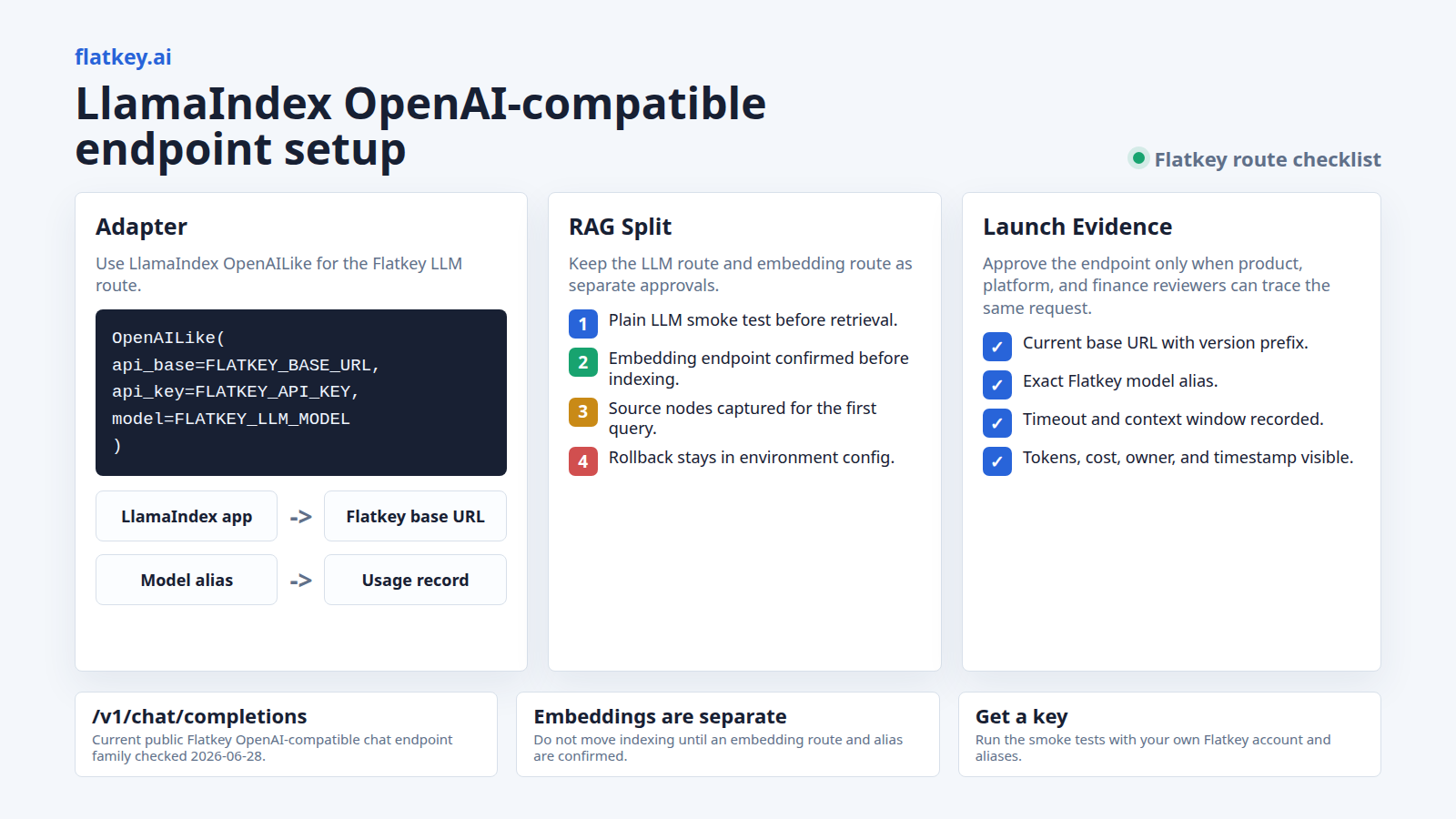
For a LlamaIndex OpenAI-compatible endpoint setup with Flatkey, use LlamaIndex's OpenAILike integration, set api_base to the current Flatkey base URL from your console, set api_key to your Flatkey key, and use a Flatkey model alias as model.
pip install llama-index-core llama-index-llms-openai-likeexport FLATKEY_API_KEY="fk_your_key"
export FLATKEY_BASE_URL="https://console.flatkey.ai/v1" # Copy the current value from Flatkey
export FLATKEY_LLM_MODEL="your-flatkey-model-alias"import os
from llama_index.llms.openai_like import OpenAILike
def required_env(name: str) -> str:
value = os.getenv(name)
if not value:
raise RuntimeError(f"Missing {name}")
return value
flatkey_llm = OpenAILike(
model=required_env("FLATKEY_LLM_MODEL"),
api_base=required_env("FLATKEY_BASE_URL"),
api_key=required_env("FLATKEY_API_KEY"),
context_window=int(os.getenv("FLATKEY_CONTEXT_WINDOW", "8192")),
timeout=float(os.getenv("FLATKEY_TIMEOUT_SECONDS", "60")),
is_chat_model=True,
is_function_calling_model=False,
)
response = flatkey_llm.complete("Reply with one short Flatkey LlamaIndex routing check.")
print(str(response))That is the minimum LlamaIndex OpenAI-compatible endpoint check. It proves only one request path. It does not prove embeddings, retrieval quality, function calling, streaming, cost visibility, tenant attribution, or rollback.
What The Current LlamaIndex Docs Support
The current LlamaIndex API reference describes OpenAILike as a thin wrapper around the OpenAI model for third-party tools that provide an OpenAI-compatible API. Its setup fields include model, api_base, api_key, context_window, is_chat_model, is_function_calling_model, and timeout.
LlamaIndex also has an OpenAILikeEmbedding class with model_name, api_key, api_base, batch size, and dimensions options. Treat that as an embedding integration pattern, not automatic proof that the same Flatkey route supports embeddings for your account. The Flatkey endpoint map checked for this guide did not list an embeddings endpoint publicly, so keep embeddings on your approved embedding provider unless your Flatkey console or support contact confirms the route and model alias.
| LlamaIndex Piece | Use It For | Flatkey Review Point |
|---|---|---|
OpenAILike |
Chat or completion-style LLM calls through an OpenAI-compatible API. | Use this for the Flatkey LLM route, then test the exact model alias. |
OpenAILikeEmbedding |
Embedding calls to an OpenAI-compatible embedding API. | Use only if your Flatkey account or another approved provider exposes the embedding route you need. |
Settings.llm |
Global LLM default for indexing and querying workflows. | Useful for one controlled service; local overrides are safer in mixed-provider apps. |
VectorStoreIndex |
RAG indexing and query workflows. | LLM routing and embedding routing are separate checks. |
Fresh Flatkey Evidence To Use Carefully
Flatkey's homepage checked on June 28, 2026 has the title One API gateway for production AI teams and public copy around model access, routing, billing, usage analytics, and operational controls. The live pricing API returned 599 model rows, 23 vendors, pricing version a42d372ccf0b5dd13ecf71203521f9d2, and endpoint families for /v1/chat/completions, /v1/responses, /v1/messages, /v1/images/generations, and /v1/video/generations.
Use those facts as dated public evidence for Flatkey's gateway and catalog shape. Do not treat them as a guarantee that every Flatkey account can call every route, every model alias supports every LlamaIndex feature, or every dashboard column is available. Before production traffic, your LlamaIndex OpenAI-compatible endpoint checks should use the exact key, base URL, alias, and feature path that your application will send.
Set Environment Variables First
Keep the Flatkey base URL, API key, and model alias outside code. That makes a LlamaIndex OpenAI-compatible endpoint rollout reviewable in deployment configuration and easier to roll back during an incident.
export FLATKEY_API_KEY="fk_your_key"
export FLATKEY_BASE_URL="https://console.flatkey.ai/v1"
export FLATKEY_LLM_MODEL="your-flatkey-model-alias"
export FLATKEY_TIMEOUT_SECONDS="60"
export FLATKEY_CONTEXT_WINDOW="8192"
Copy the current base URL from Flatkey instead of freezing an old host from a blog post. Flatkey public pages have shown both router and console host language across prior checks, so your console value is the source of truth for your account.
Configure OpenAILike For Flatkey
The smallest production-friendly setup is a helper that refuses to start with missing environment values. It also keeps context window and timeout explicit so reviewers can see the limits that LlamaIndex will plan around.
import os
from llama_index.llms.openai_like import OpenAILike

def required_env(name: str) -> str:
    value = os.getenv(name)
    if not value:
        raise RuntimeError(f"Missing {name}")
    return value

def flatkey_llm() -> OpenAILike:
    return OpenAILike(
        model=required_env("FLATKEY_LLM_MODEL"),
        api_base=required_env("FLATKEY_BASE_URL"),
        api_key=required_env("FLATKEY_API_KEY"),
        context_window=int(os.getenv("FLATKEY_CONTEXT_WINDOW", "8192")),
        timeout=float(os.getenv("FLATKEY_TIMEOUT_SECONDS", "60")),
        is_chat_model=True,
        is_function_calling_model=False,
    )
Set is_function_calling_model=True only after you test a real Flatkey alias with the LlamaIndex workflow that needs tools or structured calls. A model that answers chat prompts is not automatically approved for function calling.
Run A Plain LLM Smoke Test
Start with a single non-retrieval call. A passing RAG query can hide whether the LLM route, retriever, embedding model, or vector store did the useful work. A plain LlamaIndex OpenAI-compatible endpoint smoke test isolates Flatkey authentication, base URL shape, model alias, timeout, and response parsing.
llm = flatkey_llm()

response = llm.complete(
    "Return exactly one sentence confirming this Flatkey LlamaIndex route check."
)

print(str(response))
Approve this only after you can find the same request in Flatkey usage records with the expected key, alias, timestamp, and cost or token evidence. If text returns but no usage row is visible to the operator who owns the key, the setup is not ready.
Use Settings Deliberately
LlamaIndex Settings is a global singleton for commonly used resources in indexing and querying. That is convenient, but it can surprise teams that mix providers, aliases, or test fixtures in one process.
from llama_index.core import Settings

Settings.llm = flatkey_llm()
Use global Settings.llm when one service owns one Flatkey route. Use local overrides when only a specific query engine should use Flatkey:
query_engine = index.as_query_engine(llm=flatkey_llm())That local override keeps a LlamaIndex OpenAI-compatible endpoint test from silently changing every query path in a larger application.
Handle Embeddings As A Separate Route
RAG needs embeddings, but LLM endpoints and embedding endpoints are not the same thing. LlamaIndex lets you set Settings.embed_model globally or pass an embedding model into the indexing path. Do not assume a Flatkey chat alias can embed documents.
If your account has an approved OpenAI-compatible embedding endpoint, the LlamaIndex pattern looks like this:
pip install llama-index-embeddings-openai-like

export EMBEDDING_API_KEY="your_embedding_key"
export EMBEDDING_BASE_URL="https://your-approved-embedding-endpoint/v1"
export EMBEDDING_MODEL="your-embedding-model"
from llama_index.embeddings.openai_like import OpenAILikeEmbedding
embed_model = OpenAILikeEmbedding(
model_name=required_env("EMBEDDING_MODEL"),
api_base=required_env("EMBEDDING_BASE_URL"),
api_key=required_env("EMBEDDING_API_KEY"),
embed_batch_size=int(os.getenv("EMBEDDING_BATCH_SIZE", "10")),
)
Settings.embed_model = embed_modelIf Flatkey confirms an embedding endpoint for your account, those variables can point at Flatkey. If not, keep the embedding provider unchanged and move only the LLM route through Flatkey. That separation avoids a common LlamaIndex OpenAI-compatible endpoint failure: chat works, but indexing fails because embeddings were moved without proof.
RAG Smoke Test With VectorStoreIndex
The LlamaIndex VectorStoreIndex docs show loading documents with SimpleDirectoryReader and creating an index with VectorStoreIndex.from_documents. Once embeddings are configured separately, use Flatkey as the query-time LLM and keep the data set tiny for the first check.
from llama_index.core import Settings, SimpleDirectoryReader, VectorStoreIndex

Settings.llm = flatkey_llm()
# Settings.embed_model must already point at your approved embedding model.

documents = SimpleDirectoryReader("./rag-smoke-data").load_data()
index = VectorStoreIndex.from_documents(
    documents,
    show_progress=True,
)

query_engine = index.as_query_engine(llm=flatkey_llm())
response = query_engine.query(
    "Answer in one sentence: what source document did this answer use?"
)

print(str(response))
print(response.source_nodes[:2])
For the first RAG pass, capture the source nodes, model alias, response text, token or cost evidence, and the embedding provider used to build the index. If the answer looks correct but source nodes are empty, the retrieval path still needs review.
What To Capture Before Launch
| Check | Capture | Why It Matters |
|---|---|---|
| Base URL | Current Flatkey console value, including any /v1 prefix. |
Missing path segments cause 404s that look like model failures. |
| Model alias | Exact Flatkey model string used in OpenAILike(model=...). |
A vendor family name is not enough for production routing. |
| Chat mode | is_chat_model and is_function_calling_model values. |
LlamaIndex behavior changes when a model is treated as chat-capable or tool-capable. |
| Embedding path | Provider, base URL, model, batch size, and dimensions if set. | RAG quality and failures often come from embeddings, not the LLM answer call. |
| Usage evidence | Timestamp, key owner, route, alias, tokens, cost unit, and workload name where available. | Operations and finance teams need to reconcile traffic after migration. |
| Rollback | Previous provider, previous base URL, old model string, and deploy flag. | Rollback should be a config change, not a code rewrite under pressure. |
Common Failure Modes
| Symptom | Likely Cause | Fix |
|---|---|---|
| 404 or route not found | The base URL is missing /v1, points to an old host, or the selected endpoint family is wrong. |
Copy the current Flatkey console base URL and rerun the plain LLM smoke test. |
| 401 or 403 | The process loaded the wrong key or mixed provider-specific environment variables. | Log only env var names, not secret values, and confirm the Flatkey key owner and scope. |
| LLM smoke test passes but indexing fails | The embedding model was not configured or was moved to an unsupported endpoint. | Keep embeddings on an approved provider until the embedding route is confirmed. |
| RAG answer works but usage cannot be found | The request used a different key, route, or alias than the reviewer expected. | Capture timestamp, key owner, alias, and a workload label for every smoke test. |
| Tool or structured extraction fails | is_function_calling_model was enabled before the alias was tested with that request shape. |
Test the smallest tool or structured output workflow first, then expand to the production schema. |
Where This Fits With Other Flatkey Guides
If you need the broader migration pattern, start with the OpenAI-compatible API migration guide. For adjacent tool setup workflows, review the Cherry Studio API setup guide and the cc-switch Claude Code Flatkey guide. Use Flatkey pricing to inspect the current model catalog, then get a key when you are ready to run the smoke tests in your own account.
FAQ
How do I set a LlamaIndex OpenAI-compatible endpoint for Flatkey?
Install llama-index-llms-openai-like, create an OpenAILike instance, set api_base to the current Flatkey base URL, set api_key to your Flatkey key, and set model to a Flatkey model alias.
Should I use OpenAI or OpenAILike in LlamaIndex?
Use OpenAILike for a third-party OpenAI-compatible endpoint because the class is designed for that setup. Use the official OpenAI class when you are calling OpenAI directly.
Can I use the same Flatkey route for LlamaIndex embeddings?
Do not assume that. LLM calls and embedding calls are separate endpoints. Use OpenAILikeEmbedding only after your Flatkey account or another approved provider confirms an OpenAI-compatible embedding endpoint and model alias.
Does the Flatkey base URL need /v1?
Use the value shown in your current Flatkey console. OpenAI-compatible SDK patterns commonly include the version prefix so clients can append route paths correctly, but your console value should win over any static article example.
Were these LlamaIndex snippets tested against Flatkey?
No. The snippets were prepared from current LlamaIndex documentation and syntax-reviewed as templates on June 28, 2026. They were not executed against Flatkey because no live Flatkey API key was available in this runtime.
Bottom Line
A LlamaIndex OpenAI-compatible endpoint migration should be a small LLM adapter change with a serious verification checklist around it. Use OpenAILike, keep Flatkey base URL and model aliases in environment variables, smoke-test a plain LLM call first, keep embeddings as a separate route decision, confirm usage evidence in Flatkey, and keep rollback ready until your RAG or agent workload is stable. When the checks are ready, get a key and run them with your own Flatkey aliases.