n8n AI Agent OpenAI credentials setup is easy to underestimate. The visible change is small: use an OpenAI credential, paste a Flatkey key, and point the credential at the current Flatkey base URL. The production work is checking the model alias, endpoint family, Responses toggle, tool behavior, retries, usage evidence, and rollback before an automation starts moving real customer or operations data.
This guide is for developers, automation builders, AI product teams, platform engineers, finance operators, and procurement reviewers who run n8n AI Agent workflows and want one Flatkey entry point instead of separate provider credentials in every workflow. It was prepared on June 28, 2026 from current n8n documentation, n8n source code, OpenAI developer documentation, and fresh Flatkey public pages. No live account-specific Flatkey smoke test was available in this runtime, so treat the examples as setup templates and run the checks with your own key, base URL, and model aliases.
Quick Answer: n8n AI Agent OpenAI Credentials
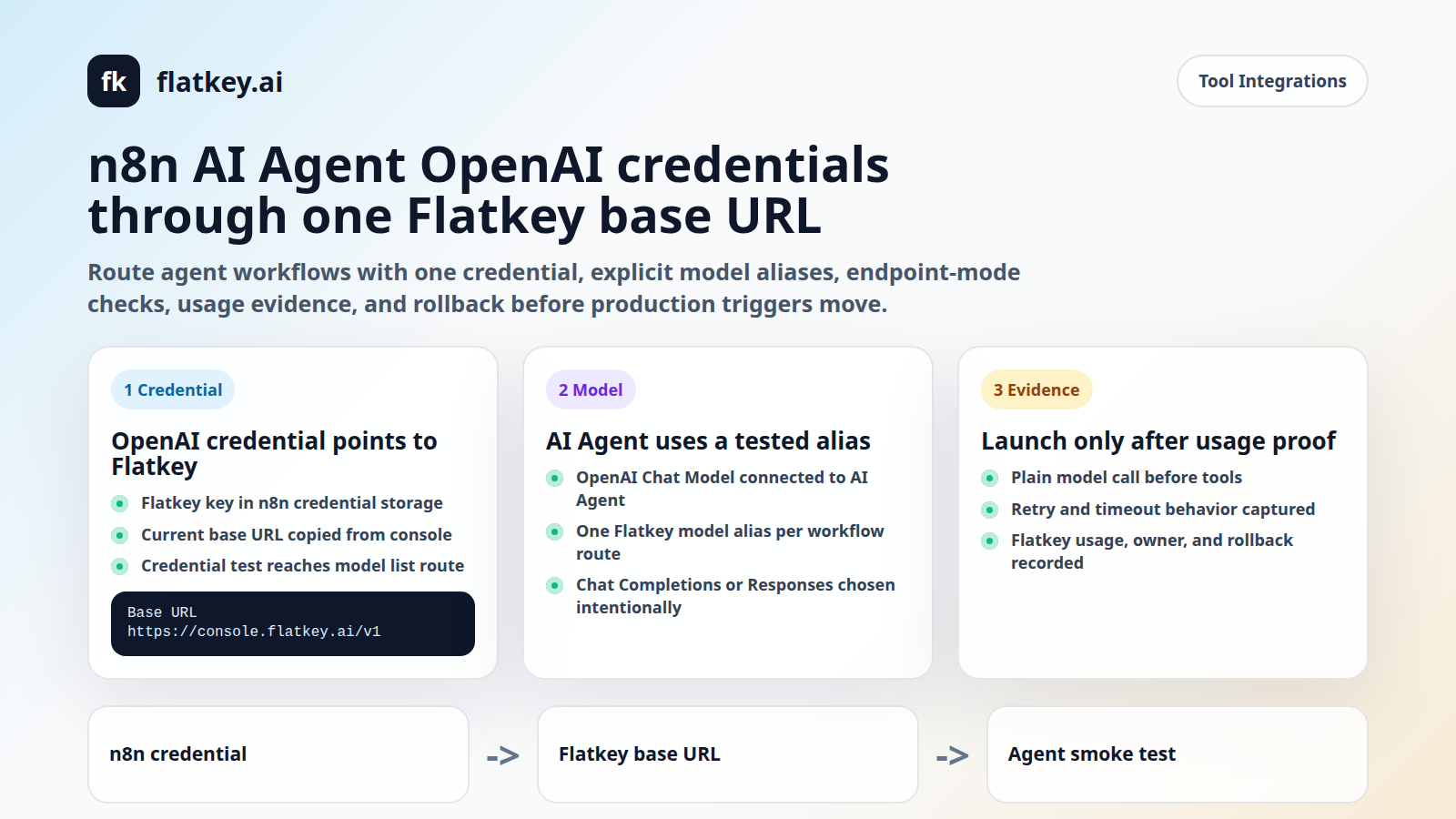
For n8n AI Agent OpenAI credentials with Flatkey, create or edit an n8n OpenAI credential, put your Flatkey key in the API Key field, set the credential Base URL to the current Flatkey console value, and select that credential in the OpenAI Chat Model node connected to your AI Agent node. Then use a Flatkey model alias as the model ID and smoke-test the workflow before enabling production triggers.
| n8n Field | Flatkey Value | Review Check |
|---|---|---|
| OpenAI credential: API Key | Your Flatkey API key | Store it in n8n credentials only. Do not paste it into prompts, workflow JSON, or logs. |
| OpenAI credential: Base URL | Current Flatkey console base URL, for example https://console.flatkey.ai/v1 when shown in your account |
Copy the live value from Flatkey. A stale host or missing /v1 usually fails before the model is reached. |
| OpenAI Chat Model: Model | Exact Flatkey model alias | Do not use a vendor family name as a proxy for an enabled account alias. |
| OpenAI Chat Model: Use Responses API | Enable only when the selected alias and route are approved for Responses behavior | Test this separately from Chat Completions, especially if built-in tools are enabled. |
That is the shortest usable path for n8n AI Agent OpenAI credentials. The rest of the guide explains how to avoid the failure modes that usually appear after the credential test passes.
What The Current n8n Docs And Source Confirm
The official n8n OpenAI credentials documentation says the OpenAI credential authenticates OpenAI-related nodes, including OpenAI, Chat OpenAI, Embeddings OpenAI, and LM OpenAI. The documented authentication method is API key, with an optional organization ID for accounts that need it.
The current n8n credential source is more specific about the routing field. The OpenAI credential includes a Base URL field named url, with a default of https://api.openai.com/v1 and a description that it overrides the default API base URL. Its credential test uses the configured base URL and calls /models. That matters for Flatkey because your n8n AI Agent OpenAI credentials test is not only checking a key. It is also checking whether n8n can reach the OpenAI-compatible model-list route at the base URL you configured.
The OpenAI Chat Model node source confirms the Chat Model consumes the openAiApi credential. If a node-level base URL option is present in an older node version, n8n validates it against the credential. Otherwise, the Chat Model uses the credential URL. The current n8n Chat Model docs also show a Use Responses API toggle, built-in tools for Responses, timeout, max retries, output format, metadata, and other options.
The AI Agent node docs say an AI Agent must connect at least one tool sub-node. The OpenAI Chat Model docs add an important constraint: OpenAI built-in tools such as Web Search, File Search, and Code Interpreter are supported only when the OpenAI Chat Model is used with the AI Agent node. Do not assume those built-in tools work through a custom base URL until you test the exact Flatkey route and model alias.
Fresh Flatkey Evidence To Use Carefully
Flatkey's homepage checked on June 28, 2026 has the title One API gateway for production AI teams and says flatkey.ai unifies model access, routing, billing, usage analytics, and operational controls. The same page currently shows https://console.flatkey.ai/v1 and https://console.flatkey.ai/v1/chat/completions in public examples.
The Flatkey pricing API checked for this guide returned success: true, pricing version a42d372ccf0b5dd13ecf71203521f9d2, 599 model rows, 23 vendors, and supported endpoint families including /v1/chat/completions, /v1/responses, /v1/messages, /v1/images/generations, and /v1/video/generations.
Use those as dated public facts, not as a launch guarantee. Your n8n AI Agent OpenAI credentials migration still needs a live smoke test for the specific key, workspace, Flatkey group, model alias, endpoint mode, and n8n workflow shape you plan to run.
Set The Credential Once, Then Reuse It Deliberately
In n8n, put the Flatkey key and base URL in one OpenAI credential instead of editing each workflow node independently. That gives the platform team one place to rotate the key and one place to review whether workflows point at the intended Flatkey gateway.
- Open n8n credentials and create an OpenAI credential.
- Paste your Flatkey API key into API Key.
- Leave Organization ID blank unless your setup explicitly requires one.
- Set Base URL to the current Flatkey value from your account, including the version prefix when shown.
- Run the credential test and confirm n8n can reach the model-list route.
Do not hard-code the Flatkey base URL inside prompt text or workflow notes. It should live in the credential. If a later migration changes the host or path, the safest update is a credential change plus workflow smoke tests, not a search-and-replace across agent instructions.
Configure The OpenAI Chat Model Node
After the credential exists, connect an OpenAI Chat Model node to the AI Agent node and select the Flatkey-backed OpenAI credential. In the model field, use the exact Flatkey model alias that your account is allowed to call. If the model picker loads a broad list from a custom base URL, still pick intentionally. A successful list load does not prove that every listed model is available, tool-capable, or approved for your use case.
| Decision | Recommended Starting Point | Why It Matters |
|---|---|---|
| Model field | One explicit Flatkey alias per workload | Finance and operations reviewers need to map each workflow to a known route. |
| Timeout | Set a workflow-specific timeout instead of accepting an accidental default | Agents that call external tools can run longer than a simple chat request. |
| Max retries | Keep retries modest until you understand idempotency | Retried automations can duplicate tickets, emails, database writes, or tool calls. |
| Response format | Use text first, then JSON or JSON Schema after the route is proven | Structured output support can vary by model and endpoint mode. |
| Metadata | Add workflow, environment, owner, and cost-center labels where supported | Usage review is much easier when requests carry operational context. |
This is where n8n AI Agent OpenAI credentials become an operations control point. The credential points to Flatkey, but the model alias, retries, tools, and output format decide whether the workflow is actually safe to run.
Choose Chat Completions Or Responses Intentionally
OpenAI's current documentation describes Chat Completions as a conversation-style endpoint that generates a response from a list of messages, while noting that new projects should try Responses for the latest platform features. n8n's OpenAI Chat Model docs expose this same split through a Use Responses API option.
For a first Flatkey migration, start with the same endpoint mode your workflow already uses. If your existing n8n AI Agent workflow was working with Chat Completions, keep that shape until the Flatkey credential, model alias, and usage record are proven. Then test Responses as a separate change if you need built-in tools, persistent conversation IDs, prompt cache keys, JSON Schema response format, service tier, or related Responses-only options.
Flatkey's public catalog currently lists both /v1/chat/completions and /v1/responses endpoint families. That is useful, but it is not enough to approve a workflow. A n8n AI Agent OpenAI credentials checklist should record which endpoint mode was tested, which model alias was used, and which n8n node options were enabled at the time.
Smoke Test The Workflow In Four Passes
Do not treat one green credential check as production readiness. Use a four-pass test so each failure surface is isolated.
| Pass | What To Run | Approval Evidence |
|---|---|---|
| Credential route | n8n OpenAI credential test against Flatkey | Credential succeeds without exposing the key in logs; base URL includes the expected host and path. |
| Plain model call | AI Agent plus OpenAI Chat Model, no risky external write tools | Response text, model alias, timestamp, and Flatkey usage evidence line up. |
| Tool call | One safe tool, such as a read-only lookup or test fixture | The agent calls the expected tool once, with valid input, and retry behavior is understood. |
| Production-like run | Same trigger shape, same tool set, same endpoint mode, same alias, and realistic input volume | Operators can find cost, tokens, owner, error rate, and rollback path without guessing. |
For every pass, capture the n8n workflow name, environment, credential name, Flatkey base URL host, model alias, endpoint mode, timestamp, status, retry count, and any Flatkey usage or billing record available to your team. That evidence is what turns n8n AI Agent OpenAI credentials from a one-off setup into a repeatable change-management pattern.
Common Failure Modes
| Symptom | Likely Cause | Fix |
|---|---|---|
| Credential test returns 404 | The Base URL is missing /v1, uses a stale host, or points at an endpoint instead of the API root. |
Copy the current Flatkey base URL from the console and retest the credential before changing the model. |
| Credential test returns 401 or 403 | The wrong key was pasted, the key was revoked, or n8n is using a different credential than expected. | Rotate or reselect the credential. Log credential names and owners, never secret values. |
| Model list loads but the agent fails | The selected alias is not enabled for that account, endpoint mode, or feature set. | Test one explicit alias through the intended Chat Completions or Responses path. |
| Plain text works but tools fail | The model or route does not support the requested tool behavior, or retries duplicate tool calls. | Start with one read-only tool, then add write tools only after idempotency and retry behavior are reviewed. |
| Usage cannot be reconciled | The workflow lacks owner labels, uses a shared credential without route notes, or sends traffic through an unexpected alias. | Add workflow metadata, owner naming, and Flatkey usage checks to the launch checklist. |
What To Capture For Finance And Procurement
One reason to route n8n AI Agent OpenAI credentials through Flatkey is that automation spend becomes easier to inspect. That only works when workflow owners leave enough evidence for finance and procurement reviewers.
- Credential owner: who owns the Flatkey key and who can rotate it.
- Workflow owner: the team responsible for prompt changes, tool permissions, and incident response.
- Model alias: the exact Flatkey model string used by the OpenAI Chat Model node.
- Endpoint mode: Chat Completions or Responses, plus any built-in tools enabled.
- Budget path: how the workflow maps to usage, quota, or billing review in Flatkey.
- Rollback: prior credential, prior model, trigger disable step, and owner escalation path.
Keep this review record close to the n8n workflow, not buried in a private chat thread. The next person debugging a failed automation needs to know whether the problem is n8n, the credential, Flatkey routing, the upstream model, the tool, or the workflow input.
Where This Fits With Other Flatkey Guides
If you need the broader base URL migration path, start with the OpenAI-compatible API migration guide. For adjacent tool setup patterns, review the Cherry Studio API setup guide and the cc-switch Claude Code Flatkey guide. Use Flatkey pricing to inspect current model and endpoint coverage, then get a key when you are ready to test the setup in your own n8n workspace.
FAQ
Can n8n OpenAI credentials use a Flatkey Base URL?
Yes. The current n8n OpenAI credential source includes a Base URL field that defaults to https://api.openai.com/v1 and can override the API base URL. Use the current Flatkey console value, then test the credential and the actual AI Agent workflow.
Should I put the Flatkey key in the n8n OpenAI API Key field?
For a Flatkey OpenAI-compatible route, use the Flatkey key in the n8n OpenAI credential's API Key field and use Flatkey's current base URL in the Base URL field. Keep the key inside n8n credentials and do not expose it in workflow JSON or logs.
Do n8n AI Agent OpenAI credentials require the Responses API?
No. Treat Chat Completions and Responses as separate endpoint modes. Use the mode your workflow needs, and test the selected Flatkey alias with that mode before enabling production triggers.
Can I use OpenAI built-in tools through Flatkey in n8n?
Do not assume it without a smoke test. n8n documents built-in tools for the OpenAI Chat Model with AI Agent and Responses API, while Flatkey publicly lists a Responses endpoint family. You still need to test the exact model alias and tool configuration for your account.
What should I check when n8n says the credential works but the agent fails?
Check the model alias, endpoint mode, Base URL path, timeout, retries, tool configuration, and Flatkey usage record. The credential test proves only that n8n could authenticate and reach a route such as /models; it does not prove every agent feature.
Bottom Line
n8n AI Agent OpenAI credentials should be a controlled gateway change, not a blind provider swap. Put the Flatkey key and current base URL in one n8n OpenAI credential, select that credential in the OpenAI Chat Model node, use explicit Flatkey model aliases, choose Chat Completions or Responses intentionally, test tools separately, and verify usage in Flatkey before production traffic moves. When the checklist is ready, get a key and run it against your own n8n workflows.