OpenAI-compatible API troubleshooting gets much easier when you stop treating every failed request as "the provider is down." Most failed migrations come from one of six layers: the key, the base URL, the endpoint family, the model name, streaming behavior, or billing/readback.
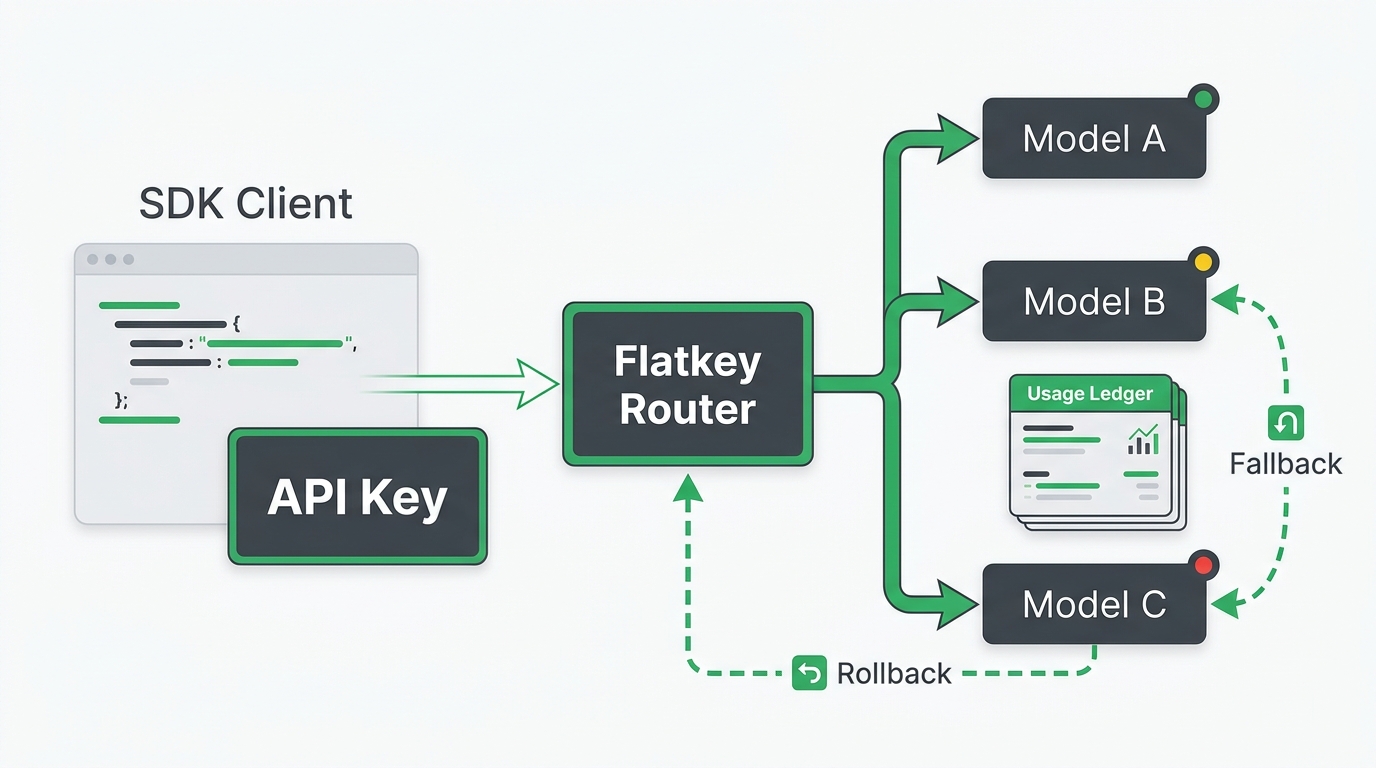
Flatkey helps teams keep model access, routing, billing, usage analytics, and operational controls in one place, but an OpenAI-compatible client still needs precise configuration. A request can look correct in the SDK and still fail because the client is pointed at the wrong /v1 root, the model alias belongs to a different endpoint family, or the stream is being buffered by a proxy.
Use this OpenAI-compatible API troubleshooting guide as a clean debug path before you change application code. Start with curl, prove one non-streaming request, add the SDK, then add streaming, tools, and production traffic one layer at a time.
The five-minute OpenAI-compatible API troubleshooting path
Before you inspect framework code, capture the smallest request that should work. For Flatkey, use the base URL shown in your current console. The public Flatkey homepage currently shows a request to https://router.flatkey.ai/v1/chat/completions, which means SDK clients should usually receive the /v1 root as the base URL and the SDK should append /chat/completions.
export FLATKEY_API_KEY="sk-fk-..."
export FLATKEY_BASE_URL="https://router.flatkey.ai/v1"
export FLATKEY_MODEL="your-model-alias"

curl -sS "$FLATKEY_BASE_URL/chat/completions" \
  -H "Authorization: Bearer $FLATKEY_API_KEY" \
  -H "Content-Type: application/json" \
  -d '{
    "model": "'"$FLATKEY_MODEL"'",
    "messages": [
      {"role": "user", "content": "Reply with exactly: ok"}
    ]
  }'
If this request fails, the issue is not your app framework. Fix the key, base URL, endpoint family, or model alias first. If it succeeds, copy the same values into the SDK and keep debugging from there.
The fastest OpenAI-compatible API troubleshooting rule is simple: do not test streaming, tools, JSON mode, retries, or a full agent workflow until a plain non-streaming text request succeeds.
Read the error as a layer, not a verdict
Use the status code to decide what to change next.
| Symptom | Likely layer | What to check first |
|---|---|---|
401, invalid_api_key, or authentication error |
Key and auth header | Bearer format, key source, copied whitespace, provider key versus gateway key |
403 or permission denied |
Account, project, or policy | IP allowlist, project membership, model approval, endpoint permission |
404, model_not_found, or unknown model |
Model catalog and endpoint family | Exact model alias, model enabled state, /chat/completions versus /responses versus another endpoint |
400 malformed request |
Payload shape | Required fields, unsupported parameters, tool schema, message format |
| Stream connects but no tokens appear | Streaming path | stream: true, SSE parser, buffering proxy, endpoint stream support |
| Request succeeds but usage is missing | Readback and billing | Non-streaming comparison request, dashboard record, final stream event behavior |
429, 500, 502, 503, or 504 |
Rate, capacity, or upstream | Backoff, request volume, status page, retry policy, fallback route |
OpenAI's own error guide treats 401s as authentication problems, 429s as rate or quota problems, and 500/503 responses as retryable server or overload conditions. An OpenAI-compatible gateway can add its own details, so preserve the response body and request ID when you escalate.
Fix 401s before changing models
A 401 is the most common OpenAI-compatible API troubleshooting detour because it looks like a model or route problem when it is usually an auth problem.
Check these in order:
- The request has exactly one
Authorization: Bearer ...header. - The key is a Flatkey key when calling Flatkey, not a direct OpenAI, Anthropic, Google, or test key.
- The key has no copied quotes, newline, invisible prefix, or trailing space.
- The key is loaded from the environment your process actually runs in, not only from your shell.
- The account, project, team, or IP policy allows the route.
Use a short shell check that does not print the key:
test -n "$FLATKEY_API_KEY" && echo "key is set"
printf '%s' "$FLATKEY_API_KEY" | wc -c
If curl works but the SDK returns 401, inspect environment variable names. OpenAI's Python client reads OPENAI_API_KEY by default, and the Node client reads OPENAI_API_KEY by default. If your app still exports OPENAI_API_KEY with an old direct-provider key, the SDK may ignore your new gateway key unless you pass api_key or apiKey explicitly.
Fix the base URL without duplicating the endpoint
Base URL mistakes usually fall into two patterns:
- The SDK receives the full endpoint, such as
https://router.flatkey.ai/v1/chat/completions, and then appends/chat/completionsagain. - The SDK receives only the domain, such as
https://router.flatkey.ai, and never reaches the OpenAI-compatible/v1route.
For Python, pass base_url or set OPENAI_BASE_URL. The official Python client source also falls back to https://api.openai.com/v1 when no custom base URL is provided.
import os
from openai import OpenAI

client = OpenAI(
    api_key=os.environ["FLATKEY_API_KEY"],
    base_url=os.environ.get("FLATKEY_BASE_URL", "https://router.flatkey.ai/v1"),
)

response = client.chat.completions.create(
    model=os.environ["FLATKEY_MODEL"],
    messages=[{"role": "user", "content": "Reply with exactly: ok"}],
)

print(response.choices[0].message.content)
For Node, pass baseURL or set OPENAI_BASE_URL. The official Node client documents baseURL as the override for the default OpenAI API root.
import OpenAI from "openai";

const client = new OpenAI({
  apiKey: process.env.FLATKEY_API_KEY,
  baseURL: process.env.FLATKEY_BASE_URL ?? "https://router.flatkey.ai/v1",
});

const response = await client.chat.completions.create({
  model: process.env.FLATKEY_MODEL!,
  messages: [{ role: "user", content: "Reply with exactly: ok" }],
});

console.log(response.choices[0]?.message?.content);
If this OpenAI-compatible API troubleshooting step still fails, log the resolved base URL at process startup. Do not log the key.
Separate model names from endpoint families
"Model not found" can mean the alias is wrong, but it can also mean the alias is being sent to the wrong endpoint family. A model that works for chat completions may not be exposed through Responses, Messages, images, video, or embeddings with the same payload shape.
Run this checklist before renaming models in production:
| Check | Why it matters |
|---|---|
| Confirm the exact model alias in the current Flatkey console | Gateway aliases may differ from direct-provider marketing names |
| Confirm the endpoint family | /v1/chat/completions and /v1/responses have different request shapes |
| Remove optional parameters | An unsupported option can hide the real model issue |
| Try a short non-streaming request | A plain request isolates the route from stream parsing |
| Record the failing body and timestamp | Support and audit review need the exact model, route, and error |
OpenAI's external model documentation uses the same idea for custom endpoints: provide an endpoint URL, specify model slugs, and run a verification call. Treat your gateway setup the same way. Keep a small approved-model map in code instead of letting every service type raw model strings.
Debug streaming after non-streaming works
Streaming should be a second-stage test. The OpenAI Chat Completions reference returns either a JSON chat completion object or a streamed sequence of chat completion chunk objects. The Responses API also supports text/event-stream when stream is enabled.
Use a direct stream probe:
curl -N "$FLATKEY_BASE_URL/chat/completions" \
  -H "Authorization: Bearer $FLATKEY_API_KEY" \
  -H "Content-Type: application/json" \
  -d '{
    "model": "'"$FLATKEY_MODEL"'",
    "stream": true,
    "messages": [
      {"role": "user", "content": "Count from one to five slowly."}
    ]
  }'
If the non-streaming request works and the stream does not, inspect the stream path:
- Confirm the response uses an SSE-compatible content type.
- Disable API client middleware that buffers the whole response before returning it.
- Disable reverse-proxy buffering for this route.
- Check whether your frontend parser expects Chat Completions chunks while your route returns Responses events.
- Compare with the existing Flatkey streaming checklist at
/blog/openai-compatible-streaming-sse-test.
This OpenAI-compatible API troubleshooting step is especially important in serverless and automation tools. Some wrappers return a successful HTTP status while hiding the fact that no tokens reached the caller until the stream closed.
Add tools only after the base request is clean
Tool calling adds another failure layer. A gateway, route, or selected model may accept plain chat messages but reject a tool schema, tool_choice, parallel tool calls, or strict structured output settings.
Use a three-request ladder:
- Plain text request with the same model.
- Same request with one tiny function schema.
- Full production tool schema.
If request 1 works and request 2 fails, you are not debugging auth or base URL anymore. You are debugging model capability, endpoint family, or schema support. Remove optional fields, shorten descriptions, and verify whether the selected model route supports the tool behavior you need.
Prove usage and billing readback
Do not finish OpenAI-compatible API troubleshooting at "the response returned text." For production migration, you also need to prove that the request is visible where finance and operations teams will review it.
After a successful smoke test, capture:
| Evidence | What it proves |
|---|---|
| Request timestamp and route | Which gateway path received traffic |
| Model alias | Which configured model was requested |
| Response status and request ID | What support can trace |
| Usage object or token count | Whether the app can record cost drivers |
| Dashboard or billing readback | Whether finance can reconcile spend |
| Fallback or retry event, if any | Whether routing policy changed the path |
Flatkey is positioned around one key, clear pricing, unified billing, and a dashboard for keys, usage, and routing. For a migration, pair the engineering smoke test with a usage-readback check in the console before you move real traffic.
A production-safe troubleshooting workflow
Use this sequence when an OpenAI-compatible API migration is failing:
- Run one non-streaming curl request with the current console base URL, one key, and one approved model alias.
- Fix any 401 or 403 before changing payloads.
- Fix base URL composition before changing SDK versions.
- Fix model alias and endpoint family before changing retry policy.
- Add the SDK with explicit
api_keyorapiKeyandbase_urlorbaseURL. - Add streaming and verify the client receives incremental events.
- Add tools or structured output one feature at a time.
- Check usage and billing readback.
- Move the working values into a rollback-ready config.
That order keeps OpenAI-compatible API troubleshooting from becoming a guessing session. Every step either proves a layer or gives you a smaller failure to fix.
When Flatkey helps
Flatkey is useful when the root problem is operational sprawl: too many provider keys, inconsistent model access, hard-to-review usage, and separate billing paths. A unified gateway does not remove the need to test endpoint family, model alias, streaming, tools, and billing readback, but it gives the team one place to standardize those checks.
If you are migrating an app, pair this guide with the Flatkey OpenAI-compatible migration guide at /blog/openai-compatible-api-migration and the smoke-test checklist at /blog/ai-api-smoke-test-checklist.
When you are ready to test the workflow with a Flatkey key, start at /sign-up and keep the first smoke test small enough to inspect by hand.
FAQ
Why does my OpenAI-compatible API return 401 when the key is set?
The process may be reading a different environment variable than the one you changed, or the key may belong to the wrong provider. Check the resolved variable name, the Authorization: Bearer header, copied whitespace, and any account or IP policy.
Should the SDK base URL include /chat/completions?
Usually no. Give the SDK the /v1 base URL, then let the SDK append the endpoint. Passing the full endpoint often creates duplicated paths.
Why does a model work without streaming but fail with stream: true?
The base route may be correct while the streaming path is blocked by buffering middleware, an SSE parser mismatch, or a route/model combination that does not support streaming. Test with curl -N before debugging frontend code.
Why does "model not found" happen with a valid model name?
The alias may be valid in one endpoint family and invalid in another, or the gateway may expose a different alias than the direct provider. Confirm the current console alias and endpoint family together.
What should I test before sending production traffic?
Test one non-streaming request, one SDK request, one stream, one representative tool call if your app uses tools, one failure path, and one billing/readback record. Then keep a rollback config for the previous provider route.
OpenAI-compatible API troubleshooting is not about memorizing every provider error. It is about proving the path from key to base URL, from base URL to endpoint family, from endpoint family to model alias, and from successful response to usage record. When those layers are clear, switching traffic through Flatkey becomes a controlled migration instead of a late-night debug session.