Quick answer: the best Portkey alternative depends on what your team wants to own. Flatkey is the strongest fit for managed multi-model access and unified billing; LiteLLM is the common self-hosted proxy choice; OpenRouter emphasizes broad managed model access; Helicone is observability-led; Kong AI Gateway suits teams already operating enterprise API infrastructure; and direct provider accounts preserve the most provider-native control.
This 2026 comparison evaluates Portkey alternatives by routing, observability, billing, self-hosting, migration effort, and production ownership—not by feature-count alone.
Source note: the comparison was refreshed on October 12, 2026. Product plans, model catalogs, and provider availability change, so verify current documentation and your account before procurement or production cutover.
Best Portkey alternatives at a glance
| Alternative | Best starting point when... | Main tradeoff to verify |
|---|---|---|
| Flatkey | You want managed multi-model access, one OpenAI-compatible route, unified billing, and low migration effort. | Confirm the exact model, endpoint family, account access, and live route price. |
| LiteLLM | You want an open-source proxy and are willing to operate the gateway yourself. | Your team owns hosting, upgrades, secrets, observability, and incident response. |
| OpenRouter | You prioritize a broad managed model catalog and fast experimentation. | Review routing policy, billing workflow, provider controls, and production support. |
| Helicone | Observability, request tracing, and usage analysis are the first problem to solve. | Check whether access, routing, and billing match your full gateway requirements. |
| Kong AI Gateway | Your organization already uses enterprise API-management infrastructure. | Evaluate implementation effort, policy depth, and ongoing platform ownership. |
| Direct provider accounts | You need provider-native features, contracts, or data controls above all else. | Expect separate keys, bills, quotas, dashboards, and fallback logic. |
For deeper comparisons, see the OpenRouter alternatives guide, LiteLLM alternatives, and the AI gateway pricing guide.
Quick answer: the right Portkey alternative depends on operating model
A Portkey alternative is a fit when your team wants a different balance of managed access, account ownership, provider billing, gateway control, and compliance effort. Portkey is especially relevant when you want a full gateway and observability stack, self-hosting or enterprise deployment options, and documented controls such as fallbacks, logs, budget limits, guardrails, prompts, and governance. Flatkey belongs on the shortlist when you want one managed route for many AI models, a current OpenAI-compatible base URL, public model pricing, unified billing, and a simpler adoption path for product and automation teams.
| Buyer situation | What to compare | Likely direction |
|---|---|---|
| You need a broad production AI stack with gateway, observability, guardrails, prompts, and governance. | Depth of gateway configuration, logging, policy, self-hosting, and enterprise deployment controls. | Portkey may remain the stronger fit. |
| You want managed multi-model access with fewer provider-account and billing steps. | Base URL migration, model catalog coverage, billing workflow, usage visibility, and key ownership. | Flatkey should be evaluated as a Portkey alternative. |
| You already have direct contracts with several AI providers. | Whether the gateway should proxy your provider accounts, centralize observability, or replace separate vendor billing. | Compare Portkey, direct provider routing, and Flatkey side by side. |
| You have regulated data-boundary or internal deployment requirements. | Self-hosting, VPC, air-gapped deployment, audit evidence, retention, and data logging controls. | Portkey enterprise deployment options or an internal gateway may be necessary. |
What Portkey is built for
Portkey's official Universal API docs describe one API for 200+ LLMs across major providers, with OpenAI Chat Completions, OpenAI Responses, and Anthropic Messages formats. The docs list https://api.portkey.ai/v1 as the OpenAI-compatible base URL and show provider switching through request configuration.
Portkey's docs also show a mature gateway surface. Its fallback docs explain prioritized fallback targets, default triggering on non-2xx status codes, custom status-code triggers, traceability by Config ID and Trace ID, and composition with load balancing or conditional routing. Its logs docs describe chronological request logs with timestamp, request type, LLM, tokens, thinking tokens, cost, raw request/response detail, gateway status, and a DO NOT TRACK mode that omits request and response content while keeping high-level statistics.
For budget control, Portkey's Budget Limits docs say teams can set cost or token limits on providers and integrations, with reset options and pricing-support caveats. The same docs state the feature is currently available to Enterprise customers and select Pro users. Portkey's feature comparison page also lists plan-level request volumes, log retention, open source, managed, hybrid, and enterprise deployment surfaces. Those are meaningful strengths if you are buying a gateway as a control plane.
What Flatkey is built for
Flatkey's homepage checked for this article is titled One API gateway for production AI teams and describes unified model access, routing, billing, usage analytics, and operational controls. Its public code example currently points an OpenAI-compatible client at https://router.flatkey.ai/v1/chat/completions, which maps to https://router.flatkey.ai/v1 as the base URL when your account confirms that value.
Flatkey's public pricing and model directory expose server-rendered routes across chat, responses, image, and video endpoints. Because catalog inventory changes, verify the current model alias, endpoint family, availability, and displayed rate on the live model page before cutover.
That makes Flatkey a practical Portkey alternative for teams that mainly need managed access and operating clarity: one route for multiple models, one place to review usage and spend, and a lower-friction base URL migration for OpenAI-compatible tools, SDKs, agents, and automation workflows.
Portkey alternative comparison matrix
The strongest Portkey alternative decision comes from comparing operating evidence, not generic feature names. Use this matrix before committing engineering time or procurement review.
| Decision area | Portkey evidence to request | Flatkey evidence to request | Why it matters |
|---|---|---|---|
| Account ownership | Which upstream provider accounts, keys, projects, and saved resources your team controls. | Which Flatkey workspace, key owner, provider group, and model aliases your team can use. | Support, incident response, finance review, and key rotation all depend on ownership. |
| Billing model | Plan fee, request volume, log retention, overages, provider pass-through costs, and enterprise terms. | Recharge workflow, model pricing rows, per-model usage fields, and billing owner workflow. | The cheapest-looking route can become expensive if logs, overages, or provider billing are unclear. |
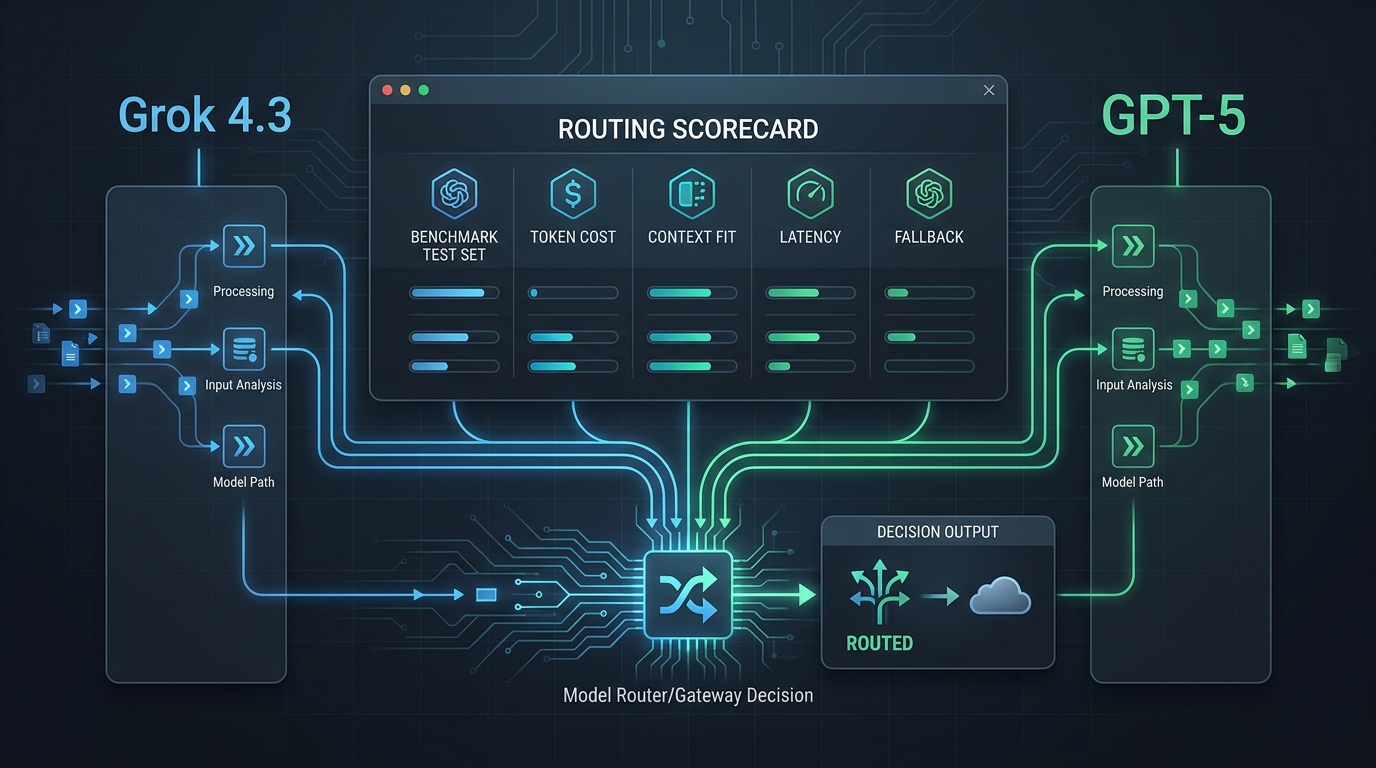
| Routing and fallback | Config object, fallback triggers, load balancing behavior, trace IDs, and provider compatibility tests. | Model selection, provider group availability, route status, fallback expectations, and usage rows. | Reliability claims need request-level proof, not a checkbox. |
| Logs and retention | Retention by plan, raw request/response controls, export needs, and DO NOT TRACK policy. |
Usage analytics fields, request ownership, billing reconciliation, and what your team can export or review. | Logs are both debugging evidence and data-handling risk. |
| Spend limits | Budget or rate limit scope, reset cadence, who can edit limits, and feature availability by plan. | Workspace balance, key ownership, quota workflow, alerting expectations, and per-model cost review. | Finance operators need a control that actually maps to how traffic is generated. |
| Migration effort | SDK choice, config headers, base URL, provider parameters, and gateway config rollout. | OpenAI-compatible base URL, model alias mapping, endpoint family, and tool smoke tests. | A small code diff can still fail if aliases, endpoints, or credentials are wrong. |
| Procurement and trust | Deployment model, certifications, audit logs, data retention, BAA or enterprise paperwork if needed. | Public trust page evidence, billing terms, support path, account owner, and data handling questions. | Security approval usually turns on evidence, not product language. |
Buyer checklist for a Portkey alternative
1. Provider account and key ownership
Start by mapping who owns upstream access. With Portkey, ask whether the gateway will use your saved provider keys, Portkey-managed integrations, an enterprise deployment, or a hybrid model. With Flatkey, ask who owns the Flatkey workspace, which keys exist for staging and production, and which model groups those keys can reach.
This matters because an AI incident rarely stops at code. Someone must rotate keys, approve a backup model, explain a failed request, or reconcile a provider charge. A Portkey alternative that makes ownership simpler for your team may be better than a feature-rich gateway that nobody owns operationally.
2. Billing, pricing, and overage proof
Do not compare only published plan pages. Compare the bill you will actually receive. Portkey's public feature comparison page lists Dev, Pro, Enterprise, request volumes, and Pro overage pricing. Its logs docs also include plan-level log volume and retention notes. Flatkey's public pricing page lists model pricing and provider coverage, but your actual decision should include recharge workflow, model availability, and how usage will be reviewed by environment or owner.
For each Portkey alternative, create a one-page bill scenario: expected monthly requests, model mix, image or video calls, retries, fallbacks, log volume, retention needs, and who approves overage.
3. Routing and fallback behavior
Reliability is where gateway comparisons get vague. Portkey documents fallback configuration, non-2xx default triggers, custom triggers, fallback-chain logging, and strategy composition. If you evaluate Flatkey, verify the practical route you will use: base URL, endpoint family, model alias, provider group, request status, and what the dashboard shows after a success and after a failure.
The right test is not "does the first prompt work?" It is "can we prove which route handled this request, what it cost, and what should happen when the primary model is unavailable?" That is the minimum standard for any Portkey alternative.
4. Logs, retention, and raw payload controls
Portkey's docs describe request logs with gateway status, raw detail views, sharing, Config IDs, Prompt IDs, and a DO NOT TRACK option. Those details are valuable for platform teams, but they also require a logging policy. Decide who can see prompts, completions, customer identifiers, attachments, and cost fields.
For Flatkey, verify what your workspace exposes for usage analytics, billing review, and operational controls. If legal or security reviewers need a retention guarantee, export, or redaction behavior, ask for evidence before launch instead of inferring it from a dashboard screenshot.
5. Quotas, budgets, and owner escalation
Budget controls need scope. Are they per key, provider, workspace, customer, integration, model family, or environment? Portkey's Budget Limits docs describe cost and token limits on providers or integrations, reset options, and plan availability. For any Portkey alternative, ask the same questions: what happens at the limit, who is notified, can the limit be edited, and does the control apply retroactively?
Flatkey buyers should pair model pricing review with workspace-level ownership: who holds the balance, who can approve recharge, and who watches usage when a new agent or automation workflow goes live.
6. Migration surface area
The cleanest migration is usually an OpenAI-compatible base URL change, but the base URL is only one line. You still need to map model aliases, endpoint families, retries, streaming, tool calling, Responses API behavior, Anthropic Messages behavior, image or video routes, environment secrets, and rollback.
Flatkey's public pages support the base URL and endpoint-family review for many OpenAI-compatible workloads. For deeper gateway policies, Portkey may require headers, configs, virtual keys, or SDK-specific setup. Your Portkey alternative shortlist should include the exact code diff and the exact rollback diff.
7. Procurement evidence
Procurement usually wants proof in a different language than engineering. Translate the gateway decision into evidence: vendor entity, plan, data path, support path, account owner, billing owner, key rotation, logging policy, audit needs, uptime expectations, incident contact, and exit plan.
The practical article to keep open during this review is the enterprise AI API gateway checklist. Use it to turn the Portkey alternative discussion into a procurement packet rather than a feature debate.
When Flatkey should be on the shortlist
Flatkey is worth evaluating as a Portkey alternative when your team values managed access more than owning a full gateway control plane. Common cases include product teams that need multiple model families behind one API route, automation builders who want one OpenAI-compatible key across tools, finance teams that need cleaner model usage review, and platform engineers who want a pragmatic migration from direct provider keys.
Flatkey also fits teams that are already comparing API gateway buying decisions across OpenRouter, LiteLLM, and internal routing options. If that is your path, compare this guide with the OpenRouter alternatives and LiteLLM alternatives articles. The same evaluation pattern applies: account ownership, billing, routing proof, logs, quotas, migration effort, and operational evidence.
A sensible Flatkey pilot is narrow: select one non-critical workflow, verify the current base URL in your account, choose one model alias, run a chat completion or Responses API test, check usage and cost, then document ownership. If that works, expand by model family or tool, not by rewriting every client at once.
When Portkey may still be the better choice
Portkey may be the better choice when the gateway itself is a platform product inside your company. That includes teams that need open source deployment options, hybrid or air-gapped enterprise deployment, detailed gateway configs, guardrails, prompt management, governance, observability workflows, or documented request-level fallback chains.
Portkey may also fit better if your team already has provider contracts and wants a control plane on top of those accounts rather than a managed access layer. In that case, the real comparison is not "Portkey versus Flatkey" in isolation. It is "gateway control plane plus provider contracts" versus "managed multi-model access plus unified billing workflow."
A seven-step pilot for your Portkey alternative review
- Select one workflow. Use a low-risk internal agent, batch job, coding tool, or support automation path before migrating customer-critical traffic.
- Freeze the current route. Record the current provider key, model, endpoint, request shape, retry behavior, average usage, and rollback owner.
- Map the candidate gateway route. For Flatkey, record base URL, API key owner, model alias, endpoint family, and expected pricing row. For Portkey, record base URL, provider, config, virtual key, and headers.
- Run a transport test. Send a minimal request and confirm response shape, status, latency range, and error format.
- Run a capability test. Test the exact capability the workflow needs: streaming, tool calling, long context, image generation, video generation, or Messages API compatibility.
- Run a finance test. Confirm where the request appears, what cost fields show up, who can review them, and how the bill will be reconciled.
- Write the go/no-go note. Include owner, support path, logging policy, quota behavior, rollback diff, and the next workflow to test.
FAQ
What is the best Portkey alternative?
The best Portkey alternative depends on what you are replacing. If you need a broad gateway control plane with observability, guardrails, prompts, governance, and deployment options, Portkey may remain the better fit. If you need managed multi-model access, an OpenAI-compatible route, public model pricing, unified billing, and usage review, evaluate Flatkey.
Is Flatkey a direct replacement for Portkey?
Flatkey should be treated as an alternative buying model, not a one-for-one clone. Portkey documents a broad production stack. Flatkey focuses on managed AI API gateway access, model routing, billing, usage analytics, and operational controls. Compare the workflow you actually need before calling either a replacement.
What should I compare first in a Portkey alternative?
Compare account ownership, billing, routing proof, logs, quotas, migration effort, and procurement evidence first. Feature names are less useful until you know who owns the key, where the request goes, what the request costs, and what evidence you can show after it runs.
Does Portkey support OpenAI-compatible APIs?
Yes. Portkey's Universal API docs show OpenAI Chat Completions, OpenAI Responses, and Anthropic Messages formats, with https://api.portkey.ai/v1 as the OpenAI-compatible base URL for OpenAI SDK style usage. Verify current docs and account setup before migration.
Does Flatkey support OpenAI-compatible migration?
Flatkey's public homepage checked for this guide shows an OpenAI-compatible chat completions route under https://router.flatkey.ai/v1, and the pricing page lists several endpoint families. Before production use, verify your account base URL, API key, model alias, and endpoint family in Flatkey.
How should finance review a gateway comparison?
Finance should ask for a usage scenario rather than a plan screenshot: request volume, model mix, log volume, fallback behavior, image or video traffic, overage terms, recharge workflow, and the person who approves spend. The same finance packet should be used for every Portkey alternative.
Final decision rule
Choose Portkey if you are buying a full gateway and governance control plane. Choose Flatkey if your priority is a managed, OpenAI-compatible AI API gateway with unified model access, billing visibility, and a faster path to consolidate provider usage. The right Portkey alternative is the one your developers, platform team, finance owner, and procurement reviewer can all operate with evidence.
To test Flatkey in that operating model, review the current model pricing, then get a key and run one measured workflow before migrating broader traffic.