Unified AI API Use Cases by Funnel Stage
A unified AI API is not one job. It serves different jobs at different points in the buying funnel.
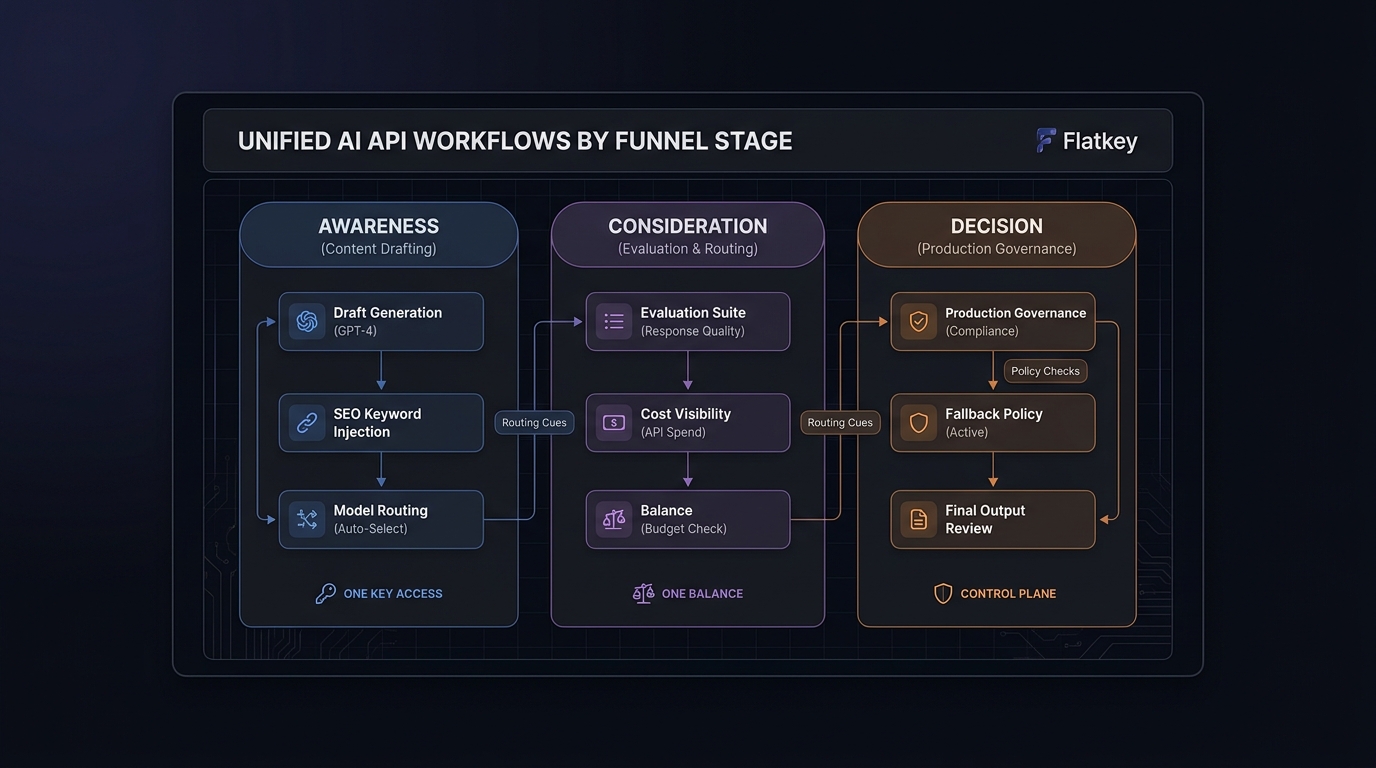
At awareness, people need a simple way to understand what the workflow can do. At consideration, they need to compare direct provider access against a unified control plane. At decision, they need to know whether the stack is stable enough for real traffic.
This guide maps unified AI API use cases by funnel stage so teams can move from first exploration to evaluation and then to production with less guessing.
Flatkey matters here because the current site positions itself as one key, one balance, 100+ official models, and 1,000+ pay-per-call tools. That makes it a practical comparison layer when the question is not only “can I call a model?” but “where should the unified AI API sit in the workflow?”
Snapshot: September 6, 2026. Flatkey pages can change, so check the linked official pages before making a rollout decision.
Funnel map
| Funnel stage | Reader intent | Best unified AI API job | Main risk |
|---|---|---|---|
| Awareness | Learn what the stack can do | Summaries, content drafting, quick demos | Overexplaining the platform instead of the workflow |
| Consideration | Compare approaches | Structured output, evaluation loops, routing tests | Proving capability without proving repeatability |
| Decision | Choose a production path | Stable routing, fallback policy, cost control | Shipping a direct connection without governance |
Awareness stage: help people understand the work
At awareness, the reader does not need a full implementation plan. They need a small answer: what does a unified AI API actually help with?
The best awareness-stage use cases are:
- summary generation for dense docs, transcripts, and research notes;
- multimodal explanation of screenshots, charts, or diagrams;
- content drafts for support, marketing, or internal enablement;
- lightweight classification and tagging.
This is where the unified AI API should stay narrow. Show the job, show one example, and move on. Readers at this stage are asking whether the workflow fits their problem, not how to wire every endpoint.
Consideration stage: compare workflow fit
Consideration is where the article becomes operational. The question changes from “what can a unified AI API do?” to “what should sit behind it, and what needs validation before I trust it?”
Good consideration-stage use cases include:
- tool-using assistants that need function calling;
- workflows that must return structured JSON or schema-bound output;
- evaluation pipelines that compare quality across prompts or models;
- routing tests for latency, cost, and fallback behavior.
This is also where most teams need a comparison lens. A unified AI API may be the right choice, but the real decision is often between direct provider access and a gateway layer that keeps routes, usage, and fallback policy visible.
What to test before you commit
| Test | Why it matters |
|---|---|
| Structured output validity | Confirms the workflow can be machine-consumed |
| Function-call accuracy | Confirms the tool path is reliable |
| Retry behavior | Reveals hidden cost and latency |
| Fallback path | Protects production traffic when one route fails |
| Cost per accepted result | Keeps the decision tied to business output |
Decision stage: choose the production path
Decision-stage content should push the reader toward an operating choice. The choice is not “unified AI API or nothing.” The choice is which access pattern is stable enough for production.
Use a direct provider when:
- the team has one clear integration path;
- usage is modest and easy to track;
- the workflow has low routing complexity;
- governance is handled elsewhere.
Use a unified AI API when:
- multiple models need to sit behind one policy surface;
- you want one balance and one bill;
- fallback and usage review matter;
- the same team may later compare models or tools.
That is the decision-stage lesson this topic should teach. Readers are not buying a unified AI API in the abstract. They are choosing how to operationalize it.
Where Flatkey fits
Flatkey belongs in the consideration and decision stages. That is where the reader cares about routing, governance, and cost control instead of raw model novelty.
The current Flatkey homepage says one balance covers 100+ official models and 1,000+ tools, and the pricing page says all 100+ models are included with model and tool access under shared plans. That is useful when the unified AI API must stay compatible while the team changes workloads.
The supporting pages worth linking are:
- Flatkey pricing for current model access and billing context;
- AI gateway architecture for one-key, one-route thinking;
- AI gateway for automation builders for fallback routing and cost visibility;
- AI API gateway for the direct gateway comparison;
- AI API checklist for faster decisions for evaluation criteria.
FAQ
What is the best unified AI API use case for awareness-stage readers?
Simple summaries, content drafting, and explanation of mixed inputs.
What matters most at the consideration stage?
Function calling, structured output, repeatable evaluation, and whether the workflow is cheaper or safer behind a gateway.
What matters most at the decision stage?
Stable routing, fallback policy, cost visibility, and ownership.
Final take
Unified AI API use cases by funnel stage give you a cleaner content and product decision map. Awareness is about understanding. Consideration is about proving fit. Decision is about production control.
If you want one route for evaluation and production comparisons, start with Flatkey pricing and test the workflow against your actual acceptance criteria.