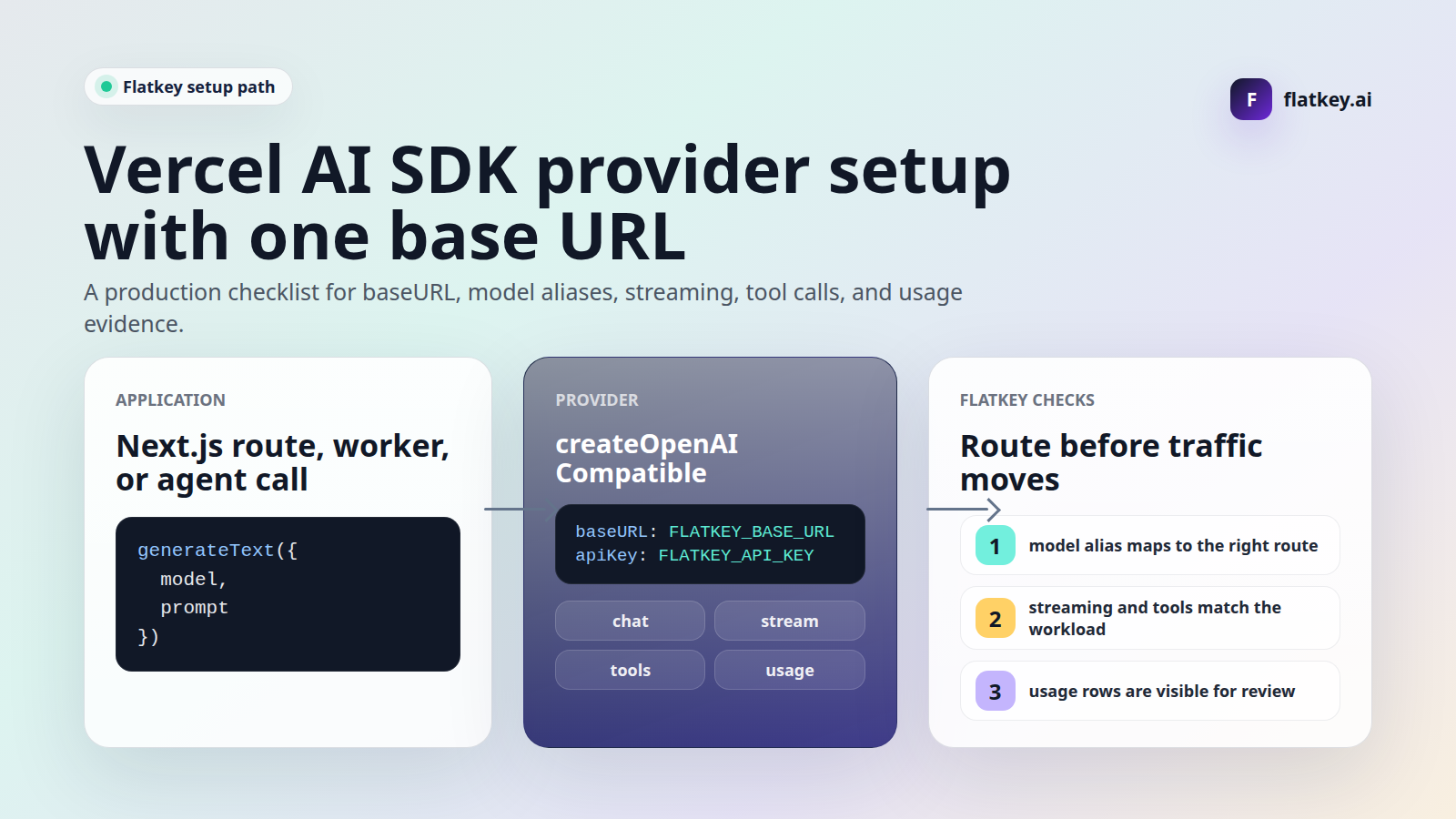
Vercel AI SDK custom provider base URL setup is more than a string replacement. The useful part is pointing the AI SDK provider at Flatkey, but the safe production work is verifying model aliases, endpoint family, streaming behavior, tool calls, usage evidence, quota controls, and rollback before user traffic moves.
This guide is for developers, AI product teams, platform engineers, automation builders, finance operators, and procurement reviewers using the AI SDK in a Next.js route, server action, worker, queue, or agent loop. It was updated on June 29, 2026 from current AI SDK documentation, a type-check against current AI SDK packages, and live Flatkey public pages. The code snippets are templates. No live Flatkey API key was available in this task, so run the smoke tests with your own key, current Flatkey console base URL, and model aliases enabled for your account.
Quick Answer: Vercel AI SDK Custom Provider Base URL
For a Vercel AI SDK custom provider base URL setup with Flatkey, start with the official OpenAI-compatible provider package. Create a provider with createOpenAICompatible, set baseURL to the current Flatkey base URL from your console, set apiKey to your Flatkey key, and use Flatkey model aliases in generateText or streamText.
npm install ai @ai-sdk/openai-compatible zodexport FLATKEY_API_KEY="fk_your_key"
export FLATKEY_BASE_URL="https://console.flatkey.ai/v1" # Copy the current value from Flatkey
export FLATKEY_MODEL="your-flatkey-model-alias"import { createOpenAICompatible } from '@ai-sdk/openai-compatible';
import { generateText } from 'ai';
function requiredEnv(name: string): string {
  const value = process.env[name];
  if (!value) {
    throw new Error(`Missing ${name}`);
  }
  return value;
}

const flatkey = createOpenAICompatible({
  name: 'flatkey',
  apiKey: requiredEnv('FLATKEY_API_KEY'),
  baseURL: requiredEnv('FLATKEY_BASE_URL'),
  includeUsage: true,
});
const result = await generateText({
model: flatkey.chatModel(requiredEnv('FLATKEY_MODEL')),
prompt: 'Reply with one short Flatkey AI SDK routing check.',
});
console.log(result.text);
console.log(result.finishReason);
console.log(result.usage);
console.log(result.warnings);That is the minimum working shape for a Vercel AI SDK custom provider base URL migration. Do not stop there. A passing text response proves only that one request shape reached one model alias. It does not prove streaming usage, tools, structured output, cost visibility, quota behavior, or rollback.
What The Current AI SDK Docs Support
The current AI SDK documentation has two relevant paths. The OpenAI Compatible provider package is built for providers that implement the OpenAI API. It exposes createOpenAICompatible with options including name, apiKey, baseURL, headers, queryParams, custom fetch, includeUsage, supportsStructuredOutputs, request-body transforms, and metadata extraction.
The OpenAI provider package also supports createOpenAI({ baseURL }) for customized setups, including proxy servers. The OpenAI Compatible provider is the cleaner default for a Vercel AI SDK custom provider base URL because its provider name, custom metadata extraction, provider-specific options, and model factory names are designed for non-OpenAI OpenAI-compatible routes.
| Provider Pattern | Use It When | Flatkey Review Point |
|---|---|---|
createOpenAICompatible |
You want a named Flatkey provider for OpenAI-compatible chat, streaming, tools, embeddings, images, or completion models. | Preferred starting point for a Flatkey integration because name: 'flatkey' makes provider-specific options and metadata easier to reason about. |
createOpenAI({ baseURL }) |
Your codebase already standardizes on @ai-sdk/openai and you only need a proxy-style custom base URL. |
Be explicit about .chat(...) versus Responses behavior; do not assume OpenAI provider defaults match every Flatkey route. |
| Raw fetch wrapper | You need a non-standard body transform or an endpoint the AI SDK provider does not cover. | Keep this as an exception. You lose the SDK's normalized result shape, tool helpers, and typed stream helpers. |
Fresh Flatkey Evidence To Use Carefully
Flatkey.s homepage checked on June 29, 2026 has the title One API gateway for production AI teams and a meta description saying Flatkey unifies model access, routing, billing, usage analytics, and operational controls. The live pricing API returned 633 model rows, 23 vendors, and endpoint families for /v1/chat/completions, /v1/responses, /v1/messages, /v1beta/models/{model}:generateContent, /v1/images/generations, and /v1/video/generations.
Use those facts as dated public evidence for positioning and catalog shape, not as proof that every account can call every route, every model alias is available, or every feature is enabled. Before production traffic, your Vercel AI SDK custom provider base URL checks should use the exact key, base URL, model alias, endpoint family, and feature path that your app will send.
Base URL And Environment Setup
Keep the base URL, key, and model alias in environment variables. That makes a Vercel AI SDK custom provider base URL rollout reviewable in deployment configuration instead of buried inside route handlers, prompt files, and workers.
function requiredEnv(name: string): string {
const value = process.env[name];
if (!value) {
throw new Error(`Missing ${name}`);
}
return value;
}
const flatkey = createOpenAICompatible({
name: 'flatkey',
apiKey: requiredEnv('FLATKEY_API_KEY'),
baseURL: requiredEnv('FLATKEY_BASE_URL'),
includeUsage: true,
});Then keep workload routing separate from transport setup. The base URL tells the SDK where to send requests. The model alias decides what Flatkey route and upstream model you are asking for.
const MODEL_ROUTES = {
  supportTriage: 'FLATKEY_SUPPORT_MODEL',
  workflowPlanning: 'FLATKEY_PLANNING_MODEL',
  codeReview: 'FLATKEY_CODE_MODEL',
  fallback: 'FLATKEY_FALLBACK_MODEL',
} as const;

function modelFor(routeName: keyof typeof MODEL_ROUTES) {
  return flatkey.chatModel(requiredEnv(MODEL_ROUTES[routeName]));
}
This pattern prevents teams from scattering provider names, model aliases, and base URLs across the codebase. It also gives finance and operations teams a stable set of workload names to match against usage rows.
Smoke Test Non-Streaming Text First
Start with generateText. It gives you a straightforward result object with text, finish reason, usage, warnings, steps, and response metadata. Use it to prove authentication, base URL shape, model alias, and usage visibility before testing streaming or tools.
import { generateText } from 'ai';

const result = await generateText({
  model: modelFor('supportTriage'),
  prompt: 'Reply with one short migration readiness check.',
});

console.log({
  text: result.text,
  finishReason: result.finishReason,
  usage: result.usage,
  warnings: result.warnings,
});
Approve this first Vercel AI SDK custom provider base URL check only if the generated text, model alias, finish reason, and usage fields are good enough for your application's logging and reviewer needs. If the call returns text but the usage cannot be found in Flatkey records, the migration is not ready for production.
Test Streaming Separately
Streaming has a different failure surface. It touches response streaming, serverless timeouts, UI cancellation, error handling, and usage accounting. The AI SDK docs show streamText, result.textStream, an onError callback, and result promises such as result.usage. The OpenAI Compatible provider also has includeUsage for streaming response metadata when the provider supports it.
import { streamText } from 'ai';

const stream = streamText({
  model: flatkey.chatModel(requiredEnv('FLATKEY_MODEL')),
  prompt: 'Stream three short setup checks.',
  onError({ error }) {
    console.error(error);
  },
});

for await (const textPart of stream.textStream) {
  process.stdout.write(textPart);
}

const usage = await stream.usage;
console.log({ usage });
Keep streaming enabled only after the selected Flatkey model alias proves stable under your real request shape. If streamed text works but usage is incomplete, decide whether your team can collect usage from Flatkey records instead of the stream response before user traffic moves.
Verify Tool Calls With The Same Alias
The AI SDK tool API uses a tools object, the tool helper, an inputSchema, and an optional execute function. A plain chat pass does not approve tool calling. Test a small schema first, then expand to the tool set your agents actually use.
import { generateText, isStepCount, tool } from 'ai';
import { z } from 'zod';

const result = await generateText({
  model: flatkey.chatModel(requiredEnv('FLATKEY_TOOL_MODEL')),
  tools: {
    routeReadiness: tool({
      description: 'Return the readiness state for a Flatkey route.',
      inputSchema: z.object({
        routeName: z.string().describe('Internal route name to inspect'),
      }),
      execute: async ({ routeName }) => ({
        routeName,
        checked: true,
      }),
    }),
  },
  stopWhen: isStepCount(2),
  prompt: 'Use the tool for route supportTriage.',
});

console.log(result.toolCalls);
console.log(result.toolResults);
console.log(result.usage);
For agent traffic, record whether the model called the expected tool, whether the input validated, whether the tool result returned cleanly, and whether the Flatkey usage row can be tied back to the same route. If strict schemas, approval flows, or parallel tool calls matter, test those features with the exact model alias.
When To Use createOpenAI Instead
If your app already uses @ai-sdk/openai everywhere, the OpenAI provider's baseURL option can be a lower-diff migration path. This is still a Vercel AI SDK custom provider base URL setup, but you should be more explicit about model API selection.
import { createOpenAI } from '@ai-sdk/openai';
import { generateText } from 'ai';

const flatkeyViaOpenAIProvider = createOpenAI({
  name: 'flatkey',
  apiKey: requiredEnv('FLATKEY_API_KEY'),
  baseURL: requiredEnv('FLATKEY_BASE_URL'),
});

const result = await generateText({
  model: flatkeyViaOpenAIProvider.chat(requiredEnv('FLATKEY_MODEL')),
  prompt: 'Reply with one short OpenAI-provider base URL check.',
});
The current OpenAI provider docs say Responses is the default API for the OpenAI provider since AI SDK 5 unless you specify a route such as .chat(...). That is why the example above uses .chat(...) explicitly. If you intend to test Flatkey's /v1/responses endpoint family, treat that as a separate route check with a separate model alias and rollback path.
Setup Checklist
| Check | What To Capture | Why It Matters |
|---|---|---|
| Base URL | Current Flatkey console value, including the /v1 prefix when required. |
Missing path segments and stale hosts create confusing 404s. |
| Provider choice | createOpenAICompatible or createOpenAI({ baseURL }). |
Provider choice affects defaults, metadata, provider-specific options, and model factories. |
| Model alias | The exact Flatkey model string for each workload route. | A vendor family name is not enough for a production request. |
| Feature path | Plain text, streaming, tools, structured output, images, or Responses. | One feature pass does not approve another feature path. |
| Usage record | Timestamp, key, route, model alias, finish reason, tokens, cost unit, and owner metadata where available. | Operations and finance reviewers need to find the request without guessing. |
| Rollback | Previous key, base URL, model, deployment flag, and error threshold. | Rollback should be a configuration move, not a code rewrite during an incident. |
Common Failure Modes
| Symptom | Likely Cause | Fix |
|---|---|---|
| 404 from the AI SDK request | The base URL is missing /v1, points to the wrong host, or uses the wrong endpoint family. |
Copy the current Flatkey console value and rerun the smallest generateText check. |
| 401 or 403 | The process loaded the wrong key or mixed OPENAI_API_KEY and FLATKEY_API_KEY. |
Log only the env var names loaded, never secret values, and confirm the Flatkey key access. |
| Plain chat works but tool calls fail | The selected alias or endpoint family does not support your tool schema. | Test the smallest Zod schema first, then add strictness, approval, and multi-step loops. |
| Streaming text works but usage is empty | The route streams content but does not return streamed usage metadata. | Check Flatkey usage records and decide whether stream response usage is required for launch. |
| Provider-specific options disappear | The request uses the wrong provider name or an unsupported custom option. | Use name: 'flatkey' and test any providerOptions.flatkey field before relying on it. |
Where This Fits With Other Flatkey Guides
If you need the broader migration path, start with the OpenAI-compatible API migration guide. For adjacent tool setup patterns, review the Cherry Studio API setup guide and the cc-switch Claude Code Flatkey guide. Use Flatkey pricing to inspect the current model catalog, then get a key when you are ready to run the smoke tests in your own account.
FAQ
How do I set a Vercel AI SDK custom provider base URL for Flatkey?
Create an OpenAI-compatible provider with createOpenAICompatible, set baseURL to the current Flatkey base URL, set apiKey to your Flatkey key, and pass a Flatkey model alias to generateText or streamText.
Should I use @ai-sdk/openai-compatible or @ai-sdk/openai?
Use @ai-sdk/openai-compatible for a new Flatkey setup because it is designed for OpenAI-compatible providers. Use @ai-sdk/openai with createOpenAI({ baseURL }) when your app already standardizes on the OpenAI provider and you want a smaller code diff.
Does the base URL need to include /v1?
Use the value shown in your current Flatkey console. In most OpenAI-compatible SDK patterns, the base URL includes the version prefix so SDK calls can append paths such as /chat/completions correctly.
Can one Flatkey base URL route multiple models?
Flatkey's public positioning is one gateway for model access, routing, billing, usage analytics, and operational controls. In your app, still map each workload to an explicit Flatkey model alias and test the actual alias before traffic moves.
Were these AI SDK snippets tested?
The snippets were type-checked on June 29, 2026 against ai@7.0.4, @ai-sdk/openai-compatible@3.0.1, @ai-sdk/openai@4.0.2, TypeScript, and Zod. They were not executed against Flatkey because no live Flatkey API key was available in this runtime.
Bottom Line
A Vercel AI SDK custom provider base URL migration should be a small provider change with a serious verification checklist around it. Use createOpenAICompatible for the Flatkey provider, keep the base URL and model aliases in configuration, test non-streaming text first, test streaming and tool calls separately, confirm usage evidence in Flatkey, and keep rollback ready until production traffic is stable. When the checks are ready, get a key and run the smoke tests with your own model aliases.