OpenAI Prompt Caching (October 2026): How It Works, Pricing, and ROI
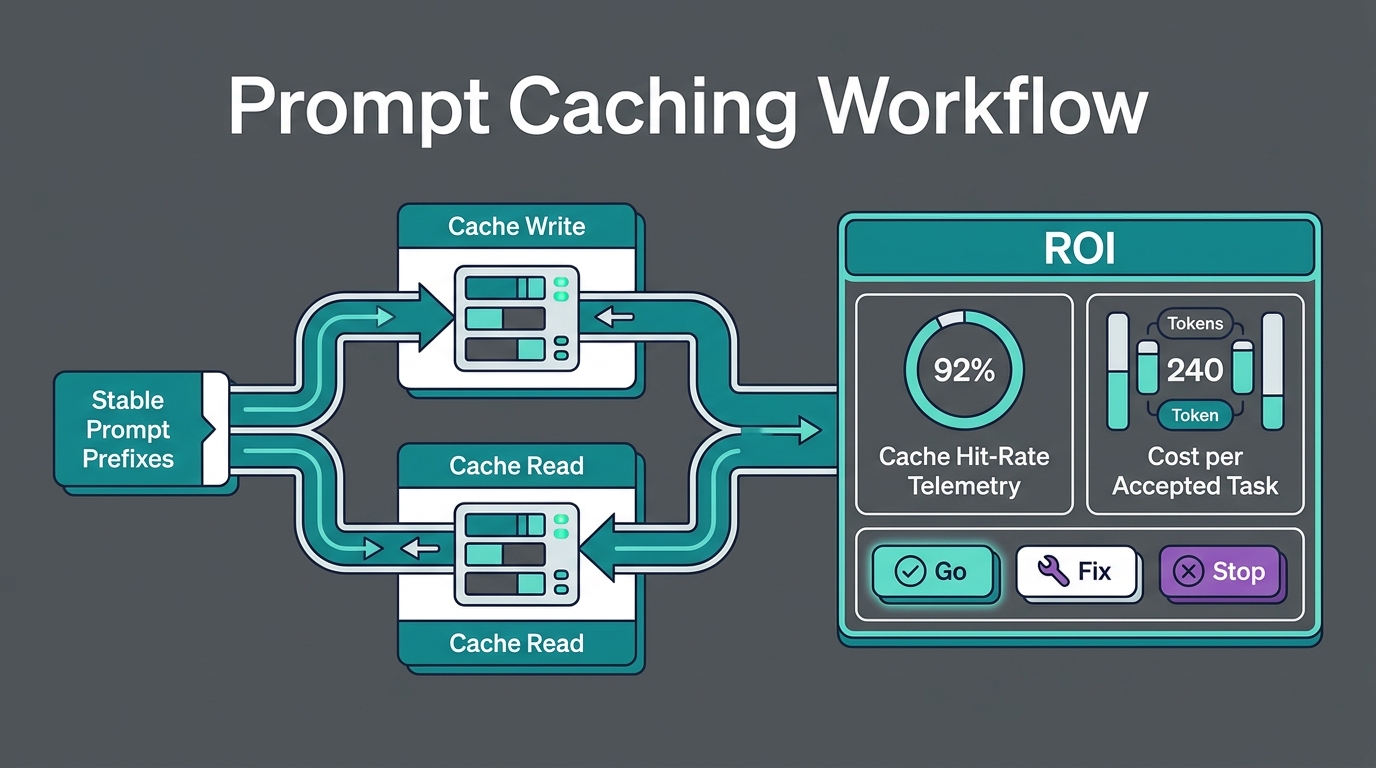
OpenAI prompt caching is on by default: when a request starts with the same prefix (at least 1,024 tokens on GPT-5.6 and later) as a recent request, OpenAI reuses the saved computation and bills those tokens at the cached-input rate, about 90–95% cheaper than normal input. On GPT-5.6 and later you also pay a one-time cache write, 1.25× the input rate for the default 30-minute lifetime or 2.5× for 12 hours, as of October 25, 2026. If a prefix is reused even once within its lifetime, caching already costs less than sending it twice.
This guide explains how OpenAI's cache works, what it costs on current models, how to control it with breakpoints and TTLs, how to measure the savings, and how it compares with Anthropic and Gemini caching. All rates come from the OpenAI prompt caching guide and the OpenAI API pricing page, checked on October 25, 2026.
OpenAI prompt caching pricing
Standard-tier prices per 1M tokens:
| Model | Input | Cached input (read) | 30-minute write | 12-hour write | Output |
|---|---|---|---|---|---|
| gpt-6-astra | $10.00 | $1.00 | $12.50 | $25.00 | $50.00 |
| gpt-6.1-sol | $2.00 | $0.10 | $2.50 | $5.00 | $10.00 |
| gpt-6-luna | $0.10 | $0.01 | $0.125 | $0.25 | $0.50 |
| gpt-5.6-sol | $4.00 | $0.40 | $5.00 | $10.00 | $20.00 |
A cache read costs 0.1× the uncached input rate on most models and 0.05× on GPT-6.1 Sol. The Batch tier halves every number in this table, and Fast mode doubles it. Regional data-residency endpoints carry a 10% uplift for models released on or after March 5, 2026.
One point people often get wrong: cache-write pricing is not an extra fee on top of input. Each input token is billed once, at either the uncached, cached-read, or cache-write rate. A 30-minute write costs 25% more than ordinary input for those tokens, and every later hit costs 10% (or 5%) of it.
How OpenAI prompt caching works
When a model reads your prompt, it computes key-value (KV) states for every token. Prompt caching saves those states for a reusable prefix, which is the unchanged beginning of the prompt. If a later request starts with exactly the same prefix and finds a matching cache entry, the model skips recomputing it, which lowers both cost and time to first token.
The cached prefix covers everything OpenAI renders before your content changes: the hidden system content, developer messages, tool definitions, and conversation history, including text, images, documents, and supported audio. The match has to be exact. If anything changes before a breakpoint, such as a timestamp in the system prompt, a reordered tool list, or a different image, everything after that change is a miss.
Key rules on GPT-5.6 and later:
- Minimum length: a prefix must be at least 1,024 tokens to be cached. OpenAI's hidden system tokens do not count toward it.
- Breakpoints: a breakpoint marks the end of a prefix that can be written to the cache. In implicit mode (the default), OpenAI places one at the end of the latest eligible message. In explicit mode you choose where they go with
prompt_cache_breakpoint. - Up to four writes per request: each request can create up to four cache writes, so you can cache layers that change at different speeds.
- Lifetimes: set
prompt_cache_options.ttlto"30m"(default) or"12h"in the Responses API. Cache reads cost the same for both.
On models before GPT-5.6, only implicit caching is available. You control retention with prompt_cache_retention: in_memory keeps entries for roughly 5–10 minutes of inactivity (up to an hour), and 24h extends that to as much as 24 hours. Organizations without Zero Data Retention default to 24h; ZDR organizations default to in_memory. On these older models, a stable prompt_cache_key helps route related requests to the same cache. OpenAI suggests keeping each key to about 15 requests per minute and splitting busier traffic across several keys.
When caching pays off
OpenAI's guide gives the basic math. At a 0.1× read rate and a 1.25× write, writing a prefix once and reusing it once costs 1.35× its normal input price, compared with 2× for sending it twice. Ten requests with one write and nine reads cost 2.15×, compared with 10× without caching.
| Requests sharing the prefix | Without cache | 30-minute cache | 12-hour cache | Saving with 30-minute cache |
|---|---|---|---|---|
| 1 | 1.00× | 1.25× | 2.50× | −25% |
| 2 | 2.00× | 1.35× | 2.60× | 33% |
| 10 | 10.00× | 2.15× | 3.40× | 79% |
| 100 | 100.00× | 11.15× | 12.40× | 89% |
The 12-hour lifetime only makes sense when the gap between requests is longer than 30 minutes but the prefix is still reused several times, for example a large product manual queried throughout the working day by a low-traffic internal tool.
OpenAI also explains when to pad a short prefix up to the minimum. With a 1,024-token minimum, a 0.1× read rate, and a 1.25× write, padding is cheaper when your original prefix is longer than 102.4 + 1,177.6 / N tokens, where N is the number of requests. Over 10 requests, expanding a prefix of 221 tokens or more to 1,024 tokens pays off.
A worked example
Suppose a support assistant on gpt-6.1-sol handles 50,000 requests a day. Each request sends an 8,000-token stable prefix (instructions, tool definitions, and policy documents), a 500-token user message, and gets a 400-token answer. Traffic is steady, so the 30-minute cache is rewritten about 48 times a day.
| Daily cost line | Without caching | With explicit caching |
|---|---|---|
| Stable prefix | 400M × $2.00 = $800.00 | writes: 0.38M × $2.50 = $0.96; reads: 399.6M × $0.10 = $39.96 |
| User message | 25M × $2.00 = $50.00 | 25M × $2.00 = $50.00 |
| Output | 20M × $10.00 = $200.00 | 20M × $10.00 = $200.00 |
| Total | $1,050.00 | ≈ $290.92 |
That is about a 72% reduction in the daily bill. The output line is the same in both columns, so once caching is working, shorter answers are the next lever.
Why explicit mode here? In implicit mode the breakpoint sits at the end of the latest message, so the 500 changing user tokens would also be written to the cache at 1.25× every time. That adds about $12.50 a day in this example. Explicit mode lets you end the cache write right after the stable prefix, so the user message is billed at the plain input rate.
How to set it up
You don't need any code to benefit from implicit caching. To control it, use the Responses API. This request caches shared instructions for 12 hours and session context for 30 minutes, and leaves the current question uncached:
curl https://api.openai.com/v1/responses \
  -H "Authorization: Bearer $OPENAI_API_KEY" \
  -H "Content-Type: application/json" \
  -d '{
    "model": "gpt-6.1-sol",
    "prompt_cache_options": { "mode": "explicit", "ttl": "30m" },
    "input": [
      { "role": "developer", "content": [
        { "type": "input_text", "text": "<shared instructions and policy docs>",
          "prompt_cache_breakpoint": { "mode": "explicit", "ttl": "12h" } } ] },
      { "role": "user", "content": [
        { "type": "input_text", "text": "<session context>",
          "prompt_cache_breakpoint": { "mode": "explicit" } },
        { "type": "input_text", "text": "What is the refund window for annual plans?" } ] }
    ]
  }'
Read the cache fields from every response and log them:
from openai import OpenAI

client = OpenAI()
resp = client.responses.create(model="gpt-6.1-sol", input=[...])  # same input as above

d = resp.usage.input_tokens_details
print("input:", resp.usage.input_tokens)
print("cache reads:", d.cached_tokens)
print("cache writes:", d.cache_write_tokens)
hit_rate = d.cached_tokens / max(resp.usage.input_tokens, 1)
print(f"token cache-hit rate: {hit_rate:.0%}")
For models that support prompt_cache_options, cache_write_tokens_details splits writes into ttl_30m_tokens and ttl_12h_tokens. Reported cached_tokens is rounded down to a multiple of 128. OpenAI also offers a Prompt Caching Dashboard to track hit rates and a Prompt Cache Diagnostics tool that explains misses.
Prompt design rules that raise hit rates
- Static first, dynamic last. Put instructions, tool schemas, few-shot examples, and reference documents at the top. Put the user's message, retrieved snippets, and anything with a date or ID at the bottom.
- Freeze the tool list. Changing tool definitions breaks the prefix. If different requests need different tools, keep the definitions stable and change which ones are callable.
- Append, don't rewrite. In multi-turn chats, add new turns to the end. Summarizing or editing earlier turns invalidates the cache.
- Keep settings stable. Model, reasoning settings, and other request options can change the rendered prefix. Pin them for cached traffic.
- Watch fallbacks. If you fail over to another model or provider, you start with a cold cache. Our model fallback playbook covers how to fail over without losing all cache locality.
OpenAI vs Anthropic vs Gemini prompt caching
Caching is not portable between providers. The mechanics and prices differ:
| OpenAI (GPT-5.6+) | Anthropic Claude | Google Gemini | |
|---|---|---|---|
| Default | Automatic | Opt-in with cache_control (automatic or per block) |
Implicit caching automatic on Gemini 2.5 and newer |
| Minimum prefix | 1,024 tokens | 512 tokens on current models | 4,096 tokens on Gemini 4 Argon and 3.8 Flash |
| Write cost | 1.25× (30 min) or 2.5× (12 h) | 1.25× (5 min) or 2× (1 h) | No write fee for implicit; explicit caching adds hourly storage |
| Read cost | 0.1× (0.05× on GPT-6.1 Sol) | 0.1× (0.05× on Opus 5.5 and Sonnet 5.5) | e.g. $0.10 vs $2.00 input on Gemini 4 Argon |
| Usage field | cached_tokens, cache_write_tokens |
cache_read_input_tokens, cache_creation_input_tokens |
total_cached_tokens |
Sources: the Anthropic prompt caching docs, Claude API pricing, Gemini context caching, and Gemini API pricing, all checked on October 25, 2026. Gemini 4 Argon supports implicit caching only. Explicit cache objects work on supported Gemini 3 and 2.5 models through generateContent, with storage billed per million tokens per hour (for example $0.50 on Gemini 3.8 Flash through December 31, 2026). DeepSeek caches automatically too; see the DeepSeek caching guide.
A seven-day caching ROI check
Before you call caching a success, measure it on real traffic:
- Day 1: pick one high-volume workflow with a long shared prefix. Log input tokens,
cached_tokens,cache_write_tokens, output tokens, and latency per request. - Days 2–3: move all static content to the top and remove dynamic values from it. Compare the token cache-hit rate (cached tokens ÷ input tokens) before and after.
- Days 4–5: if writes are high and reads are low, your traffic is too sparse for 30-minute entries. Try
"12h"on the stable layer, or consolidate the prefix so more requests share it. - Days 6–7: calculate realized cost per accepted answer, not just per token. A cheaper request that users reject is not a saving.
Good targets for a steady chat or agent workload are a token cache-hit rate above 60% and reads outnumbering writes by at least 10 to 1. Our LLM API observability guide and token usage dashboard guide show how to build these views.
Where Flatkey fits
Flatkey is an OpenAI-compatible router with one key and one balance for OpenAI, Claude, Gemini, DeepSeek, Qwen, and other models. Provider caching still depends on each provider's rules, so keep prompts stable per model and avoid rotating models on every request if you want cache hits. Start with the router quickstart, check live rates on Flatkey pricing, and see our AI API cost optimization guide for other ways to cut spend.
Caching matters most with long prompts; our LLM context window guide covers window sizes and how to count tokens before you send.
FAQ
Is OpenAI prompt caching automatic?
Yes. Prompt caching is enabled by default for supported OpenAI models, and you don't need to change your code to get cache hits. On GPT-5.6 and later you can switch to explicit mode and choose breakpoints with prompt_cache_breakpoint.
How much does OpenAI prompt caching save?
Cached input costs 0.1× the normal input rate on most current models and 0.05× on GPT-6.1 Sol, a 90–95% discount on the cached part. Total savings depend on how much of each prompt is a shared prefix and how often it is reused.
What is the minimum prompt length for caching?
1,024 tokens for GPT-5.6 and later. For earlier models it varies by request settings. Shorter prefixes are processed normally without an error.
How long does the OpenAI prompt cache last?
On GPT-5.6 and later, entries last at least 30 minutes by default, or at least 12 hours if you set ttl to "12h". On earlier models, in_memory keeps entries for about 5–10 minutes of inactivity, up to an hour, and 24h can retain them up to 24 hours.
Does prompt caching reduce latency?
Yes. Reusing a cached prefix skips recomputing it, which reduces time to first token, especially for long prompts.
Do I pay to write to the cache?
On GPT-5.6 and later, yes: 1.25× the input rate for a 30-minute write or 2.5× for 12 hours. This replaces the normal input charge for those tokens; it is not added on top.
What is prompt_cache_key?
An optional parameter that groups related requests so they are routed to the same cache. On models before GPT-5.6 it improves hit rates; OpenAI suggests about 15 requests per minute per key.
Sources
- OpenAI prompt caching guide (checked October 25, 2026)
- OpenAI API pricing (checked October 25, 2026)
- Anthropic prompt caching (October 2026)
- Claude API pricing (October 2026)
- Gemini context caching (October 2026)
- Gemini API pricing (October 2026)
- DeepSeek context caching (October 2026)