
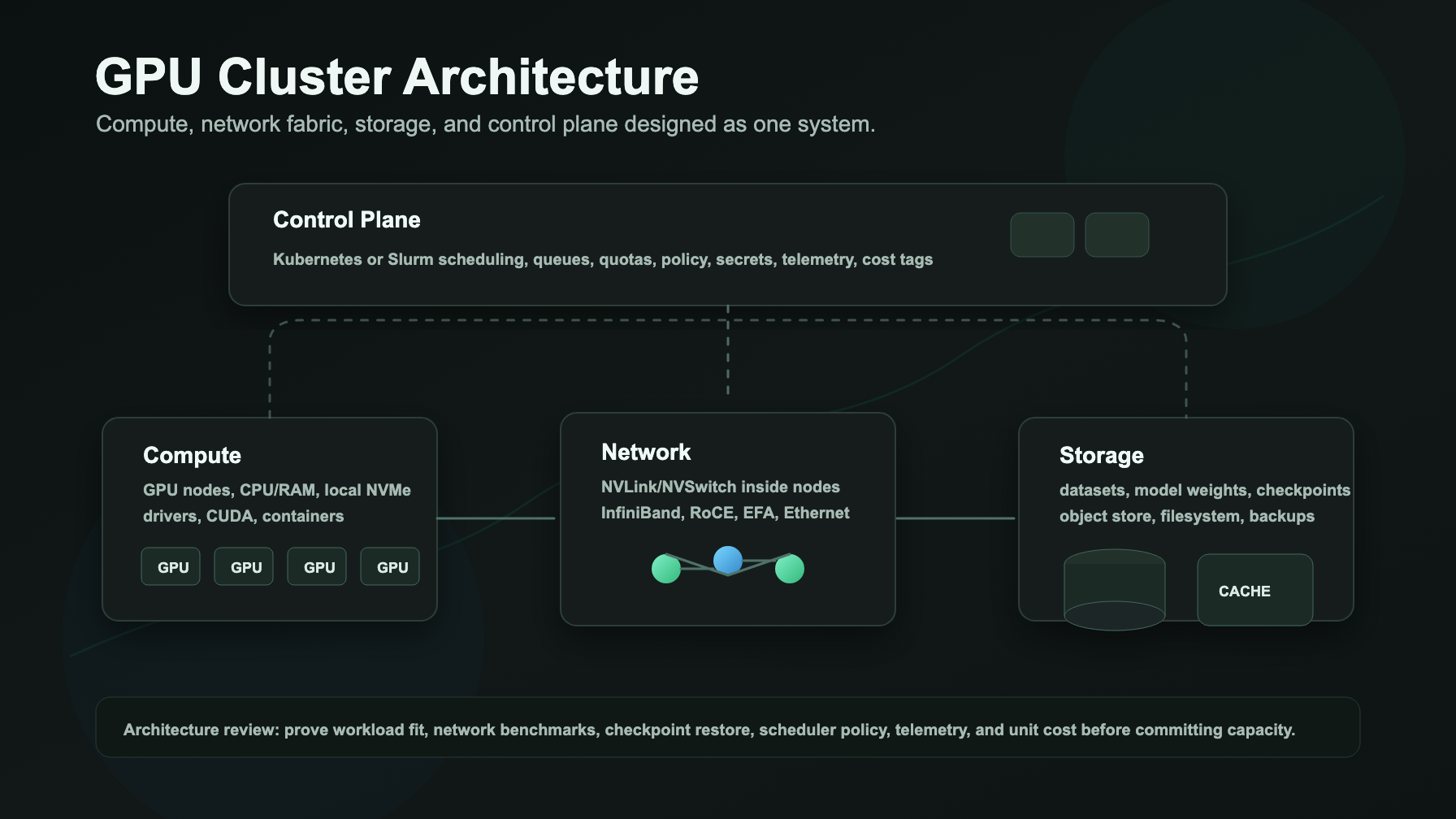
GPU cluster architecture is the shape of the whole system, not just the GPU count. A production cluster has to coordinate compute nodes, high-speed networking, storage, a scheduler, access controls, telemetry, and recovery paths before it can turn expensive accelerators into useful training runs or reliable inference.
The practical question is simple: can your team move data, schedule jobs, recover failures, and measure cost fast enough to keep the GPUs busy? If not, a cluster with better cards can still deliver worse economics than a smaller managed GPU service or model API.
This guide gives AI platform teams a working model for gpu cluster architecture: what belongs in the compute layer, what the network must prove, how storage and checkpointing fit, how Kubernetes or Slurm becomes the control plane, and what to test before renting or buying multi-node capacity.
Flatkey's practical rule is to start with the workload boundary. If the product only needs model outputs, benchmark a GPU cloud vs model API path first. If you need custom weights, placement control, long-running training, or private serving infrastructure, then design the GPU cluster around the workload's compute, network, storage, and control-plane requirements.
GPU cluster architecture quick answer
A useful GPU cluster has four planes:
| Plane | What it owns | Common failure when skipped |
|---|---|---|
| Compute | GPU servers, CPU/RAM ratio, local NVMe, GPU topology, drivers, CUDA, containers, MIG or full-GPU allocation | The team buys the right GPU model but the wrong node shape, memory layout, or driver stack. |
| Network | Intra-node NVLink/NVSwitch, cross-node InfiniBand, RoCE, EFA, Ethernet, placement, DNS, ingress, service mesh boundaries | Multi-node jobs scale poorly because "fast network" was never validated with real all-reduce or serving traffic. |
| Storage | Dataset staging, model weights, checkpoint writes, shared filesystem, object storage, local scratch, snapshots, backup, cleanup | GPUs sit idle while data loads, checkpoints block training, or restart recovery takes too long. |
| Control plane | Kubernetes, Slurm, Kueue, Volcano, Ray, user access, quotas, observability, billing tags, security policy, incident response | Jobs run, but no one can explain queue time, allocation fairness, failures, or unit cost. |
A multi-node gpu cluster architecture succeeds when these planes are designed together. Compute without fabric is isolated capacity. Fabric without storage only moves bottlenecks. Kubernetes without quota, telemetry, and runbooks is only a launch mechanism.
GPU cluster architecture diagram
Use this diagram as a review frame before you compare providers or approve a rack design.
                  users / CI / product traffic / API clients
                                  |
                                  v
        +------------------------------------------------------+
        | control plane                                        |
        | Kubernetes or Slurm scheduler, queues, quotas,       |
        | secrets, registry access, policy, telemetry, billing |
        +------------------------------------------------------+
              |                    |                    |
              v                    v                    v
   +-------------------+   +-------------------+   +-------------------+
   | gpu compute node  |   | gpu compute node  |   | gpu compute node  |
   | GPUs, CPU, RAM,   |   | GPUs, CPU, RAM,   |   | GPUs, CPU, RAM,   |
   | local NVMe, NICs  |   | local NVMe, NICs  |   | local NVMe, NICs  |
   +-------------------+   +-------------------+   +-------------------+
              \                  |                  /
               \                 |                 /
                v                v                v
        +------------------------------------------------------+
        | high-speed fabric                                   |
        | NVLink/NVSwitch inside node; InfiniBand, RoCE, EFA, |
        | or Ethernet across nodes; placement and routing     |
        +------------------------------------------------------+
                                  |
                                  v
        +------------------------------------------------------+
        | storage and data path                               |
        | object store, shared filesystem, local scratch,      |
        | model cache, checkpoints, snapshots, backups        |
        +------------------------------------------------------+
For a kubernetes gpu cluster architecture diagram, add the Kubernetes-specific objects around the control plane:
cluster admins -> node images -> GPU Operator / device plugin -> GPU nodes
app teams      -> namespace -> quota -> job queue -> Pod / Job / RayJob
finance        -> labels -> usage export -> cost per job / team / model
security       -> secrets -> image policy -> network policy -> audit logs
The diagram is intentionally plain. The goal is not to draw every service. The goal is to catch missing responsibilities before the cluster becomes a production dependency.
Start with the workload, not the rack
Before choosing Kubernetes, Slurm, a cloud reservation, or a bare-metal vendor, write a one-page workload brief.
| Field | What to define |
|---|---|
| Workload type | Pretraining, fine-tuning, batch inference, online inference, embeddings, retrieval, image/video generation, simulation, or research notebooks. |
| Framework | PyTorch, JAX, TensorFlow, vLLM, SGLang, TensorRT-LLM, Ray, Slurm, Kubernetes Jobs, or custom services. |
| GPU target | H100, H200, B200, A100, L40S, RTX PRO, AMD MI-series, or an acceptable range. |
| Node shape | GPUs per node, GPU memory, CPU cores, system RAM, local NVMe, NIC count, and power envelope. |
| Scale shape | Single node, multi-node synchronous training, sharded inference, batch queue, or mixed platform. |
| Network sensitivity | Required all-reduce performance, latency tolerance, placement group needs, traffic isolation, and egress path. |
| Storage sensitivity | Dataset size, model weight size, checkpoint frequency, restore target, filesystem needs, and object-store region. |
| Operations boundary | Who owns drivers, images, scheduler policy, telemetry, support, patching, user access, and incident response. |
| Business denominator | Cost per completed training run, cost per accepted inference output, GPU-hour utilization, or reserved GPU-month. |
If you cannot fill this table, do not sign a long capacity contract yet. Rent a smaller slice, run benchmarks, and turn the logs into the procurement brief. The GPU cluster rental guide gives the buying-side checklist once the architecture shape is clear.
Compute plane: GPU nodes are not interchangeable
The compute plane defines what a job can actually use. A complete compute spec includes more than "8x H100" or "B200 cluster."
Ask for:
- GPU model, memory size, and PCIe versus SXM where relevant.
- GPUs per node and the intra-node topology.
- CPU model, CPU count, system RAM, and NUMA layout.
- Local NVMe capacity and expected throughput.
- NIC count, NIC speed, and whether GPU-direct paths are supported.
- Driver, CUDA, container runtime, and OS image lifecycle.
- MIG, vGPU, time-slicing, or full-GPU allocation policy.
- Node homogeneity and replacement policy.
The intra-node topology matters because eight GPUs in one server are not equivalent to eight single-GPU nodes. The node design sets memory pressure, CPU bottlenecks, local staging speed, and how expensive cross-node communication becomes.
NVIDIA's Kubernetes GPU Operator documentation is useful here because it shows how drivers, the NVIDIA Container Toolkit, device plugin, DCGM telemetry, and related components can be managed as a cluster stack rather than as one-off node setup. Kubernetes device plugin documentation explains the general extension point used to expose vendor devices as schedulable resources.
Network plane: prove the fabric with a benchmark
Multi-node training and high-throughput serving depend on the network. A cluster spec should state the fabric and the acceptance test, not only the bandwidth headline.
Ask for:
- Intra-node NVLink or NVSwitch details.
- Cross-node InfiniBand, RoCE, EFA, or Ethernet design.
- NIC count and speed per node.
- Placement guarantee and failure domain.
- Oversubscription ratio.
- GPUDirect RDMA support where relevant.
- Container and host networking model.
- Observability for fabric errors, retransmits, congestion, and node failures.
Use an acceptance test before the commitment starts:
network acceptance test:
  run NCCL all_reduce across every rented node
  record bandwidth, latency, node IDs, GPU model, driver, CUDA, NCCL version
  repeat after installing the production container image
  save logs and compare them with the provider's quoted topology
NVIDIA NCCL and NCCL tests are standard references for validating collective communication behavior in distributed GPU workloads. The key is not to chase one benchmark number. The key is to catch mismatched nodes, bad placement, fabric congestion, or driver/container drift before a full training run fails.
For inference, the network test should include the real traffic path: request ingress, model shard communication, KV-cache behavior when relevant, storage fetches, and egress. A training fabric that looks strong in isolation can still produce poor user latency if the serving stack crosses too many network boundaries.
Storage plane: keep data, weights, and checkpoints out of the critical path
Storage is where many GPU cluster architecture plans become expensive. The GPU quote is visible. The data path is often hidden until the first production run.
Design storage around four flows:
| Flow | Architecture question |
|---|---|
| Dataset staging | How long does it take to move the dataset from object storage, remote filesystem, or data warehouse to the nodes? |
| Model weights | Where are base weights, fine-tuned weights, tokenizer files, and engine artifacts cached? |
| Checkpoints | How often are checkpoints written, how large are they, and how long does restore take after node failure? |
| Outputs and logs | Where do generated artifacts, metrics, traces, and audit logs go, and what retention policy applies? |
For training, checkpoint throughput and restore time are architecture concerns, not backup details. For inference, model weight loading, local cache warm-up, and persistent volume behavior affect deployment time and failover time.
NVIDIA's GPUDirect Storage documentation is a useful source when the architecture requires a direct data path between local or remote storage and GPU memory. Not every cluster needs GPUDirect Storage, but teams that move large datasets or checkpoints should explicitly decide whether the storage stack is ordinary, optimized, or a bottleneck they accept.
Control plane: Kubernetes, Slurm, or both?
The control plane turns hardware into a platform. It decides who can run what, when jobs start, how failures are retried, and how teams understand usage.
Kubernetes GPU cluster architecture
Kubernetes fits GPU platforms that need service deployment, multi-tenant namespaces, container-native workflows, API-driven automation, policy, and integration with cloud-native observability. A production kubernetes gpu cluster architecture usually includes:
- Node images and bootstrap automation.
- GPU Operator or vendor-specific driver/device plugin management.
- Device plugin or Dynamic Resource Allocation for GPU exposure.
- Namespaces, RBAC, secrets, image pull policy, and network policy.
- Jobs, Deployments, RayJob, training operators, or inference services.
- Kueue or another queueing layer when batch fairness matters.
- Quotas by team, project, environment, or customer.
- DCGM, Prometheus, logs, traces, and billing labels.
- Admission controls for images, privileged workloads, host mounts, and GPU sharing.
Kubernetes device plugins expose GPUs as extended resources. Kubernetes Dynamic Resource Allocation adds a richer claim-based resource model for devices and other specialized resources. Kueue adds job queueing concepts such as workloads, queues, cohorts, and resource flavors for batch and AI/ML scheduling. Together, these tools can turn a GPU pool into a governed platform instead of a set of SSH-accessible machines.
Slurm GPU cluster architecture
Slurm fits many HPC-style and research environments because it is built around queues, partitions, accounting, reservations, and batch jobs. Slurm's GRES documentation covers GPU resources and how jobs request them.
Slurm is often a strong fit when:
- Users submit batch training jobs.
- Queue policy is central.
- Teams already have HPC operations experience.
- The workload is less service-oriented.
- MPI, NCCL tests, and batch accounting are familiar operational primitives.
Some organizations run both: Slurm for research and large training queues, Kubernetes for inference services and platform APIs. That can work, but only if identity, data access, observability, and cost allocation are designed across both systems.
Observability and cost controls belong in the first design
Do not add telemetry after the cluster is live. The questions that matter to engineering and finance are predictable:
- Which jobs used which GPUs?
- Which namespace, team, customer, model, or experiment caused the spend?
- What was the useful utilization, not just allocated GPU time?
- How much time was spent waiting in queue?
- Which failures burned the most GPU-hours?
- Which storage or network bottleneck caused idle GPUs?
- What was the cost per completed run or accepted output?
Minimum telemetry should include:
- GPU utilization, memory utilization, power, temperature, and ECC events.
- Per-job runtime, queue time, retry count, exit reason, and owner.
- Network fabric health and benchmark history.
- Storage throughput, latency, checkpoint time, and restore time.
- Scheduler allocation events and quota denials.
- Billing labels or usage exports tied to business units.
Flatkey's model/API baseline matters here. If a managed model API produces the same accepted output with clearer unit cost and less operational burden, the cluster has to beat that baseline after idle time, retries, storage, and labor are counted.
Security, isolation, and access design
GPU clusters often start as engineering projects and become shared infrastructure. Treat access design as part of the architecture.
Define:
- Authentication and identity source.
- Namespace, project, or account isolation.
- SSH policy, if any.
- Container image registry, signing, and scanning.
- Secrets management.
- Network egress policy.
- Data deletion and cleanup after jobs.
- Audit log retention.
- Break-glass access.
- Vendor support access and remote hands workflow.
For multi-tenant clusters, decide whether GPU sharing is allowed. Full-GPU allocation is simpler. MIG, vGPU, or time-slicing can improve utilization, but they also change isolation, telemetry, scheduling, and performance expectations.
Cluster sizing: turn the architecture into numbers
Sizing should be driven by the useful unit:
required_gpu_capacity =
  target_work_completed_per_month
  / useful_work_per_gpu_month_after_failures_idle_and_retries
Then pressure-test it:
| Sizing question | Why it matters |
|---|---|
| What utilization is useful, not just allocated? | Idle reservations and failed runs do not help product output. |
| What is the longest acceptable queue time? | A cheap cluster can still miss launch or training windows. |
| What happens when one node fails mid-run? | Restart time changes effective throughput. |
| Can the model move to another GPU class? | Hardware commitments can outlive model architecture. |
| What is the expansion lead time? | GPU demand can move faster than procurement. |
| What is the exit path? | Resale, contract termination, data cleanup, and migration cost belong in the decision. |
For a cost model, connect this article to your GPU cluster TCO worksheet:
effective_cluster_unit_cost =
  (compute + network + storage + support + operations + idle + retries)
  / accepted workload units
The denominator should match the product: completed training runs, accepted inference tokens, generated media jobs, search index updates, or customer requests.
Architecture review checklist
Use this checklist before approving a multi node gpu cluster architecture diagram or provider quote.
| Area | Pass condition |
|---|---|
| Workload brief | The team has defined model, framework, scale shape, data path, utilization target, and business denominator. |
| Compute | Node shape includes GPU topology, CPU/RAM, local NVMe, NICs, driver/CUDA lifecycle, and replacement policy. |
| Network | Fabric type, placement, oversubscription, failure domains, and NCCL or serving benchmark are documented. |
| Storage | Dataset staging, weight cache, checkpoint write/restore, object storage, snapshots, and cleanup are tested. |
| Scheduler | Kubernetes, Slurm, or mixed architecture has clear ownership for queues, quotas, retries, and user access. |
| Observability | Jobs, GPUs, fabric, storage, and costs are visible by team and workload. |
| Security | Identity, secrets, image policy, network policy, audit logs, and data cleanup are defined. |
| Acceptance test | Provider or internal team can run the production container, benchmark the network, write and restore checkpoints, and export logs. |
| Unit economics | The cluster is compared against cloud rental, colocation, on-premises, and model/API baselines using the same denominator. |
Official references to keep open
Use official docs as source checks during architecture review:
| Source | Use it for |
|---|---|
| Kubernetes device plugins | How specialized hardware such as GPUs is exposed to Kubernetes scheduling. |
| Kubernetes Dynamic Resource Allocation | Claim-based allocation model for specialized resources. |
| NVIDIA GPU Operator | Driver, container runtime, device plugin, MIG, and GPU telemetry management for Kubernetes. |
| NVIDIA NCCL documentation and NCCL tests | Distributed communication and practical all-reduce validation. |
| NVIDIA GPUDirect Storage | Storage-to-GPU data path considerations for large data and checkpoint flows. |
| Kueue concepts | Kubernetes-native queueing concepts for batch and AI/ML workloads. |
| Slurm GRES | GPU resources, accounting, and job requests in Slurm. |
Treat these as architecture references, not as a substitute for acceptance testing on the exact cluster you will run.
When a GPU cluster is the wrong architecture
Do not build or reserve a cluster only because GPU-hour pricing looks attractive. A direct GPU cluster may be the wrong architecture when:
- The product only needs model outputs.
- The model mix changes weekly.
- The team cannot operate drivers, schedulers, storage, networking, and incidents.
- The workload is bursty and low-utilization.
- Data movement dominates compute.
- Procurement wants a three-year commitment before benchmark evidence exists.
- Finance cannot map cluster spend to accepted outputs.
In those cases, compare cloud GPU rental prices, serverless GPU, or a model API first. The right architecture is the one that delivers reliable accepted output at the lowest total operational cost, not the one with the largest accelerator inventory. For a provider-level market scan, use the GPU cloud comparison before you request quotes.
Final take
A strong gpu cluster architecture is a system design: compute nodes that match the workload, network fabric proven by benchmarks, storage that does not starve the GPUs, and a control plane that can schedule, secure, observe, and charge back usage.
For small experiments, start with rental or managed APIs. For serious multi-node training or private inference, use the diagram and checklist above before committing to a provider, rack, or reservation. The expensive mistake is not choosing Kubernetes instead of Slurm, or H100 instead of H200. The expensive mistake is buying GPU capacity before the architecture proves it can turn that capacity into useful work.


