
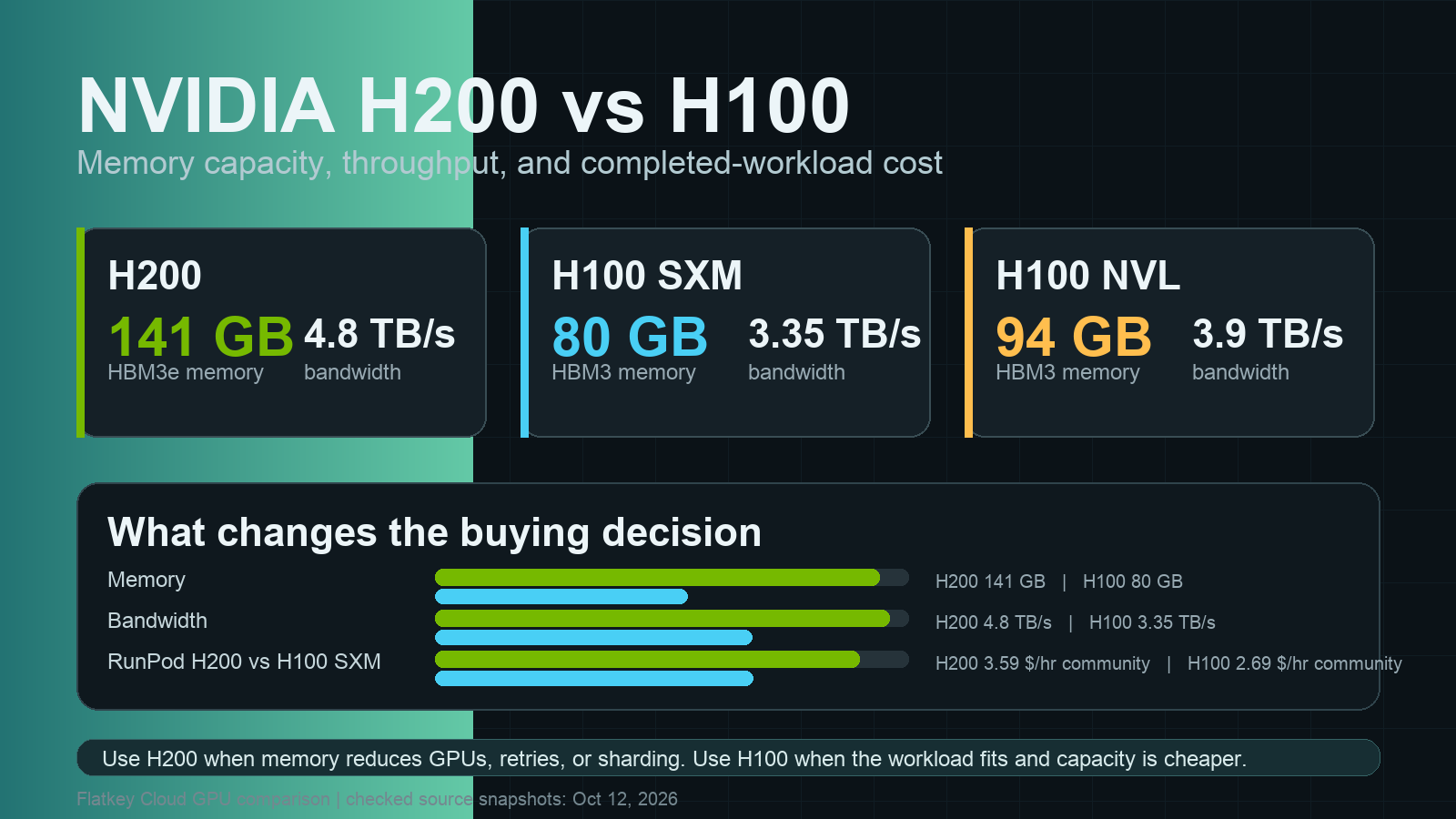
If you are comparing H100 vs H200, the short version is simple: H200 is the better choice when the workload is memory-bound, long-context, or hard to fit on 80GB H100s. H100 is still the practical baseline when capacity is cheaper, already available, or the job is compute-bound enough that the extra HBM3e does not reduce wall-clock time.
The catch is cost. H200 is not automatically cheaper just because it has more memory. It wins when the larger 141GB memory pool, 4.8TB/s memory bandwidth, or higher batch size lets you finish the job with fewer GPUs, fewer replicas, fewer quantization compromises, or fewer failed runs.
H100 vs H200: quick decision
Choose H200 when:
- Your model, context length, KV cache, or batch target is close to the 80GB H100 ceiling.
- You are serving LLM inference where memory bandwidth and batch size matter more than raw tensor-core peak.
- You want fewer tensor-parallel shards for 70B-class inference, RAG with long prompts, or high-concurrency serving.
- The H200 rental premium is smaller than the savings from fewer GPUs, higher accepted throughput, or simpler operations.
Choose H100 when:
- The workload already fits cleanly in 80GB, with room for activations, KV cache, optimizer state, or serving overhead.
- You are optimizing for available capacity, mature images, known cluster behavior, or lower hourly price.
- The bottleneck is CPU preprocessing, storage, networking, queueing, software overhead, or model quality rather than GPU memory.
- You can get H100 SXM or NVL at a much better effective price than H200.
For most AI teams, the first test is not a benchmark leaderboard. It is this question: does H200 reduce the number of GPUs, the precision compromise, or the queue time enough to beat H100's usually broader availability?
NVIDIA H200 vs H100 specs that matter
NVIDIA positions H200 as a Hopper-generation upgrade focused on larger and faster memory. The H200 product page lists 141GB of HBM3e memory and 4.8TB/s of memory bandwidth. NVIDIA's H100 page lists H100 SXM at 80GB of HBM3 memory and 3.35TB/s of memory bandwidth, and H100 NVL at 94GB and 3.9TB/s.
| Spec | NVIDIA H200 SXM / HGX | NVIDIA H100 SXM | NVIDIA H100 NVL |
|---|---|---|---|
| GPU generation | Hopper | Hopper | Hopper |
| GPU memory | 141GB HBM3e | 80GB HBM3 | 94GB HBM3 |
| Memory bandwidth | 4.8TB/s | 3.35TB/s | 3.9TB/s |
| Best-fit workload | Memory-heavy LLM inference, larger batch, long context, HPC memory pressure | Mature training and inference baseline | Air-cooled / PCIe-friendly LLM serving |
| Practical buying question | Does the extra memory reduce GPUs or retries? | Is the cheaper and available baseline enough? | Does NVL memory/interconnect fit your server design? |
Those memory differences are the heart of the nvidia h200 vs h100 comparison. H200 has about 76% more memory than H100 SXM and about 43% more memory than H100 NVL. Its bandwidth is about 43% higher than H100 SXM and about 23% higher than H100 NVL.
That does not mean every job is 23-76% faster. It means the memory subsystem gives H200 more room to keep large working sets on GPU and feed the compute cores. The performance gain depends on model size, context length, precision, serving framework, batch strategy, interconnect, and whether the workload is actually memory-bound.
H200 vs H100 memory: why 141GB changes LLM serving
The phrase h200 vs h100 memory usually shows up when a team is trying to avoid an unpleasant tradeoff:
- aggressive quantization that hurts output quality,
- more tensor-parallel shards than the team wants to operate,
- smaller batches that waste serving capacity,
- shorter context windows than the product needs,
- or failed jobs when real prompts are larger than the benchmark prompts.
The H100 80GB profile is still strong for many inference and fine-tuning jobs. But 80GB disappears quickly when you add model weights, KV cache, framework overhead, speculative decoding buffers, adapters, embeddings, and concurrent requests.
H200's 141GB memory gives infrastructure teams more options. A model that only fits on multiple H100s may fit with fewer H200s. A serving tier that has to keep context short on H100 may support longer requests on H200. A training or fine-tuning job that spills into smaller microbatches on H100 may use more efficient batch settings on H200.
That is why the h100 vs h200 decision should be modeled around completed work, not hourly GPU price alone.
NVIDIA H200 vs H100 performance comparison
For a nvidia h200 vs h100 performance comparison, separate three cases.
1. Memory-bound LLM inference
This is the cleanest H200 case. NVIDIA says H200's larger HBM3e memory and 4.8TB/s bandwidth are designed to accelerate generative AI and LLM workloads, and its page shows higher Llama 2 and GPT-style inference throughput examples versus H100 under specified batch and sequence settings.
Use H200 first for:
- 70B-class model serving,
- long-context RAG,
- high-batch decode workloads,
- serving routes with large KV cache pressure,
- and product workloads where failed or downgraded requests are expensive.
Do not copy NVIDIA's example multiplier into your own forecast without testing. The gain depends on prompt length, output length, batch size, quantization, engine settings, and whether the H100 baseline was already optimized.
2. Training and fine-tuning
H100 remains a strong default for training clusters because it is widely deployed, well supported, and available in mature managed-cloud and dedicated-cluster configurations. H200 can still help when memory pressure limits microbatch size, sequence length, activation checkpointing choices, or optimizer strategy.
For full training, the decision is often less about one GPU and more about cluster shape:
- how many GPUs per node,
- NVLink/NVSwitch topology,
- cross-node networking,
- storage throughput,
- checkpointing time,
- framework maturity,
- and reservation availability.
If a training run already scales well on H100 and does not hit memory pressure, H200 may not justify a premium. If H200 lets you avoid extra parallelism, avoid recomputation, or reduce failed runs, the economics can flip.
3. Compute-bound or pipeline-bound jobs
Some jobs do not care much about the extra memory. If preprocessing, data loading, CPU transforms, object storage, network transfer, or application orchestration is the bottleneck, H200 can sit idle just like H100.
Before paying for H200, run a profile:
- GPU utilization,
- memory allocated and reserved,
- HBM bandwidth utilization,
- tokens per second,
- accepted requests per minute,
- queue wait,
- failure/retry rate,
- and cost per accepted output.
If the memory graph is flat and the pipeline is waiting elsewhere, H100 is usually the safer buy.
Cost: compare H200 vs H100 by completed workload
GPU rental prices move quickly, and marketplace availability changes by region and time. Treat the following as source-page snapshots checked on October 12, 2026, not permanent price promises.
RunPod's pricing page listed H200 at $3.59/hr on Community Cloud and $4.59/hr on Secure Cloud. The same page listed H100 PCIe at $1.99/hr community and $2.89/hr secure, H100 SXM at $2.69/hr community and $3.49/hr secure, and H100 NVL at $2.59/hr community and $3.19/hr secure.
Lambda's pricing page listed 1x H100 SXM at $4.29/GPU/hr and 1x H100 PCIe at $3.29/GPU/hr, with lower per-GPU H100 SXM cluster examples at larger node counts. Lambda's public table did not expose a comparable H200 on-demand row in the page snapshot used for this article.
AWS's P5 family page is useful for deployment context: it presents P5, P5e, and P5en as NVIDIA H100 and H200 instance families for large-scale ML training, inference, and HPC, with P5e exposing 8 H200 GPUs and 1,128GB of HBM3e per p5e.48xlarge instance. For budget work, verify the exact AWS region, purchase option, and support plan before using any number in a model.
The practical worksheet:
completed workload cost =
  hourly GPU price
  x number of GPUs
  x wall-clock hours
  + storage
  + network egress
  + idle/queue time
  + failed run and retry cost
  + engineering time for sharding, quantization, and debugging
H200 can cost more per hour and still win when it cuts GPU count, reduces sharding complexity, raises accepted throughput, or prevents memory-related failure. H100 can be cheaper when the job fits cleanly and the H200 premium does not change the completed-workload math.
For a fuller cost worksheet, use the related Flatkey guide to GPU rental prices.
Workload-by-workload recommendation
| Workload | Better default | Why |
|---|---|---|
| 70B LLM inference with long prompts | H200 | More memory and bandwidth can support larger KV cache, larger batches, or fewer shards. |
| 7B-34B inference with moderate context | H100 | Many jobs fit comfortably, and H100 capacity is usually easier to source. |
| High-concurrency chat serving | Test both | H200 may improve tokens per second per replica; H100 may win on price and availability. |
| Full model training | H100 first, H200 if memory-bound | H100 clusters are mature; H200 helps when memory limits batch/sequence strategy. |
| Fine-tuning / LoRA | H100 for most jobs | H200 helps only when sequence length, batch, or base model size pushes memory limits. |
| Memory-heavy HPC | H200 | 141GB and 4.8TB/s are the main reasons to pay for H200. |
| Development and debugging | H100 or cheaper GPU | H200 is usually wasteful before the workload shape is known. |
A simple H100 vs H200 testing plan
Run the same real workload on both GPU types before committing to a reserved cluster. Synthetic benchmarks are useful for orientation, but buying decisions should use production-shaped prompts, batch settings, and failure rules.
- Define the target outcome. Use tokens per second, jobs completed per day, cost per accepted answer, cost per training step, or wall-clock time to target quality.
- Use production-sized inputs. Include real prompt length, retrieval context, output length, batch variation, and concurrency.
- Hold model quality constant. Do not let one GPU use a lower-quality quantization just to fit.
- Measure GPU count and utilization. A single H200 may beat multiple H100s for some serving tiers; a cheap H100 may beat an underused H200 for smaller models.
- Track retries and memory failures. Out-of-memory retries, smaller batches, and emergency sharding are real cost.
- Include idle time. A cheaper H100 that waits in queue for hours may lose to an available H200.
- Repeat across time windows. Marketplace prices and capacity can shift between weekday peaks and off-hours.
Flatkey's broader cost guidance is the same for GPUs and model APIs: compare the route that produces the accepted result, not just the listed unit price. The same idea appears in AI model pricing comparison, AI API pricing comparison, and how to compare AI model prices.
When a model API is better than either GPU
The H200 vs H100 decision assumes you need to manage GPUs directly. That is not always true.
Use a hosted model API or router instead of renting GPUs when:
- traffic is bursty,
- model choice changes often,
- you need several providers rather than one fixed open-weight model,
- ops time matters more than absolute GPU utilization,
- or you need per-request usage logs, budget controls, and failover.
Flatkey is built for that side of the decision: one key, one balance, one invoice, official model endpoints, request-level usage logs, and routing across model providers. For teams that only need output from frontier or hosted open models, a model API can avoid idle GPU spend and operational overhead. For teams serving proprietary weights at sustained load, direct H100 or H200 capacity may still be the right infrastructure layer.
Final recommendation
For H100 vs H200, buy or rent H200 when memory is the bottleneck and the larger GPU changes the workload shape. The best H200 cases are long-context LLM inference, 70B-class serving, memory-heavy HPC, and any route where 141GB of HBM3e lets you use fewer GPUs or simpler serving architecture.
Use H100 when the workload fits, availability matters, and the price gap is real. H100 remains the safer default for mature training stacks, development, moderate-context inference, and teams that already know their utilization profile.
The deciding metric is not "which GPU is faster." It is cost per accepted result after memory fit, throughput, queue time, retries, and engineering complexity.
Frequently asked questions
Is H200 faster than H100?
For memory-bound LLM inference and memory-heavy HPC, H200 can be faster because it has 141GB of HBM3e memory and 4.8TB/s bandwidth. For compute-bound or pipeline-bound jobs, the gain may be small. Test with production-shaped prompts and batch sizes.
Is H200 worth the extra cost?
H200 is worth the premium when it reduces GPU count, avoids memory failures, improves accepted throughput, or simplifies sharding. If your model already fits on H100 and the job is not memory-bound, H100 is usually more cost-effective.
How much memory does H200 have compared with H100?
NVIDIA lists H200 at 141GB. H100 SXM is listed at 80GB, while H100 NVL is listed at 94GB. That extra memory is the main reason buyers compare H200 vs H100 memory for LLM workloads.
Should I use H100 or H200 for Llama 2 70B?
H200 is attractive for 70B-class inference because the larger memory pool and bandwidth can support larger batches, longer context, or fewer shards. H100 NVL and H100 SXM can still be good choices when availability and hourly price are better.
Should I rent GPUs or use model APIs?
Rent GPUs when you have sustained utilization, proprietary weights, or custom serving requirements. Use model APIs when traffic is bursty, provider choice changes often, or you need routing, usage ledgers, invoices, and failover without operating GPU servers.


