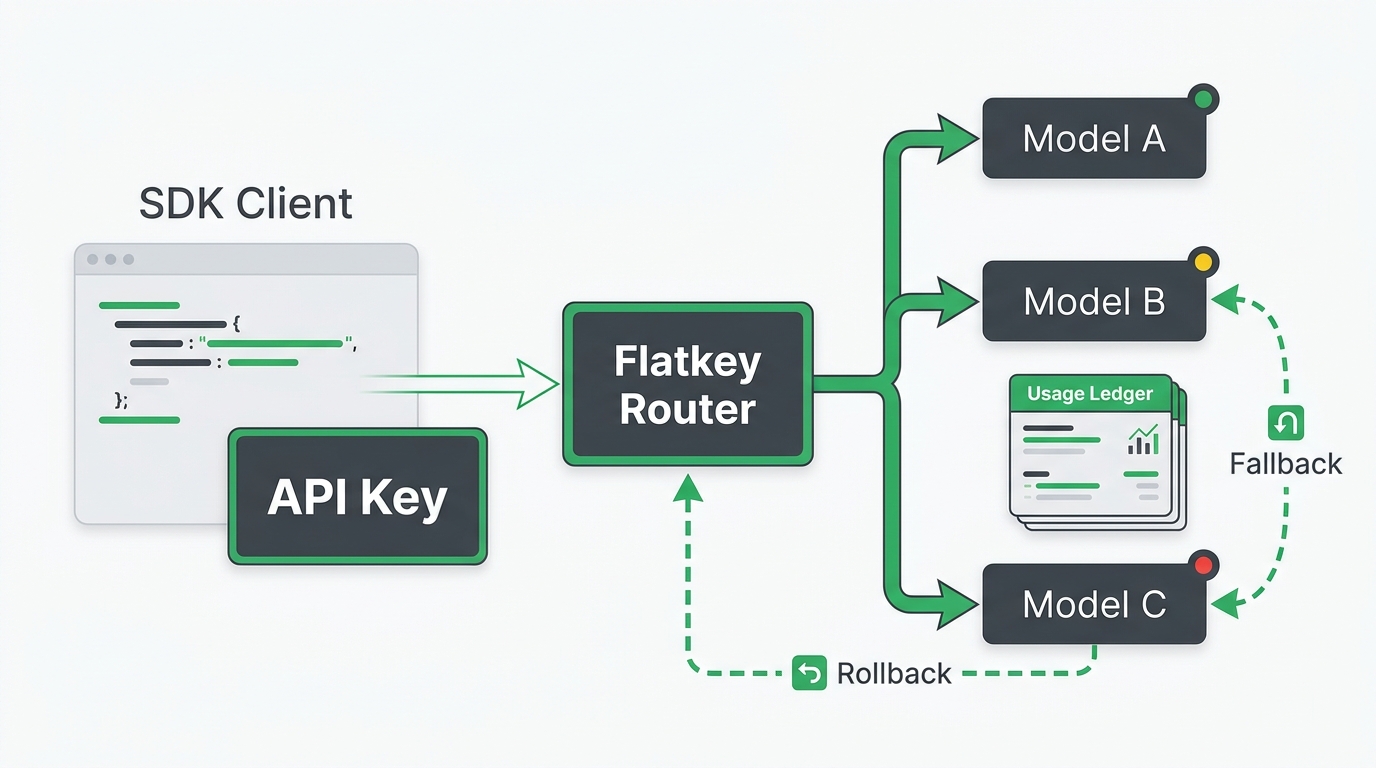
A one API key multiple AI models setup sounds like a small credential change. In practice, it is a production migration. The key may be unified, but your application still depends on the right base URL, SDK option, model alias, endpoint family, response shape, streaming behavior, usage record, quota rule, billing proof, and rollback path.
This guide was checked on July 7, 2026 Asia/Shanghai against Flatkey's public home page, pricing page, model directory, live pricing API, and current OpenAI SDK and documentation references. Moving to one API key multiple AI models should reduce provider-account work only after these checks pass. Do not retire direct provider access, update procurement records, or send production traffic until your own key, model row, logs, and rollback have been tested.
Quick Answer: What To Check Before You Switch
The fastest safe path is not "change the API key and ship." The safer path is a narrow proof run: choose one workflow, point it at the new gateway base URL, call one approved model, inspect the response, trace usage and cost, test one quota boundary, document fallback behavior, and keep the old provider path ready until the evidence is clean.
| Migration Area | What To Verify | Evidence To Capture | Rollback Trigger |
|---|---|---|---|
| Base URL and SDK | The client uses the gateway base URL, not the default provider URL. | Config diff, environment variables, and a successful test request. | SDK cannot route, auth fails, or endpoint path differs from the workflow. |
| Model aliases | Requested model, served model, provider, and endpoint family are understood. | Pricing/model row, request log, and response metadata where available. | The alias maps to the wrong capability, modality, price unit, or status. |
| Feature compatibility | Streaming, tools, JSON, images, video, or long context behave as needed. | Normal request, streaming request, tool request, and malformed request traces. | Response shape breaks parsers or a required feature is not supported. |
| Usage and billing | Usage units, balance impact, and invoice path are explainable. | Request log, usage row, cost record, and finance owner approval. | Finance cannot reconcile the request or the cost basis is unclear. |
| Quotas and access | Limits protect the workflow without blocking expected traffic. | Quota test, blocked-request log, key owner, and exception process. | Quota errors are opaque, unlogged, or impossible to distinguish from provider limits. |
| Rollback | The team can return to direct provider access or pin a known route quickly. | Rollback environment variables, owner, expected time, and smoke-test command. | Latency, error rate, cost, or response quality deviates from the acceptance range. |
one API key multiple AI models migration checklist
Use this one API key multiple AI models checklist before changing production traffic. It is intentionally operational: each row asks for evidence a developer, platform owner, finance reviewer, or procurement reviewer can inspect later.
| Check | Developer Proof | Operations Or Finance Proof |
|---|---|---|
| Provider-account reduction | List which direct provider accounts and keys are no longer needed for the pilot workflow. | Confirm who owns the gateway balance, invoice, support path, and approval process. |
| Base URL replacement | Point the SDK to https://router.flatkey.ai/v1 for OpenAI-compatible calls. |
Record the app, environment, secret name, and change owner. |
| Endpoint family | Confirm whether the workflow uses chat completions, responses, messages, image generation, or video. | Match that endpoint family to the current model/pricing row on pricing. |
| Response shape | Compare status, output content, tool calls, stream events, usage fields, and error body. | Attach the accepted response sample to the migration ticket. |
| Usage proof | Run a request with a unique test prompt or metadata value where supported. | Find the matching usage or billing row and confirm the cost basis. |
| Quota proof | Apply a small non-production limit and trigger it deliberately. | Confirm the log explains whether the block came from app key, team budget, balance, gateway, or provider limit. |
| Rollback proof | Switch one environment back to the old provider key and base URL. | Confirm rollback ownership, expected time, and approval conditions. |
Start With Account Reduction, Not Just Code
A one API key multiple AI models migration should have a clear account map. Which provider accounts are being replaced? Which ones remain for emergency rollback, special models, committed spend, data-region rules, or procurement reasons? Which team owns the new gateway key?
Flatkey's current public pages support the managed one-key use case: the home page presents Flatkey as one API gateway for production AI teams, says teams can get one API key for connected AI models, and describes one place for access, pricing, and control. The pricing page says self-serve plans are prepaid top-ups, balance is consumed when API requests use models, and one balance can route across GPT, Claude, Gemini, DeepSeek, image, audio, and video models through one OpenAI-compatible gateway.
That does not mean every direct provider account should disappear on day one. Keep provider access available until you have request logs, usage proof, cost proof, and rollback proof for each workflow. The business win is fewer unmanaged keys and cleaner billing, not a risky big-bang credential replacement.
Base URL And SDK Checks
Most teams start the one API key multiple AI models switch by changing two values: the API key and the base URL. The current OpenAI Python SDK exposes a base_url client option and also reads OPENAI_BASE_URL. The current OpenAI JavaScript/TypeScript client exposes baseURL and also reads OPENAI_BASE_URL. OpenAI's current documentation also shows OpenAI SDK requests going through alternate OpenAI-compatible endpoints in provider-specific flows.
For Flatkey, use these as templates only until your account key and chosen model have been tested:
from openai import OpenAI

client = OpenAI(
    api_key=os.environ["FLATKEY_API_KEY"],
    base_url="https://router.flatkey.ai/v1",
)

response = client.chat.completions.create(
    model="your-approved-model",
    messages=[{"role": "user", "content": "Return one sentence for a migration smoke test."}],
)

print(response.choices[0].message.content)
import OpenAI from "openai";

const client = new OpenAI({
  apiKey: process.env.FLATKEY_API_KEY,
  baseURL: "https://router.flatkey.ai/v1",
});

const response = await client.chat.completions.create({
  model: "your-approved-model",
  messages: [{ role: "user", content: "Return one sentence for a migration smoke test." }],
});

console.log(response.choices[0]?.message?.content);
Your first acceptance check is simple: the request should authenticate, route through the intended endpoint family, return the expected response shape, and appear in usage evidence. If any of those fail, do not continue with a broader rollout.
Model Alias And Endpoint Family Checks
A one API key multiple AI models setup can hide complexity behind a single credential. The model alias still matters. A chat workflow, image workflow, video workflow, Anthropic Messages workflow, and Gemini workflow may use different endpoint families, request fields, response shapes, price units, and support boundaries.
Flatkey's live pricing API checked for this article returned success: true, pricing version a42d372ccf0b5dd13ecf71203521f9d2, 45 model rows, 48 vendor records, and supported endpoint mappings for /v1/chat/completions, /v1/messages, /v1beta/models/{model}:generateContent, /v1/images/generations, and /v1/videos. Treat that as point-in-time proof of the public catalog shape, not a promise that every model row is enabled for your account or permanent for production.
Before rollout, capture this model record:
| Field | Example Record |
|---|---|
| Requested alias | The exact model string in application config. |
| Endpoint family | Chat completions, responses, messages, image generation, video, or provider-native path. |
| Capability | Text, vision, tool use, structured output, image, audio, video, or embedding. |
| Status | Current row state, availability note, and date checked. |
| Cost basis | Input tokens, output tokens, cache, image unit, video second, or request unit. |
| Fallback | Allowed backup route, disabled fallback, or manual rollback only. |
Usage, Quota, And Billing Proof
The biggest operational mistake in a one API key multiple AI models migration is treating a successful response as the finish line. A request that works but cannot be reconciled is not production-ready. Finance needs to know which balance, invoice, team, or customer absorbed the request. Platform owners need to know which limit will stop runaway usage.
Flatkey's current pricing page says usage is metered by model, token type, and request logs so teams can review spend and control cost. The same page describes prepaid top-ups, one balance across top models, usage analytics and cost controls, enterprise invoicing, procurement support, and one invoice across providers. Use those pages as the starting point, then verify the exact dashboard rows from your own pilot traffic.
Run five proof requests before promotion:
- Normal request: expected model, expected output, expected usage row.
- Streaming request: if your app streams, verify event shape and final usage accounting.
- Tool or JSON request: if your workflow depends on tools or schema output, verify the parser path.
- Quota request: deliberately hit a small test quota and inspect the error and log.
- Rollback request: run the same prompt through the old provider path and confirm the rollback command still works.
Cutover Workflow For A Controlled Switch
A one API key multiple AI models cutover should be staged by workflow, not by company. Start with one non-critical path, then promote only after logs and billing evidence match the acceptance criteria.
- Freeze the baseline: save the old provider key name, provider base URL, model string, average latency range, error budget, and expected output contract.
- Create the Flatkey route: generate a scoped key, choose the model row, record the endpoint family, and store the base URL in configuration.
- Run a local smoke test: one request from a developer machine or staging shell, with no production traffic.
- Run staging traffic: replay representative prompts, including edge cases, streaming, tool calls, and known invalid inputs.
- Review evidence: compare response shape, usage units, request logs, quota behavior, cost basis, and rollback proof.
- Promote gradually: move a small production percentage, monitor, then increase only if acceptance metrics stay inside range.
- Keep rollback live: leave the old provider path configured until the owner signs off on removal.
For a broader base URL migration playbook, use OpenAI-compatible API migration. For the first Flatkey chat-completion smoke test, use Flatkey quickstart chat completion router.
Rollback Table
The rollback rule should be written before the migration starts. A one API key multiple AI models rollout touches product behavior and billing evidence, so rollback should not depend on a last-minute debate.
| Signal | Threshold To Define | Rollback Action | Owner |
|---|---|---|---|
| Authentication failures | Number or percentage of requests failing with credential errors. | Restore old provider key and base URL for the workflow. | Platform owner |
| Response parser failures | Schema, tool-call, or stream parser errors above baseline. | Pin the old model route while investigating response differences. | Application owner |
| Usage evidence gap | Requests cannot be matched to usage or billing rows. | Pause rollout and keep only staging tests active. | Finance and operations |
| Quota ambiguity | Blocked requests do not identify which limit failed. | Disable production migration until quota ownership is clear. | Platform owner |
| Cost variance | Cost per accepted output exceeds the approved test range. | Return traffic to the prior route and review model alias or price unit. | Finance owner |
Where Flatkey Fits
Flatkey is a practical fit when the goal is a one API key multiple AI models path with fewer separate provider applications, one OpenAI-compatible base URL, prepaid balance, usage analytics, request logs, quota controls, and clearer billing review. It is especially relevant when developers want a small SDK migration and finance wants less fragmented provider spend.
The right next step is not a blind switch. Open Flatkey pricing, confirm the current model row and endpoint family, then get a key and run the checklist above with one workflow. After the evidence is clean, expand by model, team, and environment.
FAQ
Can one API key multiple AI models work with existing SDKs?
Yes, when the SDK supports a configurable base URL and the gateway supports the endpoint family your workflow uses. For OpenAI-compatible calls, test the API key, base URL, model alias, response shape, streaming path, and usage evidence before production rollout.
Does one AI API key mean we can delete every provider account?
No. A gateway can reduce separate provider-account work, but some teams keep direct provider accounts for rollback, committed spend, data-region requirements, support relationships, or models that are not part of a gateway route. Remove old keys only after the migration proof is complete.
What is the most important proof before switching?
The most important proof is a traceable request: the application call, requested model, served route, status, response shape, usage unit, billing impact, quota behavior, and rollback path should all be visible to the right owner.
Should we migrate every model at once?
No. Start with one production-like workflow and one approved model. After the evidence passes, repeat the same checklist for each model family, modality, and endpoint pattern.
What should finance review in a multi-model API key migration?
Finance should review who owns the balance or invoice, how request usage is metered, whether logs show model and unit details, how quotas prevent runaway spend, and how migrated traffic maps to teams, environments, or customers.
How do I start with Flatkey?
Review the current pricing and model rows, get a key, point one OpenAI-compatible staging workflow at https://router.flatkey.ai/v1, and run the migration checklist before expanding production traffic.
Get a key: use Flatkey for a scoped one API key multiple AI models proof run, then promote only after base URL, model alias, usage, quota, billing, and rollback evidence are clean.