The Seedance vs Veo API: Video Generation Routing and Pricing Review decision is not a beauty contest between demos. For a production media workflow, the useful question is narrower: which route can produce the clip format you need, how is the job billed, what controls are available, and where can engineering and finance verify the result after launch?
A practical Seedance vs Veo API comparison starts with output contract and pricing unit. Seedance 2.5 is useful when you need longer short-form clips, heavier reference-media control, and ByteDance-style creative behavior. Veo 3.1 is useful when you need Google's native-audio video workflow, 720p/1080p/4k options, reference-image controls, first/last-frame generation, or extension from a prior Veo clip. Flatkey is useful when the hard part is not one prompt, but one gateway route, one billing review surface, and repeatable model switching through /v1/videos.
This Seedance vs Veo API: Video Generation Routing and Pricing Review was refreshed on September 14, 2026. It uses current Flatkey model pages, Google Gemini API documentation, Google pricing, BytePlus Seedance product material, and BytePlus ModelArk video-generation API documentation. Treat every price below as a routing snapshot, not a contract. Always re-check the live model row and your account terms before moving production traffic.
Seedance vs Veo API: Video Generation Routing and Pricing Review quick answer
| Route | Prefer it when | Current route/pricing checks |
|---|---|---|
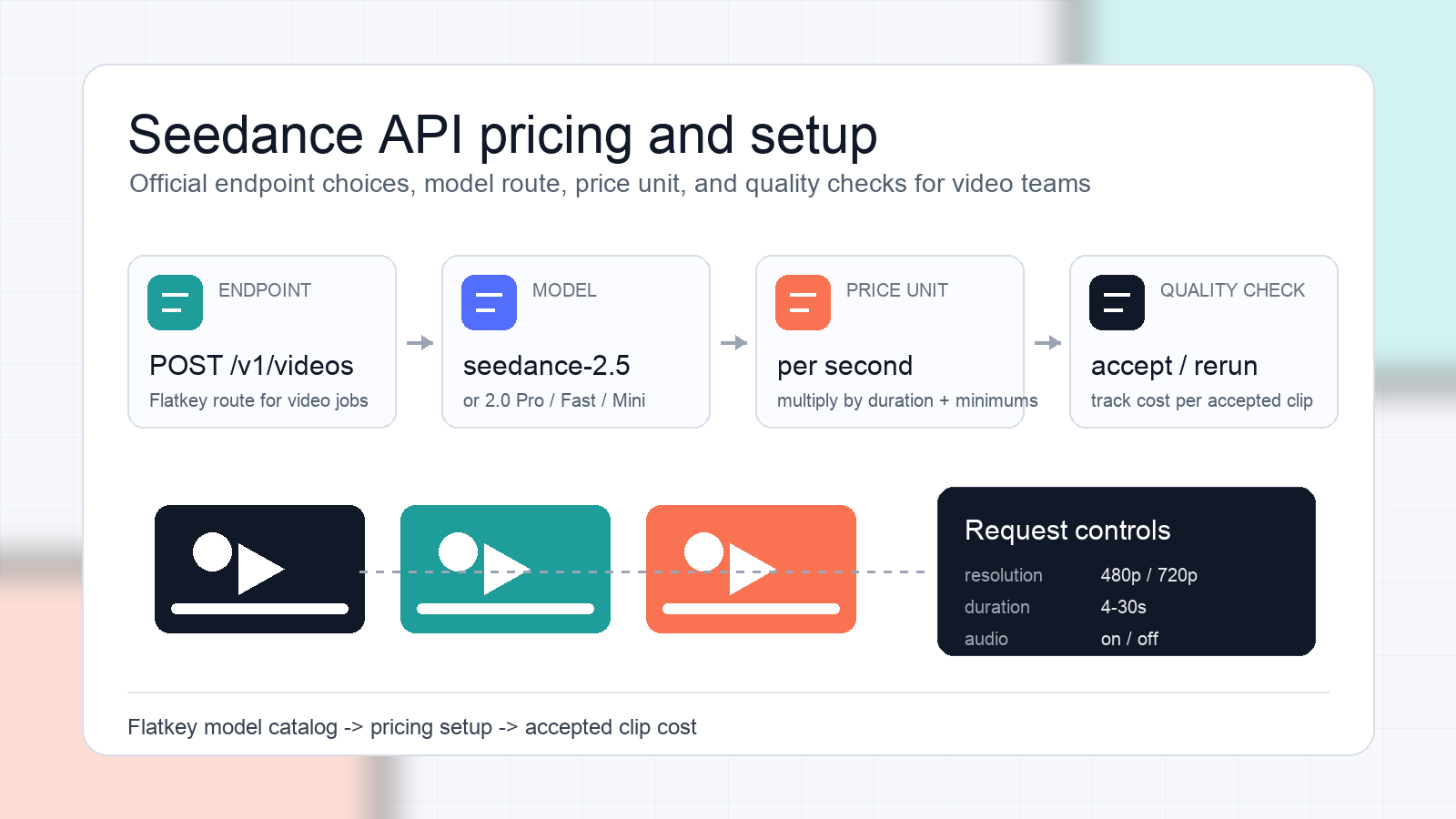
| Seedance 2.5 through Flatkey | You need 4-30 second requests, text-to-video, image-to-video, reference-to-video, optional audio, and stronger reference-media workflows. | Flatkey's Seedance 2.5 page routes through POST /v1/videos, shows 480p and 720p per-second pricing, and exposes reference image, video, and audio inputs. |
| Seedance 2.0 or 2.0 Pro through Flatkey | You need an older Seedance route for shorter 5s/10s clips and lower displayed per-second route cost. | Flatkey shows seedance-2.0 and seedance-2.0-pro through POST /v1/videos, with 720p/1080p options and a displayed Flatkey price from $0.037181 per second. |
| Veo 3.1 Fast through Flatkey | You need a lower-cost Veo lane for 4s/6s/8s clips where Fast quality is acceptable. | Flatkey's Veo 3.1 Fast page routes through POST /v1/videos, accepts size and duration, and shows a displayed Flatkey price from $0.080 per second. |
| Veo 3.1 Standard through Flatkey | You need the default Veo 3.1 behavior and can afford the higher route. | Flatkey's Veo 3.1 Standard page routes through POST /v1/videos and shows a displayed Flatkey price from $0.320 per second. |
| Direct Gemini API Veo | You need the native Gemini API operation model, Google account controls, or exact Google pricing/limits. | Google's pricing page lists Veo 3.1 Standard, Fast, and Lite paid-tier prices per second; Google's Veo docs describe long-running operations, polling, durations, resolution limits, and preview status. |
| Direct BytePlus ModelArk Seedance | You need BytePlus account controls, native ModelArk workflow, or commercial terms outside Flatkey. | BytePlus positions Seedance 2.5 as fully available and describes 4-30 second videos, 480p/720p, multimodal inputs, and per-token pricing offsets. |
The short version: use Seedance when the creative workflow depends on Seedance behavior or 30-second/referenced-media control; use Veo when the workflow depends on native audio, 1080p/4k, extension, or Google account controls; use Flatkey when your team needs to operationalize both model families behind one route review and one usage ledger.
Pricing units are the first routing risk
The biggest Seedance vs Veo API mistake is comparing a "from" price on one model page with a different resolution, duration, or direct-provider tier on another page. Normalize every quote to a job before choosing a default route.
For an 8-second planning estimate, the current snapshot looks like this:
| Model route | Displayed billing unit | Example normalized estimate | Important caveat |
|---|---|---|---|
| Flatkey Seedance 2.5 480p | $0.140 per second on the model page | 8s x $0.140 = $1.12 | Seedance 2.5 supports 4-30 second requests; final settings matter. |
| Flatkey Seedance 2.5 720p | $0.314 per second on the model page | 8s x $0.314 = $2.51 | The model directory card and detail page can show different "from" views; use the detail page before approval. |
| Flatkey Seedance 2.0 / 2.0 Pro | from $0.037181 per second | 5s = about $0.19; 10s = about $0.37 | The visible Flatkey control set offers 5s and 10s durations for these older routes, not a generic 8s option. |
| Flatkey Veo 3.1 Fast | from $0.080 per second | 8s x $0.080 = $0.64 | The Flatkey page shows a "from" route price; validate size and account route before launch. |
| Flatkey Veo 3.1 Standard | from $0.320 per second | 8s x $0.320 = $2.56 | The Flatkey page shows a "from" route price; validate size and account route before launch. |
| Direct Google Veo 3.1 Fast | $0.10/s 720p, $0.12/s 1080p, $0.30/s 4k | 8s 720p = $0.80; 8s 1080p = $0.96; 8s 4k = $2.40 | Google's page says free tier is not available for Veo and prices are paid-tier USD per second. |
| Direct Google Veo 3.1 Standard | $0.40/s 720p or 1080p, $0.60/s 4k | 8s 720p/1080p = $3.20; 8s 4k = $4.80 | Google says you are charged only if the video is successfully generated. |
| Direct Google Veo 3.1 Lite | $0.05/s 720p, $0.08/s 1080p, no 4k | 8s 720p = $0.40; 8s 1080p = $0.64 | Google lists Lite in the direct Gemini API pricing table; this refresh did not verify a live Flatkey Lite model page. |
This is why the Seedance vs Veo API: Video Generation Routing and Pricing Review should approve a route class, not just a vendor name. A 30-second Seedance 2.5 720p generation, a 10-second Seedance 2.0 job, an 8-second Veo 3.1 Fast clip, and an 8-second Veo 3.1 Standard 4k clip are different buying decisions.
When the Seedance vs Veo API: Video Generation Routing and Pricing Review points to Seedance
Choose Seedance first when the workflow is built around reference-rich social video production, product shots, ad variations, or longer short-form clips. BytePlus says Dreamina Seedance 2.5 supports 30-second long narrative output, multi-reference assets, powerful editing, 4-30 second video duration, 480p/720p resolution options, and multimodal video generation. Its product post also describes up to 50 multimodal references for a single clip, including images, video, audio, and text.
On Flatkey, the current Seedance 2.5 page describes text-to-video and image-to-video workflows, reference media, first/last-frame controls, 4-30 second requests, and optional audio through /v1/videos. The route UI exposes text-to-video, image-to-video, reference-to-video, up to 30 reference images, up to 10 reference videos, up to 10 reference audios, 480p/720p, 4-30 second durations, and a generate-audio toggle.
That makes Seedance a strong default candidate when your product needs:
- Longer generated clips than Veo's common 4s/6s/8s control set.
- More reference assets per job.
- Iterative creator workflows where prompts, images, short videos, and audio assets all steer the output.
- A route that product managers can evaluate by accepted clip, not just by one video sample.
The main caveat is pricing normalization. Seedance pricing can vary by resolution, input mode, plan, and route. Do not route all video jobs to Seedance 2.5 simply because one "from" price looked attractive. Lock the exact duration, resolution, reference mode, and acceptance criteria first.
When the Seedance vs Veo API: Video Generation Routing and Pricing Review points to Veo
Choose Veo first when the workload needs Google's video-generation controls or when your team already operates Gemini API workflows. Google's Veo documentation says Veo 3.1 generates 8-second videos with natively generated audio and supports 720p, 1080p, and 4k. The same docs describe landscape and portrait videos, video extension, first-and-last-frame generation, and up to three reference images for style and content guidance.
The Gemini API workflow is asynchronous. A request starts a long-running job and returns an operation object, then the client polls until done is true and downloads the generated video. That matters for queue design, retries, timeouts, and user-facing progress states. A route that looks simple in a demo can still need a durable job table in production.
Veo is a better candidate when your product needs:
- Native audio generation tightly coupled with the video.
- 1080p or 4k output where supported.
- 4s/6s/8s duration control rather than 30-second clips.
- First/last-frame interpolation or extension from a prior generated video.
- Direct Google account governance or Gemini API operation semantics.
The main caveat is preview behavior. Google's current Veo docs mark Veo 3.1, Veo 3.1 Fast, and Veo 3.1 Lite as Preview. That does not mean unusable, but it does mean product teams should freeze route assumptions only after testing the exact model code, region/account access, latency, safety blocks, and generated-video retention behavior.
Flatkey route checks before production traffic
Flatkey is not a substitute for provider verification. It is the layer that makes route verification repeatable across teams, which is the operating point of this Seedance vs Veo API: Video Generation Routing and Pricing Review.
Before you approve a Seedance or Veo route through Flatkey, check the same fields every time:
| Check | What to verify |
|---|---|
| Model ID | seedance-2.5, seedance-2.0, seedance-2.0-pro, veo-3.1-fast-generate-preview, or veo-3.1-generate-preview. |
| Endpoint | The model page should show POST /v1/videos or the endpoint family your client is wired to call. |
| Billing unit | Confirm whether the current page bills per second, by resolution, or with a "from" price. |
| Duration set | Seedance 2.5 currently exposes 4-30 second options; Veo routes expose 4s/6s/8s options. |
| Resolution set | Seedance and Veo expose different resolution choices; do not hide this behind one quality flag. |
| Reference inputs | Seedance 2.5 exposes larger reference counts in Flatkey UI; Veo docs describe up to three reference images. |
| Audio behavior | Seedance exposes optional audio on the Flatkey page; Veo 3.1 docs describe native audio as always on for listed Veo 3.1 variants. |
| Operation model | Direct Gemini API Veo is long-running and poll-based; Flatkey route behavior should be tested in your own client. |
| Logging | Capture request ID, model ID, duration, resolution, accepted/rejected state, retry count, and final billed amount. |
| Rollback | Keep an approved fallback policy for transient failures, blocked generations, and budget caps. |
This Seedance vs Veo API: Video Generation Routing and Pricing Review is intentionally operational. The route that wins a prompt test can still lose in production if it has the wrong retry behavior, unclear billing, weak logs, or no rollback plan.
A copyable video route scorecard
Use this scorecard before sending creator traffic to production:
| Criterion | Seedance route evidence | Veo route evidence | Decision rule |
|---|---|---|---|
| Accepted clip rate | How many clips pass brand, motion, face/product consistency, and moderation review? | How many clips pass the same checks? | Default to the route with lower accepted-clip cost, not lower raw per-second price. |
| Duration fit | Does the workflow need 4-30s generation or 5s/10s older routes? | Does 4s/6s/8s cover the product promise? | Do not choose a route that forces awkward editing after generation. |
| Resolution fit | Are 480p/720p/1080p options sufficient for the channel? | Is 720p/1080p/4k needed? | Route by publishing destination, not by a single global setting. |
| Reference control | How many images, videos, or audio references are required? | Are up to three image references enough? | Route reference-heavy creator jobs separately from simple prompt-only clips. |
| Audio | Is optional audio enough, or will audio be added downstream? | Is native generated audio required? | Treat audio as a product requirement, not a bonus. |
| Latency and queue | What are p50/p95 job times for your prompt set? | What are p50/p95 job times for your prompt set? | Compare completed jobs under load, not one-off demo calls. |
| Finance review | Can finance replay the model, duration, unit price, and billed amount? | Can finance replay the model, duration, unit price, and billed amount? | No route is approved without usage evidence. |
For more route-policy context, pair this article with Flatkey's multimodal agent routing playbook and the image generation API practical guide. For Seedance-specific evaluation criteria, use the Seedance API evaluation framework and the Seedance API for text-to-video product teams guide.
Implementation workflow
- Pick three real job types: product reveal, creator UGC variation, and narrative scene.
- Freeze prompt, reference media, duration, resolution, aspect ratio, and audio requirement for each job.
- Run each job on the candidate Seedance and Veo routes with the same review rubric.
- Calculate accepted-clip cost: total billed cost divided by clips that pass review.
- Record blocked, failed, rejected, retried, and manually edited jobs separately.
- Approve defaults by workflow class: short native-audio clips, longer reference-heavy clips, and lower-cost draft clips may need different defaults.
- Add budget caps per environment, tenant, and creator workspace.
- Keep one fallback route per class, but only when the fallback preserves the same output contract.
- Review Flatkey model pages and direct-provider pricing before every launch window.
Flatkey's API quickstart is the right next internal link if the team already knows the route and needs to wire the call. The model directory and pricing page should be the last checks before approval.
FAQ
Is Seedance cheaper than Veo?
Not universally. Seedance vs Veo API pricing depends on route, duration, resolution, account terms, and whether you measure raw generations or accepted clips. In the current snapshot, Flatkey shows lower "from" prices for some Veo and older Seedance routes, while Seedance 2.5 has route-specific 480p and 720p prices on its detail page. Normalize by job before deciding.
Does Veo support longer clips than Seedance?
No for the current route set covered here. Google's Veo 3.1 docs describe 4s, 6s, and 8s generated-video durations, with 8s required for some higher-resolution or reference-image workflows. BytePlus and Flatkey Seedance 2.5 material describe 4-30 second requests.
Does Seedance support reference media?
Yes. BytePlus describes Seedance 2.5 as supporting multimodal references, and the current Flatkey Seedance 2.5 page exposes reference images, reference videos, and reference audios in the route UI. Verify the exact file constraints and route behavior with your own account before production launch.
Does Veo generate audio?
Yes. Google's Veo 3.1 documentation describes video with natively generated audio and lists audio as always on for Veo 3.1, Veo 3.1 Fast, and Veo 3.1 Lite. Google also notes that audio processing issues can block video generation and that blocked generations are not charged.
What is the safest default after this Seedance vs Veo API: Video Generation Routing and Pricing Review?
The safest default is not one model. Use Seedance 2.5 for longer reference-heavy creator jobs, Veo 3.1 Fast or Standard for short native-audio/high-resolution Google workflows, and older Seedance routes only when their shorter duration set and output quality pass review. Keep the decision in a route scorecard so product, engineering, and finance can review the same evidence.
Conclusion
The Seedance vs Veo API: Video Generation Routing and Pricing Review should end with a route table, not a winner badge. Seedance and Veo solve overlapping but different video-generation jobs. Normalize every candidate by accepted clip, duration, resolution, reference inputs, audio behavior, route health, and billing readback. Then use Flatkey where a single /v1/videos workflow, model directory, pricing review, and usage evidence make the route easier to operate.