
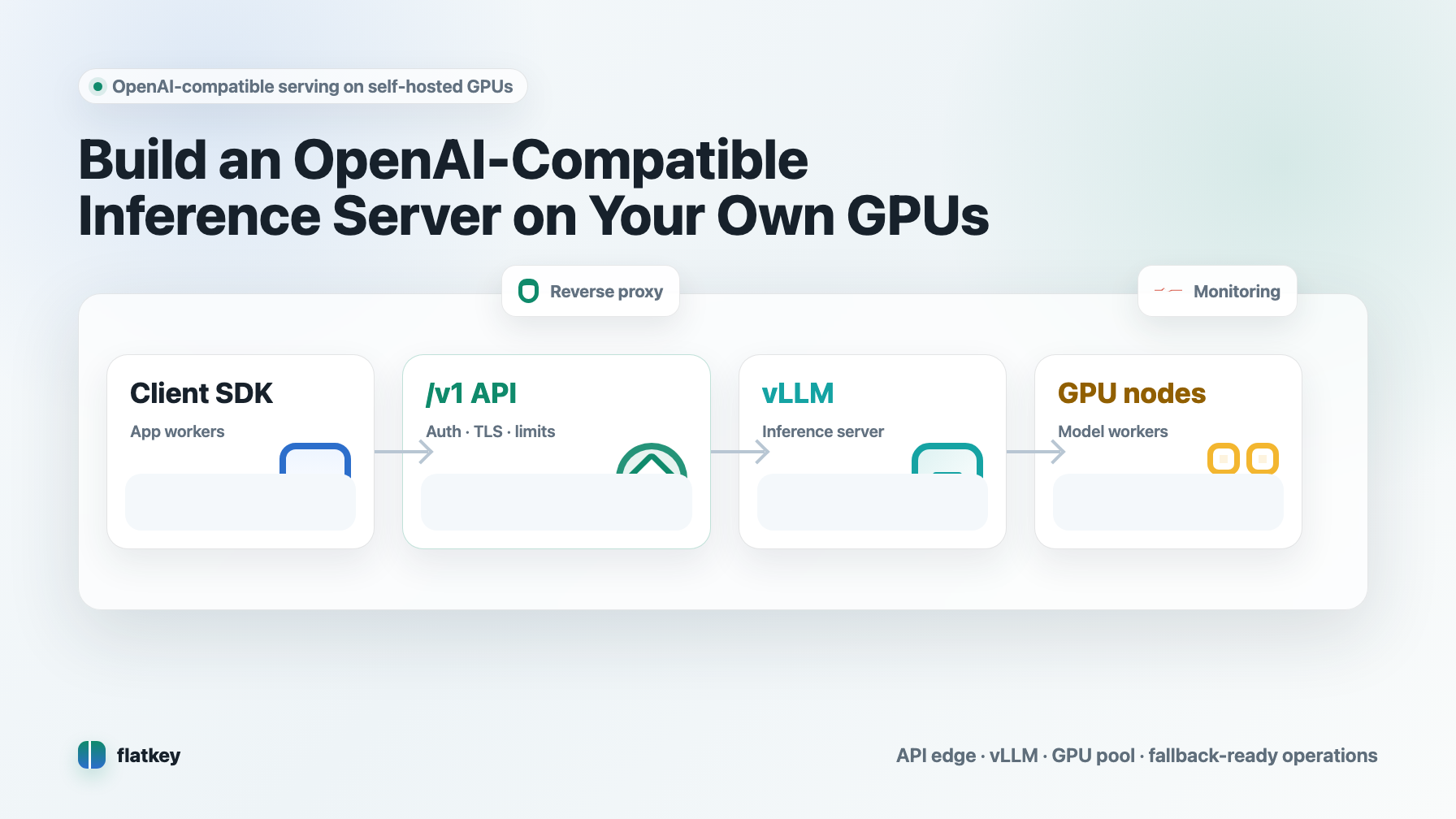
If you already have GPU capacity, an OpenAI-compatible inference server lets your application keep the same client shape while you swap the backend from a hosted model API to your own infrastructure. The usual path is simple in concept: run vLLM or LocalAI on a GPU node, expose a /v1 API, point your SDK base_url at that endpoint, then harden the service for auth, routing, monitoring, and capacity.
This guide focuses on the practical build: how to stand up a vllm inference server openai compatible api, what to test before putting it behind production traffic, and when it is smarter to keep self-hosting as a benchmark while routing most workloads through a managed model API such as Flatkey.
The Quick Answer
For most LLM text workloads, start with vLLM. It provides an OpenAI-compatible HTTP server, supports common OpenAI-style endpoints such as chat completions, completions, embeddings, and model listing depending on the loaded model type, and ships official Docker images for deployment.
A minimal self-hosted stack looks like this:
| Layer | Production choice | Why it matters |
|---|---|---|
| GPU host | H100, H200, B200, A100, L40S, or other supported accelerator | Determines model size, concurrency, context length, and latency ceiling. |
| Container runtime | NVIDIA driver plus NVIDIA Container Toolkit | Lets Docker containers see GPUs through --gpus all. |
| Inference engine | vLLM for high-throughput text serving; LocalAI for broader local OpenAI-compatible use cases | vLLM is the default starting point for serving transformer LLMs on GPUs. |
| API surface | /v1/chat/completions, /v1/completions, /v1/models, and only the extra endpoints your model supports |
Keeps client migration small and prevents false compatibility assumptions. |
| Edge | Nginx, Envoy, Caddy, or a cloud load balancer | Handles TLS, auth, request limits, and routing. |
| Ops | Metrics, logs, GPU telemetry, canaries, and fallback routing | Keeps the server from becoming an invisible outage source. |
Use a vllm inference server openai compatible api when you need direct hardware control, data locality, custom model weights, or predictable high-volume serving economics. Use a gateway/model API baseline when you mainly need reliable outputs and do not want to own GPU utilization, driver drift, model loading, and failover.
Before You Build: Decide If Self-Hosting Is Worth It
Running your own OpenAI-compatible inference server is not automatically cheaper. It can be excellent when your GPUs stay busy and your workload fits the model you host. It can be expensive when utilization is spiky, prompts vary wildly, model quality changes often, or the team spends more time debugging infra than shipping product.
Use this decision table before renting or buying hardware:
| Question | Self-host if the answer is yes | Prefer managed API or gateway if the answer is yes |
|---|---|---|
| Do you have steady traffic? | GPUs can stay warm and highly utilized. | Traffic is bursty, seasonal, or experimental. |
| Do you need custom weights? | You serve a fine-tuned, quantized, or private model. | Public frontier or open-weight hosted models are enough. |
| Is data locality required? | Requests must remain inside your VPC or on-prem network. | Standard API security controls meet the requirement. |
| Can you operate GPU infra? | You already monitor drivers, CUDA, containers, memory, queues, and rollout risk. | You do not want GPU operations to become the product roadmap. |
| Is output quality stable? | One model family is good enough for the workflow. | You need to compare, route, or fail over across many models. |
Flatkey fits the last column as the baseline: one OpenAI-compatible endpoint, one balance, and access to many official models. Even if you build a vllm inference server openai compatible api, keep a model API baseline in your benchmark so you can compare latency, quality, and cost per accepted output rather than only cost per GPU-hour.
Reference Architecture
A production OpenAI-compatible inference server should not expose the model engine directly to the public internet. Put a thin control layer in front of it.
flowchart LR
  A[OpenAI SDK / app workers] --> B[API edge: TLS, auth, rate limits]
  B --> C[OpenAI-compatible /v1 route]
  C --> D[vLLM inference server]
  D --> E[GPU node or GPU pool]
  D --> F[Metrics and logs]
  B --> G[Fallback route: Flatkey or another model API]
The important design choice is separating compatibility from operations. vLLM can speak the OpenAI-style API. Your edge should own authentication, quota, request-size limits, TLS, audit logs, and fallback behavior.
Step 1: Prepare the GPU Host
Start with a clean Linux GPU machine. Confirm the host has:
- A compatible NVIDIA driver for the GPU and CUDA stack you plan to run.
- Docker or another supported container runtime.
- NVIDIA Container Toolkit configured so containers can access GPUs.
- Enough local or network storage for model weights.
- A network path that does not expose the inference port until auth and TLS are in place.
NVIDIA's container toolkit install flow configures Docker with nvidia-ctk runtime configure --runtime=docker, then restarts Docker. After that, a container can be run with GPU access using Docker's GPU flags.
Run these checks before installing the model server:
nvidia-smi
docker run --rm --gpus all nvidia/cuda:12.6.0-base-ubuntu22.04 nvidia-smi
If either command fails, fix the driver/runtime layer first. A vllm inference server openai compatible api cannot be stable when the base GPU runtime is unstable.
Step 2: Start a vLLM Inference Server OpenAI Compatible API
vLLM's official Docker deployment docs identify vllm/vllm-openai as the image for running an OpenAI-compatible server. A practical first run looks like this:
docker run --rm --gpus all \
  --ipc=host \
  -p 8000:8000 \
  -e HUGGING_FACE_HUB_TOKEN="$HUGGING_FACE_HUB_TOKEN" \
  vllm/vllm-openai:latest \
  --model meta-llama/Llama-3.1-8B-Instruct \
  --host 0.0.0.0 \
  --port 8000 \
  --served-model-name llama-3.1-8b-instruct
For a private model, replace the model id with your own repository or local path. For production, pin image tags and model revisions rather than deploying latest.
Then test model listing:
curl http://localhost:8000/v1/models
And test chat completions:
curl http://localhost:8000/v1/chat/completions \
  -H "Content-Type: application/json" \
  -d '{
    "model": "llama-3.1-8b-instruct",
    "messages": [
      {"role": "system", "content": "You are a concise assistant."},
      {"role": "user", "content": "Reply with one sentence about self-hosted inference."}
    ],
    "temperature": 0.2
  }'
That is the first working milestone: a local vllm inference server openai compatible api that your application can call with the same request shape it already uses for OpenAI-style chat.
Step 3: Point Your Existing SDK at the Local Endpoint
Most OpenAI-compatible migration work should happen in configuration, not in application logic. With the Python SDK pattern, set a custom base_url and API key:
from openai import OpenAI

client = OpenAI(
    base_url="http://localhost:8000/v1",
    api_key="local-dev-key",
)

response = client.chat.completions.create(
    model="llama-3.1-8b-instruct",
    messages=[
        {"role": "user", "content": "Give me a deployment checklist."}
    ],
)

print(response.choices[0].message.content)
In production, do not point app workers directly at a raw vLLM process. Point them at your own internal gateway or load balancer:
OPENAI_BASE_URL=https://inference.example.com/v1
OPENAI_API_KEY=<your-internal-service-token>
That gateway can route to vLLM, block unsupported request fields, normalize model aliases, and fail over to Flatkey or another model API when the self-hosted pool is saturated.
Step 4: Know What "OpenAI-Compatible" Does Not Mean
OpenAI-compatible does not mean every endpoint, model behavior, tool call, streaming event, or provider-specific option behaves exactly like OpenAI. It means the server accepts a familiar shape for selected endpoints.
Before you call the migration done, test:
| Compatibility area | What to verify |
|---|---|
| Chat messages | Role handling, system messages, long context, multimodal payloads if used. |
| Streaming | Event format, disconnect behavior, client timeouts, partial output handling. |
| Tools/function calling | Whether the loaded model and server support your tool-call pattern. |
| Embeddings | Whether the loaded model is actually an embedding model. |
| Error codes | 400, 401, 404, 408, 429, 500, 503 behavior at the edge and engine. |
| Request parameters | Temperature, max tokens, top-p, stop sequences, extra provider parameters. |
| Token accounting | Prompt/output token counts and cost attribution. |
The safest pattern is to maintain a compatibility test suite. Send a fixed set of real application prompts to OpenAI, Flatkey, and your vllm inference server openai compatible api. Compare latency, schema validity, refusal behavior, output quality, and accepted-output rate.
Step 5: Size GPU Memory for the Model and Traffic
The main serving failure mode is not "the server starts slowly." It is "the server starts, then falls over under real context length and concurrency."
Plan memory around:
- Model weights.
- KV cache for context and concurrent sequences.
- Runtime overhead.
- Fragmentation and headroom.
- Tensor parallelism when a model does not fit on one GPU.
- Quantization tradeoffs if you use lower precision.
For a deeper worksheet, use the Flatkey guide to LLM GPU memory requirements. For cluster-level planning, pair this with GPU cluster architecture and GPU cluster TCO style analysis.
A rough acceptance rule:
usable_capacity = model_fit + target_context + target_concurrency + 20-30% headroom
If you cannot keep the headroom, reduce context length, reduce concurrency, use a smaller model, split across GPUs, or route overflow traffic away from the self-hosted pool.
Step 6: Add an API Edge Before Production
The raw vLLM server is not your full production control plane. Put an edge in front of it and make the edge responsible for:
- TLS termination.
- Service-to-service authentication.
- Request body limits.
- Per-team or per-app rate limits.
- Model alias mapping.
- Structured request logs.
- Timeout and retry budgets.
- Canary routing.
- Fallback routing.
Example Nginx shape:
server {
  listen 443 ssl;
  server_name inference.example.com;

  client_max_body_size 4m;

  location /v1/ {
    proxy_pass http://vllm_backend:8000/v1/;
    proxy_http_version 1.1;
    proxy_set_header Host $host;
    proxy_set_header X-Request-Id $request_id;
    proxy_read_timeout 120s;
  }
}
That is only a starting point. Production teams should add authentication, mTLS or private networking, request logging policies, and explicit limits around prompt size and output length.
Step 7: Measure Accepted Output, Not Just Tokens Per Second
GPU serving dashboards often over-index on throughput. Tokens per second matters, but product teams usually care about accepted outputs: responses that are fast enough, valid enough, and good enough to ship to the user or downstream workflow.
Track:
| Metric | Why it matters |
|---|---|
| Time to first token | User-perceived latency for streaming apps. |
| End-to-end latency | Queue time plus generation time. |
| Queue depth | Early warning that the GPU pool is saturated. |
| GPU memory utilization | Whether context/concurrency assumptions are realistic. |
| Error rate by model alias | Detects model-specific failures. |
| Output schema pass rate | Critical for agents, extraction, and tool workflows. |
| Accepted-output rate | Combines quality, latency, and validity. |
| Fallback rate | Shows when the self-hosted pool is not enough. |
Then calculate cost per accepted output:
cost_per_accepted_output =
  (gpu_cost + storage + network + ops_time + fallback_api_cost)
  / accepted_outputs
This is where a vllm inference server openai compatible api gets an honest comparison against managed APIs. If the local GPU is cheaper per raw token but worse on retries, failures, or operator time, the accepted-output cost may be higher than expected.
Step 8: Add Fallback Instead of Treating the GPU Box as a Single Point of Failure
Your application should not care whether the response comes from self-hosted vLLM, Flatkey, or another model route. It should ask for a model alias and receive a response or a controlled failure.
Use routing rules like:
| Condition | Route |
|---|---|
| Normal traffic, GPU healthy | Self-hosted vLLM. |
| GPU queue above threshold | Spill over to Flatkey model API. |
| Model loading or restart | Route all traffic to Flatkey until warm. |
| Schema failures spike | Canary back to managed API. |
| Experimental prompt eval | Run against both local and managed model for comparison. |
This design lets the team keep the economics and control of self-hosting without tying product availability to one inference server.
vLLM vs LocalAI for OpenAI-Compatible Local Inference
vLLM and LocalAI both show up in searches for an OpenAI-compatible inference server, but they fit different jobs.
| Option | Best fit | Watch out for |
|---|---|---|
| vLLM | High-throughput LLM serving on GPU, especially transformer text models. | Compatibility depends on model type and endpoint; production hardening still sits around it. |
| LocalAI | Local OpenAI-compatible API across multiple local model backends and modalities. | Throughput and GPU behavior depend heavily on backend, model, and hardware. |
| Flatkey | Managed OpenAI-compatible model API baseline across many official models. | You give up direct control of the serving engine but avoid owning GPU operations. |
For this article's target workload, start with a vllm inference server openai compatible api. Evaluate LocalAI when your goal is broader local experimentation or a single local API over multiple backends rather than maximum GPU serving throughput for one LLM family.
Production Checklist
Use this before you route real users:
- [ ] GPU driver and container runtime verified with
nvidia-smiinside a container. - [ ] vLLM image tag and model revision pinned.
- [ ] Model alias stable and documented.
- [ ]
/v1/modelsand/v1/chat/completionstested through the final edge URL. - [ ] Streaming tested with client disconnects.
- [ ] Long-context and concurrency tests run at expected production shape.
- [ ] Auth added at the edge; raw vLLM port not public.
- [ ] Request body size, max output tokens, and timeouts enforced.
- [ ] Logs exclude sensitive prompt data unless explicitly approved.
- [ ] Metrics capture latency, queueing, GPU memory, error rates, and accepted-output rate.
- [ ] Fallback route configured for saturation and incidents.
- [ ] Managed API baseline measured against the same prompts.
- [ ] Rollback plan tested.
Common Mistakes
The biggest mistake is treating the first successful curl as the end of the work. It is only the start.
Other common failures:
- Running
latestimages in production without pinning versions. - Exposing the raw inference port to the internet.
- Assuming every OpenAI request parameter is supported.
- Benchmarking one short prompt and calling the result "production ready."
- Ignoring KV cache growth from real context length.
- Forgetting that model load time affects deploys and recovery.
- Measuring GPU-hour cost without operator time, retries, and quality failures.
- Skipping fallback because the local endpoint is "OpenAI-compatible."
A production vllm inference server openai compatible api is useful infrastructure. It is not magic compatibility, and it is not a replacement for operational discipline.
When to Use Flatkey Alongside Your Own GPUs
Flatkey is most useful in this architecture as the managed model/API baseline and fallback path. Keep your application on an OpenAI-compatible client shape, then route some traffic to your local GPU pool and some to Flatkey.
That gives you:
- A way to compare self-hosted output quality against hosted models.
- Overflow capacity when local GPUs are saturated.
- A fallback route during driver, model, or deployment incidents.
- Access to other model families without adding more provider keys.
- A cleaner path back to managed APIs if a self-hosted model underperforms.
The decision is not "own GPUs or use APIs." For many teams, the durable setup is both: own the GPU path where it gives control or cost advantage, and keep a managed route for resilience and model choice.
FAQ
What is an OpenAI-compatible inference server?
An OpenAI-compatible inference server exposes HTTP endpoints with OpenAI-style request and response shapes, usually under /v1. That lets applications use familiar SDK configuration such as a custom base_url while sending traffic to a different backend.
Is vLLM an OpenAI-compatible inference server?
Yes. vLLM provides an OpenAI-compatible server and documents support for common OpenAI-style endpoints such as chat completions, completions, embeddings, and model listing, depending on the model type and feature.
Can I run a vLLM OpenAI-compatible server locally?
Yes. You can run vLLM locally on a GPU workstation or server, then expose the /v1 endpoint to your application. For production, put an authenticated edge or internal gateway in front of it.
What hardware do I need?
It depends on the model size, precision, context length, and concurrency target. Start by sizing model weights plus KV cache and headroom, then test with real prompts. A small instruct model may fit on one GPU; a 70B model or high-concurrency workload may require larger-memory GPUs or tensor parallelism.
Should I use vLLM or LocalAI?
Use vLLM first when the job is high-throughput LLM inference on GPUs. Evaluate LocalAI when you want a broader local OpenAI-compatible server across multiple local backends or modalities.
Does OpenAI-compatible mean drop-in identical?
No. Endpoint shape may match, but model behavior, supported parameters, tools, streaming, embeddings, errors, and token accounting can differ. Run compatibility tests before switching production traffic.
Conclusion
Building a vllm inference server openai compatible api is the fastest practical way to turn your own GPUs into an OpenAI-style endpoint. The core build is straightforward: prepare the GPU runtime, run vLLM, point the SDK at /v1, then add the edge, monitoring, compatibility tests, and fallback routes that make it production-grade.
The best teams do not stop at "it runs." They compare self-hosted inference against a managed model API baseline, measure accepted outputs, and keep a fallback route ready. That is how you get the control of your own GPUs without making every product request depend on one fragile inference server.
Official References
- vLLM OpenAI-compatible server docs: https://docs.vllm.ai/en/latest/serving/online_serving/
- vLLM Docker deployment docs: https://docs.vllm.ai/en/latest/deployment/docker/
- NVIDIA Container Toolkit install guide: https://docs.nvidia.com/datacenter/cloud-native/container-toolkit/latest/install-guide.html
- OpenAI Python SDK README: https://github.com/openai/openai-python
- LocalAI project docs: https://localai.io/


