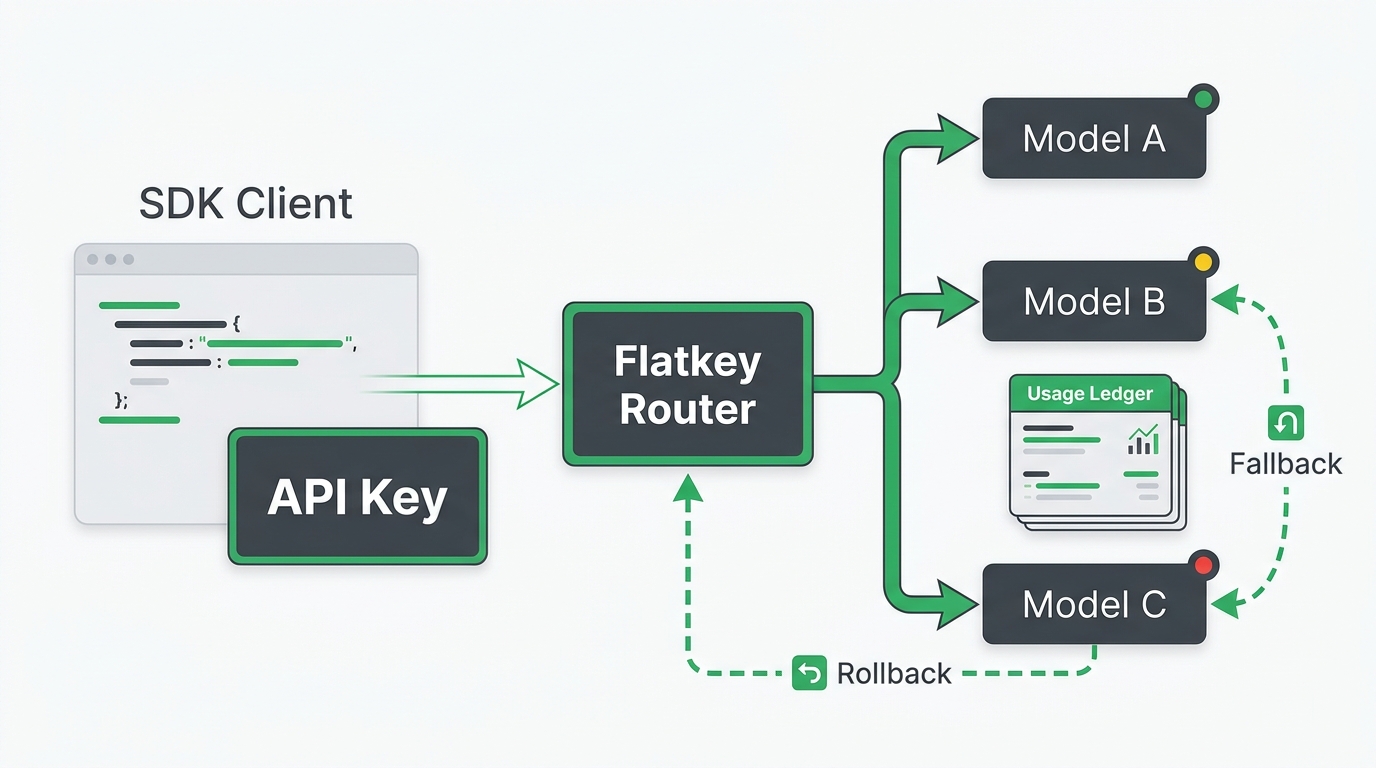
OpenAI-compatible model names are the quiet place where otherwise clean migrations break. The SDK accepts a model string, the request shape looks familiar, and the base URL points at an OpenAI-compatible route. Then production sees model_not_found, a silent fallback to the wrong capability, or an image model sent to a chat endpoint.
The fix is not to memorize every provider's catalog. Treat OpenAI-compatible model names as controlled configuration: each string belongs to a provider catalog, an endpoint family, a route, a version policy, and a billing record. Verify all five before you move real traffic.
Flatkey is useful here because teams can centralize model access, routing, billing, usage analytics, and operational review behind one gateway. But a gateway does not make loose model strings safe. This guide gives you a verification workflow for OpenAI-compatible model names before you change a base URL, SDK setting, or production alias.
Why OpenAI-Compatible Model Names Drift
"OpenAI-compatible" describes an API shape, not a universal naming standard. A compatible endpoint may accept OpenAI-style JSON and SDKs while still requiring its own model IDs.
That means these strings are not interchangeable:
| Where The String Came From | Why It Can Fail |
|---|---|
| Provider marketing page | The displayed product name may not be the API model ID. |
| Old code sample | The model may be deprecated, renamed, or scoped to a different endpoint. |
| Another gateway | Gateway aliases are local routing configuration, not provider-wide truth. |
| A different endpoint family | Chat, Responses, embeddings, image, audio, and video routes can expose different model sets. |
| Another region or workspace | Some providers make the endpoint and model catalog depend on region, workspace, or account access. |
The safe rule is simple: do not approve OpenAI-compatible model names from memory. Approve them from the current catalog, the current endpoint family, and a smoke test.
The Model Name Verification Workflow
Use this workflow before changing OPENAI_BASE_URL, baseURL, model, a Flatkey alias, or a production routing policy.
| Step | Question | Evidence To Save |
|---|---|---|
| 1. Catalog | Does the current provider or Flatkey catalog expose this exact model string? | Screenshot, API readback, or catalog export with timestamp. |
| 2. Endpoint family | Is the model enabled for chat/completions, responses, images, embeddings, or another route? |
Route-specific docs and one minimal request. |
| 3. Alias owner | Is the app using a direct provider ID or a gateway alias? | Config file, Flatkey model alias, and owner/team field. |
| 4. Version policy | Is the string stable, dated, preview, deprecated, or provider-routed? | Deprecation note, model page, changelog, or approval record. |
| 5. Runtime proof | Does the exact app environment call the route successfully? | Curl response, SDK response, request ID, and usage record. |
| 6. Rollback | What string and route do you restore if it fails? | Previous config, feature flag, and rollback owner. |
This is the core value of a model-name checklist: it turns OpenAI-compatible model names from ad hoc strings into reviewed deployment inputs.
Current Provider Examples To Learn From
Use official docs to understand the pattern, then verify your own account or gateway catalog before shipping.
| Provider Path | Official Pattern Checked On July 7, 2026 | Migration Lesson |
|---|---|---|
| OpenAI | The API uses a model field for Chat Completions and Responses, and the List models endpoint returns models available to the authenticated account. Current OpenAI model guidance identifies gpt-5.5 as the latest family, while API examples can still show older example strings. |
Use docs for the contract, but use the account catalog for availability. |
| Google Gemini OpenAI compatibility | Google documents an OpenAI-compatible base URL under https://generativelanguage.googleapis.com/v1beta/openai/ and examples such as gemini-3.5-flash for chat. |
Do not replace a Gemini model with an OpenAI-looking name. Keep the Gemini ID. |
| xAI | xAI docs show OpenAI SDK usage with base_url="https://api.x.ai/v1" and example model strings such as grok-build-0.1. |
The SDK can be OpenAI-shaped while the model string remains xAI-specific. |
| Alibaba Cloud DashScope | DashScope documents OpenAI-compatible mode for Qwen models, region or workspace-specific compatible-mode/v1 URLs, and examples such as qwen-plus. |
Base URL, region, workspace, and model name are a bundle. Verify them together. |
| Flatkey | Flatkey's public homepage shows an OpenAI-style route at https://router.flatkey.ai/v1/chat/completions and positions the product around one key, model access, routing, billing, usage analytics, and operations controls. |
Use the current Flatkey console or catalog for the real alias, then smoke test the exact route. |
These examples show why OpenAI-compatible model names should be treated as provider-specific strings. Compatibility reduces client changes; it does not erase catalog differences.
Build An Approved Model Map
Do not scatter raw model strings across app code, notebooks, automation tools, and support scripts. Put approved OpenAI-compatible model names in one small map and route every service through it.
type EndpointFamily = "chat" | "responses" | "embeddings" | "images" | "video";

type ApprovedModelRoute = {
  alias: string;
  providerModel: string;
  endpointFamily: EndpointFamily;
  baseURL: string;
  owner: string;
  reviewedAt: string;
  rollbackAlias: string;
};

export const models: Record<string, ApprovedModelRoute> = {
  support_chat: {
    alias: "support_chat",
    providerModel: process.env.FLATKEY_SUPPORT_CHAT_MODEL!,
    endpointFamily: "chat",
    baseURL: process.env.FLATKEY_BASE_URL ?? "https://router.flatkey.ai/v1",
    owner: "support-platform",
    reviewedAt: "2026-07-07",
    rollbackAlias: "support_chat_previous",
  },
};
The map separates the name your app uses from the provider or gateway model string. That gives procurement, finance, and incident responders a stable place to ask: who approved this model, what endpoint is it for, and how do we roll it back?
For broader catalog governance, pair this with the AI model catalog guide. For base URL migration, use the OpenAI-compatible API migration guide.
Smoke Test The Exact Name Before SDK Migration
A model-name smoke test should be small enough to inspect by hand. Do not start with tools, streaming, JSON schema, or a framework wrapper. Start with the route, key, and model string you plan to ship.
export FLATKEY_API_KEY="sk-fk-..."
export FLATKEY_BASE_URL="https://router.flatkey.ai/v1"
export FLATKEY_MODEL="the-current-flatkey-model-alias"

curl -sS "$FLATKEY_BASE_URL/chat/completions" \
  -H "Authorization: Bearer $FLATKEY_API_KEY" \
  -H "Content-Type: application/json" \
  -d '{
    "model": "'"$FLATKEY_MODEL"'",
    "messages": [
      {"role": "user", "content": "Reply with exactly: model route ok"}
    ]
  }'
If this fails, do not debug the SDK. Check the model string, endpoint family, key scope, route, and catalog first. If it succeeds, save the response body, status code, request ID if present, timestamp, usage object, and Flatkey usage readback.
Then test the same OpenAI-compatible model names through the SDK:
import OpenAI from "openai";

const client = new OpenAI({
  apiKey: process.env.FLATKEY_API_KEY,
  baseURL: process.env.FLATKEY_BASE_URL ?? "https://router.flatkey.ai/v1",
});

const response = await client.chat.completions.create({
  model: process.env.FLATKEY_MODEL!,
  messages: [{ role: "user", content: "Reply with exactly: sdk route ok" }],
});

console.log(response.choices[0]?.message?.content);
The SDK test should use the same base URL root, the same model alias, and the same endpoint family. If curl works but the SDK fails, inspect environment variables before changing model names.
Separate Aliases From Provider IDs
An alias is not the same thing as a provider ID. A provider ID is the string accepted by the upstream provider or provider-compatible route. A gateway alias is the string your gateway maps to a provider model, fallback policy, price group, or account.
Both can be valid. Problems start when teams stop labeling which one they are using.
Use this naming discipline:
| Field | Example Shape | Rule |
|---|---|---|
| App alias | support_chat |
Stable name used by your application. |
| Gateway alias | support-chat-balanced |
Owned by the gateway or platform team. |
| Provider model ID | qwen-plus, gemini-3.5-flash, or current catalog value |
Verified from provider docs or catalog. |
| Endpoint family | chat, responses, images, embeddings |
Must match the route and parser. |
| Version state | stable, preview, dated, deprecated | Reviewed before production traffic. |
This makes OpenAI-compatible model names auditable. If a route fails, you can tell whether the problem is the app alias, the Flatkey alias, the provider model ID, or the endpoint family.
Avoid Endpoint Family Mismatches
model_not_found does not always mean the string is misspelled. It can mean the string is valid on another route.
A chat model may not be available on a Responses route. An image model may use an image-generation endpoint. A video model can require a different payload family. A provider compatibility layer can silently ignore unsupported fields or expose only part of the provider catalog.
Before adding optional parameters, answer these questions:
- Is this model approved for the route I am calling?
- Does this endpoint expect
messages,input,prompt, images, files, or another request shape? - Does the selected SDK append the endpoint path after the base URL?
- Does the provider require a region-specific or workspace-specific base URL?
- Does Flatkey route this alias to the same endpoint family in staging and production?
The OpenAI-compatible API troubleshooting guide covers the broader debug path. For model-name work, keep the failure small: one route, one model string, one short request.
Plan For Version And Deprecation Changes
OpenAI-compatible model names change over time. Some names are stable families, some are dated snapshots, some are preview models, and some are gateway aliases that your own team controls.
Create a review cadence for every production model route:
| Signal | Action |
|---|---|
| New provider model family | Add it to staging only, then compare quality, cost, latency, and tool behavior. |
| Preview or beta suffix | Require an owner and rollback date before production use. |
| Deprecation notice | Create a migration task with deadline, replacement, test plan, and route owner. |
| Gateway alias change | Run the smoke test and usage readback before updating production config. |
| Provider region change | Verify base URL, workspace, catalog, billing, and latency again. |
Do not bury these decisions in environment variables alone. Keep the evidence in a reviewable packet so engineering, operations, and procurement can see why the model is allowed.
What To Check In Flatkey Before Cutover
Use Flatkey as the operational control point, not as a reason to skip verification.
Before moving production traffic, confirm:
- The current Flatkey base URL in your console or onboarding notes.
- The exact model alias you will send from the app.
- The provider model or route behind the alias.
- The endpoint family, such as Chat Completions or Responses.
- Quota and spend limits for the key or workspace.
- Usage readback after a successful smoke test.
- Fallback behavior if the primary route fails.
- Rollback config for the previous provider route or previous Flatkey alias.
Then compare the operational side on Flatkey pricing and get a key for a test path. Treat pricing and model catalog pages as current evidence only when you check them on the day you migrate.
FAQ
Are OpenAI-compatible model names universal?
No. OpenAI-compatible model names are still provider or gateway-specific strings. The request shape can be compatible while the model catalog remains different.
Why does my OpenAI-compatible route return model_not_found?
The model string may be misspelled, unavailable to the account, disabled in the gateway, sent to the wrong endpoint family, scoped to another region, or deprecated. Verify the exact string in the current catalog and run a minimal route test.
Should I use direct provider model IDs or Flatkey aliases?
Use a Flatkey alias when you want centralized routing, billing, usage review, fallback control, or team-level governance. Keep the alias mapped to a verified provider model ID and document the owner.
Can I copy a model name from an old provider guide?
Only as a starting point. Old guides can contain retired, preview, or example-only strings. Re-check the current provider docs, current Flatkey catalog, and one live smoke test.
What should be in a model-name change review?
Include the old string, new string, endpoint family, base URL, provider or Flatkey alias, owner, source docs, smoke-test response, usage readback, expected cost impact, fallback behavior, and rollback plan.
Bottom Line
OpenAI-compatible model names are migration inputs, not trivia. Verify the catalog, endpoint family, alias owner, version policy, and runtime proof before changing production traffic. If you centralize those checks in Flatkey, the same model-name evidence can support engineering cutover, incident review, usage reconciliation, and procurement approval.
When you are ready to test, start with one key, one base URL, one endpoint family, and one approved model alias. That is the fastest way to make OpenAI-compatible model names boring enough for production.