Seedance API: Pricing, Quality, and Setup for Official Endpoints
The Seedance API is useful when a team needs short-form video generation from text, image, or reference media, but the integration decision is not just "which model looks best?" You also have to choose an endpoint, understand the pricing unit, control duration and resolution, and measure the cost of clips that your editors or product users actually accept.
This guide focuses on the official setup paths a media or product team can use today:
- BytePlus ModelArk's official video generation task API, which is the direct provider path for Seedance models.
- Flatkey's
/v1/videosroute, which exposes Seedance model IDs through one API key, one balance, and a live model catalog.
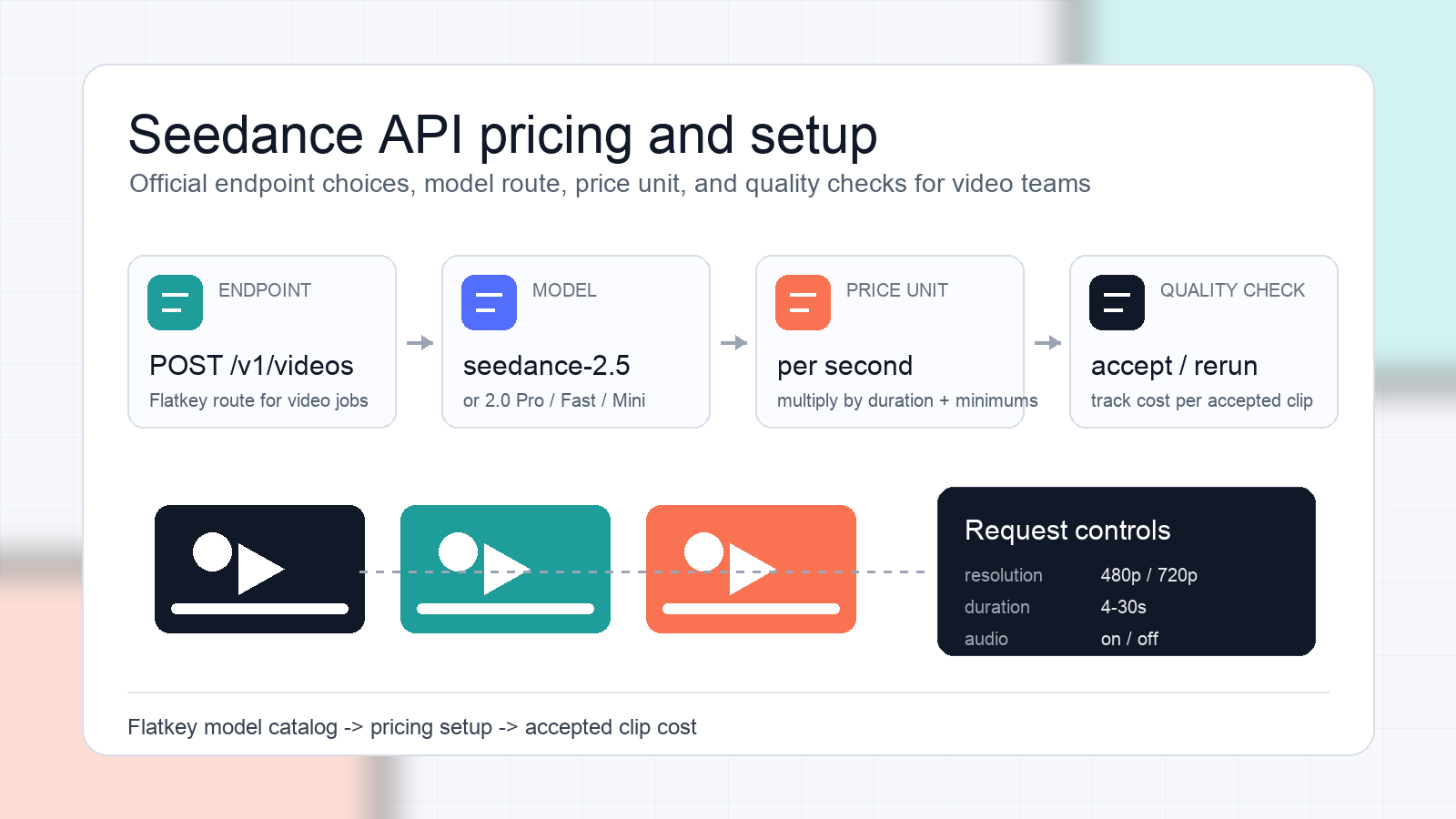
The short version: use Seedance 2.5 when you need stronger reference-guided video workflows, optional audio, and 4-30 second outputs. Use Seedance 2.0 Pro, Fast, or Mini when you need a lower per-second route for high-volume tests and can keep your acceptance rubric strict. Always compare on cost per accepted clip, not only price per second.
If you are still comparing model quality, pair this pricing guide with the Seedance API evaluation framework. If you are comparing provider routes, read the Seedance vs Veo API routing and pricing review. If you are moving from tests into operations, keep the Seedance API production checklist open while you wire queues, retries, and review states.
Seedance API endpoint options
| Setup path | Endpoint pattern | Best fit | What to verify before launch |
|---|---|---|---|
| BytePlus ModelArk direct | Official ModelArk video generation task API | Teams that want a direct provider account and native provider operations | Region availability, API key setup, task lifecycle, current token-pricing calculator, and task retrieval behavior |
| Flatkey | POST /v1/videos |
Teams that want one key, one wallet, and model routing across video, image, audio, and text models | Current model page, per-second rate, model ID, duration/resolution controls, and request success telemetry |
BytePlus ModelArk documents Seedance under its video generation API and pricing sections. Its pricing page describes video generation models as using a token rate and token consumption model, and notes that final token consumption is returned after the API call through usage fields. The same pricing page also notes minimum token consumption behavior for Seedance 2.0 series and Seedance 2.5 requests when estimated usage falls below the minimum.
Flatkey's Seedance model pages present a simpler buyer-facing unit for the routes currently in the catalog: price per second, plus the visible duration and resolution options for each model page. This is easier for planning a creative test budget, but production teams should still log the submitted model, resolution, duration, account group, final status, and accepted/rejected outcome.
Current Flatkey Seedance API pricing snapshot
The pricing below was checked from Flatkey public model pages on October 13, 2026. Treat it as a setup snapshot, not a contract: always confirm the live model page before launch or a large batch run.
| Model ID | Visible Flatkey route | Pricing shown in catalog | Useful when |
|---|---|---|---|
seedance-2.5 |
/v1/videos |
480p from $0.084/second with a 4s minimum; 720p from $0.188/second with a 4s minimum |
You need Seedance 2.5 capabilities, 4-30s outputs, reference workflows, first/last-frame control, and optional audio |
seedance-2.0-pro |
/v1/videos |
480p from $0.037181/second; 720p from $0.083592/second; 1080p from $0.205578/second |
You want stronger Seedance 2.0 output quality and can pay more than Fast or Mini |
seedance-2.0-fast |
/v1/videos |
480p from $0.028535/second; 720p from $0.064152/second |
You need more exploration volume before final review |
seedance-2.0-mini |
/v1/videos |
480p from $0.018158/second; 720p from $0.040824/second |
You need low-cost prompt screening or internal concept tests |
The table gives a starting estimate. Real campaign cost depends on duration, resolution, reruns, failures, moderation rejections, user edits, and the number of generated clips that pass your review standard.
Price per second is not the same as creative cost
For a video generation workflow, the metric that matters is:
accepted_clip_cost =
  total_spend_for_generation_batch
  / number_of_clips_that_pass_review
For example, a route that costs less per second can still be more expensive if it produces many clips that fail brand, continuity, or product-detail review. A higher-priced route can be cheaper when it reduces reshoots and editorial labor.
Use this simple worksheet before choosing a Seedance API route:
| Field | Example value | Why it matters |
|---|---|---|
| Model ID | seedance-2.5 |
Keeps cost and quality data tied to the actual route |
| Workflow | Text-to-video, image-to-video, or reference-to-video | Reference-led workflows often have different acceptance criteria than pure text prompts |
| Resolution | 480p, 720p, or 1080p when available | Higher resolution usually raises price and review expectations |
| Duration | 5s, 10s, or another supported length | Duration is the most obvious cost multiplier for per-second pricing |
| Attempts per accepted clip | 1.8 | Captures reruns, prompt edits, and failed concepts |
| Accepted clip rate | 55% | Turns nominal price into campaign cost |
| Human review time | minutes per batch | Creative operations cost is not visible in API pricing |
Seedance 2.5 vs Seedance 2.0 setup choice
Choose Seedance 2.5 when your workflow depends on reference media, frame control, optional audio, or longer 4-30 second outputs. Flatkey's Seedance 2.5 page lists text-to-video, image-to-video, and reference-to-video workflows on /v1/videos, with 480p and 720p options and audio generation as a request option.
Choose Seedance 2.0 Pro when you need a Seedance 2.0 route with higher visible resolution options on Flatkey and are evaluating final creative quality. Choose Seedance 2.0 Fast for iteration speed and broader testing. Choose Seedance 2.0 Mini for low-cost screening, prompt triage, and early concept exploration.
Do not switch models on price alone. Run a small quality test set first:
- Pick 20 prompts from real campaign briefs.
- Include at least five hard prompts with product details, hands, packaging, motion continuity, or brand-sensitive claims.
- Generate the same duration and resolution across candidate routes when possible.
- Blind-review the clips before showing model names or prices.
- Track accepted clips, minor-edit clips, rejected clips, retry count, generation latency, and final cost.
Flatkey Seedance API setup
The Flatkey route keeps setup compact because the public model pages expose the model ID and route together. Start with a small request, then add storage, retry, and review logic.
export FLATKEY_API_KEY="your_flatkey_api_key"
export FLATKEY_BASE_URL="https://router.flatkey.ai"

curl -sS "$FLATKEY_BASE_URL/v1/videos" \
  -H "Authorization: Bearer $FLATKEY_API_KEY" \
  -H "Content-Type: application/json" \
  -d '{
    "model": "seedance-2.5",
    "content": [
      {
        "type": "text",
        "text": "A clean product reveal video on a white studio table. The camera moves slowly from left to right while the package rotates once. No text, no watermark."
      }
    ],
    "resolution": "720p",
    "ratio": "16:9",
    "duration": 5,
    "generate_audio": false
  }'
For image-to-video or reference-to-video, add the supported media inputs from the model page or console workflow, then keep the same logging discipline. Store the submitted model, workflow, prompt version, references, resolution, ratio, duration, audio flag, task ID or response ID, final status, spend, and review outcome.
BytePlus ModelArk setup checks
If you use BytePlus ModelArk directly, follow the current ModelArk docs for API key creation, base URL and authentication, video generation task creation, task retrieval, listing, and cancellation or deletion. The exact request shape and pricing calculator should be checked in the BytePlus console or documentation at launch time.
Use this checklist before a direct provider launch:
- Confirm the Seedance model is activated in the required region.
- Confirm whether your workflow is text-to-video, image-to-video, reference-to-video, or another provider-specific mode.
- Confirm whether pricing is token-based, package-based, or subject to a calculator for the current account.
- Confirm the task lifecycle: create, poll or retrieve, list, cancel, delete, and failure states.
- Confirm returned usage fields, especially the field used for final token consumption.
- Confirm minimum token consumption rules for your resolution, aspect ratio, duration, and video input mode.
- Confirm content safety, storage retention, and media URL requirements.
The important difference is operational: direct ModelArk gives you the provider-native surface, while Flatkey gives you one account surface across many models and modalities.
Quality rubric for Seedance API tests
Pricing only becomes useful after you define quality. Use a rubric that matches how your team will accept or reject clips.
| Review dimension | Pass condition | Reject signal |
|---|---|---|
| Prompt adherence | The clip follows the requested subject, action, setting, and tone | The result changes the core object, action, or scene |
| Temporal continuity | Motion progresses naturally across the clip | Subject identity, hands, products, or background shift between frames |
| Brand safety | No unwanted text, logos, claims, or sensitive imagery | Watermarks, hallucinated packaging, unsafe claims, or policy issues |
| Reference fidelity | Reference images or frames remain recognizable when used | Product shape, character identity, or color palette drifts |
| Editability | The clip can move into the next production step | The clip needs a full rerun rather than a small edit |
| Cost fit | Accepted clip cost is inside the campaign budget | The route looks cheap per second but expensive per accepted clip |
For a production team, the output of this rubric should be a routing rule. For example:
Use seedance-2.0-mini for rough prompt screening.
Use seedance-2.0-fast for broader concept exploration.
Use seedance-2.0-pro when final 2.0 quality matters.
Use seedance-2.5 when reference control, audio, or 4-30s output is required.
Production setup: what to log from day one
Do not wait until costs surprise you to add observability. Log these fields from the first Seedance API test:
request_idor task IDuser_id, workspace, campaign, or customer accountmodelworkflowresolutionratiodurationgenerate_audio- reference media count and type
- submitted prompt version
- response status
- provider error code or gateway error code
- latency to accepted output
- billed amount or returned usage
- review result: accepted, edited, rejected, or failed
Those fields let finance and creative operations answer the real questions: which route creates usable clips, where do reruns happen, and whether a higher-priced route is actually cheaper for a specific campaign type.
Common Seedance API setup mistakes
The most expensive mistakes are usually operational:
- Comparing a 480p route against a 720p or 1080p route and calling it a model-quality difference.
- Ignoring minimum duration or minimum token consumption behavior.
- Measuring generated clips instead of accepted clips.
- Changing prompt, model, duration, and resolution at the same time during tests.
- Treating text-to-video and reference-to-video as the same workflow.
- Forgetting to track human review time and rerun count.
- Hardcoding one Seedance model ID without a fallback or review path.
The fix is simple: freeze a test set, run comparable settings, log the route and cost fields, then pick the route based on accepted output.
Recommended setup plan
For a team starting this week, use this sequence:
- Run 20 prompts on
seedance-2.0-miniorseedance-2.0-fastto screen prompt structure. - Promote the best prompts to
seedance-2.0-proandseedance-2.5. - Compare accepted clip rate, not only visual favorites.
- Use
seedance-2.5for reference-heavy or audio-enabled clips. - Use a lower-cost 2.0 route for broad exploration when acceptance rate remains good.
- Keep the same Flatkey balance and reporting surface if your workflow also uses image, audio, or text models.
That gives you a practical Seedance API pricing setup: one endpoint path, visible model choices, a cost worksheet, and a review rubric that keeps quality tied to spend.
FAQ
What is the Seedance API?
The Seedance API is a video generation API for creating short clips from prompts and, depending on the selected route, image or reference media. On Flatkey, Seedance model pages expose the video route through /v1/videos.
How is Seedance API pricing calculated?
On Flatkey's public model pages, the currently visible Seedance routes are presented as price per second, with model-specific resolution and duration options. BytePlus ModelArk's pricing documentation describes video generation pricing through token rate and token consumption, with final usage subject to returned usage fields and minimum token consumption rules for some Seedance requests.
Which Seedance model should I start with?
Start with seedance-2.0-fast or seedance-2.0-mini for low-cost exploration, then evaluate seedance-2.0-pro and seedance-2.5 on the prompts that survive review. Choose seedance-2.5 when you need its documented reference, audio, and 4-30 second workflow controls.
What endpoint should I use for Flatkey Seedance API requests?
Use POST /v1/videos with the Seedance model ID shown on the Flatkey model page. The Seedance 2.5, 2.0 Pro, 2.0 Fast, and 2.0 Mini pages all show /v1/videos as the route.
What should I measure in a Seedance API quality test?
Measure prompt adherence, motion continuity, reference fidelity, brand safety, editability, latency, retry count, and cost per accepted clip. Price per second is only one input to the decision.
Sources checked
- Flatkey Seedance 2.5 model page: https://flatkey.ai/models/seedance-2.5
- Flatkey Seedance 2.0 Pro model page: https://flatkey.ai/models/seedance-2.0-pro
- Flatkey Seedance 2.0 Fast model page: https://flatkey.ai/models/seedance-2.0-fast
- Flatkey Seedance 2.0 Mini model page: https://flatkey.ai/models/seedance-2.0-mini
- Flatkey pricing page: https://flatkey.ai/pricing
- BytePlus ModelArk pricing documentation: https://docs.byteplus.com/en/docs/modelark/model-pricing
- BytePlus ModelArk video generation task API documentation: https://docs.byteplus.com/en/docs/modelark/create-video-generation-task-api