If you are searching for the largest context window LLM, the practical answer in current API work is not "pick the biggest number and ship." The useful answer is: choose a long-context route that is live for your account, verify the exact model ID, test recall across the full prompt, and budget for the output, cache, and retry behavior.
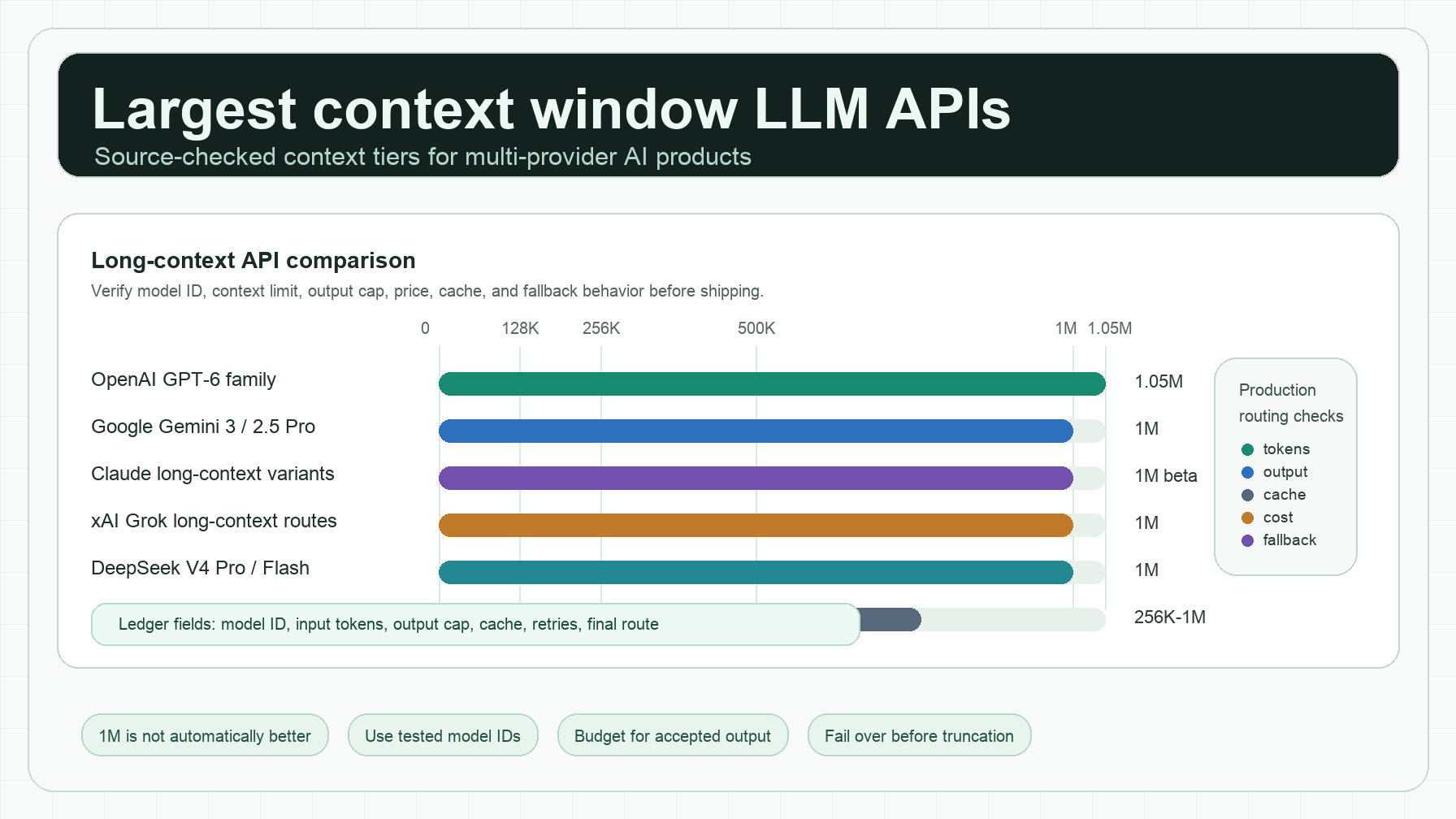
As of this source check, the largest broadly documented current context windows cluster around the 1M-token tier, with OpenAI listing 1.05M-token GPT-6 family models, Anthropic listing multiple 1M-token Claude models, Google Gemini and several China-origin frontier models listing 1M-class windows, and xAI's current Grok 4.3 docs listing 1M. Older xAI Grok Fast launch posts advertised 2M-token windows, but current migration and model docs matter more than stale launch copy when you are selecting a production API route.
For developers and AI product teams, the decision should be: which largest context window LLM API can handle the actual workload without silent truncation, latency spikes, budget blowouts, or model-ID surprises?
Largest context window LLM APIs: the quick answer
The largest context window LLM for a production API workflow depends on whether you mean "largest number ever announced" or "largest current model route you can reliably call today."
Use this source-checked shortlist as the starting point:
| Provider / model route | Published context window | Output cap noted in source | Production caveat |
|---|---|---|---|
| OpenAI GPT-6 Astra, GPT-6.1 Sol, GPT-6 Luna | 1.05M tokens | 128K tokens | Long context may have different pricing tiers; verify the exact model page before budgeting. |
| Anthropic Claude current 1M models | 1M tokens | 128K tokens | Anthropic's docs distinguish current 1M models from older 200K/deprecated models. |
| Google Gemini 3.8 Flash | 1,048,576 input tokens | 65,536 output tokens | Input size is not the same as output size; tool and modality support varies by model. |
| DeepSeek V4 Pro / Flash routes | 1M context in current DeepSeek V4 API docs | Up to 384K max_tokens in chat-completion docs | Check the /models metadata and model aliases before migration. |
| Alibaba Qwen3.8 Max / Flash | 1M tokens | 131,072 output tokens on Qwen3.8 Max docs | Supported length can vary with API parameter combinations and deployment scope. |
| Moonshot Kimi K3 | 1M tokens | Route-dependent | Kimi K3 is useful for long code and document workflows, but access path and model variant matter. |
| xAI Grok 4.3 | 1M tokens | Route-dependent | Earlier Grok Fast 2M claims are not enough; confirm current live route and retirement status. |
| Cohere Command A | 256K tokens | Route-dependent | Strong enterprise/RAG candidate, but not a 1M-class context route. |
| Mistral Large 3 / Mistral 3 family | 256K tokens in current limitation docs | Route-dependent | Useful if you need open or European deployment options, but smaller than 1M-class APIs. |
Sources checked: OpenAI model docs, Anthropic context-window docs, Google Gemini model docs, DeepSeek API docs, Alibaba Model Studio docs, Moonshot/Kimi K3 materials, xAI model and migration docs, Cohere model docs, and Mistral docs.
Why "largest" is not the same as "best"
The largest context window LLM is attractive when your product needs to process a full repository, a long contract set, a support history, a research corpus, or a multi-hour agent session. But a bigger window can hide expensive failure modes.
Four checks matter more than the headline token number:
- Usable input window. Some docs list total context; others split input and output. If a request allows 1M total tokens but needs 64K output tokens, you cannot safely fill the entire prompt with input.
- Output cap. Long-context summarization, code migration, and report generation often fail on output limits before they fail on input limits.
- Recall quality. A model can accept 1M tokens and still miss details in the middle of the prompt. Run needle, citation, and diff-reconstruction tests before trusting it.
- Cost and latency. A long prompt can be technically valid and still be too slow or too expensive for the user flow.
This is why Flatkey treats long-context selection as a routing problem, not a trivia question. A single key and request ledger help teams compare model ID, input tokens, output tokens, cache behavior, retries, and final route across providers instead of scattering experiments across separate provider accounts.
The long-context API selection framework
Use this framework when evaluating the largest context window LLM for a feature.
1. Define the job before choosing the model
Start with the shape of the prompt:
| Workload | What usually breaks first | Good first test |
|---|---|---|
| Repository analysis | Retrieval across many files and output budget | Ask for a cited dependency map across distant files. |
| Contract or policy review | Middle-context recall | Hide clauses at the beginning, middle, and end, then ask for exact citations. |
| Support history summarization | Duplicate facts and stale state | Ask for the final customer state and contradictory events. |
| Agent memory | Accumulated tool noise | Replay a long session and measure whether the model follows the latest objective. |
| Research synthesis | Source attribution | Require source-level citations and conflict handling. |
A largest context window LLM is usually worth testing when retrieval alone loses important order, code dependencies, or conversational state. If the job is simple question answering over a static knowledge base, a smaller context model with better retrieval can be faster and cheaper.
2. Test the exact model route
Do not test "Claude," "Gemini," "Qwen," or "Grok" as brand names. Test the model ID your product will actually call.
Your test record should include:
long_context_route_test:
  checked_at: "2026-10-12"
  provider: "example-provider"
  model_id: "exact-model-id"
  advertised_context_window: "1M"
  max_input_tokens_tested: 850000
  max_output_tokens_requested: 16000
  cache_enabled: true
  batch_or_priority_mode: "standard"
  fallback_route: "exact-fallback-model-id"
  pass_conditions:
    - no truncation
    - citations from beginning middle and end
    - stable JSON or markdown structure
    - latency within product SLO
    - accepted-output cost within budget
This keeps the largest context window LLM comparison tied to the route your users will experience.
3. Separate context window from output window
For long-context work, output cap is often the hidden constraint. Google Gemini 3.8 Flash documents a 1,048,576 input token limit and a 65,536 output token limit. OpenAI's GPT-6 family model docs list 1.05M context and 128K max output. Anthropic's current 1M context-window docs also note 128K max output for supported 1M models.
Those are all large enough for serious long-context work, but they are not interchangeable. A product that asks for a full migration plan, generated code patches, and explanations may care more about output budget than raw input size.
4. Treat retired and legacy slugs as risk
The SEO pages that rank for "which LLM has the largest context window" often mix current docs, preview launches, aggregator listings, and retired model names. That is dangerous in code.
For example, xAI has official launch material for Grok Fast models with a 2M-token context window, but current model and migration docs should drive a production decision. If a legacy slug is mapped to a newer model, you may inherit a different context limit, pricing policy, or behavior than the original announcement promised.
The safest rule: call the provider's model metadata endpoint or current model page during evaluation, then store the checked date next to the route.
Which model should you test first?
Here is a pragmatic route order for product teams.
For codebase analysis
Start with a 1M-class model that handles code well and supports structured output. OpenAI GPT-6 family routes, Claude 1M routes, Gemini 3.8 Flash, Qwen3.8 Max, Kimi K3, and DeepSeek V4 routes are all plausible candidates depending on your quality, region, and cost requirements.
Add a smaller fallback model for cheap classification, file grouping, and pre-filtering. The largest context window LLM should not be your only route for every request.
Related Flatkey reading: How to Evaluate a New Model in 48 Hours, AI Model Catalog Guide, and LLM API fallback routing.
For long documents and compliance review
Prioritize models with reliable citation behavior, enough output room for structured findings, and predictable data handling. Test the model against documents with repeated definitions, contradictory clauses, and late-stage amendments.
If you are comparing Claude, Gemini, and OpenAI routes, also read Gemini vs Claude API routing checks and Claude vs GPT API routing.
For agent memory
Do not assume a 1M-token model should keep a full transcript forever. Tool logs, browser outputs, failed attempts, and repeated system notes can crowd out the actual task state.
Use compaction, tool-result clearing, and route canaries. The largest context window LLM should extend the agent's working set, not become an excuse to skip memory hygiene.
For cost-sensitive summarization
Start with chunking, caching, and smaller-model pre-processing. Then escalate only the difficult merged context to a 1M-class route.
For budget work, pair this article with AI API pricing comparison, how to compare AI model prices, and AI API quota management.
A copyable long-context benchmark
Use a small benchmark before you commit to the largest context window LLM route.
benchmark_name: long_context_route_canary
prompt_shape:
  total_input_tokens: [128000, 256000, 500000, 850000]
  hidden_facts:
    beginning: 5
    middle: 5
    end: 5
  distractor_facts: 20
required_outputs:
  - exact cited facts from beginning middle and end
  - conflict summary
  - JSON object with source spans
  - concise final recommendation
fail_if:
  - answer cites only beginning or end
  - middle facts are hallucinated or skipped
  - output truncates before final JSON
  - latency exceeds product SLO
  - accepted-output cost exceeds budget
routing_policy:
  primary: "1M-class model"
  fallback: "smaller model plus retrieval"
  retry_rule: "retry only on transport or provider-side errors"
This test gives you a real answer to "what LLM has the largest context window that works for us?" instead of a generic leaderboard answer.
How Flatkey helps compare long-context routes
Flatkey is useful when you need to test long-context APIs across multiple providers without rebuilding credentials, billing, and usage tracking every time.
With a multi-provider API route, your team can:
- Call official model endpoints through one key and one balance.
- Track input tokens, output tokens, cache behavior, retries, and cost in one ledger.
- Compare 1M-class routes against smaller fallback routes.
- Keep model allowlists and sub-key budgets separate by environment or team.
- Move a workload between providers with less application-code churn.
A typical OpenAI-compatible setup looks like this:
from openai import OpenAI
import os

client = OpenAI(
    api_key=os.environ["FLATKEY_API_KEY"],
    base_url="https://router.flatkey.ai/v1",
)

response = client.chat.completions.create(
    model="your-tested-long-context-route",
    messages=[
        {"role": "system", "content": "Return cited findings only."},
        {"role": "user", "content": "Analyze the attached long-context corpus."},
    ],
)

print(response.choices[0].message.content)
The important part is not the snippet. The important part is the routing record behind it: exact model ID, checked date, context limit, fallback policy, and usage ledger.
Common mistakes when choosing the largest context window LLM
Mistake 1: Comparing brand names instead of model IDs
"Claude supports 1M" is less useful than "this exact Claude model ID supports 1M on the API route I can call." Model families change quickly.
Mistake 2: Ignoring output tokens
If your prompt consumes nearly the full context window, your model may have too little room to answer. Keep a reserve for output and reasoning.
Mistake 3: Trusting aggregator data without a provider check
Aggregators are useful for discovery, but production decisions should verify first-party docs or live model metadata.
Mistake 4: Using one long-context model for every task
Most products need a route ladder: cheap extraction, medium synthesis, and largest context window LLM escalation for cases where context truly changes the answer.
Mistake 5: Skipping fallback behavior
Long prompts fail in different ways: request too large, provider overload, timeout, context truncation, or expensive low-quality output. Define the fallback before the first incident.
Final recommendation
If your team asks "which LLM has the largest context window?", answer in two layers.
First, identify the current 1M-class and 1.05M-class routes from official docs: OpenAI GPT-6 family, current Claude 1M models, Gemini 3.8 Flash, DeepSeek V4, Qwen3.8, Kimi K3, and current Grok long-context routes are the routes worth checking first.
Second, run your own route canary. The largest context window LLM for your product is the one that preserves the facts your users care about, returns enough structured output, stays inside latency and cost limits, and has a fallback route when the provider or model ID changes.
Flatkey is built for that second layer: one key, one balance, official model routes, and a usage ledger that lets developers compare long-context behavior without turning every experiment into a separate provider integration.
Sources
- OpenAI API model docs: https://developers.openai.com/api/docs/models
- Anthropic Claude context-window docs: https://platform.claude.com/docs/en/build-with-claude/context-windows
- Google Gemini 3.8 Flash model docs: https://ai.google.dev/gemini-api/docs/models/gemini-3.8-flash
- DeepSeek API list-models docs: https://api-docs.deepseek.com/api/list-models/
- DeepSeek chat-completions docs: https://api-docs.deepseek.com/api/create-chat-completion/
- Alibaba Model Studio Qwen3.8 Max docs: https://docs.modelstudio.console.alibabacloud.com/en/model-studio/qwen3-8-max
- Alibaba Model Studio newly released models: https://www.alibabacloud.com/help/en/model-studio/newly-released-models
- Moonshot Kimi K3 blog: https://www.kimi.ai/blog/kimi-k3
- xAI Grok 4.3 docs: https://docs.x.ai/developers/models/grok-4.3
- xAI May 15, 2026 model retirement docs: https://docs.x.ai/developers/migration/may-15-retirement
- Cohere Command A docs: https://docs.cohere.com/v1/docs/command-a
- Mistral known limitations: https://docs.mistral.ai/resources/known-limitations