
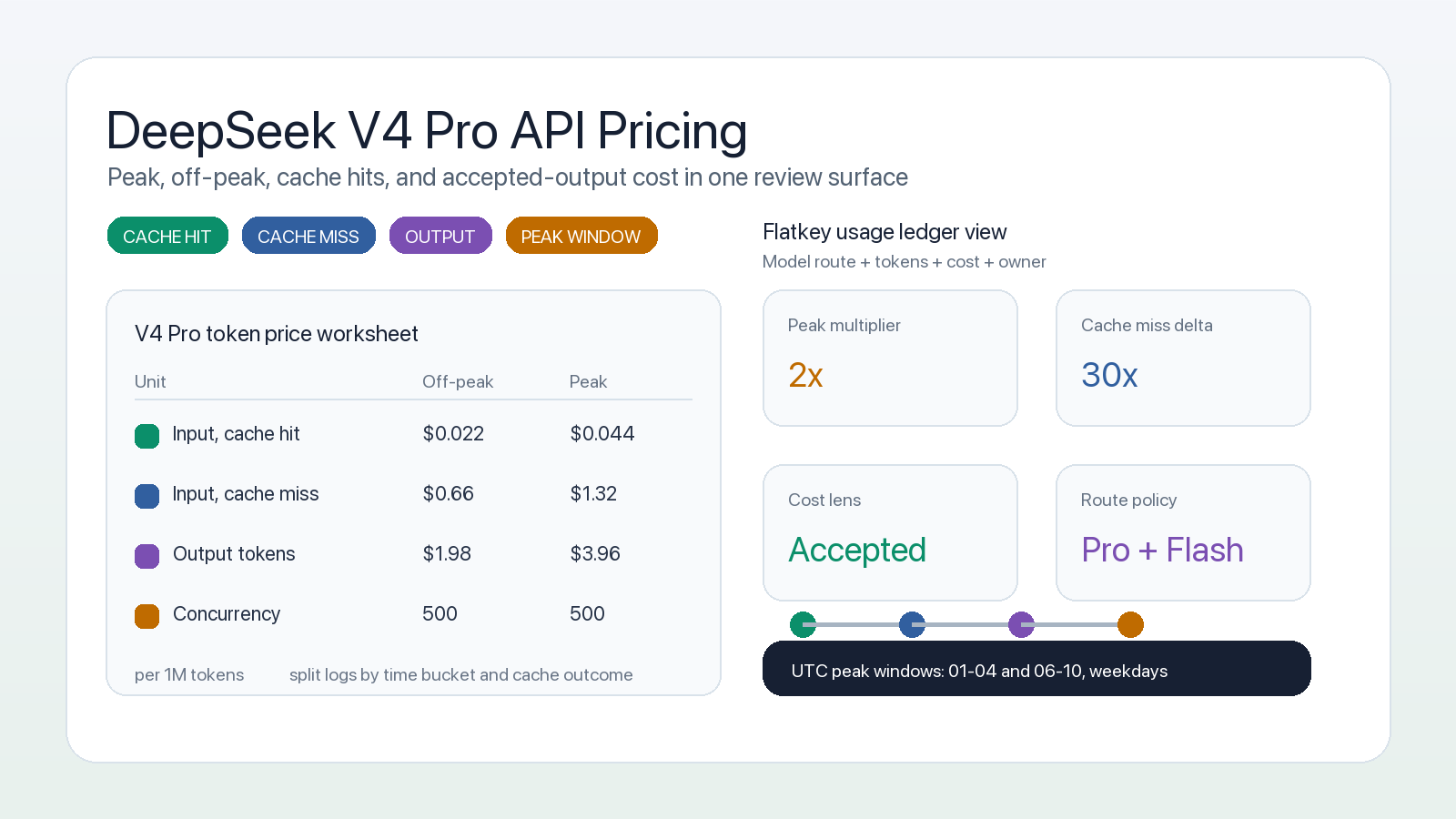
If you are checking deepseek v4 pro api pricing for a product budget, do not stop at the headline output-token rate. DeepSeek V4 Pro pricing changes with three variables that affect the bill more than most teams expect: whether the request lands in peak or off-peak hours, whether input tokens are cache hits or cache misses, and how much output your workflow actually accepts.
As of the official DeepSeek pricing page checked on October 11, 2026, deepseek-v4-pro is listed as DeepSeek-V4-Pro-0813 with a 1M-token context window, a 384K maximum output, OpenAI-format and Anthropic-format API support, and separate prices for cache-hit input, cache-miss input, and output tokens. DeepSeek's update page also says V4 Pro API service continues after September 14, 2026 with the billing method unchanged, so teams should treat the current Pro table as active, not as a retired transition-only route.
The practical takeaway: deepseek v4 pro api pricing is predictable only if your worksheet separates peak traffic, off-peak traffic, cache hit rate, output length, retries, and accepted results. This guide gives you the current pricing table, the cost formula, and the controls to keep DeepSeek V4 Pro spend visible before it becomes a finance surprise.
DeepSeek V4 Pro API pricing in one table
DeepSeek prices its API in units of 1 million tokens. The current table lists these DeepSeek V4 Pro rates:
| Pricing unit | Off-peak price per 1M tokens | Peak price per 1M tokens | What to track |
|---|---|---|---|
| Input tokens, cache hit | $0.022 | $0.044 | Reused prompt prefixes that hit DeepSeek context caching |
| Input tokens, cache miss | $0.66 | $1.32 | New or non-reused prompt context |
| Output tokens | $1.98 | $3.96 | Model responses, reasoning-heavy answers, generated code, and agent plans |
| Concurrency limit | 500 | 500 | Parallel request planning and backpressure |
DeepSeek defines peak hours as 01:00-04:00 and 06:00-10:00 UTC, Monday through Friday, excluding Chinese public holidays. All other hours are off-peak, including weekends and full Chinese public holidays. That means the same workload can cost twice as much when it runs in a peak window.
For comparison, DeepSeek's current Flash table is cheaper:
| Model | Cache-hit input, off-peak/peak | Cache-miss input, off-peak/peak | Output, off-peak/peak | Concurrency |
|---|---|---|---|---|
deepseek-v4-pro |
$0.022 / $0.044 | $0.66 / $1.32 | $1.98 / $3.96 | 500 |
deepseek-flash |
$0.003 / $0.006 | $0.15 / $0.30 | $0.60 / $1.20 | 2500 |
That does not mean every team should route everything to Flash. It means DeepSeek V4 Pro API pricing needs a workload-level decision. Use Pro where quality, long-context behavior, or complex coding-agent output justifies it. Use Flash where latency, concurrency, vision support, or simple cost control matters more.
For the broader provider comparison, keep the canonical DeepSeek API pricing guide open next to this Pro-specific worksheet.
The cost formula procurement should actually use
The simple formula is:
request_cost =
  cache_hit_input_tokens / 1,000,000 * cache_hit_price
+ cache_miss_input_tokens / 1,000,000 * cache_miss_price
+ output_tokens / 1,000,000 * output_price
For monthly planning, split that formula into peak and off-peak buckets:
monthly_cost =
  off_peak_cache_hits * 0.022 / 1,000,000
+ off_peak_cache_misses * 0.66 / 1,000,000
+ off_peak_output_tokens * 1.98 / 1,000,000
+ peak_cache_hits * 0.044 / 1,000,000
+ peak_cache_misses * 1.32 / 1,000,000
+ peak_output_tokens * 3.96 / 1,000,000
Here is the useful version as a worksheet:
| Field | Example value to collect | Why it changes the bill |
|---|---|---|
| Workload name | Coding agent, RAG answer, batch review | Different jobs have different output length and retry behavior |
| Time bucket | Peak or off-peak | Peak rates are double off-peak rates |
| Input tokens | 80,000 per request | Large context magnifies cache-miss cost |
| Cache-hit rate | 60% of input tokens | Cache hits are much cheaper than cache misses |
| Output tokens | 12,000 per accepted result | Pro output is the dominant cost in many agent workflows |
| Retry rate | 8% | Retries multiply both input and output cost |
| Acceptance rate | 70% | Rejected or unused generations still cost money |
| Fallback route | Flash, Qwen, Claude, GPT, or none | Fallback can save incidents but may add duplicate calls |
| Owner | Team, product, customer, or environment | Needed for showback, chargeback, and quota policy |
This is also where Flatkey fits the workflow. Flatkey gives teams one API key, one balance, one invoice, and a usage ledger across official model routes, so engineering and finance can review DeepSeek V4 Pro cost beside other model spend instead of reconciling each provider account separately.
Why cache hits matter more than the headline price
DeepSeek context caching is enabled by default for API users. A later request can receive cache-hit pricing when it fully matches a persisted cache prefix unit. DeepSeek describes prefix units as being persisted at request boundaries, from detected common prefixes, and at fixed token intervals for long inputs or outputs.
That matters because DeepSeek V4 Pro cache-hit input is dramatically cheaper than cache-miss input:
| Time bucket | Cache-hit input | Cache-miss input | Difference |
|---|---|---|---|
| Off-peak | $0.022 / 1M | $0.66 / 1M | Cache miss is 30x higher |
| Peak | $0.044 / 1M | $1.32 / 1M | Cache miss is 30x higher |
If your prompts repeat stable system instructions, tool manifests, schema definitions, codebase summaries, or retrieval preambles, the cache hit rate can matter more than a small change in output length. If every request arrives with a different prefix, your plan should assume cache-miss pricing until logs prove otherwise.
For teams running agents, the best practice is simple:
- Keep stable system prompts and tool schemas at the front of the context.
- Version long reusable instruction blocks instead of rewriting them on every run.
- Track cache-hit and cache-miss input tokens separately.
- Compare DeepSeek V4 Pro API pricing by accepted task, not only by raw token.
- Re-check the official pricing page before changing a high-volume route.
For adjacent methods, read the prompt caching workflow guide and the AI API spend management guide.
Peak versus off-peak scheduling
DeepSeek's off-peak policy creates a straightforward scheduling lever. Interactive product traffic must run when users need it. Batch evaluations, repository scans, data-label review, and nightly agent jobs can often move.
Use this routing rule:
| Workload type | Recommended cost policy |
|---|---|
| User-facing chat or coding assistant | Keep latency first, but cap max output and retry count |
| Background evals | Schedule off-peak unless release timing requires peak execution |
| Long-context document analysis | Push to off-peak and maximize cache reuse |
| CI agent review | Run only changed files through Pro; route simple checks to Flash |
| Procurement benchmark | Run a representative mix in both peak and off-peak buckets |
This is not just about saving half the token rate. The bigger benefit is predictability. When teams know which DeepSeek V4 Pro jobs are allowed to run during peak hours, finance can forecast a worst-case bill and engineering can reserve Pro for work that actually needs it.
Flatkey can support that operating model by keeping the routing decision, model policy, and usage review in one place instead of scattering environment variables across repos.
When DeepSeek V4 Pro is worth the higher rate
DeepSeek V4 Pro API pricing makes sense when the workload is valuable enough to justify the Pro route. Typical candidates include:
- Coding-agent tasks where a wrong answer burns engineering time.
- Long-context analysis where truncation or shallow synthesis is more expensive than the token bill.
- Procurement, finance, or compliance reviews that need a stronger model before human sign-off.
- Benchmark suites that compare Pro against Flash and other frontier models before rollout.
- High-value product flows where the accepted answer rate matters more than the cheapest generated token.
DeepSeek Flash is the better default for many cheaper or more parallel tasks. The current Flash route has lower token rates, higher listed concurrency, and vision support in the pricing table. If you are still deciding between the two, use DeepSeek V4 Pro vs Flash as the model-selection companion, then bring the final candidate back to this cost worksheet.
Controls to prevent DeepSeek V4 Pro spend drift
A pricing guide should end in controls, not just tables. For DeepSeek V4 Pro, start with these:
| Control | Owner | What it prevents |
|---|---|---|
| Model allowlist | Platform engineering | Accidental Pro usage by experiments or copied configs |
| Peak-hour policy | Product and finance | Unplanned double-rate batch jobs |
| Max output tokens | Application team | Agent responses that run far beyond accepted output needs |
| Retry budget | Reliability owner | Silent multiplication of expensive calls |
| Per-key quotas | Platform engineering | One app, customer, or agent consuming the shared balance |
| Usage ledger review | Finance and engineering | Disputes over team, customer, or environment cost |
| Route canary | Platform engineering | Model ID, pricing, or behavior changes entering production unnoticed |
If your team is already comparing providers, add this article to the broader how to compare AI model prices workflow and the AI gateway pricing checklist.
OpenAI-compatible setup through Flatkey
If your application already uses the OpenAI SDK shape, keep the code path stable and move provider selection into configuration.
import OpenAI from "openai";

const client = new OpenAI({
  apiKey: process.env.FLATKEY_API_KEY,
  baseURL: "https://router.flatkey.ai/v1",
});

const response = await client.chat.completions.create({
  model: process.env.DEEPSEEK_PRO_MODEL || "deepseek-v4-pro",
  messages: [
    {
      role: "user",
      content: "Review this release-risk summary and return the three highest-risk changes.",
    },
  ],
  max_tokens: 4000,
});
Before shipping this into production, verify the exact model ID available to your account, run a route canary, and compare the resulting ledger rows against the official DeepSeek pricing page. For setup details, use DeepSeek API access and the AI model catalog guide.
DeepSeek V4 Pro API pricing checklist
Use this checklist before approving Pro for a workload:
- Confirm the official
deepseek-v4-proprice table on the day of approval. - Separate peak and off-peak token estimates.
- Estimate cache-hit and cache-miss input tokens separately.
- Cap maximum output tokens per workflow.
- Track accepted results, not just generated responses.
- Set retry and fallback budgets.
- Assign a team, environment, and customer tag to each key or request.
- Compare Pro against Flash for the same prompts.
- Review the Flatkey usage ledger weekly during rollout.
- Reprice the route after any DeepSeek model, alias, or billing update.
DeepSeek V4 Pro API pricing is attractive when Pro quality improves the accepted result enough to justify the higher token rate. It becomes risky when the model is treated as an uncapped default route.
FAQ
What is the current DeepSeek V4 Pro API pricing?
As of October 11, 2026, DeepSeek lists deepseek-v4-pro at $0.022 per 1M cache-hit input tokens off-peak and $0.044 peak, $0.66 per 1M cache-miss input tokens off-peak and $1.32 peak, and $1.98 per 1M output tokens off-peak and $3.96 peak.
Are DeepSeek V4 Pro peak prices different from off-peak prices?
Yes. DeepSeek says off-peak rates are half of peak rates. Peak hours are 01:00-04:00 and 06:00-10:00 UTC, Monday through Friday, excluding Chinese public holidays. All other hours are off-peak.
Is DeepSeek V4 Pro still available after September 14, 2026?
DeepSeek's update page says that in response to user demand, API services for DeepSeek V4 Pro continue after September 14, 2026 with the billing method remaining unchanged, and that DeepSeek will provide notice if there are further changes.
Why is cache-hit pricing so important for DeepSeek V4 Pro?
DeepSeek V4 Pro cache-hit input is 30x cheaper than cache-miss input in both peak and off-peak buckets. For long prompts, repeated system instructions, and agent tool manifests, the cache-hit rate can materially change the monthly bill.
Should I use DeepSeek V4 Pro or DeepSeek Flash?
Use DeepSeek V4 Pro for workloads where quality, long-context behavior, or accepted-result rate justifies the higher token rate. Use DeepSeek Flash for cheaper high-volume work, vision workloads, and jobs where the current Flash model is good enough.
How can Flatkey help control DeepSeek V4 Pro API pricing?
Flatkey gives teams one API key, one balance, one invoice, routing controls, and usage ledger visibility across official model routes. That lets teams review DeepSeek V4 Pro spend beside other model costs and set quotas, model allowlists, and fallback rules in one control plane.


