Gemini API Base URL: OpenAI-Compatible Setup (2026)
Quick answer: The official Gemini API base URL for OpenAI-compatible SDK calls is
https://generativelanguage.googleapis.com/v1beta/openai/. For Flatkey, usehttps://router.flatkey.ai/v1with a Flatkey API key.Last verified: October 12, 2026 against Google's OpenAI compatibility guide.
If you already use the OpenAI SDK, the fastest way to test Gemini is to change the API key, the base URL, and the model ID. The official Gemini API OpenAI-compatible base URL is:
https://generativelanguage.googleapis.com/v1beta/openai/
For Flatkey, the OpenAI-compatible router base URL is:
https://router.flatkey.ai/v1
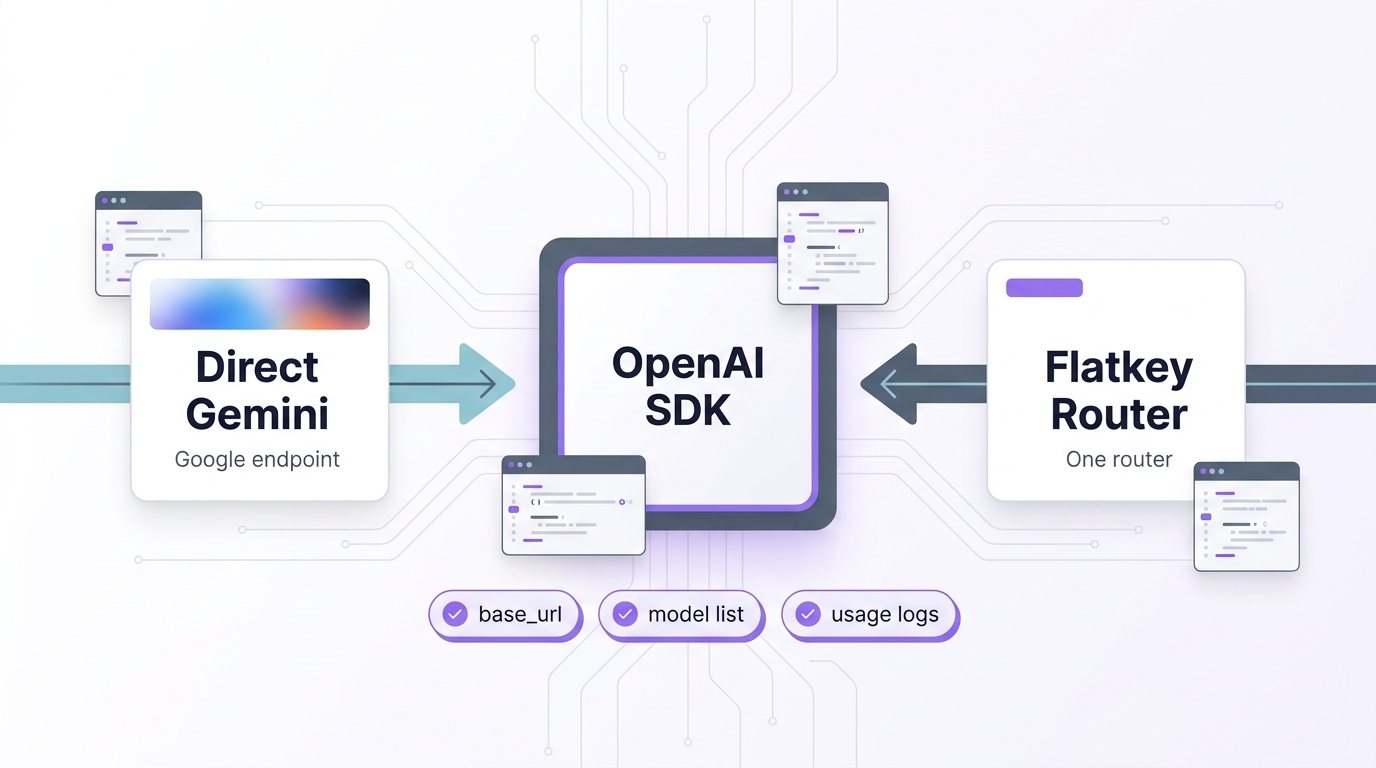
That is the core setup: direct Gemini uses a Google API key and Google's OpenAI-compatible endpoint; Flatkey uses a Flatkey key, the Flatkey router, and a Gemini model ID available in your Flatkey account.
Use the direct Google route when you only need Gemini and want the closest provider-specific setup. Use the Flatkey route when you are already comparing Gemini with GPT, Claude, DeepSeek, Qwen, or other models and want one OpenAI-compatible base URL, one model list, and one usage log.
Gemini API base URLs at a glance
| Setup choice | Base URL | API key | Model ID source | Best fit |
|---|---|---|---|---|
| Direct Gemini | https://generativelanguage.googleapis.com/v1beta/openai/ |
Gemini API key | Google Gemini API model docs or client.models.list() |
You only need Gemini and want direct Google access. |
| Flatkey router | https://router.flatkey.ai/v1 |
Flatkey API key | Flatkey /v1/models or the Model Directory |
You want Gemini next to other model providers behind one key. |
Do not mix the two. A Gemini API key will not authenticate against Flatkey, and a Flatkey key will not authenticate against Google's direct Gemini endpoint.
Direct Gemini setup with the OpenAI SDK
Google's OpenAI compatibility layer lets you keep the OpenAI SDK shape for common chat-completion workflows. The important difference is the client configuration.
Python
import os
from openai import OpenAI

client = OpenAI(
    api_key=os.environ["GEMINI_API_KEY"],
    base_url="https://generativelanguage.googleapis.com/v1beta/openai/",
)

response = client.chat.completions.create(
    model="gemini-3.8-flash",
    messages=[
        {"role": "user", "content": "Write one sentence about model routing."}
    ],
)

print(response.choices[0].message.content)
JavaScript
import OpenAI from "openai";

const client = new OpenAI({
  apiKey: process.env.GEMINI_API_KEY,
  baseURL: "https://generativelanguage.googleapis.com/v1beta/openai/",
});

const response = await client.chat.completions.create({
  model: "gemini-3.8-flash",
  messages: [
    { role: "user", content: "Write one sentence about model routing." },
  ],
});

console.log(response.choices[0].message.content);
REST
curl https://generativelanguage.googleapis.com/v1beta/openai/chat/completions \
  -H "Content-Type: application/json" \
  -H "Authorization: Bearer $GEMINI_API_KEY" \
  -d '{
    "model": "gemini-3.8-flash",
    "messages": [
      {"role": "user", "content": "Write one sentence about model routing."}
    ]
  }'
Before you ship, run client.models.list() or GET /openai/models against the same base URL. That catches the most common mistake: copying an old model ID from a blog post and assuming it still exists for your account.
Flatkey router setup for Gemini
Flatkey keeps the OpenAI SDK shape, but the base URL and key change again. You use the Flatkey router, then pick a Gemini model ID from Flatkey's /v1/models response or the live Model Directory.
Python
import os
from openai import OpenAI

client = OpenAI(
    api_key=os.environ["FLATKEY_API_KEY"],
    base_url="https://router.flatkey.ai/v1",
)

models = client.models.list()
gemini_models = [model.id for model in models.data if "gemini" in model.id]
print(gemini_models)

response = client.chat.completions.create(
    model=os.environ.get("FLATKEY_GEMINI_MODEL", "gemini-2.5-flash"),
    messages=[
        {"role": "user", "content": "Write one sentence about model routing."}
    ],
)

print(response.choices[0].message.content)
JavaScript
import OpenAI from "openai";

const client = new OpenAI({
  apiKey: process.env.FLATKEY_API_KEY,
  baseURL: "https://router.flatkey.ai/v1",
});

const models = await client.models.list();
console.log(models.data.map((model) => model.id).filter((id) => id.includes("gemini")));

const response = await client.chat.completions.create({
  model: process.env.FLATKEY_GEMINI_MODEL || "gemini-2.5-flash",
  messages: [
    { role: "user", content: "Write one sentence about model routing." },
  ],
});

console.log(response.choices[0].message.content);
In production, do not assume Google's direct model ID and Flatkey's routed model ID will always be identical. Treat the model list as the source of truth for the account you are calling.
Environment variables to keep the switch reversible
A clean Gemini routing setup should make direct and routed tests easy to compare without editing application code.
# Direct Gemini
GEMINI_API_KEY="..."
GEMINI_OPENAI_BASE_URL="https://generativelanguage.googleapis.com/v1beta/openai/"
GEMINI_MODEL="gemini-3.8-flash"

# Flatkey router
FLATKEY_API_KEY="..."
FLATKEY_BASE_URL="https://router.flatkey.ai/v1"
FLATKEY_GEMINI_MODEL="gemini-2.5-flash"
Then select the route from configuration:
import os
from openai import OpenAI

route = os.environ.get("AI_ROUTE", "flatkey")

if route == "direct_gemini":
    client = OpenAI(
        api_key=os.environ["GEMINI_API_KEY"],
        base_url=os.environ["GEMINI_OPENAI_BASE_URL"],
    )
    model = os.environ["GEMINI_MODEL"]
else:
    client = OpenAI(
        api_key=os.environ["FLATKEY_API_KEY"],
        base_url=os.environ["FLATKEY_BASE_URL"],
    )
    model = os.environ["FLATKEY_GEMINI_MODEL"]

response = client.chat.completions.create(
    model=model,
    messages=[{"role": "user", "content": "Return exactly: route ok"}],
)
This pattern lets an indie hacker test direct Gemini first, add Flatkey later, and roll back without rewriting the request path.
Smoke-test checklist before you move traffic
| Check | Direct Gemini | Flatkey router |
|---|---|---|
| Authentication | Confirm the Gemini key works only against Google's endpoint. | Confirm the Flatkey key works only against router.flatkey.ai. |
| Model list | Run client.models.list() against the Gemini base URL. |
Run client.models.list() against Flatkey and filter for Gemini IDs. |
| Basic chat | Send a short non-streaming chat completion. | Send the same prompt through the Flatkey Gemini model. |
| Streaming | Test streaming only if your app uses streaming. | Test streaming on the exact routed model before enabling it for users. |
| Tool calling | Test a small function schema if your app uses tools. | Confirm the routed model supports the tool behavior your app expects. |
| Structured output | Validate real JSON output, not just status 200. |
Validate the same schema and retry behavior. |
| Usage review | Check Google usage and errors in your provider account. | Check Flatkey Usage Logs for model, token counts, latency, and cost. |
OpenAI-compatible does not mean every provider-specific feature behaves identically. It means your client shape can stay close enough for common SDK workflows. The smoke test should cover the features your app actually depends on.
Common base URL mistakes
Leaving off /openai/ on the direct Gemini route
For direct OpenAI-compatible Gemini calls, use:
https://generativelanguage.googleapis.com/v1beta/openai/
Do not use the native Gemini generateContent endpoint with OpenAI SDK chat-completion code. Native Gemini API examples and OpenAI-compatible examples are different request shapes.
Using base_url in Node or baseURL in Python
Python OpenAI SDK configuration uses base_url. The JavaScript SDK uses baseURL.
OpenAI(base_url="https://router.flatkey.ai/v1")
new OpenAI({ baseURL: "https://router.flatkey.ai/v1" })
Treating model IDs as permanent
Model names change faster than SDK setup code. For the direct route, check Google's model docs or list models through the Gemini OpenAI-compatible endpoint. For Flatkey, check /v1/models and the Model Directory.
Skipping logs
The first successful response is not the end of the setup. After the first Flatkey request, open Usage Logs and verify the model, token counts, latency, and cost. That makes the setup operationally traceable instead of just syntactically correct.
When Flatkey adds value
Flatkey is useful when Gemini is one route in a broader model stack. For example:
- You want Gemini, Claude, GPT, DeepSeek, and Qwen behind one OpenAI-compatible base URL.
- You are testing model fallback behavior and do not want separate provider keys scattered across apps and agents.
- You need a shared usage ledger for model IDs, token counts, latency, and per-request cost.
- You want developers to change the model parameter without changing the SDK client.
If your app will only ever call Gemini, the direct Google setup may be enough. If your product is already comparing providers, the Flatkey router gives you a cleaner migration path.
Internal links worth keeping open
- Flatkey API quickstart
- OpenAI-compatible migration guide
- Gemini vs Claude route checks
- Flatkey Model Directory
- Flatkey pricing page
- Flatkey status page
For current per-model prices and which Gemini models are free, see our Gemini API pricing and free tier guide.
If you have not created a key yet, start with how to get a Google Gemini API key.
FAQ
What is the official Gemini OpenAI-compatible base URL?
The official Gemini OpenAI-compatible base URL is https://generativelanguage.googleapis.com/v1beta/openai/. Use it with a Gemini API key, not a Flatkey key.
What base URL should I use for Gemini through Flatkey?
Use https://router.flatkey.ai/v1 with a Flatkey API key. Then choose a Gemini model ID from Flatkey's /v1/models response or the live Model Directory.
Can I use the same Gemini model ID in both places?
Sometimes, but do not assume it. The safe process is to list models for the exact route and account you are using, then pin that ID in configuration.
Does OpenAI-compatible mean full feature parity?
No. Treat OpenAI compatibility as an SDK and request-shape convenience. Test streaming, tools, structured output, files, and multimodal inputs on the exact model and route before production rollout.
Should an indie hacker start direct or with Flatkey?
Start direct if you are only proving Gemini works. Start with Flatkey if the real decision is which model should power the product, not whether Gemini alone can answer the prompt.
Bottom line
The Gemini API base URL decision is simple when you separate the two routes:
- Direct Gemini:
https://generativelanguage.googleapis.com/v1beta/openai/ - Flatkey router:
https://router.flatkey.ai/v1
Keep keys separate, list models before calling chat completions, test the features your app uses, and verify usage after the first request. When you are ready to compare Gemini with other providers through one OpenAI-compatible layer, create a Flatkey key and move one workload at a time.