GLM-5.3 Prime API: Pricing, Context, and Setup
Quick answer:
glm-5.3-primeis a separate premium service row, not just another name for Z.AI's baseglm-5.3. Alibaba Model Studio lists Prime at $2.80 per 1M input tokens, $0.56 per 1M cached input tokens, and $8.80 per 1M output tokens, with a 1M-token context window, 128K maximum output, and 10,000 RPM.Last verified: October 12, 2026 against Alibaba Model Studio's GLM-5.3 Prime page.
GLM-5.3 Prime API access is part of a moving GLM family, not a one-row pricing lookup, not a one-row pricing lookup. Z.AI still documents glm-5, but its current docs and pricing table also point teams toward glm-5.1, glm-5.2, and glm-5.3 for newer coding-agent and long-context work. If you are choosing a GLM route for an AI product, the practical question is no longer "How do I call GLM-5?" It is "Which GLM-5 family route should we test, how do we keep the integration OpenAI-compatible, and how do we compare the real cost before moving traffic?"
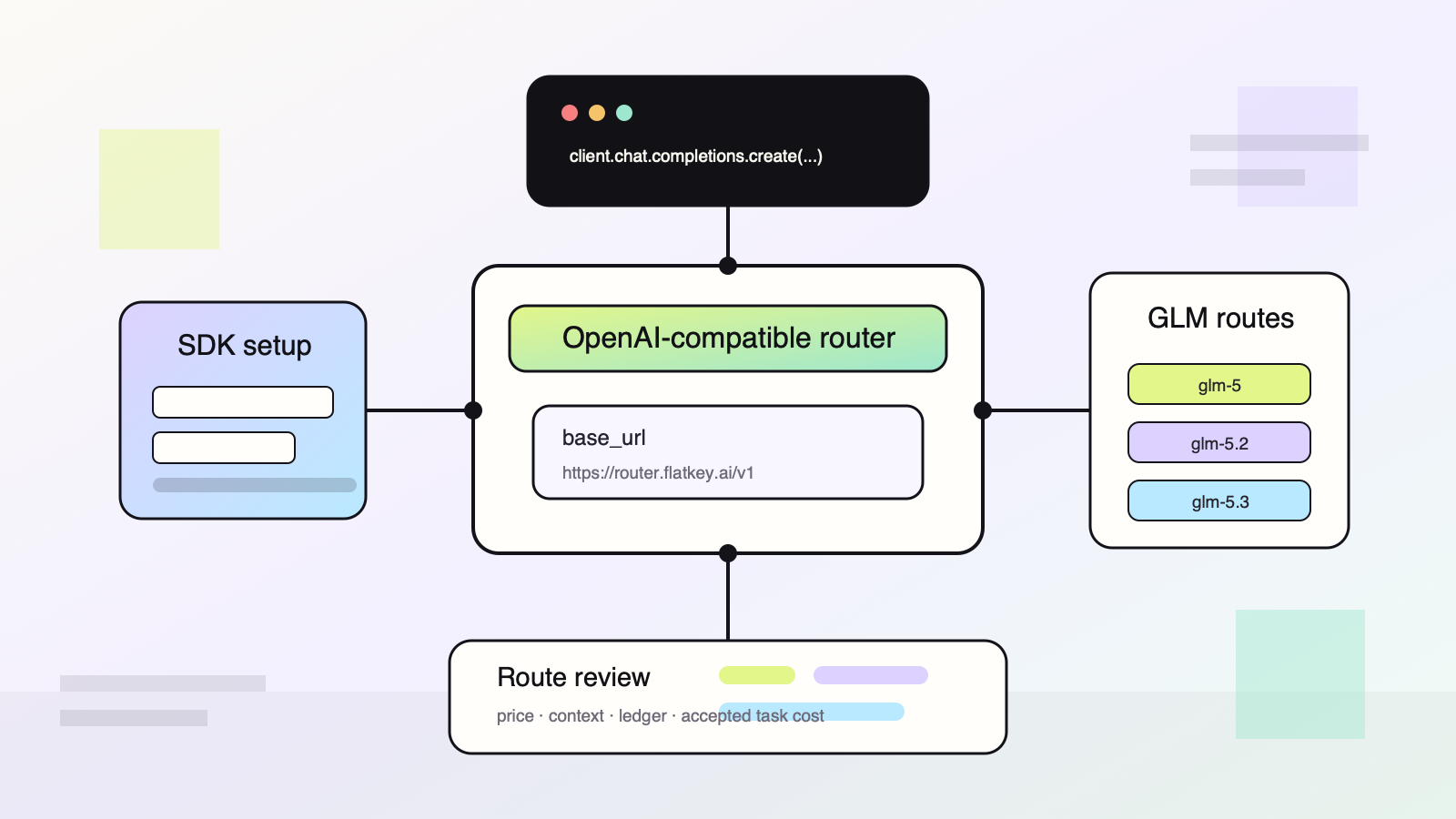
The short answer: start with an OpenAI-compatible client, pin the model ID you are testing, and keep a small route review record for price, context window, output cap, tool behavior, and accepted-task rate. Direct Z.AI access uses https://api.z.ai/api/paas/v4/ as the OpenAI SDK base_url. Flatkey uses the same OpenAI SDK pattern with https://router.flatkey.ai/v1, so a product team can test GLM routes next to GPT, Claude, Gemini, DeepSeek, Qwen, and other models under one key and one usage ledger.
GLM-5.3 Prime quick answer
Use this decision path before shipping GLM into production:
- Choose the exact model ID:
glm-5,glm-5.2,glm-5.3, or a lower-latency Flash route when available. - Confirm the pricing unit: Z.AI publishes GLM token prices per 1M input, cached input, and output tokens.
- Confirm the context window and output cap: Z.AI documents
glm-5at 200K context and 128K maximum output; its migration guide documentsglm-5.3at 1M context and 128K maximum output. - Start with the OpenAI SDK: Z.AI documents OpenAI SDK compatibility by changing the API key and base URL.
- If you use Flatkey, switch only the key and
base_url, then set the GLM model ID in the request. - Measure accepted-task cost, not just token list price.
For AI product teams, any GLM-5.3 Prime rollout should be treated as a seven-day canary, not a blind model swap. Log prompt tokens, cached tokens, output tokens, latency, tool calls, retries, route errors, accepted result rate, and human escalation rate.
GLM-5.3 Prime at a glance
| GLM-5.3 Prime field | Published value |
|---|---|
| Input tokens | $2.80 per 1M |
| Cached input | $0.56 per 1M |
| Output tokens | $8.80 per 1M |
| Context window | 1M tokens |
| Maximum output | 128K tokens |
| Published rate limit | 10,000 RPM |
Naming caution: the glm-5.3-prime row published through Alibaba Model Studio and exposed through Flatkey should not be treated as the same commercial tier as Z.AI's base glm-5.3. Compare model ID, provider surface, rate limit, and billed route separately before moving traffic.
Use Prime when the higher throughput or service tier matters enough to justify the price. If your workload does not need that lane, benchmark base glm-5.3, Flash, and other routes on accepted-task cost rather than assuming “Prime” is automatically the best value.
Current GLM-5 family pricing
Z.AI's current pricing documentation lists prices in USD per 1M tokens. The key rows for this guide are below.
| Model | Official input | Official cached input | Official output | When to test |
|---|---|---|---|---|
glm-5 |
$1.00 | $0.20 | $3.20 | Baseline GLM-5 route, 200K context, lower list price than newer flagship rows. |
glm-5.1 |
$1.40 | $0.26 | $4.40 | Similar price band to 5.2/5.3; test only if you need a specific availability or regression lane. |
glm-5.2 |
$1.40 | $0.26 | $4.40 | Long-context GLM route for coding agents and repository-scale work. |
glm-5.3 |
$1.40 | $0.26 | $4.40 | Current flagship route for long-horizon coding, agents, and complex project delivery. |
glm-5.3-flash |
$0.15 | $0.03 | $0.50 | Fast/low-cost exploration where quality gates can tolerate a smaller model. |
glm-5.3-flashx |
$0.37 | $0.075 | $1.25 | Middle lane between Flash and flagship routes. |
Flatkey's live model directory currently shows base GLM family routes alongside glm-5.3-prime. Treat the Prime row as a separate Alibaba Model Studio service tier, not as Z.AI base glm-5.3 list pricing. At the time of this check, Flatkey showed glm-5 at $0.80 input, $0.16 cached input, and $2.56 output per 1M tokens, while base glm-5.3 matched the $1.40 input, $0.26 cached input, and $4.40 output row. Always re-check the exact model route before launch because gateway discounts, model availability, and release lanes can change faster than an article can.
Which GLM model ID should a product team test?
Do not treat glm-5 and glm-5.3 as interchangeable because they share a family name. Test them as separate routes.
Use glm-5 when:
- You want a lower listed baseline for coding, analysis, or tool-heavy engineering workflows.
- Your prompts fit comfortably inside the 200K context documented for GLM-5.
- You need a stable first pass before deciding whether the newer route is worth the extra cost.
Use glm-5.2 or glm-5.3 when:
- Your agent loads large repositories, long documents, or multi-file context.
- You need the 1M context lane described in Z.AI's GLM-5.3 migration guide.
- Your workflow is complex enough that quality and tool-call reliability matter more than raw token price.
Use Flash routes when:
- You are classifying, summarizing, formatting, or doing early exploratory runs.
- You have a strict budget cap and can escalate failures to a stronger route.
- You measure accepted result rate and are willing to retry or escalate when the first pass misses the bar.
The practical routing pattern is a two- or three-lane policy: use a lower-cost GLM route for first-pass work, send long-context or high-risk tasks to glm-5.3, and escalate unresolved tasks to another premium model only when the GLM route fails your acceptance test.
Direct Z.AI OpenAI-compatible setup
Z.AI documents OpenAI SDK compatibility. The migration is the same shape developers already know: install the OpenAI SDK, set the API key, set the Z.AI base URL, and choose the model ID.
import os
from openai import OpenAI

client = OpenAI(
    api_key=os.environ["ZAI_API_KEY"],
    base_url="https://api.z.ai/api/paas/v4/",
)

response = client.chat.completions.create(
    model="glm-5",
    messages=[
        {"role": "system", "content": "You are a concise product engineering assistant."},
        {"role": "user", "content": "Review this feature plan and list the riskiest assumptions."},
    ],
    extra_body={
        "thinking": {"type": "enabled"},
    },
    max_tokens=4096,
)

print(response.choices[0].message.content)
For glm-5.3, Z.AI's migration guide says deep thinking is forced on by default and can be controlled with reasoning_effort. If you migrate from glm-5 or glm-5.2 to glm-5.3, add regression tests for streaming, delta.reasoning_content, tool-call argument streaming, randomness, latency, and maximum output size.
Flatkey OpenAI-compatible setup
Flatkey keeps the same OpenAI SDK shape. Change the API key, use Flatkey's router base URL, and keep the model ID explicit.
import os
from openai import OpenAI

client = OpenAI(
    api_key=os.environ["FLATKEY_API_KEY"],
    base_url="https://router.flatkey.ai/v1",
)

response = client.chat.completions.create(
    model="glm-5.3",
    messages=[
        {"role": "system", "content": "You are a senior code-review assistant."},
        {"role": "user", "content": "Review this diff and return blocking issues first."},
    ],
    extra_body={
        "thinking": {"type": "enabled"},
        "reasoning_effort": "high",
    },
    stream=False,
)

print(response.choices[0].message.content)
This is the reason GLM-5 API Access: Pricing and OpenAI-Compatible Setup matters for product teams. You can test GLM routes without rewriting your app around a provider-specific SDK. You can also compare GLM against non-GLM routes in the same usage ledger when price, latency, or quality shifts.
A seven-day GLM route canary
Before you move production traffic, run the route through a small canary that answers four questions:
| Day | Check | What to record |
|---|---|---|
| 1 | Basic compatibility | Model ID, base URL, SDK version, request/response shape, streaming behavior. |
| 2 | Cost sample | Input tokens, cached input tokens, output tokens, retries, accepted result count. |
| 3 | Tool behavior | Tool-call schema adherence, argument completeness, timeout rate, malformed tool calls. |
| 4 | Long-context load | Context size, retrieval method, latency, truncation behavior, failure mode. |
| 5 | Quality review | Human acceptance rate, edit distance, escalation rate, support-ticket risk. |
| 6 | Failure handling | Retry policy, fallback route, idempotency, user-facing error copy. |
| 7 | Launch gate | Final route choice, budget cap, owner, rollback trigger, next review date. |
Use this route review record:
route_review:
  model_id: glm-5.3
  provider_or_gateway: flatkey
  base_url: https://router.flatkey.ai/v1
  official_source_checked: 2026-10-10
  price_unit: per_1m_tokens
  input_price_usd: 1.40
  cached_input_price_usd: 0.26
  output_price_usd: 4.40
  context_window_tokens: 1048576
  max_output_tokens: 128000
  workload:
    name: coding_agent_pr_review
    sample_size: 200
    accepted_result_target: 0.85
  controls:
    max_tokens_per_request: 12000
    monthly_budget_usd: 500
    fallback_model: claude-or-gpt-route-after-human-approval
    owner: platform-ai
The important field is not only input_price_usd or output_price_usd. It is accepted result rate. A cheap route that needs three retries and one human repair can cost more than a higher-priced route that succeeds once.
Where Flatkey fits
Direct Z.AI access is the cleanest path when GLM is the only model you need and one team owns the provider account. Flatkey becomes more useful when GLM is one route in a multi-model product:
- You want one key and one base URL for GLM, GPT, Claude, Gemini, DeepSeek, Qwen, Kimi, Seedance, and other supported models.
- You need a request-level usage ledger for token cost, cached-token cost, output cost, failures, and team/customer attribution.
- You want model allowlists, sub-key budgets, shared prepaid balance, invoice reconciliation, or fallback policies.
- You need to compare GLM cost against other model families without rebuilding each integration.
If your team is already evaluating model prices, pair this GLM article with Flatkey's guides to AI model pricing comparison, how to compare AI model prices before switching providers, AI gateway pricing, GLM-4.7 vs Claude Sonnet routing, and the AI model catalog guide.
Common mistakes
The first mistake is writing "GLM-5 pricing" into a spreadsheet without a model ID. glm-5, glm-5.2, glm-5.3, Flash, and Prime rows can have different prices, context windows, and behavior.
The second mistake is comparing input-token prices only. For coding agents, output tokens, cached input, long-context retrieval, tool retries, and accepted-patch rate usually matter more.
The third mistake is skipping migration tests. Z.AI's GLM-5.3 migration guide calls out sampling defaults, forced thinking, reasoning_effort, streaming output, tool streaming, maximum context, and maximum output. Treat those as regression areas.
The fourth mistake is launching with one provider key shared across environments. Use separate keys or sub-keys for development, staging, production, and customer traffic so finance and engineering can explain the bill.
Frequently asked questions
Is GLM-5 OpenAI-compatible?
Yes. Z.AI documents OpenAI SDK compatibility and shows the OpenAI Python SDK using base_url="https://api.z.ai/api/paas/v4/". Flatkey also exposes GLM routes through an OpenAI-compatible router at https://router.flatkey.ai/v1.
What is the current official GLM-5 API price?
Z.AI's pricing page currently lists glm-5 at $1.00 per 1M input tokens, $0.20 per 1M cached input tokens, and $3.20 per 1M output tokens. The newer glm-5.1, glm-5.2, and glm-5.3 rows are listed at $1.40 input, $0.26 cached input, and $4.40 output per 1M tokens.
Should I use GLM-5 or GLM-5.3?
Use glm-5 when you want a lower-cost baseline and your workload fits its documented 200K context. Test glm-5.3 when you need the newer flagship route, 1M context, long-horizon coding behavior, or GLM-5.3-specific tool and reasoning features.
Can I switch from direct Z.AI to Flatkey without changing the SDK?
In most OpenAI SDK integrations, yes. Keep the OpenAI client, change the API key, change base_url to https://router.flatkey.ai/v1, and keep the GLM model ID explicit. Then run the same regression suite you would run for any model-route change.
What should I measure after setup?
Measure input tokens, cached input tokens, output tokens, request latency, tool-call success, retries, fallback rate, accepted result rate, and cost per accepted task. That is the practical measurement layer behind GLM-5 API Access: Pricing and OpenAI-Compatible Setup.
Final checklist
GLM-5 API Access: Pricing and OpenAI-Compatible Setup is simple at the SDK layer and nuanced at the operating layer. Before launch, confirm the exact model ID, official pricing row, Flatkey route row if you use the gateway, context window, output cap, thinking/tool parameters, budget cap, and rollback route.
When GLM is one model among many, Flatkey gives product teams a one-key router, an OpenAI-compatible base URL, and a usage ledger for comparing GLM routes against the rest of the model stack.
Sources
- Z.AI GLM-5 documentation: https://docs.z.ai/guides/llm/glm-5
- Z.AI pricing documentation: https://docs.z.ai/guides/overview/pricing
- Z.AI OpenAI Python SDK documentation: https://docs.z.ai/guides/develop/openai/python
- Z.AI GLM-5.3 migration guide: https://docs.z.ai/guides/overview/migrate-to-glm-new
- Flatkey homepage: https://flatkey.ai/
- Flatkey model directory: https://flatkey.ai/models