
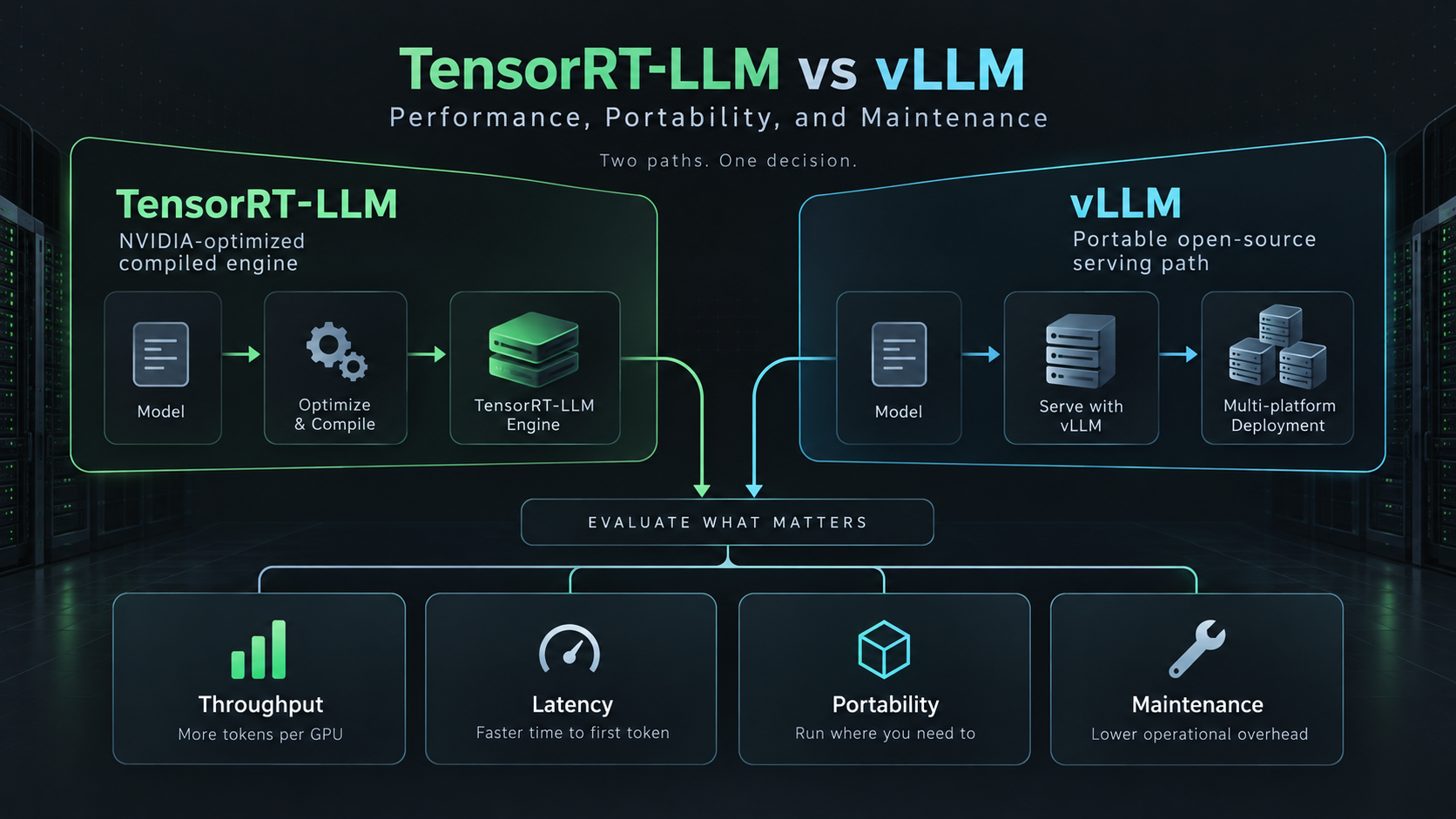
TensorRT-LLM vs vLLM: Performance, Portability, and Maintenance
If you are comparing TensorRT-LLM vs vLLM, the practical answer is not "which one is faster?" It is "which one can your team keep fast after the model, GPU, traffic pattern, and serving requirements change?"
TensorRT-LLM is usually the better fit when you are standardized on NVIDIA GPUs, can afford an optimization and validation cycle, and need to squeeze the most predictable performance out of a small set of production models. vLLM is usually the better fit when you need broad model coverage, faster iteration, OpenAI-compatible serving, and portability across more hardware and deployment patterns.
That is the short version. The expensive mistakes happen in the middle: picking vLLM because it is easier to start, then discovering that one high-volume endpoint needs lower latency than your Python-first stack can deliver; or picking TensorRT-LLM because a benchmark looked great, then realizing every model update requires a heavier build, test, and rollback path.
This guide is a practical TensorRT-LLM vs vLLM comparison across performance, portability, maintenance, model support, and operational risk. If you came here for a TensorRT-LLM vs vLLM speed comparison, skip any single-number answer and use the benchmark plan below against your own traffic before committing GPU budget.
TensorRT-LLM vs vLLM at a Glance
| Decision area | Choose TensorRT-LLM when... | Choose vLLM when... |
|---|---|---|
| Performance target | You need highly optimized NVIDIA GPU inference for a known model family and stable serving shape. | You need strong general serving performance with less compile and engine-management overhead. |
| Hardware strategy | Your fleet is NVIDIA-only, often Hopper or newer, and you plan around CUDA/NCCL/TensorRT. | You may run across NVIDIA, AMD ROCm, Intel XPU, TPU, or mixed lab and cloud environments. |
| Model cadence | You serve a small set of models and can validate engine builds before rollout. | You frequently try new Hugging Face models, MoE variants, adapters, or quantization formats. |
| Team profile | You have infra engineers who can own kernel, engine, CUDA, and deployment tuning. | You want ML engineers to ship serving changes with familiar Python and OpenAI-compatible APIs. |
| Maintenance risk | You accept more build and compatibility work for tighter optimization control. | You accept less vendor-specific optimization for faster upgrades and broader community coverage. |
| Best first move | Benchmark after freezing model, GPU, batch profile, sequence length, and quantization. | Start here for exploration, model qualification, and heterogeneous infrastructure. |
The cleanest pattern for many teams is not a permanent either-or choice. Start with vLLM to validate demand, model quality, prompt shape, and traffic mix. Move only the stable, high-volume, NVIDIA-bound endpoints into TensorRT-LLM when the measured gain clears the added maintenance cost.
What TensorRT-LLM Is Good At
TensorRT-LLM is NVIDIA's LLM inference stack built around TensorRT, CUDA, and NVIDIA GPU systems. It is designed for optimized inference, not just easy model launch. The official TensorRT-LLM documentation centers on engine building, runtime execution, performance tuning, model support, and NVIDIA GPU feature support.
The main advantage is control. TensorRT-LLM can take advantage of NVIDIA-specific optimization paths, including attention kernels, quantization paths, multi-GPU parallelism, and deployment patterns that align tightly with NVIDIA hardware. If you already plan to run H100, H200, B200, or GB200-style infrastructure, TensorRT-LLM belongs in the performance shortlist.
The tradeoff is that "optimized" does not mean "free." You should expect more work around:
- Building or converting model artifacts.
- Validating engine settings for each model and precision.
- Pinning compatible CUDA, TensorRT, driver, container, and GPU combinations.
- Re-running acceptance tests when model weights, context length, parallelism, or quantization changes.
- Keeping a fallback path when a model variant is not yet supported by your TensorRT-LLM version.
That extra work is rational when one endpoint consumes enough GPU hours that a single-digit percentage improvement matters, or when latency predictability is part of the product contract.
What vLLM Is Good At
vLLM is an open-source LLM serving engine built for high-throughput serving, continuous batching, PagedAttention, and practical OpenAI-compatible APIs. The vLLM project documentation emphasizes serving, benchmarking, OpenAI-compatible endpoints, quantization, and GPU installation options.
The main advantage is iteration speed. You can usually bring up a model, expose an OpenAI-compatible server, test traffic, and compare quantization settings without committing to a heavier compiled-engine workflow. That makes vLLM a strong default for teams still deciding which model, prompt format, context length, or GPU type actually survives production.
vLLM is also stronger when portability is a real requirement. Its documentation covers NVIDIA CUDA, AMD ROCm, Intel XPU, TPU, and other installation paths or integrations, though feature parity varies by backend. That matters if your procurement plan includes cloud GPU spot capacity, AMD trials, internal lab machines, or future accelerator diversity.
The tradeoff is that portability and fast iteration can hide production tuning work. vLLM still needs careful configuration for:
- KV cache sizing and eviction behavior.
- Tensor parallel and pipeline parallel choices.
- Prefill/decode scheduling under real traffic.
- Quantization compatibility.
- CUDA graph or eager-mode behavior.
- Long-context memory pressure.
- Multi-tenant fairness and admission control.
vLLM is easier to start. It is not automatic infrastructure.
TensorRT-LLM vs vLLM Performance Comparison
Any useful TensorRT-LLM vs vLLM benchmark has to specify the workload. A benchmark that only reports tokens per second for one model at one batch size can point you in the wrong direction.
For LLM serving, performance has at least five dimensions:
| Metric | Why it matters | What can distort it |
|---|---|---|
| Time to first token | Interactive chat and agent UX depend on early response latency. | Prompt length, prefill scheduling, network overhead, warmup state. |
| Inter-token latency | Streaming quality depends on steady decode speed. | Batch pressure, KV cache layout, quantization, GPU clocks. |
| Throughput | Batch, summarization, and offline generation care about total tokens per second. | Request mix, sequence length, concurrency, sampling settings. |
| Cost per accepted output | Business cost depends on useful answers, not raw token speed. | Error rate, timeout rate, retries, rejected outputs, quality regressions. |
| Operational tail latency | Production users feel p95/p99, not only average throughput. | Bursty arrivals, multi-tenant queues, cold starts, OOM recovery. |
TensorRT-LLM often has the strongest case when the benchmark is narrow, stable, and NVIDIA-bound: one model family, one GPU class, one quantization target, one context window, and a known request distribution. vLLM often has the strongest case when the benchmark includes change: model swaps, multiple model sizes, mixed prompts, adapter experiments, and a team that needs to keep shipping.
Do not compare a highly tuned TensorRT-LLM engine against a default vLLM launch command and call that a product decision. Also do not compare a well-tuned vLLM service against a generic TensorRT-LLM sample and assume the NVIDIA path cannot catch up. Tune both until each reflects the level of engineering attention you are actually willing to fund.
Portability: The Hidden Difference
Portability is where TensorRT-LLM vs vLLM becomes a business decision rather than only an infra decision.
TensorRT-LLM is tightly aligned with NVIDIA. That is a strength if your roadmap is also tightly aligned with NVIDIA. You get a coherent vendor stack: CUDA, TensorRT, NCCL, NVIDIA containers, NVIDIA GPU features, and NVIDIA performance guidance. For enterprises buying dedicated GPU clusters, that coherence can reduce ambiguity.
vLLM is broader. It is not equally optimized on every backend, but its open-source serving workflow is designed around faster model and infrastructure experimentation. If your team might test AMD MI300-series or MI400-series systems, run across rented cloud GPU inventory, or keep a fallback deployment on commodity NVIDIA machines, vLLM reduces the chance that your serving layer becomes a hard lock-in point.
The rule is simple:
- If hardware standardization is the plan, TensorRT-LLM can turn that standardization into performance leverage.
- If hardware optionality is the plan, vLLM makes optionality easier to preserve.
This is also where a model/API baseline helps. If your team does not need direct kernel control, compare self-hosted TensorRT-LLM and vLLM against a managed model API route. Flatkey gives teams one OpenAI-compatible access layer for model APIs, so you can compare self-hosted GPU cost against the cost and operational simplicity of routed model usage. The right answer may be: self-host the stable high-volume workload, route the bursty or experimental workload through an API.
Maintenance: Where the Bill Shows Up
The maintenance difference is easy to underweight during a proof of concept.
TensorRT-LLM maintenance tends to concentrate in build and compatibility work. You need to know which model architectures are supported, which quantization path is valid, whether the target GPU and TensorRT-LLM version support the feature you want, and how to rebuild or roll back engines. This is manageable for a strong infra team. It is risky for a small product team that just wants to ship an AI feature.
vLLM maintenance tends to concentrate in runtime operations and upgrade discipline. You still have to pin versions, validate model support, test quantization paths, and monitor serving behavior, but the development loop is usually closer to standard Python and model-serving workflows. That makes vLLM easier to hand to ML platform teams that already work in Hugging Face, Kubernetes, and OpenAI-compatible API patterns.
Here is the practical maintenance checklist:
| Maintenance question | Why it matters |
|---|---|
| Who owns version pinning and rollback? | Both engines move quickly. Untested upgrades can change performance or compatibility. |
| How often do models change? | High model churn favors vLLM. Low churn gives TensorRT-LLM more time to repay tuning effort. |
| Do you need custom kernels or deep NVIDIA tuning? | If yes, TensorRT-LLM aligns better with the optimization path. |
| Do you need broad model and backend coverage? | If yes, vLLM usually lowers exploration friction. |
| Can you run load tests before every rollout? | TensorRT-LLM especially needs this, but vLLM benefits from it too. |
| What is your fallback when an engine path fails? | A second engine, a smaller model, or a routed model API prevents outages from becoming product incidents. |
Model Support and Quantization
Model support changes quickly. Treat every public model-support table as a starting point, not a deployment guarantee.
For TensorRT-LLM, check the official support matrix, model examples, and release notes before committing a model. Pay attention to the exact architecture, precision, quantization recipe, tensor parallel degree, context length, and GPU generation.
For vLLM, check the supported models, quantization documentation, and issue tracker for the exact model family and serving mode you plan to use. vLLM's practical advantage is that community support often appears quickly for popular open models, but that does not remove the need for your own acceptance tests.
Use this model qualification table before the TensorRT-LLM vs vLLM decision:
| Check | Pass condition |
|---|---|
| Architecture support | The exact model family is documented or validated in your own smoke test. |
| Weight format | The engine can load your source weights without a fragile conversion chain. |
| Quantization | FP8, INT8, INT4, AWQ, GPTQ, or other method is supported for the model and hardware you will actually run. |
| Context length | The target context fits memory at expected concurrency with production KV cache settings. |
| Parallelism | Tensor parallel, pipeline parallel, or expert parallel behavior is validated on your GPU topology. |
| Streaming | Time to first token and inter-token latency pass with real prompt shapes. |
| Rollback | You can revert model, engine, and container versions without manual surgery. |
Benchmark Plan: How to Test TensorRT-LLM vs vLLM
Run the benchmark like a production acceptance test, not like a demo.
1. Freeze the workload
Define:
- Model name and exact revision.
- Precision or quantization mode.
- GPU type and count.
- Driver, CUDA, container, and engine versions.
- Context window target.
- Prompt length distribution.
- Output length distribution.
- Concurrency targets.
- Streaming vs non-streaming mix.
- Quality acceptance criteria.
If those are not fixed, your TensorRT-LLM vs vLLM benchmark is not reproducible.
2. Test four traffic shapes
| Traffic shape | What it reveals |
|---|---|
| Low concurrency, short prompts | Baseline latency and cold path overhead. |
| High concurrency, short prompts | Scheduler efficiency and decode pressure. |
| Long prompts, short outputs | Prefill performance and KV cache pressure. |
| Mixed long and short requests | Tail latency, fairness, and queue behavior. |
3. Measure accepted-output cost
For each engine, track:
- GPU dollars per hour.
- Requests completed.
- Tokens generated.
- p50, p95, and p99 time to first token.
- p50, p95, and p99 end-to-end latency.
- Timeout and retry rate.
- OOM and eviction events.
- Output rejection rate from your evaluator or human review.
Then calculate:
accepted_output_cost =
  total_gpu_cost_for_test_window
  / accepted_outputs
This is more useful than raw tokens per second because it includes failed, slow, retried, or rejected outputs.
4. Run an operations test
Before choosing, simulate:
- Model rollback.
- Container rollback.
- One GPU failure or node drain.
- Sudden 3x traffic spike.
- Long-context burst.
- Bad prompt distribution that creates more long outputs than expected.
- A model update that changes weight format or tokenizer behavior.
If TensorRT-LLM wins raw throughput but your team cannot safely rebuild and roll back engines, the benchmark did not capture production risk. If vLLM wins iteration speed but p99 latency breaks under your real traffic, the benchmark did not capture user experience.
Decision Matrix
| Situation | Better default |
|---|---|
| Early product exploration | vLLM |
| Frequent model swaps | vLLM |
| OpenAI-compatible local serving with fast setup | vLLM |
| Heterogeneous hardware planning | vLLM |
| Stable high-volume endpoint on NVIDIA GPUs | TensorRT-LLM |
| Latency-sensitive serving with strong NVIDIA infra ownership | TensorRT-LLM |
| Enterprise GPU fleet standardized on NVIDIA | TensorRT-LLM |
| Small team without dedicated inference engineers | vLLM or model API baseline |
| Need to compare self-hosting against managed APIs | Run both against a Flatkey model/API baseline |
For a narrow, high-volume production service, TensorRT-LLM may be worth the extra work. For an AI product team still learning its workload, vLLM is usually the better first serving layer.
How Flatkey Fits the Decision
Flatkey is not a replacement for TensorRT-LLM or vLLM when you need direct control of your own GPUs. It is the baseline you should compare against before you spend weeks tuning self-hosted inference.
Use Flatkey as the model/API baseline when:
- Your workload is bursty and does not justify reserved GPU capacity.
- You need access to multiple model providers from one OpenAI-compatible route.
- You want to compare self-hosted GPU cost against API cost per accepted output.
- You need a fallback when a self-hosted serving stack is down, overloaded, or waiting on a model migration.
- Your team cares more about product latency and reliability than kernel-level control.
For many teams, the mature architecture is layered:
- Use Flatkey or another managed model API route for experiments, burst handling, and fallback.
- Use vLLM for portable self-hosted inference and model exploration.
- Use TensorRT-LLM for the few NVIDIA-bound endpoints where measured performance gain justifies ongoing maintenance.
Common Mistakes
Mistake 1: Picking from public benchmarks alone
Public TensorRT-LLM vs vLLM benchmark results are useful signals, but they rarely match your model, GPU, prompt mix, quantization, and SLA. Use them to form hypotheses, not final decisions.
Mistake 2: Ignoring p95 and p99 latency
Average tokens per second can improve while user experience gets worse. Always track time to first token, p95/p99 end-to-end latency, and timeout rate.
Mistake 3: Treating vLLM as the "easy forever" choice
vLLM is easier to start, but production serving still needs version pinning, observability, admission control, memory planning, and failure testing.
Mistake 4: Treating TensorRT-LLM as the "fast by default" choice
TensorRT-LLM can be very strong on NVIDIA GPUs, but the value comes from correct tuning, supported model paths, and disciplined validation.
Mistake 5: Forgetting the API baseline
If the workload is intermittent, low volume, or still changing, a managed model API route may beat self-hosting after you include engineering time, idle GPU cost, and operational risk.
Related Reading
- If you are choosing an open-source serving framework first, read vLLM vs SGLang.
- If you are still sizing hardware, start with Best GPU for LLM Inference.
- If cluster topology is the blocker, use the GPU cluster architecture guide.
- If the budget question comes first, compare GPU rental prices and GPU cluster TCO.
- If you are deciding whether to self-host at all, read GPU cloud vs model API.
Frequently Asked Questions
Is TensorRT-LLM faster than vLLM?
Sometimes, especially for stable workloads on NVIDIA GPUs after proper tuning. But "TensorRT-LLM is faster" is not a safe blanket claim. The result depends on model architecture, GPU type, quantization, sequence length, batch shape, concurrency, and how much tuning each engine receives.
Is vLLM easier to deploy than TensorRT-LLM?
Usually yes for initial deployment and model experimentation. vLLM's OpenAI-compatible server and Python-first workflow make it easier to start. TensorRT-LLM often requires more engine, container, and compatibility management.
Should I use TensorRT-LLM or vLLM for H100 inference?
Start with vLLM if you are still exploring the model or workload. Test TensorRT-LLM when the endpoint is stable, high volume, and NVIDIA-specific optimization can repay the extra maintenance.
Which is better for multi-GPU inference?
Both can serve multi-GPU workloads, but the operational question is topology and ownership. If your team can tune NVIDIA-specific parallelism deeply, TensorRT-LLM may be attractive. If you need faster model iteration and broader serving patterns, vLLM is often the simpler starting point.
Which is better for AMD GPUs?
vLLM is the practical default because it documents ROCm installation and AMD-oriented paths. TensorRT-LLM is an NVIDIA stack and should be treated as NVIDIA-specific for planning purposes.
Can I use both TensorRT-LLM and vLLM?
Yes. Many teams should. Use vLLM for exploration and broad serving coverage, then move specific high-volume NVIDIA endpoints to TensorRT-LLM after the benchmark proves the gain is worth the maintenance.
Bottom Line
The best TensorRT-LLM vs vLLM decision is workload-specific:
- Choose vLLM when portability, model iteration, and serving simplicity matter most.
- Choose TensorRT-LLM when a stable NVIDIA-bound endpoint needs the strongest tuned performance you can justify.
- Keep a model/API baseline through Flatkey when self-hosting complexity may outweigh GPU control.
Do not make the decision from one benchmark chart. Make it from your model, your GPU topology, your traffic distribution, your failure plan, and your team's ability to maintain the stack after the first successful demo.
Sources
- NVIDIA TensorRT-LLM documentation
- TensorRT-LLM architecture overview
- TensorRT-LLM support matrix
- TensorRT-LLM performance overview
- vLLM documentation
- vLLM OpenAI-compatible server
- vLLM GPU installation documentation
- vLLM quantization documentation
- vLLM paper: Efficient Memory Management for Large Language Model Serving with PagedAttention


