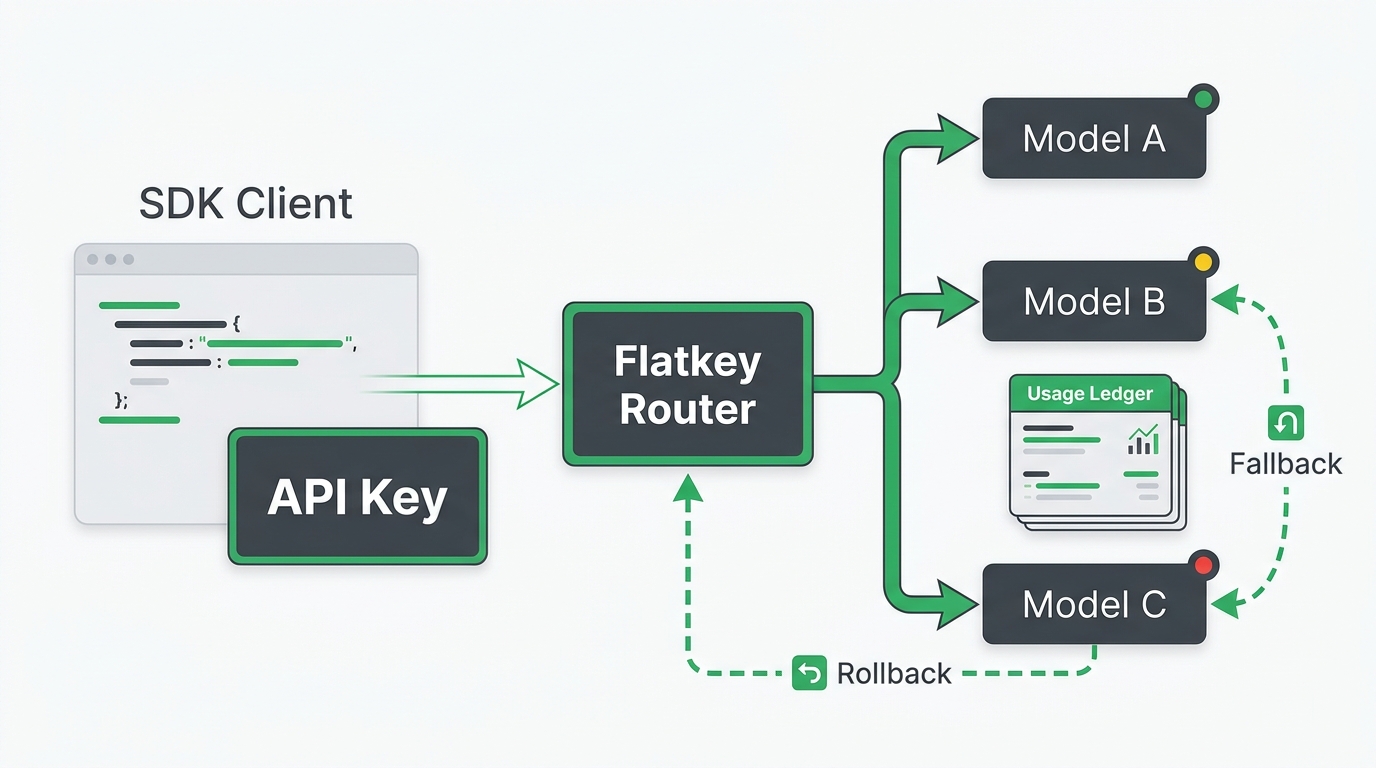
AI API base URL migration tests should happen before the environment variable changes, not after production traffic starts failing. Changing a single baseURL or base_url can move authentication, model selection, streaming, tool calling, usage records, quota behavior, and rollback control onto a new path at the same time.
Flatkey is designed for teams that want one key, one OpenAI-compatible routing layer, and clearer billing and usage review across model providers. The public Flatkey homepage checked on July 7, 2026 showed the example route https://router.flatkey.ai/v1/chat/completions, while the current models and pricing pages exposed model, endpoint, provider, and billing context for review. Treat those pages as day-of-migration evidence, then run your own account smoke tests before moving traffic.
Use this guide as a practical sequence of AI API base URL migration tests. The goal is not to prove every app path. The goal is to prove the smallest safe path through the new base URL, then add features one layer at a time.
The 7 AI API Base URL Migration Tests
Run the tests in this order. Each one should produce evidence you can attach to a deployment ticket.
| Test | What It Proves | Evidence To Save |
|---|---|---|
| 1. Auth and base URL composition | The key, host, /v1 root, and endpoint path are wired correctly. |
Redacted env snapshot, status code, response body, request time. |
| 2. Model catalog and endpoint family | The selected model alias belongs to the endpoint you are calling. | Catalog screenshot or export, model alias, endpoint family. |
| 3. Plain chat completion | A minimal non-streaming request works without SDK or app complexity. | Curl command, response ID, output text, usage object if returned. |
| 4. SDK parity | The app SDK builds the same route that curl proved. | Resolved base URL, SDK version, response, startup config log without secrets. |
| 5. Streaming or SSE | Incremental events reach the client without buffering or parser mismatch. | Raw stream sample, content type, first-token timing, final event. |
| 6. Tool or function calling | The selected route supports your tool schema and tool-choice behavior. | Tiny schema request, tool call output, failure body if unsupported. |
| 7. Usage, quota, and rollback | The new path is visible to operations, and failure can be reversed quickly. | Dashboard readback, quota result, previous config, rollback owner. |
Do not skip the early tests because a framework wrapper already worked in staging. Most AI API base URL migration tests fail because the SDK silently reads a different key, receives the wrong base URL root, or sends a valid model to the wrong endpoint family.
Test 1: Auth And Base URL Composition
Start outside the application. You need to prove that the key and base URL can reach the simplest endpoint shape.
The common base URL mistake is passing the full endpoint to the SDK. For an OpenAI-compatible SDK, the base URL is usually the API root, such as https://router.flatkey.ai/v1, and the SDK appends /chat/completions, /responses, or another endpoint. Passing https://router.flatkey.ai/v1/chat/completions as the base URL can create a duplicated path.
Use a redacted environment check first:
test -n "$FLATKEY_API_KEY" && echo "FLATKEY_API_KEY is set"
printf '%s' "$FLATKEY_API_KEY" | wc -c
printf '%s\n' "$FLATKEY_BASE_URL"
Then make one direct request:
export FLATKEY_BASE_URL="https://router.flatkey.ai/v1"
export FLATKEY_MODEL="your-current-flatkey-model-alias"

curl -sS "$FLATKEY_BASE_URL/chat/completions" \
  -H "Authorization: Bearer $FLATKEY_API_KEY" \
  -H "Content-Type: application/json" \
  -d '{
    "model": "'"$FLATKEY_MODEL"'",
    "messages": [
      {"role": "user", "content": "Reply with exactly: base url ok"}
    ]
  }'
If this returns 401, fix the key and auth header before changing models. If it returns 404, check the host, the /v1 root, and whether the endpoint path was duplicated. If it returns 403, check account, project, model, region, or IP policy. OpenAI's error-code documentation treats 401 as authentication, 429 as rate or quota, and 500 or 503 as server or overload conditions; a gateway can add more detail, so save the response body.
Test 2: Model Catalog And Endpoint Family
An OpenAI-compatible base URL does not make every model name portable. The OpenAI API has a List models endpoint, and its Chat Completions and Responses endpoints use different request shapes. A gateway or provider-compatible route can expose a model for one endpoint family but not another.
Before you change production config, create a small model map:
| Field | Example |
|---|---|
| App alias | support_chat |
| Gateway alias | support-chat-primary |
| Provider model or Flatkey model alias | Current console value |
| Endpoint family | chat, responses, images, embeddings, or video |
| Owner | Platform, AI product, automation, or support team |
| Rollback value | Previous model and previous base URL |
The pass condition is not "the model name looks right." The pass condition is that the current Flatkey console, model directory, or provider catalog shows the exact alias for the exact endpoint family you plan to call. Link this work to your broader model governance with the OpenAI-compatible model names guide.
Test 3: Plain Chat Completion
The third AI API base URL migration test is the smallest real generation request. Keep it non-streaming. Do not include tools, JSON schema, files, images, retries, or app middleware.
Save:
| Field | Why It Matters |
|---|---|
| HTTP status | Confirms the route accepted the request. |
| Response ID or request ID | Lets support trace the request. |
| Model returned | Shows which model or alias handled the request. |
| Output text | Confirms the response was generated. |
| Usage object | Starts billing and token reconciliation. |
If the plain request fails, do not debug streaming yet. Use the OpenAI-compatible API troubleshooting guide to isolate key, route, endpoint family, and model alias problems first.
Test 4: SDK Parity
After curl works, prove the SDK builds the same route. OpenAI's current official docs point developers to the official SDKs for JavaScript and Python. The OpenAI cookbook also shows custom endpoint usage where a client is created with a token and a custom base URL. For migration, make this explicit in code instead of relying on leftover OPENAI_API_KEY or OPENAI_BASE_URL values.
Python template:
import os
from openai import OpenAI

client = OpenAI(
    api_key=os.environ["FLATKEY_API_KEY"],
    base_url=os.environ.get("FLATKEY_BASE_URL", "https://router.flatkey.ai/v1"),
)

response = client.chat.completions.create(
    model=os.environ["FLATKEY_MODEL"],
    messages=[{"role": "user", "content": "Reply with exactly: sdk ok"}],
)

print(response.choices[0].message.content)
print(response.usage)
Node template:
import OpenAI from "openai";

const client = new OpenAI({
  apiKey: process.env.FLATKEY_API_KEY,
  baseURL: process.env.FLATKEY_BASE_URL ?? "https://router.flatkey.ai/v1",
});

const response = await client.chat.completions.create({
  model: process.env.FLATKEY_MODEL!,
  messages: [{ role: "user", content: "Reply with exactly: sdk ok" }],
});

console.log(response.choices[0]?.message?.content);
console.log(response.usage);
Log the resolved base URL at process startup, but do not log the key. If curl succeeds and the SDK fails, inspect environment variable precedence, SDK version, path joining, organization/project headers, and proxy behavior before changing the model.
Test 5: Streaming Or SSE
Streaming is where many migrations look healthy at the HTTP layer but fail in the app. OpenAI's Chat Completions reference returns either a JSON object or streamed chat completion chunks when streaming is enabled. The Responses API can also return text/event-stream, with event names that differ from Chat Completions chunks.
Run this after the non-streaming request works:
curl -N "$FLATKEY_BASE_URL/chat/completions" \
  -H "Authorization: Bearer $FLATKEY_API_KEY" \
  -H "Content-Type: application/json" \
  -d '{
    "model": "'"$FLATKEY_MODEL"'",
    "stream": true,
    "messages": [
      {"role": "user", "content": "Count from one to five slowly."}
    ]
  }'
Pass conditions:
| Check | Pass Condition |
|---|---|
| Content type | SSE-compatible stream, not a buffered JSON response unless expected. |
| First event | The client receives an incremental event before the full response is done. |
| Parser | Chat Completions chunks are not parsed as Responses events, or the reverse. |
| Final event | The client sees completion and does not leak open connections. |
| Usage handling | Your app knows whether usage appears in the final event, a full response, or dashboard readback. |
For deeper stream parsing, compare with the existing OpenAI-compatible streaming SSE test.
Test 6: Tool Or Function Calling
Tool calling adds schema and capability risk. OpenAI's function-calling guide describes a multi-step flow: send tools, receive a tool call, execute app code, return tool output, then receive the final model response. A base URL migration can fail at any of those boundaries even when plain text works.
Do not start with your full production tool surface. Use one tiny function:
{
  "model": "your-current-flatkey-model-alias",
  "messages": [
    {"role": "user", "content": "Use the tool for order A123."}
  ],
  "tools": [
    {
      "type": "function",
      "function": {
        "name": "lookup_order",
        "description": "Return a test order status.",
        "parameters": {
          "type": "object",
          "properties": {
            "order_id": {"type": "string"}
          },
          "required": ["order_id"],
          "additionalProperties": false
        }
      }
    }
  ],
  "tool_choice": "auto"
}
If this fails while plain chat works, you are no longer debugging the base URL. You are debugging model capability, endpoint family, schema strictness, tool_choice, or gateway support for the selected route. The published tool-calling compatibility guide covers a larger provider checklist.
Test 7: Usage, Quota, And Rollback
The final AI API base URL migration tests are operational. A generated response is not enough if finance cannot reconcile it, quotas do not behave as expected, or rollback requires an emergency code change.
After one successful smoke test, verify:
| Area | What To Check |
|---|---|
| Usage readback | Request appears in Flatkey usage, logs, billing, or dashboard view. |
| Token fields | Prompt, completion, total, cached, or route-specific usage fields are captured where your app expects them. |
| Quota behavior | A controlled low-limit or staging key produces a recognizable quota/rate response. |
| Retry policy | 429, 500, 502, 503, and 504 follow your backoff and fallback rules. |
| Rollback | The old base URL, old key, old model, and owner are ready before cutover. |
Use a rollback file that is simple enough to execute under pressure:
# active
AI_API_BASE_URL=https://router.flatkey.ai/v1
AI_API_MODEL=your-current-flatkey-model-alias

# rollback
AI_API_BASE_URL_ROLLBACK=https://previous-provider.example/v1
AI_API_MODEL_ROLLBACK=previous-production-model
AI_API_ROLLBACK_OWNER=platform-oncall
Do not rely on memory for rollback. Store the previous config, the feature flag, the deploy command, and the verification command in the same deployment ticket as the AI API base URL migration tests.
The Evidence Packet To Keep
For each environment, keep one packet that answers these questions:
| Question | Evidence |
|---|---|
| What changed? | Old base URL, new base URL, old model, new model, SDK version. |
| Who owns it? | Engineering owner, ops owner, finance/procurement approver if needed. |
| What passed? | The seven tests, timestamps, response IDs, usage record, and route screenshots. |
| What failed? | Status code, response body, retry result, and decision. |
| What is the rollback? | Previous config, owner, expected time to revert, and post-rollback smoke test. |
This is the practical advantage of running AI API base URL migration tests before cutover. The artifact is useful for deployment review, incident response, usage reconciliation, and procurement evidence.
Where Flatkey Fits
Flatkey can reduce migration sprawl by centralizing model access, routing, billing, usage analytics, and operational review behind one key. That does not remove the need to test. It gives the team a single control point where engineering, finance, and operations can inspect the same route evidence.
Before you migrate, review the live Flatkey models and pricing pages, confirm the current console base URL, and start with one small route test. If you are still planning the broader cutover, pair this guide with the OpenAI-compatible API migration guide. When you are ready to run your own tests, get a key and keep the first request small enough to inspect by hand.
FAQ
What are AI API base URL migration tests?
AI API base URL migration tests are pre-cutover checks that prove the new API root works for authentication, model routing, plain chat, SDK usage, streaming, tools, usage readback, quota behavior, and rollback.
Should I test curl or the SDK first?
Test curl first. Curl proves the key, URL, endpoint path, and model alias without framework behavior. Then test the SDK with the same values.
Should the base URL include /chat/completions?
Usually no. Give the SDK the API root such as /v1, then let the SDK append the endpoint. Use the full endpoint only for direct curl requests.
Why does streaming fail when plain chat works?
Streaming can fail because the route buffers responses, the client parser expects the wrong event shape, middleware consumes the stream, or the selected endpoint family does not support the stream shape you are using.
What if I cannot run live Flatkey requests yet?
Keep code snippets as templates, validate the public docs and console configuration, and do not move production traffic until a real key proves the seven AI API base URL migration tests in your own environment.
Bottom Line
Changing an AI API base URL is a production migration, not a string edit. Run the AI API base URL migration tests in order: auth, model catalog, plain chat, SDK parity, streaming, tools, and usage plus rollback. When all seven pass, the base URL change becomes a controlled cutover instead of a late debugging session.