H200 GPU Price: Pricing, Cost Drivers, and Buying Guide
Last updated: October 22, 2026. All amounts are USD. Public prices change frequently; verify the live source and the exact configuration before you buy or reserve capacity.
If you are looking for an H200 GPU price, first decide which thing you are actually pricing. A single H200 NVL PCIe card, an HGX/DGX-style H200 system, an eight-GPU cloud instance, and a serverless H200 worker are different products with different cost structures.
The current public examples below show why one headline number is misleading:
- A public H200 NVL card listing can be about $34,500 per card for a four-to-seven-card order, while a one-to-three-card listing can be $42,651 per card.
- A configured four-H200 server is listed in the $185,000–$220,000 range; an eight-H200 server is listed in the $305,000–$370,000 range.
- A cloud H200 can be billed by the GPU-hour instead: one current H200 Pod rate is $5.29 per hour, while the corresponding serverless worker rate is $5.93 per hour.
Those are dated public offers, not a universal MSRP or a recommendation to choose one supplier. The useful answer to “what is the H200 GPU price?” is the delivered cost of the exact form factor and operating model that can complete your workload.
Quick answer: Use a short-term rental to prove the model, context length, topology, and utilization you need. Get a purchase quote only after you know whether a PCIe H200 NVL, an eight-GPU SXM node, or a managed model API is the right fit. Then compare cost per completed workload, not card price alone.
H200 GPU price snapshot: buy, system, and cloud examples
The table is intentionally a set of separate price snapshots rather than a market average. A card listing and an eight-GPU cloud instance do not include the same hardware, support, capacity commitment, or operational burden.
| What is being priced | Public price snapshot | What the price includes | What to verify before comparing |
|---|---|---|---|
| H200 NVL PCIe card, 4–7-card order | $34,500 per card | The accelerator card only on Gatewell USA’s October 18, 2026 listing | Part number, cooling, NVLink bridges, host server, freight, tax, duties, warranty |
| H200 NVL PCIe card, 1–3-card order | $42,651 per card | A one-unit listed price on Lineage Tech, verified October 16, 2026; VAT and duties excluded | Destination, order quantity, freight, support path, server compatibility |
| Configured 4× H200 NVL server | $185,000–$220,000 | A configured air-cooled server offer, not four loose cards | CPU, RAM, NVMe, NICs, bridge topology, power, software, support |
| Configured 8× H200 NVL server | $305,000–$370,000 | A configured air-cooled server offer, not an HGX SXM system | Same as above, plus networking, rack and facility capacity |
| H200 cloud Pod | $5.29 per GPU-hour | Runpod lists 141 GB VRAM, 24 vCPUs, and 276 GB RAM for this H200 Pod rate | Cloud tier, region, availability, attached storage, billing increment, network charges |
| H200 serverless worker | $5.93 per GPU-hour | Runpod’s published serverless H200 rate | Cold-start behavior, concurrency, request pattern, storage and egress |
| AWS p5e.48xlarge Capacity Block | $54.924 per instance-hour, or $6.866 per H200 | Eight H200 accelerators per listed instance | Capacity Block terms, region, duration, full-instance commitment and adjacent services |
| AWS p5en.48xlarge Capacity Block | $63.158 per instance-hour, or $7.895 per H200 | Eight H200 accelerators per listed instance | Capacity Block terms, region, duration, full-instance commitment and adjacent services |
Sources: Gatewell USA H200 NVL listing, Lineage Tech H200 NVL listing, Runpod pricing, and AWS EC2 Capacity Blocks pricing. Prices were checked October 22, 2026.
The H200 GPU price in the first two rows is a price for a PCIe H200 NVL card. The server rows add the platform needed to operate several cards. The cloud rows convert that infrastructure into a service rate. Do not average those numbers together.
Why the H200 GPU price is not one number
NVIDIA publishes two materially different H200 deployment shapes. Both list 141 GB of HBM3e memory and 4.8 TB/s of memory bandwidth, but they are not interchangeable purchases:
| Form factor | Typical deployment | Maximum board power in NVIDIA’s datasheet | Fabric implication |
|---|---|---|---|
| H200 NVL | Dual-slot PCIe card in an air-cooled server | Up to 600 W, configurable | PCIe Gen5 plus two- or four-way NVLink bridges |
| H200 SXM | SXM module in an HGX partner or NVIDIA-Certified system | Up to 700 W, configurable | NVLink fabric for large multi-GPU systems |
NVIDIA’s H200 datasheet and HGX reference architecture also show why system quotes vary so much: the H200 SXM is designed around multi-GPU topology, while an NVL card lives in a conventional PCIe server with a different interconnect model.
That distinction changes the budget in four ways:
- The accelerator may not be the only thing you are buying. PCIe H200 NVL cards still need a qualified host, airflow, CPUs, memory, storage, network adapters, rails, and support. An SXM quote generally arrives as a multi-GPU system decision.
- Topology can change the number of GPUs you need. If the workload needs an eight-GPU NVLink domain, the relevant alternative is an eight-GPU rental or system—not a single-card price.
- Power and cooling are real line items. The 600 W and 700 W figures are maximum board-power specifications, not your metered draw. They still tell you to request power, cooling, and rack requirements in the quote.
- Quantity changes the offer. The two card listings above differ because they use different sellers, locations, and order quantities. A part number is more useful than a generic “H200” label.
What the H200 is paying for: memory capacity and topology
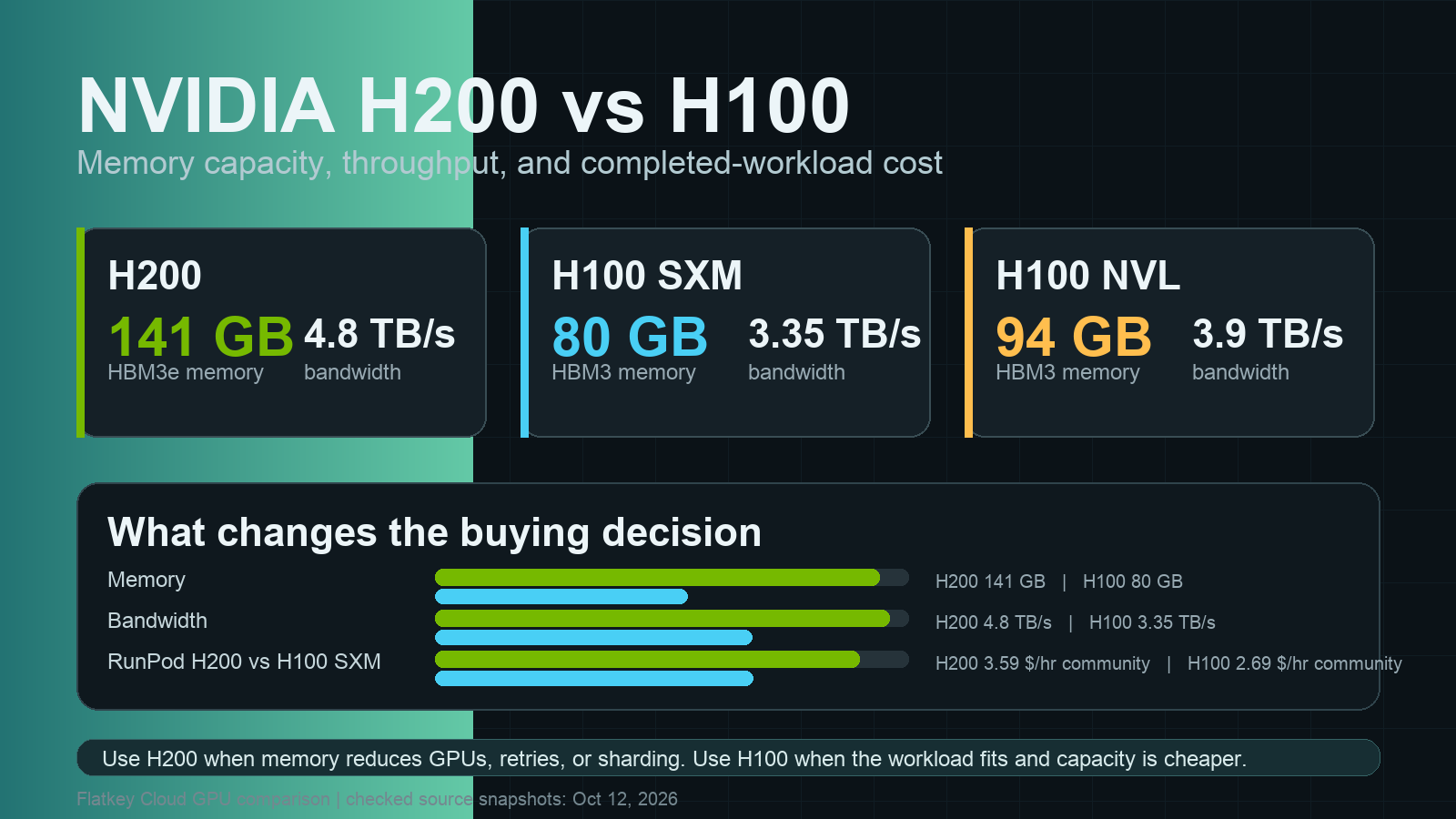
An H200 is a Hopper-generation accelerator, but the purchase decision is often about memory rather than a generic claim of more speed. NVIDIA lists 141 GB of HBM3e and 4.8 TB/s of memory bandwidth for the H200. In its HGX architecture table, NVIDIA lists 80 GB and 3.35 TB/s for the H100 SXM, compared with 141 GB and 4.8 TB/s for the H200 SXM.
That extra capacity can matter when your workload is constrained by:
- a model or quantization plan that will not fit in 80 GB;
- long-context inference where KV cache consumes the working memory;
- a batch size that would otherwise force additional model parallelism;
- a multi-GPU design where inter-GPU traffic, rather than raw arithmetic, is the bottleneck.
It does not mean an H200 is automatically cheaper for every inference job. If a model, batch, and context window fit comfortably on a smaller accelerator, the H200 GPU price premium may not reduce your cost per accepted result. Benchmark the model and serving stack you will actually run before treating memory capacity as a purchasing outcome.
For the architecture and deployment decision behind those figures, read Flatkey’s H200 GPU guide and its H200 vs. H100 comparison.
Turn an hourly H200 GPU price into a monthly budget
For rental capacity, begin with allocated GPU-hours:
monthly compute cost =
  allocated H200 GPU-hours × effective hourly rate
At continuous allocation, one GPU has roughly 730 hours in a 30-day month. The following run rates use the published per-GPU figures above and assume the rate remains available for every hour. They exclude storage, data transfer, tax, support, and any commitment rules.
| Published rate used for the example | 730 allocated H200-hours | Important caveat |
|---|---|---|
| $5.29 per hour | $3,861.70 per month | A cloud Pod rate is not a guarantee of inventory or a complete workload bill |
| $5.93 per hour | $4,328.90 per month | Serverless is usually chosen for traffic shape, not for a 24/7 idle allocation |
| $6.866 per hour | $5,012.18 per month | AWS p5e is shown as a Capacity Block per-accelerator equivalent; confirm the required full-instance and term commitment |
| $7.895 per hour | $5,763.35 per month | AWS p5en is also a Capacity Block per-accelerator equivalent; confirm the required full-instance and term commitment |
For an eight-GPU node, multiply the per-GPU run rate by eight before adding the services around it. That is why a $6.866 H200-equivalent rate corresponds to a $54.924-per-hour p5e.48xlarge price in the AWS table.
The published H200 GPU price per hour should be only one row in your operating budget. Add:
- attached or persistent storage for model weights, checkpoints, and datasets;
- data transfer and private-network requirements;
- CPU, RAM, and local NVMe included with the instance;
- orchestration, observability, backup, and incident-response work;
- failed jobs, reloads, idle time, and retry amplification;
- reservation, Capacity Block, or interruption terms.
Flatkey’s GPU rental prices guide and cloud GPU hidden costs guide provide a broader checklist for those non-accelerator line items.
Buy versus rent: use break-even math as a screening tool
For a first pass, you can calculate a hardware-only screening number:
hardware-only screening hours =
  listed accelerator price ÷ comparable delivered GPU-hour rate
Using the two public H200 NVL card examples and the $5.29-per-hour Pod rate:
| Illustration only | Arithmetic | Result |
|---|---|---|
| $34,500 card listing ÷ $5.29 per hour | 34,500 ÷ 5.29 | about 6,522 GPU-hours, or 8.9 months at 730 hours/month |
| $42,651 card listing ÷ $5.29 per hour | 42,651 ÷ 5.29 | about 8,063 GPU-hours, or 11.0 months at 730 hours/month |
This is not a true payback calculation. It deliberately excludes the host server, networking, power, cooling, tax, duties, support, downtime, utilization, financing, and residual value. It also compares different supplier offerings. Use it to identify the questions worth modeling—not to approve a purchase order.
A full ownership model should look more like this:
annual ownership cost =
  system acquisition or financing
  + power and cooling
  + rack, colocation, and network
  + support, software, and operations
  + storage and backup
  + expected downtime and unused capacity
  - expected residual value

cost per completed workload =
  annual ownership cost ÷ accepted jobs, requests, tokens, or training runs
The same discipline applies to cloud pricing:
cloud cost per completed workload =
  (GPU-hours + storage + network + managed services + failed work)
  ÷ accepted jobs, requests, tokens, or training runs
The denominator is what prevents a low-looking hourly H200 GPU price from disguising a poor deployment. Pick a unit that matches the business outcome: a successful fine-tune, an accepted batch, a generated video, a supported request, or a validated inference result.
The H200 buying checklist for procurement and ML infrastructure teams
Use this checklist before comparing supplier quotes.
- Write down the exact SKU and part number. Separate H200 NVL PCIe from H200 SXM. Do not treat “H200” as sufficient configuration information.
- Ask what is included at the system level. Capture GPU count, CPU, RAM, NVMe, NICs, power supplies, rails, NVLink bridges, warranty, and software entitlements.
- Model topology before quantity. Test whether your model needs one GPU, four linked GPUs, or an eight-GPU fabric. Buying the wrong topology is more expensive than paying a higher per-hour rate during evaluation.
- Request power and cooling assumptions. Record the facility conditions and the required airflow or liquid-cooling design. Never budget directly from TDP alone.
- Normalize tax, duties, freight, and lead time. The $42,651 Lineage price, for example, explicitly excludes VAT and duties; a delivered quote may differ materially by destination.
- Measure utilization instead of assuming 100%. A system at 45% productive utilization has a very different ownership case from a continuously scheduled fleet.
- Separate model-storage cost from GPU cost. Weights, checkpoints, datasets, snapshots, and data transfer can alter the cloud alternative.
- Set an exit assumption. Document expected service life, residual value, and whether a successor architecture could make the capacity less attractive before the model is fully amortized.
- Include operations. Put monitoring, capacity scheduling, security, patching, incident response, and on-call coverage in the model.
- Run a representative benchmark. Capture throughput, p50/p95 latency, failure rate, load time, quality acceptance, and the invoice-visible cost on the exact software stack.
When an H200 is the right choice—and when it is not
| Situation | Starting path | Why |
|---|---|---|
| You are still learning the right model, context window, or GPU count | Rent H200 capacity first | Avoid owning the wrong topology while the workload is changing |
| You have sustained, predictable multi-GPU utilization and operating capability | Obtain a system quote and model ownership TCO | Stable demand can justify examining a server-level purchase case |
| The job is bursty or has uneven traffic | Compare Pods, serverless, and reserved capacity | Idle time can dominate the cost of a fixed deployment |
| You need CUDA-level control, custom serving, or a specific runtime | Evaluate H200 deployment options | Direct infrastructure may be necessary for the workload |
| You need model capability but not GPU control | Compare a managed model API alongside GPU capacity | The operational boundary may matter more than the H200 GPU price |
For the last case, avoid framing the choice as “cloud versus on-prem.” A model API and a GPU rental can both be cloud services, but they expose different responsibilities. If your team does not need to operate model weights, drivers, capacity, or a serving stack, compare the request-level cost of an API route with the completed-workload cost of an H200 deployment. See GPU cloud vs. model API for a practical decision framework.
How to compare two H200 quotes fairly
Ask each supplier for the same worksheet, then fill it from the quote—not from a search result:
| Field | Quote A | Quote B | Why it matters |
|---|---|---|---|
| Exact H200 form factor and part number | Prevents NVL/SXM ambiguity | ||
| GPU count and NVLink/NVSwitch topology | Determines usable multi-GPU behavior | ||
| Host CPU, RAM, local NVMe, and NIC | Changes system throughput and what is already included | ||
| GPU-hour, system price, or commitment amount | Keeps the billing unit explicit | ||
| Billing increment and interruption policy | Prevents a low headline rate from masking utilization risk | ||
| Storage, egress, and data movement | Often absent from the accelerator price | ||
| Warranty, support, and replacement SLA | Affects operational risk and downtime | ||
| Power, cooling, rack, and delivery | Required to compare ownership with a cloud rate | ||
| Benchmark fixture and acceptance rule | Converts price into cost per completed workload |
This worksheet is more useful than a generic “best H200 GPU price” search because it keeps the price and the capability in the same row.
Frequently asked questions
How much does an H200 GPU cost?
For public H200 NVL PCIe card examples checked October 22, 2026, one seller listed $34,500 per card for a four-to-seven-card order, while another listed $42,651 per card for one to three cards. Those are supplier and quantity-specific offers, not a single global H200 GPU price. A server, freight, taxes, duties, cooling, and support can change the delivered cost.
Is H200 NVL priced the same as H200 SXM?
No. H200 NVL is a PCIe card designed for air-cooled servers and two- or four-way NVLink bridging. H200 SXM is a module intended for HGX-style systems and a larger multi-GPU fabric. Compare the full system configuration, not just the 141 GB memory number.
How much does it cost to rent an H200 per hour?
The published examples in this guide range from Runpod’s $5.29-per-hour H200 Pod and $5.93-per-hour H200 serverless worker to AWS Capacity Block equivalents of $6.866 per H200 for p5e and $7.895 per H200 for p5en. These are different service types and commitments, so confirm the live rate and billing terms before treating them as interchangeable.
Should I buy an H200 or rent one?
Rent when the workload, utilization, topology, or model roadmap is uncertain. Consider buying only after you have a stable utilization forecast, a system-level quote, a facility and support plan, and a cost-per-completed-workload model that includes everything around the accelerator.
Is the H200 better than the H100 for LLM inference?
The H200 can be the better choice when 141 GB of HBM3e, 4.8 TB/s of bandwidth, or the target topology removes a real memory or batch-size constraint. It is not automatically better value for work that already fits comfortably on an H100-class deployment. Test your model, context length, batch size, and serving stack. Flatkey’s H200 vs. H100 guide walks through the technical comparison.
Final recommendation
The right H200 GPU price is not the lowest card listing or the lowest hourly rate. It is the smallest verified cost to complete your target workload with the memory, topology, reliability, and operating model you actually need.
Start with a time-boxed rental benchmark. Capture the exact H200 form factor, allocated hours, storage, network, failure rate, and output acceptance. If the workload becomes stable enough to justify ownership, request a system-level quote and compare full TCO—not just the accelerator line item. If you need model capability rather than infrastructure control, price a managed API route at the same time.
Flatkey can help teams compare that API alternative without scattering integrations: its product is a unified model-and-tool routing layer with one key, one balance, and request-level usage visibility. Get an API key when you are ready to test the model/API path next to your H200 plan.