H100 GPU Price: Pricing, Cost Drivers, and Buying Guide
Last checked: October 22, 2026.
An H100 GPU price is not one number. A card listing, an eight-GPU cloud instance, and a production-ready server answer three different buying questions. If a quote does not identify the form factor, GPU count, billing model, location, and included infrastructure, it is not yet comparable.
For a dated reference point, a marketplace listing for one H100 PCIe 80 GB card started at $32,200 when checked. Public cloud examples ranged from a listed $2.89 per hour for an H100 PCIe pod to $3.99 per hour for an H100 SXM pod, while AWS listed a one-H100 P5 Capacity Block at $5.97 per accelerator-hour. Those are examples, not an MSRP or a universal rate: availability, region, commitment, CPU/RAM bundle, storage, support, and the exact H100 configuration all change the bill.
This guide shows how to turn an H100 quote into a decision rather than a misleading headline price.
H100 GPU price: the quick answer
Use the unit that matches what you are actually procuring:
| What you are pricing | Dated public reference | What the number does and does not mean |
|---|---|---|
| One H100 PCIe 80 GB card | From $32,200 | A marketplace starting price for a card, not an NVIDIA MSRP and not a complete server. |
| One H100 PCIe cloud pod | $2.89/hour | A public pod-rate example; validate the cloud tier, region, storage, and CPU/RAM bundle at checkout. |
| One H100 SXM cloud pod | $3.99/hour | A public pod-rate example for a different form factor and bundled host configuration. |
| AWS P5.4xlarge Capacity Block | $5.97/accelerator-hour | A scheduled-capacity product with one H100; it is not a like-for-like single-card rental. |
| Google Cloud A3 High | $88.49/instance-hour for 8 H100s | About $11.06 per GPU-hour after dividing by eight, but the SKU includes a large eight-GPU machine rather than eight independent cards. |
The hardware listing comes from GPU Vendors’ H100 PCIe 80 GB marketplace page. The pod rates are from Runpod’s public pricing page, updated there on October 8, 2026. The AWS number is from the EC2 Capacity Blocks for ML price table; the Google example is from the Accelerator-optimized VM pricing table. Recheck every source before approval or purchase.
The practical takeaway: use the H100 GPU price to shortlist options, but use a workload budget to decide.
First, identify which H100 you are being quoted
The label “H100” hides decisions that materially affect both capability and cost.
| Configuration | What to verify before comparing price | Why it changes the decision |
|---|---|---|
| H100 PCIe | 80 GB memory, host CPU/RAM, chassis airflow, GPU count, networking | It can be a sensible single-GPU or smaller-scale option, but the host and network still belong in the total. |
| H100 SXM | 80 GB memory, HGX/DGX-style platform, fabric topology, power and cooling | SXM is tied more closely to a high-density server platform and multi-GPU fabric; do not compare its card-equivalent price to PCIe alone. |
| H100 NVL | Exact board/pair/server SKU, usable memory, interconnect, included host | Marketplace labels vary. Confirm what constitutes one billable “GPU” and whether the listing is a card, pair, or server configuration. |
| 4- or 8-GPU node | GPU count, NVLink/NVSwitch topology, NICs, local storage, reservation terms | The node is often the actual procurement unit for distributed training, not an individual accelerator. |
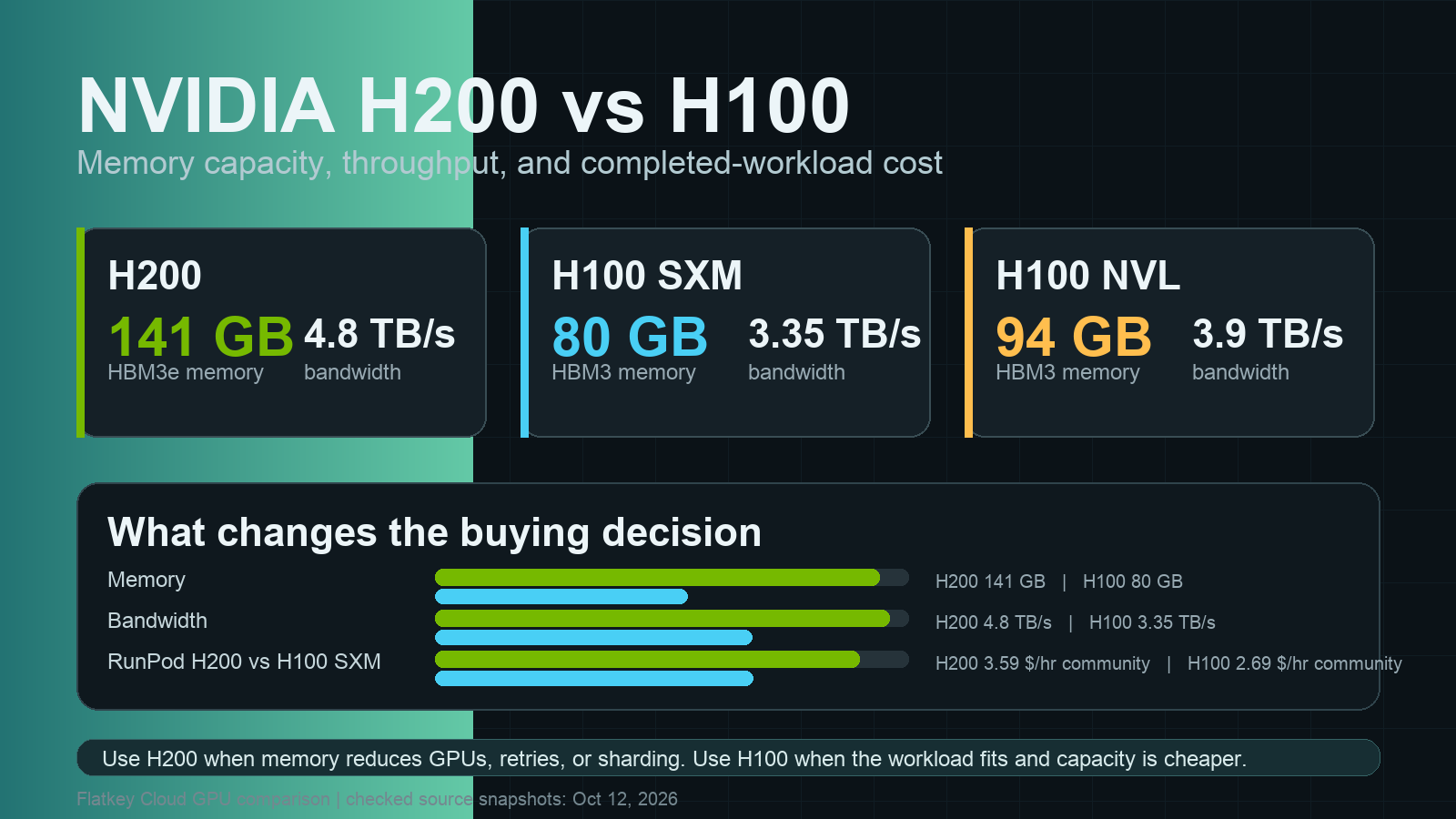
NVIDIA’s H100 datasheet lists 80 GB on both SXM and PCIe versions, with different memory bandwidth, power envelope, interconnect, and server options. It specifies 3 TB/s and up to 700 W for the SXM version versus 2 TB/s and 350 W for the PCIe version, which is why the H100 GPU price should always include the form factor and platform in the same line item. Read the NVIDIA H100 datasheet alongside the quote rather than treating “80 GB H100” as a complete specification.
For a deeper architecture and deployment walkthrough, see our NVIDIA H100 GPU guide. If the choice is really between generations, compare the workload and accepted-output cost in H100 vs. A100 or the H200 GPU price guide before treating a lower hourly rate as a win.
Why the same H100 GPU price can lead to very different monthly bills
An hourly rate is only the accelerator line item. A usable monthly plan needs the full delivery path:
Cloud workload cost
= accelerator or instance rate × scheduled hours
+ attached storage
+ data transfer / egress
+ CPU, RAM, and networking not bundled in the rate
+ support, platform, and software charges
+ idle time, retries, and failed-job allowance
Google Cloud explicitly separates GPU, machine-type, storage, and network considerations in its GPU pricing documentation. That is a useful reminder not to multiply a GPU rate by 730 and call the result a production budget.
For example, 730 booked hours at the two public pod-rate references above would be about $2,110 per month for the $2.89/hour PCIe example and $2,913 per month for the $3.99/hour SXM example, before any costs outside the displayed pod configuration. Those figures are budgeting illustrations, not quotes.
The H100 GPU price also changes with the billing model:
- On-demand works well for short-lived development, evaluation, and uncertain utilization. You pay for flexibility.
- Spot or interruptible capacity can lower the headline rate, but a training job needs checkpointing and restart logic. A low price is not cheap if an interruption loses a day of work.
- Reserved capacity or capacity blocks trade flexibility for a time-bound supply commitment. AWS’s P5 table is one example of a product that should be compared as a scheduled capacity purchase, not just as a GPU-hour.
- Dedicated or contracted cloud capacity may include a different support, availability, or network profile than a self-serve pod. Compare the contract scope, not only the GPU model.
Our GPU rental prices guide explains the on-demand, spot, and reserved distinction in more detail. For the line items that tend to surface after a prototype has passed, use the GPU cloud hidden costs guide as a pre-approval checklist.
Buying an H100: calculate all-in TCO, not card price
Buying can make sense for long-lived, predictable workloads—but a card listing is only the beginning. Use this ownership model:
Monthly owned-capacity cost
= (all-in acquisition cost − expected residual value) ÷ depreciation months
+ power and cooling
+ rack or colocation
+ network and storage
+ warranty, spares, and support
+ platform operations and on-call time
+ downtime / utilization reserve
The all-in acquisition cost should contain the exact accelerator configuration, compatible server or HGX platform, CPUs, memory, NICs, storage, power distribution, shipping, taxes, installation, and support. For SXM systems, asking only for a card quote is especially likely to omit the components that make the configuration deployable.
Here is the right way to interpret the $32,200 PCIe reference:
- It is a single-card marketplace starting price, not a validated purchase price for your organization.
- Against the $2.89/hour rental illustration, $32,200 equals roughly 11,142 GPU-hours, or about 15.3 months at 730 booked hours per month.
- That arithmetic is not a buy recommendation. It excludes the server, power, cooling, network, support, financing, and utilization risk. At 50% utilization, the calendar time required to consume those 11,142 hours doubles.
This is why a seemingly favorable H100 GPU price often fails a real break-even review. First calculate the cost of completed, accepted work—not just the cost of an allocated accelerator hour.
A copyable H100 buying worksheet
Use this before you request quotes or approve a cloud commitment.
| Question | Record this | Why it matters |
|---|---|---|
| What is the exact SKU? | PCIe, SXM, NVL; memory; GPU count; new/refurbished status | Prevents a card/server/pair comparison from masquerading as a price comparison. |
| What does the workload need? | Peak VRAM, GPU count, interconnect, throughput/latency target, persistence | Keeps a lower H100 GPU price from steering you to an unusable configuration. |
| How busy will it be? | Scheduled GPU-hours/month and expected utilization | Determines whether flexibility or owned capacity has a chance to win. |
| What is included? | vCPUs, RAM, local disk, persistent storage, NICs, egress, support, SLA | Reveals charges that do not appear in the accelerator rate. |
| What happens on interruption? | Checkpoint interval, restore time, retry cost, capacity fallback | Makes spot pricing comparable to reliable capacity. |
| What is the business metric? | Accepted jobs, tokens, images, training steps, or experiments completed | Lets you optimize cost per useful outcome instead of cost per hour. |
| What is the fallback? | Alternate GPU, another region, managed API, or queue policy | Reduces the cost of capacity shortages and failed launches. |
The quote-comparison checklist
Ask every supplier to answer these questions in writing:
- Is the quote for a PCIe card, SXM module, NVL configuration, full server, or cluster allocation?
- How many H100s are included, and what interconnect connects them?
- Which CPU, RAM, storage, network, power, and support items are included?
- Is the price on-demand, spot, reserved, scheduled, prepaid, or a capacity block?
- Which region or facility applies, and is capacity actually available for the requested window?
- Which charges remain outside the quote: storage, egress, licenses, setup, taxes, or support?
- What is the cancellation, interruption, replacement, and hardware-support policy?
- What workload test will you run to compare cost per accepted result?
When renting, reserving, buying, or using an API is the better choice
Choose the operating model first; the H100 GPU price is then much easier to evaluate.
| Situation | Usually start with | Why |
|---|---|---|
| Prototype, fine-tuning experiment, or uncertain demand | On-demand rental | Fast access and no capital commitment; instrument utilization and idle time. |
| Fault-tolerant batch work with strong checkpointing | Spot / interruptible capacity | Can be economical when a restart is cheap and capacity loss is planned for. |
| Predictable training window with a hard deadline | Reserved capacity or capacity block | You are paying for a time and availability guarantee as well as compute. |
| Sustained, high utilization with an experienced platform team | Buy or colocate after an all-in TCO model | Ownership may be viable only after facilities, support, and utilization are defensible. |
| Product use case does not require running custom weights | Model API baseline | Compare against an API path before acquiring hardware; the operational boundary may matter more than the H100 GPU price. |
If the final choice is between self-hosted inference and a managed model interface, use our GPU cloud vs. model API guide to structure the comparison. A unified AI API can also make it simpler to test a managed baseline across models before committing to a hardware procurement path.
Common H100 price questions
How much does an H100 GPU cost to buy?
There is no universal public H100 MSRP to use as a procurement figure. The H100 GPU price depends on form factor, seller, support, volume, location, and whether the quote is a card or a complete system. In this guide’s October 22, 2026 snapshot, a marketplace listed an H100 PCIe 80 GB card from $32,200. Treat that as a dated reference, then request an itemized supplier quote.
How much does it cost to rent an H100 per hour?
Public rates can differ widely by provider and product. Runpod listed H100 PCIe at $2.89/hour and H100 SXM at $3.99/hour on its pricing page, while AWS listed $5.97 per accelerator-hour for its one-H100 P5.4xlarge Capacity Block. Each includes a different delivery model, so do not rank them by the number alone.
Is an H100 SXM more expensive than an H100 PCIe?
It often appears in a more expensive platform because the hardware, power, cooling, and fabric requirements differ. Compare the exact host configuration and completed-work result. The relevant question is whether the SXM platform improves your workload enough to lower cost per accepted job, not whether its H100 GPU price is lower on a spreadsheet.
When does buying beat renting?
Only after your all-in owned-capacity cost is lower than a comparable cloud path at realistic utilization. Include the server, networking, power, cooling, support, downtime reserve, and the cost of operating the platform. A card-only break-even calculation is a screening tool, not a decision.
Make the next H100 quote comparable
The H100 GPU price becomes useful only when it is attached to a precise configuration and workload. Start with the GPU form factor, normalize the time unit, add every infrastructure line item, and calculate cost per completed outcome. Then compare flexibility, capacity risk, and operational burden—not just a card price or an hourly rate.
Before you commit, run one representative workload on the two or three viable options. That small test is usually cheaper than discovering later that the lowest H100 GPU price was attached to the wrong form factor, an incomplete server budget, or a cloud SKU your workload could not actually use.