How to Evaluate a New Model in 48 Hours: A Release-Day Checklist
A new model drops. The demo videos look strong, the pricing page is moving, the leaderboard screenshots are already circulating, and your roadmap channel wants an answer by tomorrow: should this model go into the product?
The worst answer is "we tried a few prompts and it felt better." The second-worst answer is a month-long evaluation project that misses the release window.
This guide gives AI product teams a practical middle path. Use How to Evaluate a New Model in 48 Hours: A Release-Day Checklist as a release-day operating plan: build a small but representative eval set, compare against your current production route, run compatibility and safety gates, normalize cost by accepted output, and end with a decision memo your engineering, product, and finance teams can actually sign.
The goal is not to prove that the new model is universally better. The goal is to decide whether it is safe enough, useful enough, and economical enough for one clearly defined product workflow.
The 48-hour answer
If you only have two days, evaluate the new model against one production job, not against the internet.
Choose a workload that already has users, logs, failure modes, and a current baseline. Then answer six questions:
| Gate | Question | Pass signal |
|---|---|---|
| Fit | Does the model solve the target task better than the current route? | Higher accepted-output rate on production-shaped examples |
| Contract | Does it keep your required schema, tool calls, citations, media settings, or response format? | No blocker failures in the output contract tests |
| Safety | Does it create new policy, privacy, hallucination, or brand-risk failures? | Equal or lower severe-failure rate than baseline |
| Reliability | Can it survive latency, retry, rate-limit, and long-context conditions? | p90 latency and error behavior fit the product SLO |
| Cost | Does it reduce cost per accepted output, not just token price? | Lower or justified equal accepted-output cost |
| Launch | Can you roll it out through shadow traffic, canary routing, and rollback? | Clear route policy, monitoring, and stop conditions |
That is the core of How to Evaluate a New Model in 48 Hours: A Release-Day Checklist: compress the decision to the smallest reliable production comparison.
Before hour 0: choose one workload
Do not start by asking, "Is the new model better?" Start by asking, "Better for which job?"
Pick one workflow with a measurable output:
- Customer-support answer generation.
- Code patch planning.
- Search result summarization.
- OCR extraction.
- Product-content rewrite.
- Sales research brief.
- Moderated creative generation.
- Tool-calling agent step.
- Video or image prompt expansion.
Then define the current baseline. It can be a direct provider model, a model route in your gateway, a human-assisted workflow, or a previous model version. The baseline is what turns release-day excitement into a measurable comparison.
For Flatkey teams, this is also where a unified router helps: keep the application contract stable while you test a new model route, then compare request IDs, costs, errors, and output acceptance in one ledger. If your stack is still scattered across direct keys, use the same principle manually: one task, one baseline, one decision record.
Hour 0-3: freeze the decision memo
Create the memo before anyone sees the results. This prevents the team from changing the definition of "good" after the model produces a few impressive examples.
Use this template:
New model:
Release date:
Evaluation owner:
Target workflow:
Current baseline:
User segment:
Traffic volume affected:

Decision needed:
[ ] no action
[ ] continue testing
[ ] shadow traffic
[ ] canary
[ ] full route replacement

Hard blockers:
- Data/privacy:
- Compliance:
- Output contract:
- Safety:
- Latency/SLO:
- Cost:
- Product quality:

Pass criteria:
- Quality:
- Reliability:
- Cost per accepted output:
- Rollback:

Decision deadline:
Decision approvers:
This memo is deliberately narrow. A release-day model evaluation should not decide the next year of AI architecture. It should decide one route change.
Hour 3-8: build the smallest useful eval set
A useful 48-hour eval set has four parts.
| Set | Size | Purpose |
|---|---|---|
| Golden tasks | 25-50 examples | Known examples with expected or reviewed outputs |
| Messy production tasks | 50-100 examples | Real edge cases from logs, support tickets, search queries, uploads, or agent traces |
| Contract tests | 20-40 examples | JSON, tool-call, citation, format, media, or latency constraints |
| Red-team probes | 20-50 examples | Safety, privacy, jailbreak, brand, hallucination, and refusal behavior |
OpenAI's eval guidance frames evals as structured tests with datasets, graders, and runs. Anthropic's testing guidance starts with success criteria and test cases. Google's computation-based evaluation pipeline also treats evaluation as a repeatable pipeline rather than an ad hoc chat session. The shared lesson is simple: a new model should face a test set, not a vibe check.
If you already have an eval harness, use it. If not, a spreadsheet plus deterministic scripts is enough for the first 48 hours.
Add these columns:
| Column | Example |
|---|---|
case_id |
support_refund_017 |
workflow |
support_answer |
input |
User question, tool trace, document, prompt, or media spec |
expected_behavior |
What a good answer must do |
hard_fail_conditions |
Missing citation, wrong JSON, unsafe advice, wrong language |
baseline_output |
Current route result |
new_model_output |
Candidate result |
accepted_baseline |
yes/no |
accepted_new_model |
yes/no |
reviewer_notes |
Why it passed or failed |
Do not over-optimize the harness on release day. The model launch clock is moving. You need enough structure to avoid fooling yourself.
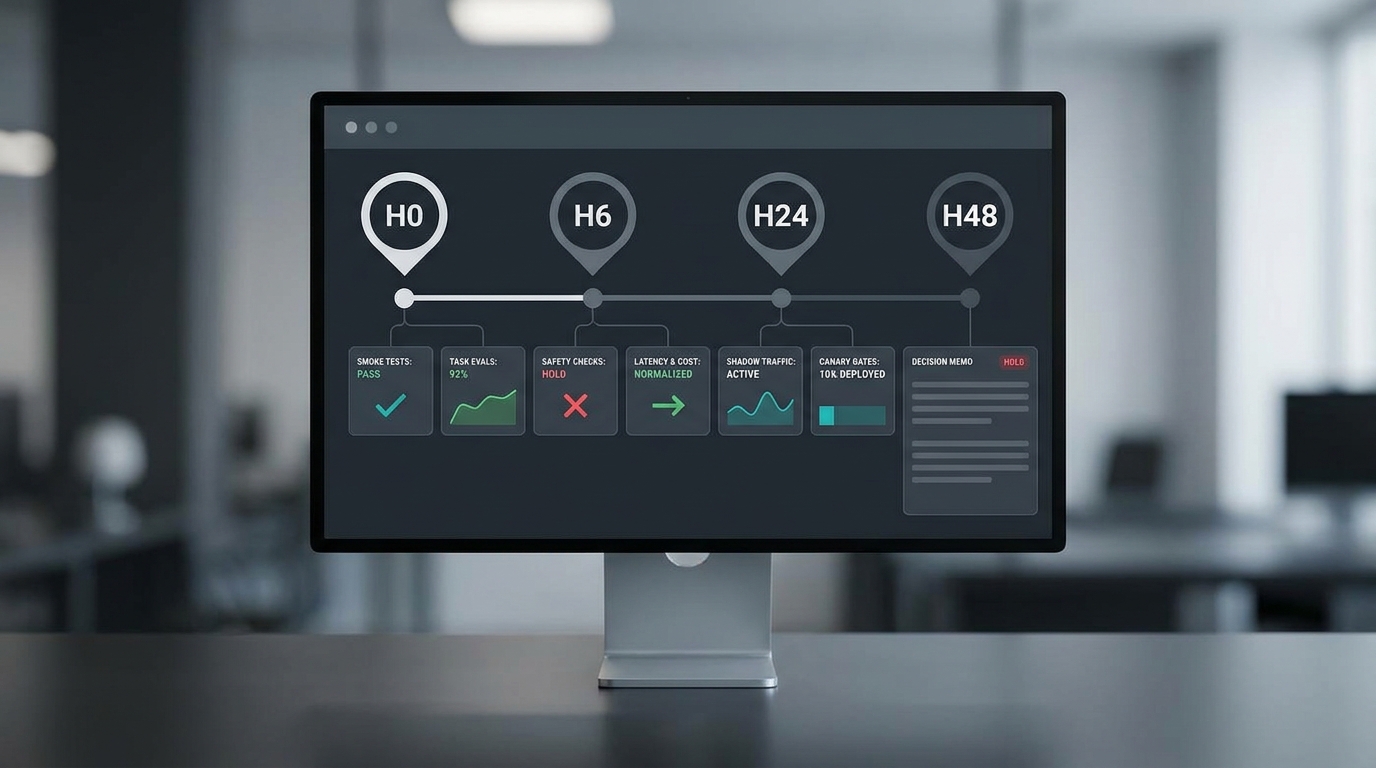
Hour 8-14: run smoke tests before quality tests
The first run is not about quality. It is about whether the model can be called, routed, billed, logged, and parsed without breaking the product.
Run these smoke tests:
- Authentication: the key, base URL, and model name work from a clean environment.
- Endpoint compatibility: the model supports the endpoint your app calls.
- Request shape: system messages, multimodal inputs, tools, response format, max tokens, streaming, and safety parameters behave as expected.
- Output contract: required JSON, XML, Markdown, citations, tool calls, or file outputs are parseable.
- Error envelope: timeouts, 400s, 429s, and provider errors map cleanly into your retry policy.
- Logging: request ID, model ID, input/output units, latency, status, and cost fields are captured.
- Rollback: the old route can be restored without code changes.
For Flatkey users, start with the model directory and the same OpenAI-compatible base URL pattern you use in production. If the candidate model is not confirmed in the live model directory, do not imply availability in the article, product, or release note. Treat it as a pending route and keep the decision memo in "continue testing."
Hour 14-24: score task quality against the baseline
Now compare the new model against your current route.
Use paired review. For each case, show the baseline output and the candidate output side by side. Hide the model names if reviewers can be biased by the launch narrative.
Score only what matters for the chosen workflow:
| Criterion | 0 | 1 | 2 |
|---|---|---|---|
| Task completion | Fails the user need | Partially solves it | Solves it |
| Factuality | Unsupported or wrong | Minor uncertainty | Grounded enough for launch |
| Format compliance | Breaks contract | Needs repair | Valid output |
| Tool/citation use | Missing or incorrect | Usable with edits | Correct and complete |
| User effort | More work than baseline | Similar | Less work than baseline |
| Brand/product fit | Unusable tone | Acceptable | Better than baseline |
Then convert scores into an acceptance rate:
accepted_output_rate =
  accepted_outputs / total_cases

candidate_lift =
  candidate_accepted_output_rate - baseline_accepted_output_rate
This is where many release-day tests go wrong. Token price is visible, but accepted output is what ships. A model that is 30 percent cheaper per token can still be more expensive if it fails twice as often, needs repair prompts, or produces outputs reviewers reject.
For broader methodology, HELM is a useful reminder that model evaluation should consider more than accuracy. It discusses scenarios and metrics such as robustness, fairness, toxicity, calibration, and efficiency. Your 48-hour version will be smaller, but it should still be multi-metric.
Hour 24-30: test contracts, tools, and routing edges
Most production failures do not look like "the answer was bad." They look like:
- The JSON schema fails on 7 percent of requests.
- A tool call silently omits a required argument.
- The model refuses a safe task your product must support.
- The model ignores language or locale constraints.
- The model overuses long reasoning output and breaks latency targets.
- A fallback route changes response shape.
- A new media model returns a different aspect ratio, duration, or file status field.
Run a contract suite before you celebrate a quality win.
contract_pass_rate =
  valid_contract_outputs / total_contract_cases

fallback_mismatch_rate =
  fallback_outputs_with_contract_or_semantic_mismatch / fallback_cases
If the model is only better when everything goes right, it is not ready for production routing. It may still be useful behind a feature flag, in a manual review workflow, or as a fallback candidate, but the decision memo should say that.
Hour 30-36: normalize latency, limits, and cost
A new model can fail the business case even if it wins the qualitative review.
Capture:
| Metric | Why it matters |
|---|---|
| p50 and p90 latency | Users experience the slow tail, not the average demo |
| timeout rate | Slow responses can become product errors |
| retry rate | Retries increase latency and cost |
| 429/rate-limit rate | Release-day demand can exceed practical quotas |
| context utilization | Large contexts can hide runaway prompt cost |
| output length | Verbose models may be more expensive per accepted result |
| accepted-output cost | The real denominator for product teams |
Use this cost formula:
cost_per_accepted_output =
  total_candidate_cost / accepted_candidate_outputs
Then compare it to the baseline:
cost_delta =
  candidate_cost_per_accepted_output - baseline_cost_per_accepted_output
Do not approve a model because the headline input-token price looks better. Approve it because the accepted-output cost, reliability, and product quality make sense together.
Hour 36-42: run shadow traffic or replay traffic
If the model passes offline evaluation, run replay or shadow traffic before canary.
Replay traffic means you run historical requests through the new model and compare outputs without affecting users. Shadow traffic means live requests are copied to the new route, but the user still receives the baseline output.
For each shadowed request, log:
- User segment or workflow.
- Baseline model and candidate model.
- Request ID.
- Input size and output size.
- Latency.
- Error class.
- Contract validity.
- Cost.
- Reviewer or automated acceptance.
- Any safety or privacy flags.
This is where a gateway or router becomes practical. The article How to Evaluate a New Model in 48 Hours: A Release-Day Checklist assumes your team can switch routes without rewriting the application every time. If you use Flatkey, keep your app pointed at the stable OpenAI-compatible layer, test model names and policy in a controlled route, and inspect usage records before a canary.
Hour 42-48: canary only if the stop rules are clear
Canary is not "turn it on for 10 percent and watch Slack." Canary is a controlled production test with a rollback rule.
Use this minimum canary plan:
| Field | Example |
|---|---|
| Scope | 2 percent of logged-in beta users on one workflow |
| Duration | 2 hours or 1,000 requests, whichever comes first |
| Guardrail | Error rate less than baseline plus 1 percentage point |
| Contract gate | JSON parse failures below 0.5 percent |
| Safety gate | No severe unresolved safety events |
| Cost gate | Accepted-output cost no more than 10 percent above baseline unless quality lift is approved |
| Rollback owner | On-call engineer |
| Decision owner | PM plus engineering lead |
The canary should produce one of four decisions:
- Do not adopt: the candidate fails a hard gate.
- Continue testing: promising but not safe enough for production.
- Limited rollout: useful for a narrow segment or workflow.
- Adopt with routing policy: winner for the tested workload, with rollback conditions documented.
The release-day scorecard
Copy this scorecard into the decision memo.
| Dimension | Weight | Baseline | Candidate | Decision note |
|---|---|---|---|---|
| Accepted-output rate | 25 | |||
| Contract pass rate | 20 | |||
| Safety severe-failure rate | 15 | |||
| p90 latency | 10 | |||
| 429/retry behavior | 10 | |||
| Cost per accepted output | 15 | |||
| Rollback readiness | 5 |
Suggested rule:
approve_for_canary =
  no_hard_blockers
  and candidate_accepted_output_rate >= baseline_accepted_output_rate
  and candidate_contract_pass_rate >= minimum_contract_gate
  and candidate_severe_failure_rate <= baseline_severe_failure_rate
  and rollback_ready == true
This rule is intentionally conservative. A new model can be exciting and still not belong in your product today.
What to skip in the first 48 hours
Skip anything that looks rigorous but does not change the release decision:
- A huge benchmark suite unrelated to your product.
- Prompt experiments with no locked test set.
- Unblinded side-by-side reviews from model fans.
- Token-price comparisons without acceptance rates.
- Full migration planning before the model passes contract tests.
- Public launch copy before the canary decision.
Open benchmark tools such as EleutherAI's Language Model Evaluation Harness can be valuable when you need reproducible benchmark runs across many tasks. For release-day product decisions, use them as part of the evidence stack, not as a replacement for your own production-shaped tests.
Where Flatkey fits
Flatkey is useful when a team wants the evaluation process to stay close to production:
- Use one stable API layer while comparing model routes.
- Check the model directory before assuming a route exists.
- Keep request IDs, usage, costs, and error classes in one ledger.
- Test fallback and rollback policy without scattering provider keys.
- Compare models by accepted work, not just by list price.
The practical CTA is simple: start with the Flatkey API quickstart, review the AI model catalog guide, and use the AI routing API metrics article to decide which telemetry fields should be mandatory in your 48-hour evaluation.
If your team is still building the broader framework, read the AI Routing API Tools: Evaluation Framework for Production Teams next. If you are replacing a provider, use the AI model evaluation workflow checklist as the longer migration companion.
FAQ
Is 48 hours enough to evaluate a new model?
Forty-eight hours is not enough to prove a model is the best long-term choice. It is enough to decide whether the model deserves no action, more testing, shadow traffic, a limited canary, or a narrow production route.
How many examples do we need for a release-day model evaluation?
For a first pass, use 25-50 golden tasks, 50-100 messy production tasks, 20-40 contract tests, and 20-50 red-team probes. Increase the set before broad rollout.
Should we use public benchmarks or internal evals?
Use both when time allows. Public benchmarks show general capability and reproducibility. Internal evals show whether the model works for your real users, prompts, schemas, tools, latency targets, and cost constraints.
What is the most important metric in a 48-hour evaluation?
Accepted-output rate is usually the most practical top-line metric because it combines quality, usability, and product fit. Pair it with contract pass rate, severe-failure rate, latency, and cost per accepted output.
How should teams compare model cost on release day?
Compare cost per accepted output, not just token price. Include retries, rejected outputs, repair prompts, longer output length, and manual review burden where you can measure it.
When should a team avoid canarying a new model?
Avoid canarying when the model breaks hard output contracts, introduces severe safety failures, cannot meet latency or rate-limit needs, lacks rollback coverage, or cannot be logged well enough to debug.
Final checklist
Use How to Evaluate a New Model in 48 Hours: A Release-Day Checklist as a discipline against launch-day noise.
Before you approve a new model for canary, confirm:
- The workload is narrow and named.
- The baseline is frozen.
- The eval set includes golden, messy, contract, and red-team cases.
- Outputs are scored against acceptance, not vibes.
- Cost is normalized by accepted output.
- Latency, retry, and rate-limit behavior are logged.
- Shadow or replay traffic has run.
- Canary scope and rollback rules are written.
- The decision memo states adopt, continue testing, limited rollout, or no action.
New models will keep arriving. The team that wins is not the team that tries every model first. It is the team that can make release-day decisions without breaking the product.