
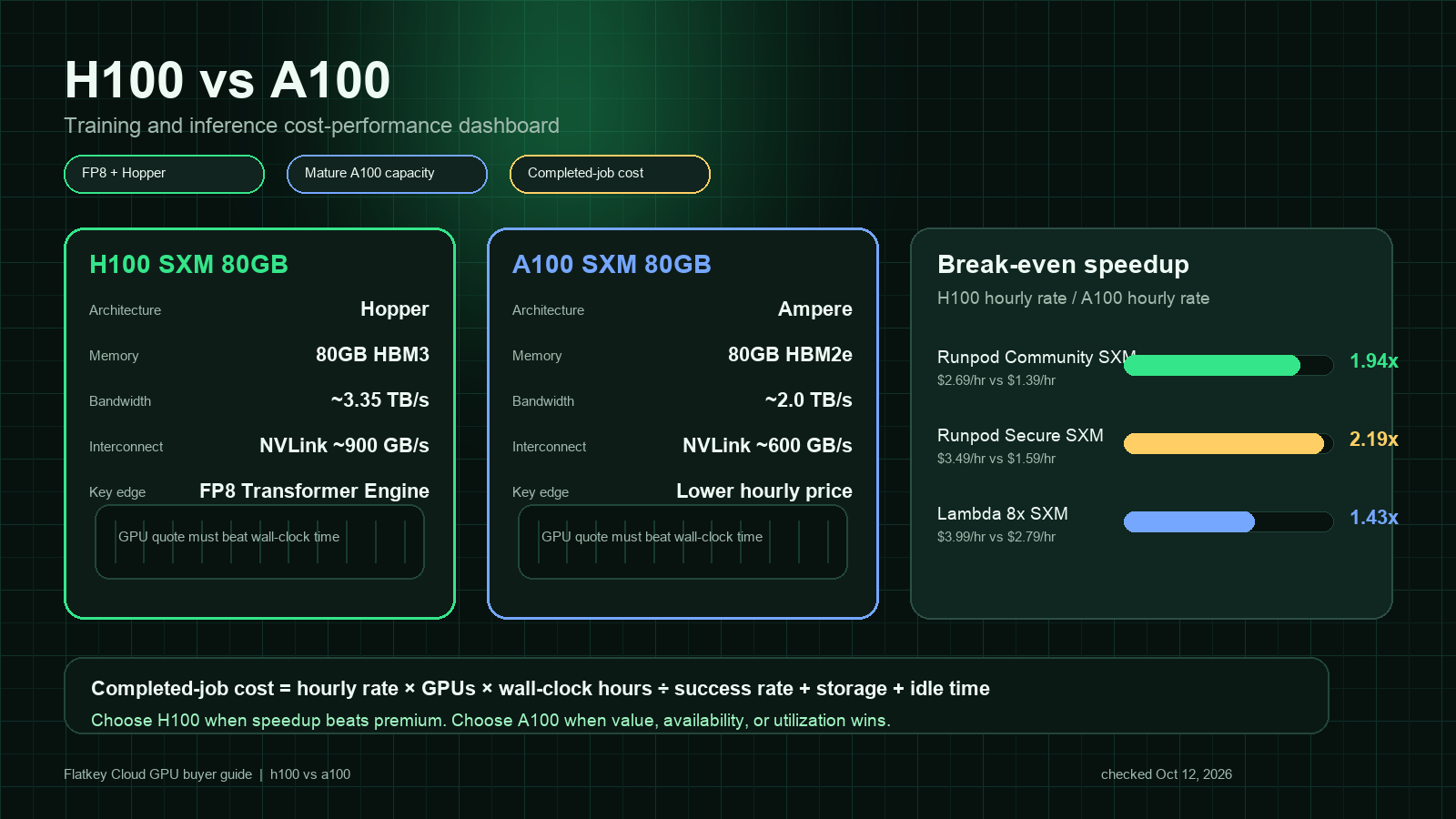
The short answer for H100 vs A100 is straightforward: choose H100 when the workload can exploit Hopper features such as FP8 Transformer Engine, higher memory bandwidth, faster fourth-generation NVLink, and newer inference kernels. Choose A100 when the job is memory-stable, FP16/BF16 throughput is already enough, availability matters more than peak speed, or the A100 hourly quote is much lower.
That is why the right question is not "Which GPU is faster?" H100 is the newer and faster accelerator. The buyer question is: does H100 finish your training or inference job enough faster to beat the A100 price premium?
This guide compares NVIDIA H100 vs A100 for AI training, LLM inference, fine-tuning, batch jobs, and cloud GPU procurement. Prices move every week, so treat the public price rows below as quote examples checked on October 12, 2026, then rerun the same calculation against your provider shortlist.
H100 vs A100 performance: quick decision table
| Workload | Usually choose | Why |
|---|---|---|
| Frontier LLM training or large distributed pretraining | H100 SXM | FP8 Transformer Engine, higher memory bandwidth, faster NVLink, and better multi-GPU scaling headroom. |
| Fine-tuning 7B to 70B models | Depends | H100 wins when time-to-train matters; A100 wins when the run is not throughput-bound or budget is fixed. |
| Latency-sensitive LLM inference | H100 | Better transformer inference path, higher bandwidth, and newer serving-stack optimization. |
| Batch inference with relaxed SLA | A100 | Lower hourly price can win if utilization is high and queue time is acceptable. |
| Multi-tenant notebooks, demos, and small jobs | A100 | Mature availability, lower cost, and MIG support make A100 a practical default. |
| Memory-bound workloads that fit in 80 GB | Test both | H100 has much higher bandwidth, but A100 80 GB can still be cheaper per completed job. |
| Legacy CUDA workloads already tuned for Ampere | A100 first | Lower migration risk unless H100 benchmarking proves a meaningful gain. |
For most teams comparing h100 vs a100 performance, start with a two-line rule:
- If the job is expensive because it runs too long, benchmark H100 first.
- If the job is expensive because the GPU sits idle, fails, or waits on data, fix utilization before paying for H100.
Core spec differences
The most important NVIDIA A100 vs H100 difference is architectural generation. A100 is based on NVIDIA Ampere. H100 is based on NVIDIA Hopper and adds the Transformer Engine, FP8 tensor acceleration, newer NVLink, and higher SXM power limits. NVIDIA positions H100 for large AI, HPC, and trillion-parameter workloads, while A100 remains a broadly deployed data center accelerator for training, inference, analytics, and HPC. Sources: NVIDIA H100 product page, NVIDIA A100 product page, and NVIDIA data center GPU line card.
| Area | NVIDIA H100 SXM 80 GB | NVIDIA A100 SXM 80 GB | Buyer implication |
|---|---|---|---|
| Architecture | Hopper | Ampere | H100 is the newer AI-optimized generation. |
| Memory | 80 GB HBM3 | 80 GB HBM2e | Same headline capacity for common 80 GB parts, but H100 has faster memory. |
| Memory bandwidth | Up to about 3.35 TB/s | Up to about 2.0 TB/s | H100 has more room for memory-bound training and inference. |
| Tensor precision | FP8, FP16, BF16, TF32, FP64 tensor paths | FP16, BF16, TF32, FP64 tensor paths | FP8 can materially improve transformer throughput when accuracy holds. |
| NVLink generation | Fourth-generation NVLink, up to 900 GB/s GPU-to-GPU bandwidth on SXM | Third-generation NVLink, up to 600 GB/s GPU-to-GPU bandwidth on SXM | H100 is stronger for multi-GPU training and large model parallelism. |
| MIG | Supported | Supported | Both can partition GPUs for multi-tenant utilization. |
| Typical SXM power envelope | Higher | Lower | H100 may require more power and cooling, but can finish faster. |
These numbers explain why an h100 gpu vs a100 comparison changes by workload. A model that can use FP8 and newer kernels may see H100 pull far ahead. A smaller job bottlenecked by CPU preprocessing, storage, or network can show a much smaller gain.
Cost-performance formula
Use completed-job cost instead of hourly price:
completed_job_cost =
  GPU_hourly_rate
  x number_of_GPUs
  x wall_clock_hours
  / success_rate
  + storage
  + network
  + idle_time
  + orchestration_overhead
Then compare:
H100 must be at least this much faster to break even =
  H100_hourly_rate / A100_hourly_rate
If H100 costs 1.8x as much as A100, it needs to finish the same accepted job more than 1.8x faster to win on raw GPU rent. If it costs 1.4x as much, the break-even bar is lower. This is why cloud GPU selection should always use the exact SKU and quote: H100 SXM, H100 PCIe, H100 NVL, A100 SXM 80 GB, and A100 PCIe 40 GB are not interchangeable.
For a broader worksheet on hidden costs, see Flatkey's guide to GPU rental prices.
Public cloud GPU price examples checked October 12, 2026
The table below is not a universal price index. It is a snapshot of public examples that show how wide the spread can be.
| Provider page | H100 example | A100 example | What it shows |
|---|---|---|---|
| Runpod pricing | H100 SXM: Community Cloud $2.69/hr, Secure Cloud $3.49/hr; H100 PCIe: Community Cloud $1.99/hr, Secure Cloud $2.89/hr | A100 SXM: Community Cloud $1.39/hr, Secure Cloud $1.59/hr; A100 PCIe: Community Cloud $1.19/hr, Secure Cloud $1.59/hr | Marketplace and secure environments can have different break-even points. |
| Lambda pricing | 8x H100 SXM cluster row: $3.99/GPU/hr; single H100 SXM row: $4.29/GPU/hr; single H100 PCIe row: $3.29/GPU/hr | 8x A100 SXM 80 GB row: $2.79/GPU/hr; single A100 SXM 40 GB row: $1.99/GPU/hr | Cluster size, memory size, and node configuration matter as much as GPU name. |
| Massed Compute pricing | Page lists on-demand GPU rates and configurations | Page lists on-demand GPU rates and configurations | Always inspect quantity, memory, storage, and instance details before comparing. |
From these examples, a buyer comparing a100 vs h100 performance should not assume one fixed premium. In one quote H100 PCIe may be close enough to A100 that H100 is easy to justify. In another, A100 may be cheap enough that a slower run still wins.
Training comparison
For training, H100 is usually the first GPU to test when:
- You train transformer models and can safely use FP8 mixed precision.
- The job is large enough that kernel speed and interconnect speed dominate setup overhead.
- You use multi-node or multi-GPU model parallelism.
- You have a hard deadline where shorter wall-clock time is worth more than the hourly premium.
- Your team can keep GPUs highly utilized with prepared data, stable checkpoints, and automated retries.
A100 can still be the better training purchase when:
- The model fits cleanly in 80 GB and does not benefit much from FP8.
- You fine-tune rather than pretrain.
- You run many experiments where queue depth matters more than fastest single run.
- Your code, drivers, CUDA stack, and monitoring are already stable on A100.
- You are buying reserved capacity and the A100 discount is steep.
The important procurement habit is to compare cost per accepted training run, not just tokens per second. A fast H100 run that fails late because of checkpoint, data, or distributed training instability can be more expensive than a slower A100 run that completes reliably.
Inference comparison
For inference, H100 often wins when the serving path is optimized for modern LLM kernels:
- Long-context requests stress memory bandwidth and KV-cache movement.
- High-concurrency serving benefits from newer kernel optimization.
- Latency SLOs are tight enough that lower p95 or p99 latency has business value.
- The model uses FP8 or quantization paths that your serving stack validates.
- You can batch enough requests to keep the GPU busy.
A100 often wins when:
- Batch jobs can run overnight.
- Request volume is spiky and would leave expensive H100s idle.
- The model is small enough that a cheaper GPU tier is the real winner.
- You are serving stable internal tools rather than revenue-critical traffic.
- You can route overflow to a managed model API instead of holding idle dedicated capacity.
For LLM serving, h100 vs a100 performance also depends on the software layer: vLLM, TensorRT-LLM, SGLang, NVIDIA NIM, quantization format, batching policy, KV-cache settings, and prompt length distribution. Do not buy H100 based only on a generic benchmark. Replay your own prompt mix.
A practical benchmark plan
Run the same benchmark on each candidate SKU. Keep the acceptance criteria fixed.
| Step | What to measure | Why it matters |
|---|---|---|
| 1. Lock workload | Model, sequence length, batch size, precision, dataset, retry policy | Prevents a fake apples-to-apples comparison. |
| 2. Measure throughput | Training tokens/sec, samples/sec, or inference tokens/sec | Shows raw speed. |
| 3. Measure latency | p50, p95, p99, time-to-first-token, decode speed | Captures user-visible performance. |
| 4. Track utilization | GPU utilization, memory bandwidth, CPU wait, storage wait, network wait | Reveals whether GPU choice is the actual bottleneck. |
| 5. Track failures | Job restarts, OOMs, kernel errors, spot interruptions | Converts cheap hourly rates into real completed cost. |
| 6. Compute accepted cost | Cost per completed run, accepted output, or million served tokens | This is the number procurement should compare. |
Minimum inference replay:
100 short prompts
100 medium prompts
100 long-context prompts
same model
same precision
same server version
same max tokens
same concurrency ladder
same quality checks
Minimum training replay:
same checkpoint
same dataset shard
same global batch size target
same optimizer settings
same precision policy
same checkpoint interval
same failure recovery method
How much faster must H100 be?
Use your quote, then compute the break-even speedup.
| Quote example | H100 price | A100 price | H100 price premium | Break-even interpretation |
|---|---|---|---|---|
| Runpod Community H100 SXM vs A100 SXM | $2.69/hr | $1.39/hr | 1.94x | H100 must finish more than 1.94x faster before hidden costs to win on GPU rent. |
| Runpod Secure H100 SXM vs A100 SXM | $3.49/hr | $1.59/hr | 2.19x | H100 needs a large speedup or a strong latency/business reason. |
| Lambda 8x H100 SXM vs 8x A100 SXM 80 GB | $3.99/GPU/hr | $2.79/GPU/hr | 1.43x | H100 can win with a much smaller speedup. |
| Lambda single H100 PCIe vs single A100 SXM 40 GB | $3.29/hr | $1.99/hr | 1.65x | The comparison is SKU-mixed; memory and interconnect differences must be considered. |
This is where many a100 vs h100 performance comparisons go wrong. A benchmark that says "H100 is 2x faster" is not enough. You need to know whether your H100 quote is 1.4x, 1.9x, or 2.2x the A100 quote, and whether the job actually completes successfully at that speed.
Procurement checklist
Before choosing H100 or A100, ask vendors for:
- Exact GPU SKU: SXM, PCIe, NVL, memory size, and MIG policy.
- Node shape: GPU count, CPU, RAM, local NVMe, network, and interconnect.
- Network fabric for clusters: NVLink/NVSwitch inside node, InfiniBand or Ethernet between nodes, oversubscription policy.
- Storage price and performance: local SSD, persistent volume, object storage, snapshot, and restore time.
- Egress and bandwidth policy.
- Billing unit: per second, per minute, or per hour.
- Interruption policy for spot or marketplace capacity.
- Region and compliance constraints.
- Support SLA and replacement process.
- Reservation terms and cancellation rules.
For distributed training, the node shape can decide the result. Eight H100s behind strong NVSwitch and a good fabric are not comparable to eight isolated GPUs connected through a weak network path.
When H100 is worth the premium
H100 is usually worth paying for when at least two of these are true:
- The workload is transformer-heavy and validated with FP8 or Hopper-optimized kernels.
- Training time blocks releases, customer delivery, or research iteration.
- Inference p95 or p99 latency affects revenue or user retention.
- The job uses multi-GPU communication heavily.
- The provider offers a moderate H100 premium over A100.
- Your team can keep utilization high.
H100 is harder to justify when:
- The GPU is idle for large parts of the hour.
- Data loading, CPU preprocessing, or network I/O is the bottleneck.
- Your serving stack is not tuned.
- The model is small enough for L40S, RTX PRO, or a managed API.
- A100 capacity is deeply discounted.
When A100 is still the pragmatic choice
A100 remains a practical default for many AI teams because it is mature, widely available, and still strong for training and inference. It is especially useful when you need predictable capacity for:
- Fine-tuning jobs.
- Embedding generation.
- Batch inference.
- Internal AI tools.
- Research notebooks.
- Multi-tenant environments using MIG.
- Legacy CUDA workloads already validated on Ampere.
If an A100 run costs half as much and finishes only 20% slower, A100 wins. If it costs 30% less but takes 2x as long, H100 probably wins. The math changes again if A100 capacity is easier to reserve or if H100 wait time delays the project.
Where Flatkey fits
GPU rental is not always the cheapest way to run AI. For some workloads, a managed model API is cheaper because you pay per successful request instead of holding a GPU. For other workloads, dedicated GPU capacity is better because you have steady volume, custom models, strict latency needs, or data-control requirements.
Flatkey helps teams compare those paths from the application side: one API key, one balance, one usage ledger, and model routing across official model endpoints. Use GPU rental when the workload needs dedicated capacity. Use a model API route when the workload is bursty, operationally simpler, or cheaper per accepted task.
H100 vs A100 FAQ
Is H100 faster than A100?
Yes. H100 is the newer Hopper-generation GPU and has major advantages in transformer-oriented workloads, memory bandwidth, FP8 support, and newer interconnect. The real decision is whether it is faster enough to overcome the H100 price premium for your workload.
Is A100 still good for LLM inference?
Yes. A100 is still a capable inference GPU, especially for batch serving, internal tools, embeddings, and workloads where latency requirements are moderate. H100 is stronger for high-throughput and latency-sensitive transformer serving when the software stack is tuned.
Should I compare H100 SXM to A100 PCIe?
Only if those are the actual quotes you can buy. For technical comparison, keep form factor and memory as close as possible: H100 SXM vs A100 SXM, H100 PCIe vs A100 PCIe, 80 GB vs 80 GB where available.
Does FP8 make H100 automatically better?
No. FP8 helps only when the model and software stack can use it without unacceptable quality loss. Validate output quality, convergence, and stability before assuming FP8 savings.
Which is better for fine-tuning?
For small and medium fine-tuning jobs, A100 can be more cost-effective. For larger jobs, tight deadlines, or training stacks that benefit from H100's bandwidth and FP8 paths, H100 can win.
What is the best metric for H100 vs A100?
Use cost per accepted result: completed training run, accepted model checkpoint, million served tokens, successful batch, or latency-qualified response. Hourly price alone is incomplete.
Bottom line
For h100 vs a100, H100 is the performance choice and A100 is often the value choice. H100 wins when Hopper features reduce wall-clock time enough to beat the hourly premium. A100 wins when the workload is stable, utilization is imperfect, the price gap is wide, or latency is not the constraint.
Before you reserve either GPU, benchmark your own model, replay your own traffic, and calculate completed-job cost. That is the only H100 vs A100 comparison that survives procurement review.


