If you are looking for an open ai api key, the practical path is simple: create a project API key in the OpenAI Platform, keep it on a server or in a secret manager, make a small server-side test request, and add cost and reliability controls before real traffic arrives. The key is an authentication secret—not a client-side config value and not a production plan by itself.
OpenAI is spelled as one word in its product documentation. This guide uses the spaced search phrase “Open AI API key” where it helps people find the setup steps they need.
Quick answer: Create the key in the OpenAI Platform dashboard, load it as
OPENAI_API_KEYon the server, use it with bearer authentication or an official SDK, review current API pricing and limits, then prepare rotation, request logging, and retry behavior before launch.
What an OpenAI API key does—and does not do
An OpenAI API key authenticates an application to the API. It lets the platform associate a request with the applicable organization and project. It does not make it safe to expose the credential in a browser, mobile app, public repository, or client-side bundle.
It also does not replace operating controls. A production service still needs a billing owner, model-selection rules, request limits, observability, a rollback path, and an answer for what happens when a dependency is slow or unavailable. OpenAI’s API overview recommends reviewing error codes, rate limits, and request-ID logging before production work begins. OpenAI API overview
How to get an Open AI API key
- Sign in to the OpenAI Platform API keys page and select the organization or project that should own the usage.
- Create a project API key for the workload. Give it a clear purpose-oriented name, such as
support-api-prodorstaging-evals. - Set an expiration date when the platform offers that option. OpenAI recommends expiration and a regular rotation process for project keys. Production best practices
- Put the value in your local environment only for a short-lived development test. In deployed environments, inject it through your hosting provider’s secret store or a dedicated secret manager.
- Never paste the value into a frontend app, a prompt, a ticket, a shared document, or source control.
The Open AI API key should map to a real ownership boundary. Use separate projects or credentials for development, staging, and production where your operating model needs independent access, limits, or revocation. That makes a leak, a budget incident, or a rollout easier to contain.
Integrate the Open AI API key on the server
OpenAI’s official SDKs read OPENAI_API_KEY from the environment. The following Node.js example keeps the credential out of the codebase and makes the selected model a deployment configuration rather than a hard-coded assumption.
npm install openai
export OPENAI_API_KEY="replace-this-locally"
export OPENAI_MODEL="your-approved-model-id"
import OpenAI from "openai";

if (!process.env.OPENAI_API_KEY) {
  throw new Error("OPENAI_API_KEY is not configured");
}

const client = new OpenAI({
  apiKey: process.env.OPENAI_API_KEY,
});

const response = await client.responses.create({
  model: process.env.OPENAI_MODEL,
  input: "Return a one-sentence health check for this integration.",
});

console.log(response.output_text);
Run this only from a server-side environment. The OpenAI developer quickstart shows the same environment-variable pattern and current SDK installation instructions.
Keep the client boundary explicit
For a web or mobile product, the browser should call your backend. Your backend authenticates the user, applies your product’s quota and abuse rules, calls OpenAI with the secret, and returns only the result that the client needs. This avoids turning one leaked provider key into unrestricted third-party usage.
If you use a serverless function, the same rule applies: configure the secret in the function’s server-side runtime, not in a browser-visible build variable. Add a repository secret scanner and a pre-commit or CI check so an accidental commit is caught before it becomes a credential incident.
Price an Open AI API key workflow without guessing
Do not treat this article as a static rate card. API prices, model availability, and feature charges can change. Use the official API pricing page for current rates, then calculate the cost of a completed product task—not just a token line item.
| Cost or control | What to decide before launch |
|---|---|
| Model and token usage | Measure representative requests, including input, output, and any reasoning or tool usage your workload invokes. |
| Feature charges | Check current pricing for the tools, storage, or modalities your application actually uses. |
| Retries | Bound retry attempts so a transient incident does not multiply workload volume and cost. |
| Spend alerts | Set a notification threshold that reaches the person who can act. |
| Hard spend limit | Understand the outage tradeoff: OpenAI says requests affected by a hard spend limit return 429 once the configured cap is reached. |
| Per-user controls | Apply your own product-level quotas and abuse limits before an end user can cause an unexpected bill. |
The distinction matters: a spend alert tells you a threshold was crossed; it does not stop traffic. A hard limit can protect budget, but it can also stop an otherwise healthy feature. Test that behavior and prepare a customer-facing fallback before relying on it. OpenAI rate limits and spend controls
Is an Open AI API key free?
Creating an API key is not the same thing as receiving a guaranteed free production allowance. API charges depend on the models and features you use, and account eligibility, billing, and limits can change. Verify your organization’s current billing state, usage limits, and the live pricing page before promising a free experience to users.
Secure the Open AI API key throughout its lifecycle
The safest API key is one that is narrowly used, monitored, and easy to replace. OpenAI explicitly says not to expose API keys in browsers or apps and recommends server-side environment variables or a key-management service. OpenAI authentication guidance
Use this minimum lifecycle:
- Create with an owner. Record the project, service, environment, responsible team, and intended expiration.
- Store once. Put the value in a secret manager or server-side deployment secret; grant the smallest practical set of people and workloads access.
- Use through one boundary. Let application services, not end-user devices, send provider requests.
- Rotate deliberately. Create the replacement, deploy it, verify a real request, then revoke the old credential.
- Revoke on exposure. Treat a provider key that reaches a public log, browser, repository, or chat transcript as compromised. Replace it instead of trying to determine whether it was copied.
For a broader secret-inventory, leak-response, and governance checklist, see Flatkey’s guide to secure API key management for AI products.
Production checklist: move from a working request to an operable service
The most useful test is not “did one prompt return text?” It is “can the team operate this request path safely when usage, failures, and costs are real?”
| Check | Done when |
|---|---|
| Credential isolation | The provider credential exists only in server-side secret storage and deployment runtime. |
| Project ownership | A named owner can view billing, rotate the credential, and respond to incidents. |
| Billing readiness | The team has reviewed current pricing, usage limits, alert thresholds, and the hard-limit behavior. |
| Model configuration | The production model is configured outside source code and tested on representative tasks. |
| Request telemetry | You log a correlation ID, outcome, latency, model, token/cost signals available to you, and OpenAI request IDs when returned. |
| Rate-limit handling | The service observes rate-limit headers and follows Retry-After when it is valid. |
| Retry policy | Retries are bounded, jittered, and limited to temporary conditions—not quota, billing, or malformed-request errors. |
| Rollout safety | A feature flag, canary, or rollback procedure exists before a model or prompt change is promoted. |
| User controls | End users have product-level quota, authentication, and abuse protections appropriate to the feature. |
| Incident path | The team can revoke a compromised key, deploy a replacement, and notify affected owners without improvising. |
OpenAI recommends logging the x-request-id header for production troubleshooting. It also distinguishes temporary rate limiting from errors that require a billing, quota, or configuration change. Temporary 429 and overload 503 responses need different handling from an error you cannot solve by retrying. OpenAI production practices and rate-limit guidance
When a single-provider key stops being the whole architecture
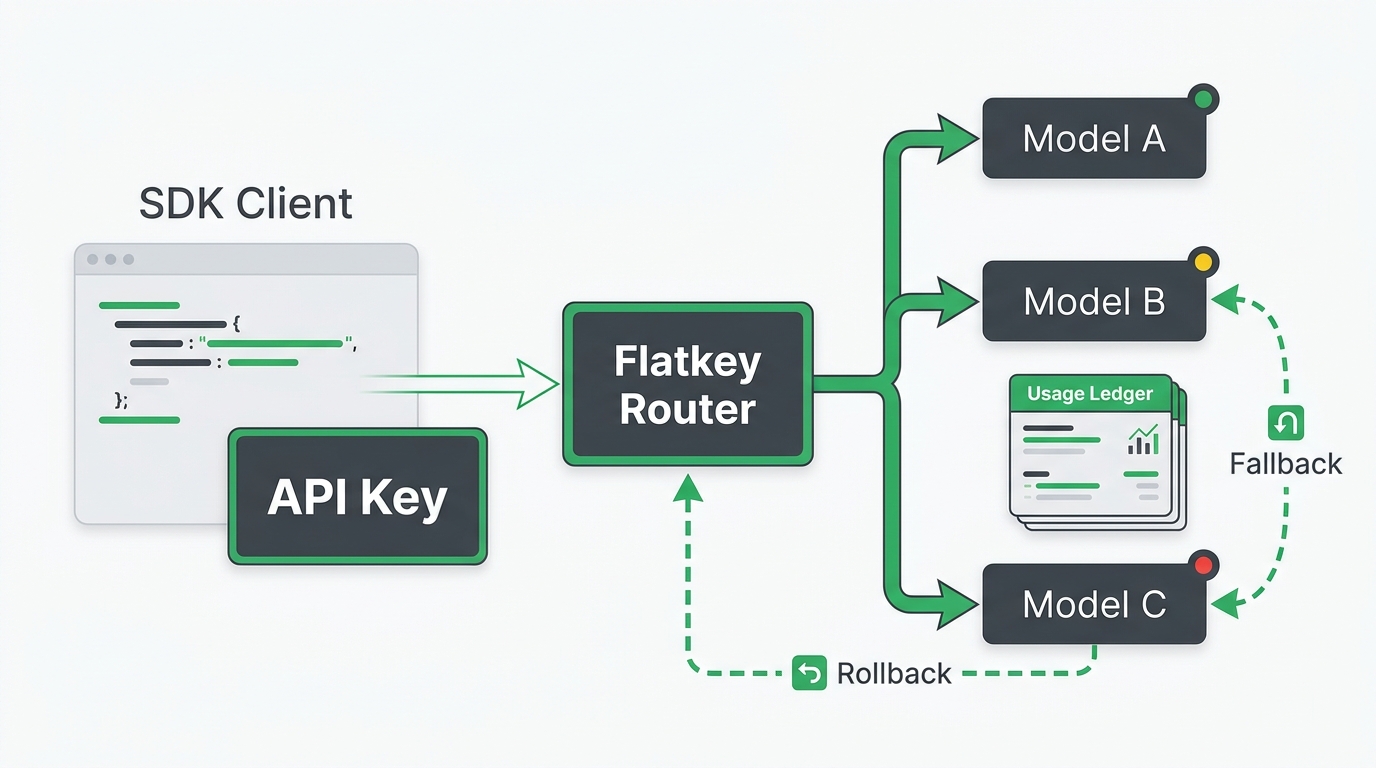
Start directly when one provider and one workload meet your needs. As a product adds different models, modalities, regions, or customer cost controls, the work often shifts from “where do I put the secret?” to “how do I govern and observe several upstreams without changing every client?”
That is where a gateway or router can be useful. Flatkey’s integration starter and OpenAI-compatible API gateway migration checklist explain how to evaluate a single compatibility surface without assuming that every provider has identical behavior. Keep the direct OpenAI path and its tests intact while you validate streaming, tools, errors, rate limits, and model-specific capabilities.
FAQ
Where do I create an API key?
Create it in the OpenAI Platform’s API-key settings for the correct organization or project. The official developer quickstart links to the current creation flow.
Can I use an API key in browser JavaScript or a mobile app?
No. Do not ship a provider secret to a client-controlled environment. Route the request through your backend, where the key stays in a server-side secret store and your own authentication and quota rules can run first.
Why is my API key request returning 429?
First inspect the response body and headers. A 429 can reflect a temporary rate limit, but it can also reflect a spend, quota, or billing condition that retrying will not repair. Follow Retry-After for a valid temporary delay, use bounded exponential backoff with jitter when appropriate, and route action-required errors to the owner. OpenAI’s rate-limit guide has the current distinctions.
Should every engineer share one API key?
Avoid unowned shared production credentials. Separate keys or projects by environment and service when practical, assign ownership, and rotate on a planned schedule. That gives you a smaller blast radius and a clean audit trail when a key must be replaced.
Next step
Get the Open AI API key working with one small, server-side request first. Then do the boring parts that prevent expensive incidents: separate environments, a named owner, current pricing checks, spend alerts, a rotation path, request IDs, and tested retry behavior. If the next problem is multi-model access rather than direct OpenAI setup, review the Flatkey quickstart before changing an existing client integration.