
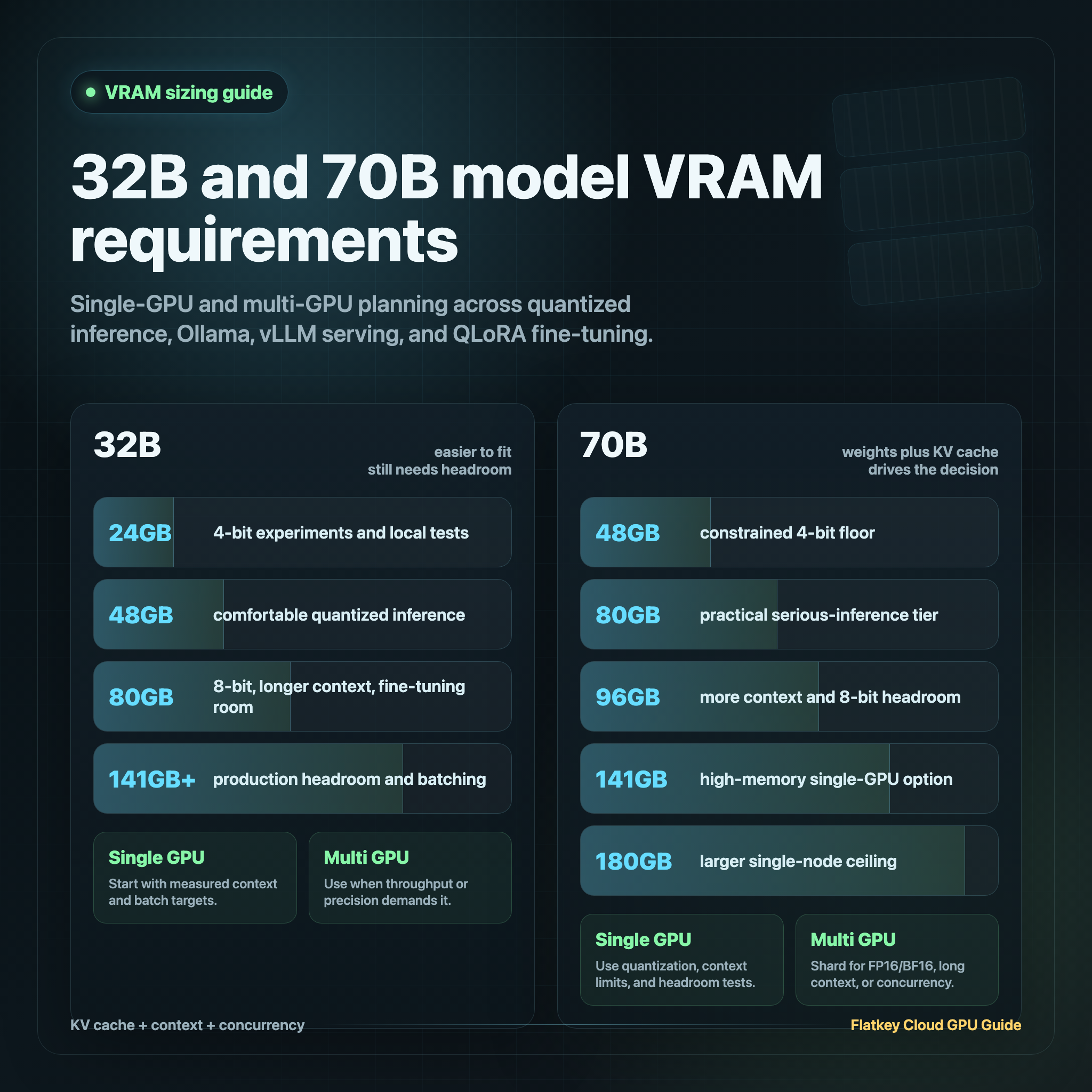
32B and 70B Model VRAM Guide: Single-GPU and Multi-GPU Options
The practical answer to 70b model vram requirements is: a 70B model can be loaded in roughly 35GB to 45GB with common 4-bit quantization, around 70GB to 90GB with 8-bit quantization and runtime overhead, and more than 140GB before overhead at FP16 or BF16. A 32B model is easier, but still needs planning: about 18GB to 24GB for 4-bit inference, 32GB to 45GB for 8-bit inference, and more than 64GB before overhead at FP16 or BF16.
Those numbers are only the floor. Real 70b model vram requirements depend on context length, batch size, KV cache, serving engine, tensor parallelism, LoRA adapters, optimizer state, and how much safety margin you need before production traffic starts failing with out-of-memory errors.
This guide is for AI engineers, platform teams, and technical buyers deciding whether a 32B or 70B workload fits on one GPU, needs multiple GPUs, or should be served through a model API instead of rented GPU capacity.
Checked on October 13, 2026.
70b model vram requirements: the quick answer
Use this as the first sizing pass, then benchmark your exact model, context window, and serving stack.
| Workload | 32B starting point | 70B starting point | Practical note |
|---|---|---|---|
| 4-bit local inference | 24GB can work, 48GB is more comfortable | 48GB can load some quantized models, 80GB is safer | Good for development, demos, internal tools, and low-concurrency serving. |
| 8-bit inference | 48GB or 80GB | 80GB minimum, 96GB or 141GB safer | Runtime overhead and KV cache often decide whether the endpoint is stable. |
| FP16/BF16 inference | 80GB | 2x80GB, 141GB, 180GB, or larger multi-GPU systems | Weight memory alone is about 2 bytes per parameter. |
| Ollama-style single-user local serving | 24GB to 48GB | 48GB to 80GB | The ollama 70b model vram requirements question is mostly about quantized model size plus context. |
| Production vLLM or SGLang serving | 48GB to 80GB | 80GB, 96GB, 141GB, or multi-GPU | Leave headroom for KV cache, batching, and failed-request recovery. |
| QLoRA fine-tuning | 48GB for constrained runs, 80GB safer | 48GB is a research floor; 80GB or multi-GPU is safer | The qlora 70b model vram requirements depend heavily on sequence length and batch strategy. |
The buyer shortcut:
- Choose 24GB only for 32B quantized experiments or very constrained 70B CPU/GPU split workflows.
- Choose 48GB for 32B comfort, 70B 4-bit local inference, or tightly tuned QLoRA experiments.
- Choose 80GB for serious 70B inference, larger context windows, or more reliable QLoRA.
- Choose 96GB, 141GB, 180GB, or multi-GPU when you need production headroom, longer contexts, higher concurrency, or FP16/BF16.
If the product only needs model outputs and not direct hardware control, compare a model/API path before signing a GPU contract. Flatkey gives teams one key, one balance, one invoice, and a usage ledger across hundreds of official models and tools, which can be a cleaner baseline when utilization is uncertain.
Why model weights are not the full VRAM requirement
The simplest memory estimate is:
model_weight_memory = parameter_count x bytes_per_parameter
That gives a useful floor:
| Model size | FP16/BF16 floor | 8-bit floor | 4-bit floor |
|---|---|---|---|
| 32B | about 64GB | about 32GB | about 16GB |
| 70B | about 140GB | about 70GB | about 35GB |
But a running LLM needs more than weights:
| Memory component | Why it matters |
|---|---|
| Quantization metadata | 4-bit and 8-bit formats need scales, group metadata, and framework buffers. |
| KV cache | Longer context windows and more concurrent requests consume additional memory. |
| Runtime buffers | vLLM, SGLang, TensorRT-LLM, llama.cpp, and Ollama each reserve memory differently. |
| CUDA graphs and kernels | Serving engines may reserve workspace for speed and stability. |
| LoRA adapters | Fine-tuned adapters add less memory than full weights, but still need budget. |
| Safety margin | Production endpoints need room for prompt variation, retries, and deployment drift. |
That is why 70b model vram requirements quantized is not the same as "the 4-bit file is 35GB." A 35GB to 45GB quantized 70B model may load on a 48GB GPU, but a longer context, larger batch, or heavier runtime can still fail.
Single-GPU options for 32B and 70B models
24GB GPUs
24GB cards are useful for 32B models in 4-bit form, smaller 70B tests with partial CPU offload, and developer experiments where latency is not the primary objective.
Do not treat 24GB as a comfortable answer for 70b model vram requirements. It can be useful with aggressive quantization, reduced context, CPU offload, or llama.cpp-style local testing, but it is usually not a production 70B serving tier.
Best fit:
- 32B 4-bit inference.
- Small context windows.
- Single-user local testing.
- Prototype evaluation before renting larger GPUs.
Watchouts:
- 70B often requires CPU offload or very tight settings.
- Long prompts can exhaust KV cache quickly.
- Throughput will be limited.
48GB GPUs
48GB is the first serious single-GPU tier for 70B quantized work. It can run many 70B 4-bit inference workloads if context and concurrency are controlled. It is also a practical floor for many QLoRA experiments, consistent with the original QLoRA result showing large 65B-class fine-tuning on a single 48GB GPU.
Best fit:
- 70B 4-bit local inference.
- 32B 8-bit inference.
- 32B fine-tuning with room for adapters and longer context.
- Tight qlora fine-tuning 70b model vram requirements experiments.
Watchouts:
- 70B at 8-bit usually does not have enough headroom.
- Long-context serving can push a 70B 4-bit model over the edge.
- Batch size is limited.
80GB GPUs
80GB is the most common practical answer for serious 70B work. A100 80GB and H100 80GB-class GPUs can handle many 70B quantized inference workloads with better context headroom than 48GB, and they are a much more comfortable starting point for QLoRA.
Best fit:
- 70B 4-bit inference with production-like context tests.
- 70B 8-bit inference if the runtime and context fit.
- 32B FP16/BF16 inference with overhead.
- 70B QLoRA with constrained but realistic settings.
Watchouts:
- FP16/BF16 70B usually needs more than one 80GB GPU.
- High concurrency still needs careful KV-cache planning.
- Provider-specific node shape and price can matter as much as VRAM.
96GB, 141GB, and 180GB GPUs
Newer high-memory accelerators change the single-GPU question. A 96GB card gives more room for 70B 8-bit or larger quantized contexts. H200-class 141GB memory can make many 70B workloads fit with much more headroom. B200-class 180GB configurations push the single-GPU or single-node ceiling further, especially when the serving stack can use newer low-precision paths.
Best fit:
- 70B inference with long context.
- Higher batch sizes and concurrency.
- 8-bit or mixed-precision serving.
- Reducing sharding complexity for large models.
Watchouts:
- Availability and rental price can outweigh theoretical fit.
- Software maturity differs across GPU generations.
- You still need a benchmark for cost per accepted output.
For adjacent hardware comparisons, see B200 vs H200, H200 vs H100, and best GPU for LLM inference.
Multi-GPU options for 70B models
Multi-GPU serving is not only "more VRAM." It also adds communication overhead, topology concerns, placement risk, and software complexity.
Use multi-GPU when:
- The model does not fit on one GPU at the precision you need.
- Long context or high concurrency needs more KV-cache room.
- You need FP16/BF16 70B serving.
- You need throughput that one GPU cannot deliver.
- You can validate tensor parallelism and interconnect performance.
| Option | When it makes sense | What to verify |
|---|---|---|
| 2x48GB | 70B quantized serving with more headroom than a single 48GB card | Interconnect, tensor-parallel support, failure behavior. |
| 2x80GB | 70B FP16/BF16 experiments or high-headroom quantized serving | Whether sharding beats one larger GPU on latency and cost. |
| 4x80GB | Heavier 70B serving, larger contexts, multiple replicas, or fine-tuning | NVLink/NVSwitch, batch policy, utilization, checkpoint strategy. |
| 8x80GB or larger | Shared production cluster, multiple endpoints, or larger-than-70B models | Scheduler, storage, observability, and cost allocation. |
For multi-node deployments, the cluster design matters. Use the GPU cluster architecture guide to review compute, network, storage, and control-plane requirements before buying capacity.
Ollama 70B model VRAM requirements
The ollama 70b model vram requirements answer depends on the model tag and quantization. Ollama model pages commonly list quantized 70B artifacts in the tens of gigabytes, not 140GB, because the default local-serving path is usually quantized rather than FP16.
A practical rule:
- 48GB can be enough to load and test some 70B quantized models.
- 64GB to 80GB gives more room for context and fewer OOM surprises.
- 24GB usually means smaller models, shorter contexts, heavy offload, or slow experiments.
- If you need production latency or multiple users, size for serving headroom, not only for the downloaded model size.
For local testing, capture the exact model tag, quantization, context length, GPU layers, and observed memory use. Do not write "70B works on my GPU" without those details. The same 70B family can have several quantized variants with different memory behavior.
QLoRA fine-tuning 70B model VRAM requirements
The qlora fine-tuning 70b model vram requirements question has two answers:
- The research floor can be surprisingly low because QLoRA freezes the base model, quantizes it, and trains small low-rank adapters.
- The production comfort zone is higher because sequence length, batch size, gradient checkpointing, data pipeline, evaluation cadence, and adapter management all add practical memory pressure.
Use this planning table:
| Fine-tuning setup | 32B starting point | 70B starting point | Notes |
|---|---|---|---|
| Minimal QLoRA experiment | 24GB to 48GB | 48GB | Keep sequence length and batch size modest. |
| Practical QLoRA run | 48GB to 80GB | 80GB | More room for data, eval, and fewer restarts. |
| Longer sequence or larger effective batch | 80GB or multi-GPU | 2x80GB or larger | Memory grows with sequence length and training strategy. |
| Full fine-tuning | Multi-GPU | Multi-GPU cluster | Optimizer state makes full fine-tuning a different problem. |
If your query is qlora fine-tune 70b model vram requirements, start by proving one constrained run on 48GB or 80GB, then scale sequence length and effective batch only after logging actual peak memory. For a production fine-tuning workflow, 80GB or multi-GPU capacity is usually easier to operate than a one-off minimum-memory setup.
KV cache and context length can change the answer
A 70B model that fits at 4K context may not fit at 32K context. The KV cache grows with:
- Number of layers.
- KV heads and head dimension.
- Context length.
- Batch size or active sequences.
- Bytes per KV-cache element.
Serving engines manage this differently. vLLM exposes memory utilization and KV-cache behavior as first-class serving concerns. llama.cpp and Ollama-style local serving expose context and offload choices that can make a model fit, but with performance tradeoffs.
The practical workflow:
- Load the model at the intended quantization.
- Set the real context length, not the default.
- Run a prompt distribution that matches production.
- Increase concurrency until latency or memory fails.
- Record peak VRAM, failed requests, tokens per second, and accepted-output quality.
Do not size 70b model vram requirements from an empty load test. Size from the context and concurrency you will actually run.
A simple VRAM worksheet
Use this worksheet before renting or reserving capacity.
model_family:
parameter_count: 32B | 70B | other
precision: fp16 | bf16 | int8 | 4-bit | mixed
serving_engine: Ollama | llama.cpp | vLLM | SGLang | TensorRT-LLM | other
target_context_window:
input_tokens_p50:
input_tokens_p95:
output_tokens_p50:
output_tokens_p95:
target_concurrency:
batching_policy:
fine_tuning_method: none | LoRA | QLoRA | full fine-tune
gpu_candidate:
gpu_memory:
observed_idle_load_vram:
observed_peak_vram:
oom_failures:
tokens_per_second:
accepted_outputs_per_hour:
cost_per_accepted_output:
For cost planning, pair the worksheet with GPU rental prices, GPU cloud hidden costs, and GPU cluster TCO.
When a model API is better than renting GPUs
GPU capacity makes sense when you need direct control over weights, quantization, deployment, custom adapters, private serving, or sustained utilization.
A model API can be better when:
- Traffic is bursty.
- The product changes models frequently.
- The team does not want to operate serving infrastructure.
- Unit economics are easier to manage per request than per GPU-hour.
- You need fast access to multiple model families rather than one fixed deployment.
Flatkey belongs on the API side of that decision. It gives developers an OpenAI-compatible endpoint, one key, one balance, one invoice, and a usage ledger across official models and tools. If your 70b model vram requirements worksheet shows low utilization, fragile OOM margins, or heavy operations overhead, benchmark a model/API baseline before committing to GPU rental. The GPU cloud vs model API guide gives the decision frame.
Official sources and docs to keep open
| Source | Why it matters |
|---|---|
| QLoRA paper and QLoRA repository | Baseline for low-memory adapter fine-tuning of large models. |
| Hugging Face bitsandbytes quantization docs | Practical 8-bit and 4-bit loading behavior in Transformers. |
| vLLM documentation | Serving memory, batching, and KV-cache behavior. |
| llama.cpp repository | GGUF, CPU/GPU offload, and local inference behavior. |
| Ollama model library | Model tags, quantized artifact sizes, and local-serving options. |
| NVIDIA A100, H100, H200, and DGX B200 | Official GPU memory tiers used in sizing decisions. |
Final recommendation
For 32B models, start with 24GB for 4-bit experiments, 48GB for comfortable inference, and 80GB if you want FP16/BF16, longer context, or fine-tuning headroom.
For 70B models, treat 48GB as the constrained 4-bit starting point, 80GB as the practical serious-inference tier, and 96GB to 180GB or multi-GPU as the production headroom tier. For FP16/BF16 70B, plan on multi-GPU or very high-memory GPUs.
The best answer to 70b model vram requirements is not a single GPU number. It is a measured configuration: model, quantization, context length, concurrency, serving engine, fine-tuning method, and cost per accepted output.
Frequently Asked Questions
How much VRAM does a 70B model need?
A 70B model needs about 140GB just for FP16 or BF16 weights, about 70GB before overhead at 8-bit, and roughly 35GB to 45GB for many 4-bit quantized variants. In practice, 70b model vram requirements are higher once KV cache, runtime buffers, context length, and concurrency are included.
Can a 70B model run on a 48GB GPU?
Yes, a 70B model can run on a 48GB GPU when it is aggressively quantized and context/concurrency are controlled. That is a viable local inference and constrained testing tier, but 80GB or larger is safer for production-like serving.
What are Ollama 70B model VRAM requirements?
For ollama 70b model vram requirements, check the exact model tag and quantized artifact size. 48GB can be enough for some quantized 70B models, but 64GB to 80GB gives more room for context and fewer OOM failures.
What are QLoRA 70B model VRAM requirements?
For qlora 70b model vram requirements, 48GB is a practical research floor for constrained experiments, while 80GB or multi-GPU capacity is safer for longer sequence lengths, larger effective batches, and production fine-tuning workflows.
Is 24GB enough for a 70B model?
24GB is usually not enough for comfortable 70B GPU inference. It may work with heavy quantization, CPU offload, small context windows, or slow experiments, but it is better treated as a 32B quantized tier.
Is 80GB enough for a 70B model?
80GB is enough for many 70B quantized inference workloads and constrained QLoRA runs. It is not usually enough for full FP16/BF16 70B inference on one GPU after overhead, and it can still fail if the context window or concurrency is too large.


