
NVIDIA B200 vs H200: Which GPU Is Better for LLM Inference?
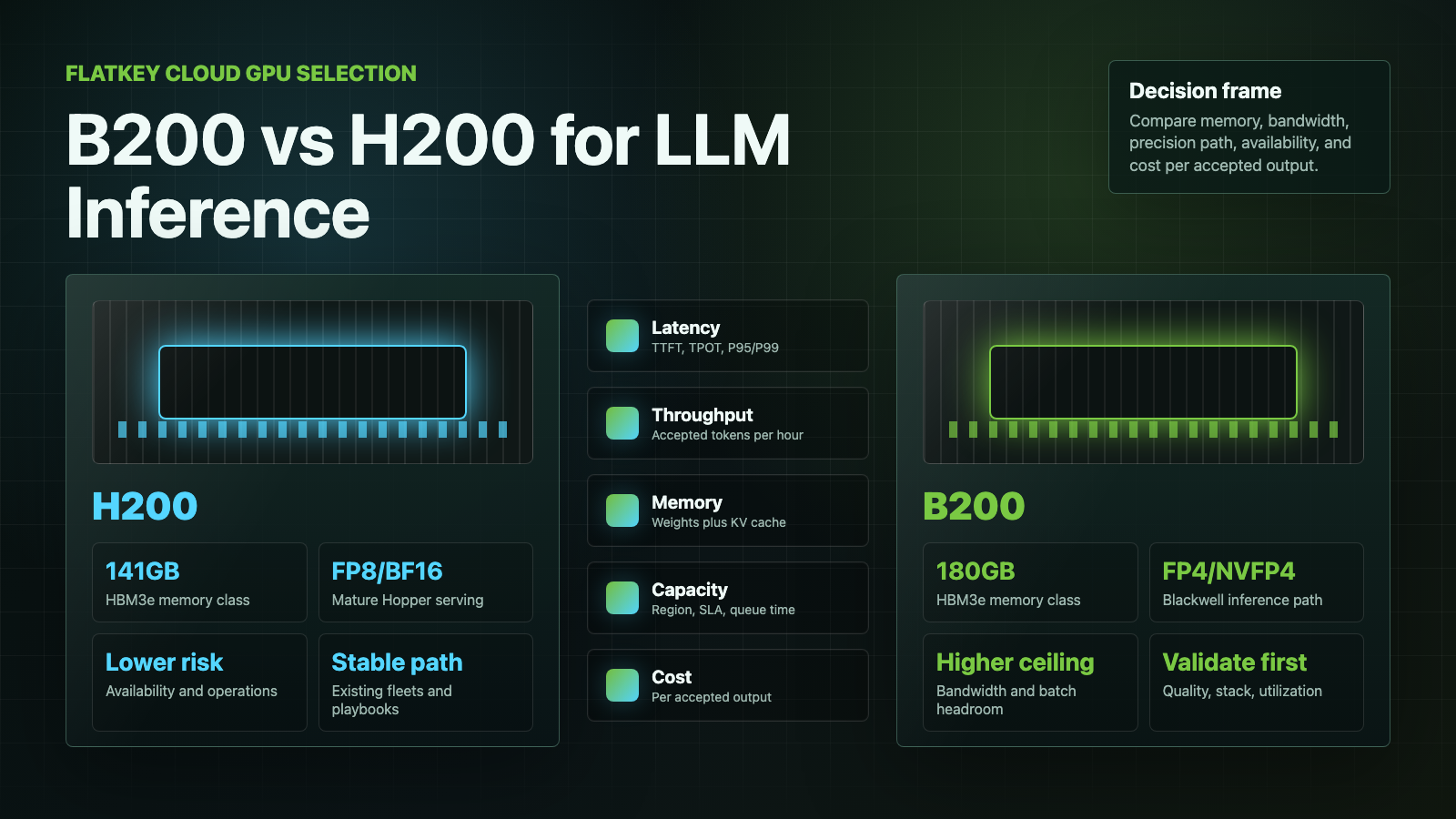
B200 vs H200 is not a simple "newer GPU wins" decision. NVIDIA B200 has the higher ceiling for LLM inference when your stack can use Blackwell low-precision paths, especially FP4/NVFP4, and when memory bandwidth is the bottleneck. NVIDIA H200 is usually the lower-risk choice when you need available capacity, mature Hopper serving support, stable FP8/BF16 behavior, and easier price discovery today.
This guide is for enterprise AI teams comparing cloud GPU capacity for LLM inference, not for chip collectors. The practical question is: which GPU gives the best latency, throughput, reliability, and cost per accepted output for your model, context length, traffic shape, and serving stack?
Checked on October 13, 2026.
B200 vs H200: the quick answer
Choose B200 when your workload is throughput-bound, memory-bandwidth-bound, or ready for Blackwell-optimized low precision. It is the better forward-looking inference platform for high-volume 70B+ serving, long-context workloads, and teams that can benchmark TensorRT-LLM, FP4/NVFP4, and modern batching seriously before committing capacity.
Choose H200 when you need capacity sooner, your workloads already run well on Hopper, your stack is built around FP8/BF16, or procurement needs a more mature cloud GPU market. H200 is still a strong LLM inference GPU because it pairs Hopper software maturity with 141GB of HBM3e memory and high memory bandwidth.
The buyer shortcut:
| Decision | Better starting point | Why |
|---|---|---|
| New high-throughput LLM inference cluster | B200 | More memory per GPU, higher memory bandwidth, Blackwell low-precision path, newer system designs. |
| Existing Hopper fleet expansion | H200 | Easier operational continuity from H100/H200, fewer stack changes, mature serving recipes. |
| FP4 or NVFP4 evaluation | B200 | Blackwell is built for the newer low-precision inference path. |
| FP8/BF16 production serving | H200 first, then benchmark B200 | Hopper support is mature; B200 still needs workload-specific validation. |
| Scarce launch-window capacity | Whichever provider can contract reliable capacity | Queue time and SLA can matter more than theoretical GPU peak. |
| Lowest risk procurement | H200 | More familiar cloud buying motion and pricing references. |
| Best long-term ceiling | B200 | More headroom if software, utilization, and availability line up. |
Spec comparison for LLM inference
Use this table as the first filter, then run your own benchmark. Do not buy B200 or H200 based only on theoretical peak numbers.
| Category | NVIDIA H200 | NVIDIA B200 | Why it matters for LLM inference |
|---|---|---|---|
| Architecture | Hopper | Blackwell | B200 adds Blackwell serving features and low-precision acceleration; H200 inherits Hopper maturity. |
| Memory capacity | 141GB HBM3e | 180GB HBM3e in common SXM/DGX B200 configurations | More memory helps with larger models, longer context windows, larger KV cache, and higher batch sizes. |
| Memory bandwidth | Up to 4.8TB/s | Up to about 8TB/s in B200 SXM-class systems | Token generation and attention-heavy workloads can become memory-bandwidth-bound. |
| Low precision | FP8, BF16, FP16, TF32 and other supported modes | FP4/NVFP4, FP8, BF16, FP16, TF32 and other supported modes | B200's advantage is strongest when the model and serving stack can use Blackwell low precision without quality loss. |
| Software maturity | Very mature Hopper ecosystem | Rapidly maturing Blackwell ecosystem | H200 has a lower adoption risk; B200 may require more benchmarking and tuning. |
| Procurement state | Broader H100/H200 cloud pattern | Newer and often more capacity-constrained | Availability can decide the answer before benchmarks do. |
Primary sources to keep open while evaluating: NVIDIA H200, NVIDIA DGX B200, NVIDIA's Tensor Core GPU datasheet, and the TensorRT-LLM performance overview.
Why B200 can beat H200 for LLM inference
The strongest argument for B200 vs H200 is not only raw compute. It is the combination of memory capacity, memory bandwidth, newer interconnect/system designs, and Blackwell low-precision inference.
1. More memory headroom
H200 already has a major memory advantage over earlier H100 80GB deployments. B200 pushes the headroom further. That matters because production LLM inference is not just model weights. You also need space for KV cache, runtime overhead, batching, framework buffers, speculative decoding state, and safety margins for long prompts.
For 70B-class models, a well-tuned H200 can be enough. For larger models, heavier concurrency, longer context windows, or multi-tenant endpoints, B200's extra memory can reduce sharding pressure and make higher batch sizes more realistic.
2. Higher memory bandwidth
Many LLM inference paths are constrained by memory movement, not only tensor peak. During generation, each token may require repeated movement of weights and KV-cache data. Higher memory bandwidth can improve throughput if the serving engine, quantization, attention kernels, and batching policy can feed the GPU efficiently.
That is why a B200 vs H200 performance comparison should record both latency and throughput. A GPU that wins maximum tokens per second may not win your P95 latency target, and a GPU that looks expensive per hour may be cheaper per million accepted tokens if utilization is high.
3. Blackwell low-precision paths
B200 is most compelling when you can validate Blackwell-optimized precision modes. FP4/NVFP4 can materially change the cost curve for some inference workloads, but the savings are not automatic. You need to test quality, refusal behavior, tool-call accuracy, summarization drift, retrieval sensitivity, and long-context behavior before switching a customer-facing endpoint.
If your production policy requires BF16 or FP8 today, H200 may be the more predictable first deployment. If you are building the next inference platform and can invest in model-specific calibration and benchmarking, B200 deserves the first benchmark slot.
Why H200 can still be the better purchase
H200 is not a legacy GPU in the way A100 is now often treated for frontier LLM serving. It is a high-memory Hopper part with a mature software path, broad operator familiarity, and enough memory for many serious LLM inference workloads.
1. Availability can beat peak performance
The "best GPU" is useless if you cannot secure it during a launch window. In cloud GPU procurement, queue time, reservation terms, support response, region, networking, and cancellation risk are part of performance. If a provider can deliver reliable H200 capacity now while B200 capacity is quote-only or backordered, H200 can be the better business decision.
For current rates, check provider pages such as RunPod pricing, Lambda GPU Cloud pricing, Vast.ai pricing, and Massed Compute pricing. Treat those pages as live source checks, not permanent rate cards.
2. Hopper serving is operationally familiar
Many teams already know how to run vLLM, SGLang, TensorRT-LLM, TGI, Ray Serve, Kubernetes operators, monitoring, and autoscaling around Hopper-class GPUs. That reduces migration risk. If your H100 or H200 fleet already has known-good images, kernels, alert thresholds, utilization targets, and incident playbooks, expanding H200 may beat a rushed B200 migration.
3. H200 can be enough for 70B production inference
For 7B, 8B, 14B, 32B, and many 70B deployments, H200 often has enough memory and throughput if the workload is tuned. The hard question is not "Can H200 serve this model?" The hard question is "Can H200 serve this model at our target latency, context length, batch size, availability target, and cost per accepted answer?"
If the answer is yes, B200 has to justify itself through better delivered economics, not only better specs.
DGX B200 vs H200: compare the system, not only the GPU
The keyword "DGX B200 vs H200" usually mixes two levels of comparison:
- GPU comparison: B200 GPU versus H200 GPU.
- System comparison: DGX B200 or HGX B200-style systems versus H200 systems.
For procurement, the system level matters more. A server with eight B200 GPUs is not just eight isolated accelerators. It includes CPU host design, memory, NVLink/NVSwitch topology, networking, storage, power, cooling, vendor support, and cluster integration.
When comparing DGX B200 vs H200 capacity, ask for:
| System question | Why it matters |
|---|---|
| GPU count and form factor | PCIe, SXM, HGX, DGX, and NVL systems have different performance and serviceability. |
| NVLink/NVSwitch topology | Multi-GPU tensor parallelism and model sharding depend on interconnect quality. |
| Network fabric | Multi-node inference and training need InfiniBand, RoCE, or equivalent fabric planning. |
| Power and rack density | B200 systems can change rack design, cooling, and deployment timeline. |
| Storage path | Model load time and checkpoint movement affect billable startup time. |
| Support and replacement SLA | Downtime is part of cost per accepted output. |
If a provider quotes "B200" capacity, confirm the actual system. A B200 PCIe node, an HGX B200 node, and a DGX B200 system are not interchangeable buying units.
B200 vs H200 performance: what to benchmark
No public benchmark can answer your B200 vs H200 decision by itself. A useful NVIDIA B200 vs H200 performance comparison needs a reproducible benchmark using your model, tokenizer, context distribution, traffic pattern, and quality threshold.
Use three benchmark modes:
| Mode | What it proves | Common mistake |
|---|---|---|
| Single-request latency | Time to first token and per-user responsiveness | Optimizing one request and assuming it predicts production throughput. |
| Saturated throughput | Maximum output tokens per second under load | Ignoring P95/P99 latency and queueing behavior. |
| Production replay | Cost and latency under real prompt lengths and concurrency | Using synthetic prompts that are shorter than real user traffic. |
Track these fields:
model_id:
weights_precision:
runtime: vLLM | SGLang | TensorRT-LLM | TGI | custom
gpu: H200 | B200
gpu_count:
context_input_p50:
context_input_p95:
output_tokens_p50:
output_tokens_p95:
target_ttft_ms:
target_tpot_ms:
concurrency:
batching_policy:
kv_cache_policy:
quality_eval_suite:
hourly_gpu_cost:
tokens_per_second:
accepted_answers_per_hour:
cost_per_1m_accepted_output_tokens:
The key metric is cost per accepted output, not tokens per second alone. If B200 is faster but costs much more per reliable reserved hour, H200 can still win. If B200 enables a much larger batch size, lower precision with acceptable quality, or fewer GPUs per endpoint, B200 can win even at a higher hourly rate.
For a broader cost worksheet, pair this benchmark with GPU rental prices, AI model pricing comparison, and how to compare AI model prices.
Workload-by-workload recommendation
| Workload | Better first benchmark | Reason |
|---|---|---|
| 8B or small model, latency-sensitive API | H200 | The workload may not need B200's memory headroom; software maturity matters. |
| 70B FP8/BF16 serving | H200 and B200 | H200 may be enough; B200 may win if memory bandwidth and batching dominate. |
| 70B FP4 serving | B200 | The precision path favors Blackwell, but quality validation is mandatory. |
| 405B or very large model serving | B200 | More memory and newer system bandwidth are valuable, though multi-GPU topology dominates. |
| Long-context RAG endpoint | B200 | KV-cache pressure and bandwidth can make B200 attractive. |
| Batch offline inference | B200 if utilization is high | Throughput ceiling matters if jobs keep the GPU saturated. |
| Bursty customer-facing inference | H200 or model API first | Idle B200 capacity can be expensive if traffic is spiky. |
| Existing H100/H200 platform | H200 expansion first | Operational continuity may beat a new stack migration. |
Price and availability checklist
Do not compare B200 vs H200 by hourly price alone. Compare completed workload economics.
| Field | H200 capture | B200 capture |
|---|---|---|
| Provider | Cloud, marketplace, dedicated cluster, colocated system | Cloud, marketplace, dedicated cluster, colocated system |
| Contract mode | On-demand, reserved, committed, private cluster | On-demand, reserved, committed, private cluster |
| Actual system | H200 PCIe, H200 SXM, H200 NVL, DGX/HGX | B200 PCIe, B200 SXM, HGX, DGX B200, GB200 option |
| Region | Latency, data rules, availability | Latency, data rules, availability |
| Hourly or monthly cost | Include storage, support, egress, idle time | Include storage, support, egress, idle time |
| Utilization | Real GPU-active time | Real GPU-active time |
| Failure and retry cost | OOM, eviction, bad image, network issue | OOM, migration bugs, tuning failures |
| Accepted output rate | Answers, tokens, jobs, or requests that pass QA | Answers, tokens, jobs, or requests that pass QA |
For procurement, ask providers to quote the same workload unit:
Please quote capacity for:
- model and precision
- target traffic
- input/output token distribution
- target P95 latency
- required region
- committed term
- support/SLA
- storage and network assumptions
- expected cost per 1M accepted output tokens
That last line is important. If the provider cannot help map GPU cost to output cost, your team owns all of the modeling risk.
When neither B200 nor H200 is the right answer
Sometimes the right answer is not a GPU cluster at all. If utilization is low, demand is spiky, the product changes models frequently, or the team does not want to operate serving infrastructure, a model API can be cheaper and faster than renting GPUs.
Flatkey sits on the API side of that decision. It gives teams one key, one balance, one invoice, and a usage ledger across 300+ official models and 1,000+ tools. If your B200 vs H200 worksheet shows low utilization or high operations overhead, compare a model API path before signing a cluster contract. For governance, budget, and routing controls, see AI gateway pricing, AI API spend management, and AI API quota controls.
This does not mean model APIs always beat GPUs. It means the GPU decision should be measured against an API alternative using the same accepted-output metric.
Final recommendation
For most enterprise AI teams, the practical B200 vs H200 answer is:
- Start with H200 if you need reliable capacity quickly, already run Hopper, or serve FP8/BF16 workloads with mature tooling.
- Start with B200 if you are building a new high-throughput LLM inference platform, can validate FP4/NVFP4 quality, and can secure enough capacity to keep the GPUs highly utilized.
- Do not commit to either GPU until you benchmark cost per accepted output on your actual prompts, context lengths, and concurrency.
If B200 is available at a reasonable committed rate and your software stack can exploit Blackwell, it is the stronger long-term LLM inference platform. If availability, price, and operational risk dominate the buying decision, H200 remains a very credible and often more practical choice.
Frequently Asked Questions
Is B200 better than H200 for LLM inference?
B200 is usually better for the highest-throughput, memory-bandwidth-heavy, Blackwell-optimized LLM inference workloads. H200 can be better when Hopper software maturity, immediate capacity, and predictable price matter more.
What is the biggest difference in NVIDIA B200 vs H200 performance?
The biggest difference in NVIDIA B200 vs H200 performance is the combination of B200's larger memory, higher memory bandwidth, and Blackwell low-precision support. The realized gap depends on model size, precision, serving engine, batching, and latency target.
Should I choose H200 vs B200 for a 70B model?
For H200 vs B200 on a 70B model, benchmark both if you can. H200 may be enough for FP8/BF16 serving with mature tooling. B200 is more attractive for high concurrency, long context, or FP4/NVFP4 serving after quality validation.
Does DGX B200 vs H200 change the answer?
Yes. DGX B200 vs H200 is a system-level decision, not just a GPU decision. Compare GPU count, NVLink/NVSwitch topology, networking, rack power, cooling, storage, support, and committed capacity terms.
Is B200 always cheaper per token than H200?
No. B200 can be cheaper per token when it is highly utilized and the serving stack uses Blackwell efficiently. H200 can be cheaper when B200 hourly rates, queue time, migration work, or underutilization offset the performance gain.
What should I measure before buying B200 or H200 capacity?
Measure time to first token, tokens per output second, P95/P99 latency, accepted answers per hour, GPU utilization, failure rate, restart cost, storage, egress, support, and cost per 1M accepted output tokens.


