Low GPU Utilization in LLM Inference: How to Find CPU, Data, Network, and Batching Bottlenecks (2026)
Low GPU utilization during LLM inference usually means the GPU is waiting on something else: too little traffic, a batch that is too small, a CPU that cannot tokenize and launch kernels fast enough, or slow data movement over PCIe or the network. Before you buy more GPUs, measure four things on the same load: GPU activity (not just nvidia-smi "GPU-Util"), CPU core usage of the serving process, the request queue, and tokens per second with time to first token (TTFT). If the queue is empty, you have a traffic or batching problem; if the queue is full while CPU cores are pinned and the GPU is idle, you have a CPU bottleneck.
This guide is written for ML and AI infrastructure engineers running vLLM, SGLang, or similar servers on cloud GPUs. It gives a diagnosis order, copyable commands for CPU sampling and GPU monitoring, a repeatable experiment that proves (or rules out) a CPU bottleneck, and fixes with their latency and rollback costs. Sources were checked on October 28, 2026.
Low GPU utilization: the quick answer
| What you see | Most likely cause | First check | Typical fix |
|---|---|---|---|
| GPU-Util low, queue empty, few running requests | Not enough concurrent traffic | vllm:num_requests_running and vllm:num_requests_waiting |
Raise client concurrency, batch offline jobs, or move to a smaller GPU |
| GPU-Util low, queue growing, one CPU core at 100% | CPU-bound API server (tokenization, detokenization, request parsing) | py-spy top on the API server process |
More CPU cores, --api-server-count, faster tokenizer backend |
| GPU-Util high but tokens/s low | GPU "busy" but memory-bound decode, or tiny kernels | DCGM PROF_SM_ACTIVE and PROF_DRAM_ACTIVE |
Larger batches, quantization, a GPU with more memory bandwidth |
| GPU-Util drops to zero in waves | Preemption, KV cache pressure, or sync points | vLLM preemption warnings, vllm:kv_cache_usage_perc |
Lower max_num_seqs, raise gpu_memory_utilization, add GPUs for KV cache |
| Multi-GPU job with idle GPUs | Communication stalls or CPU oversubscription | Nsight Systems timeline, NCCL logs | Pin threads, give each rank enough cores, check the interconnect |
| Training or embedding job with sawtooth GPU-Util | Data loading and preprocessing | PyTorch profiler, DataLoader workers | More num_workers, pinned memory, pre-tokenized datasets |
Why "GPU utilization" is often misleading
The number most people look at is utilization.gpu from nvidia-smi. NVIDIA defines it as the percent of time over the sample period during which one or more kernels was executing on the GPU (nvidia-smi documentation). That means a single small kernel running all the time can show 100%, while a GPU that alternates between big bursts and idle gaps can show 40% even though each burst is efficient.
For a real picture, use the DCGM profiling fields (NVIDIA DCGM feature overview):
| DCGM field | What it measures | How to read it |
|---|---|---|
DCGM_FI_PROF_GR_ENGINE_ACTIVE (1001) |
Fraction of time the graphics/compute engine was active | Close to nvidia-smi GPU-Util |
DCGM_FI_PROF_SM_ACTIVE (1002) |
Fraction of time at least one warp was active on an SM, averaged over all SMs | Low SM active with high GPU-Util = small or serialized kernels |
DCGM_FI_PROF_SM_OCCUPANCY (1003) |
Resident warps relative to the maximum | Low occupancy is not always bad; compare with SM active |
DCGM_FI_PROF_PIPE_TENSOR_ACTIVE (1004) |
Tensor Core pipe activity | Prefill should push this up; decode often will not |
DCGM_FI_PROF_DRAM_ACTIVE |
Memory interface activity | High DRAM active + low tensor = memory-bound decode |
DCGM_FI_PROF_PCIE_TX_BYTES / RX_BYTES |
PCIe traffic | Spikes point to host-device copies or KV offload |
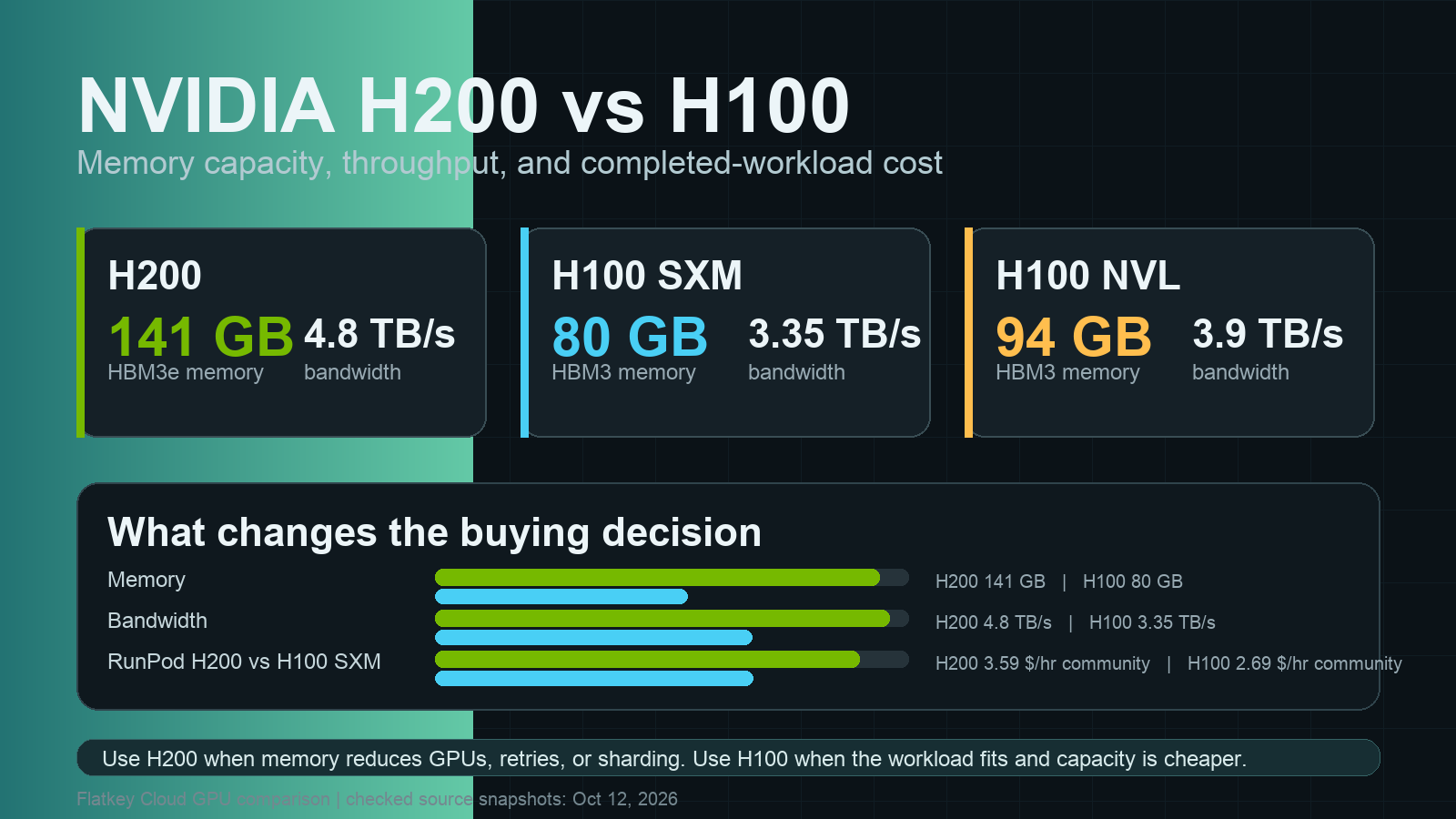
DCGM's own notes warn that a higher SM activity value does not necessarily mean better GPU usage for memory-bandwidth-limited workloads. LLM decode is exactly that kind of workload: each new token reads the model weights and the KV cache, so the GPU can be "busy" on memory while Tensor Cores sit mostly idle. This is why the H200 vs H100 comparison comes down mostly to memory capacity and bandwidth rather than raw FLOPS.
Step 1: Build a baseline on one fixed workload
Do not change anything until you have a baseline. Use the same model, the same prompt and output lengths, and the same concurrency for every measurement. vLLM ships a load generator for this (vLLM bench serve docs):
# Start the server (example model; use your own)
vllm serve Qwen/Qwen3-8B --port 8000 --gpu-memory-utilization 0.90

# In another shell: fixed synthetic load, 64 concurrent requests
vllm bench serve \
  --model Qwen/Qwen3-8B \
  --base-url http://127.0.0.1:8000 \
  --dataset-name random \
  --random-input-len 2048 \
  --random-output-len 256 \
  --num-prompts 500 \
  --max-concurrency 64 \
  --save-result --result-filename baseline.json
While the benchmark runs, record these signals over the same 60-second window:
| Signal | Tool | Why |
|---|---|---|
| GPU activity | nvidia-smi dmon -s um -d 1 or dcgmi dmon -e 1001,1002,1004,1005 -d 1000 |
Shows idle gaps and memory vs compute activity |
| CPU per core | mpstat -P ALL 1 or top -H -p <pid> |
A single pinned core is the classic CPU-bound signature |
| Queue and batch | vLLM /metrics: vllm:num_requests_running, vllm:num_requests_waiting |
Tells you if there is enough work to batch |
| KV cache | vllm:kv_cache_usage_perc |
Near 1.0 means preemption and recomputation risk |
| Latency | vllm:time_to_first_token_seconds, bench TTFT/TPOT |
User-facing impact of every change |
| Throughput | bench output tokens/s | Your actual efficiency metric |
The vLLM metric names above come from the vLLM metrics design docs. A minimal sampler that writes GPU and queue data to one CSV:
# sample_baseline.py - poll vLLM metrics and NVML once per second for 60 s
import time, csv, re, urllib.request
import pynvml  # pip install nvidia-ml-py

pynvml.nvmlInit()
h = pynvml.nvmlDeviceGetHandleByIndex(0)
METRICS = "http://127.0.0.1:8000/metrics"
want = ["vllm:num_requests_running", "vllm:num_requests_waiting", "vllm:kv_cache_usage_perc"]

def scrape():
    text = urllib.request.urlopen(METRICS, timeout=5).read().decode()
    out = {}
    for name in want:
        m = re.search(rf"^{re.escape(name)}\{{[^}}]*\}} ([0-9.eE+-]+)", text, re.M)
        out[name] = float(m.group(1)) if m else None
    return out

with open("baseline_samples.csv", "w", newline="") as f:
    w = csv.writer(f)
    w.writerow(["t", "gpu_util", "mem_util", "running", "waiting", "kv_usage"])
    for _ in range(60):
        u = pynvml.nvmlDeviceGetUtilizationRates(h)
        m = scrape()
        w.writerow([round(time.time(), 1), u.gpu, u.memory,
                    m[want[0]], m[want[1]], m[want[2]]])
        time.sleep(1)
print("wrote baseline_samples.csv")
Step 2: Rule out "not enough work" first
Low utilization with an empty queue is not a bottleneck; it is idle capacity. If num_requests_waiting stays at 0 and num_requests_running is a handful of requests, the GPU simply has nothing to batch. Check:
- Client concurrency. A single synchronous client sends one request at a time. Use async clients or a worker pool.
- Offline jobs. Batch evaluation or embedding jobs should submit many requests at once, not loop one by one.
- Right-sizing. If real peak traffic never fills the GPU, a smaller or cheaper card may be the right fix. Compare options in our best GPU for LLM inference guide and the hourly references on Flatkey Compute.
Only when the queue is non-empty (requests are waiting) and the GPU is still idle do you have a supply-side bottleneck worth chasing.
Step 3: Check the CPU path in a fixed order
When requests are waiting and the GPU is idle, work through the CPU path in this order. Each step has a test that confirms or rules it out.
3.1 Tokenization and detokenization
The API server tokenizes every prompt and detokenizes every streamed token. Long prompts, long shared prefixes, and many short bursty requests can make this CPU work dominate. A March 2026 study of multi-GPU LLM serving found that under limited CPU allocations, systems show delayed kernel launches, stalled communication, and higher tokenization latency, and that giving the servers adequate CPU reduced TTFT by 1.47x to 7.11x across configurations without adding GPUs (Chung et al., arXiv:2603.22774). The same paper notes the effect is stronger for agentic workloads, where long multi-turn contexts increase tokenization work while prefix caching reduces GPU prefill work.
Test: sample the API server process with py-spy while the benchmark runs.
# Find the vLLM API server PID, then sample it live
pgrep -af "vllm serve"
sudo py-spy top --pid <API_SERVER_PID>

# Or record a 30-second flame graph for later
sudo py-spy record -o api_server.svg --pid <API_SERVER_PID> --duration 30
If most samples sit in tokenizer encode/decode, JSON parsing, or the HTTP layer and that process is at 100% of one core, the API server is your bottleneck.
Fixes:
- Scale out the API server. vLLM can run several API server processes in front of one engine core with
--api-server-count(vLLM optimization docs):vllm serve <model> --api-server-count 4. The docs note each API server uses 8 CPU threads by default for loading media, so setVLLM_MEDIA_LOADING_THREAD_COUNTon multimodal servers to avoid exhausting cores. - Faster tokenizer backend. vLLM v0.23.0 and later can use the Rust
fastokensbackend for BPE tokenizers withVLLM_USE_FASTOKENS=1. The docs say tokenizer-bound workloads see the largest wins and GPU-bound workloads will see little end-to-end change, which is a useful self-check. - More cores per GPU. Cloud instances with few vCPUs per GPU are common. CPU cores cost far less than GPU hours, so check the vCPU count before blaming the model.
3.2 Scheduling gaps and kernel launch overhead
Between decode steps the engine has to schedule the next batch and launch kernels. On a starved or oversubscribed CPU, those gaps show up as short idle slices on the GPU timeline. vLLM's --async-scheduling option exists to avoid these gaps; its CLI reference describes it as helping "to avoid gaps in GPU utilization, leading to better latency and throughput" (vllm serve reference). CUDA Graphs (enabled unless you pass --enforce-eager) also reduce launch overhead for decode.
Test: capture a short timeline with Nsight Systems and look for gaps between kernels on the GPU row while CPU threads are busy.
nsys profile -t cuda,nvtx,osrt --duration 30 -o vllm_trace \
  vllm serve Qwen/Qwen3-8B --port 8000
# Run the same bench command, then open vllm_trace.nsys-rep in the Nsight Systems GUI
Fixes: remove --enforce-eager in production, keep async scheduling on, pin the server to dedicated cores (avoid noisy neighbors), and make sure each GPU worker process has its own physical cores.
3.3 Data reading and preprocessing
For inference, this means image or audio decoding in multimodal requests and prompt assembly in your app. For fine-tuning and embedding jobs, it means the input pipeline. In PyTorch, a sawtooth GPU-Util with long idle gaps usually means the DataLoader cannot keep up. The PyTorch data loading docs cover num_workers, pin_memory, and prefetch_factor, the three settings that matter most. Pre-tokenize datasets once instead of tokenizing inside the training loop.
3.4 Network and serialization
Large JSON payloads, base64 images, and streaming many small chunks add CPU and network time. Check whether a gateway or reverse proxy in front of the server is the slow part by benchmarking against the server directly, then through the proxy. If you route traffic through an OpenAI-compatible inference server behind a gateway, measure both hops separately.
Step 4: If the CPU is not the bottleneck, check batching and memory
If CPU cores have headroom and the queue is full but tokens/s is still low, look at the GPU side:
| Symptom | Check | Fix | Cost of the fix |
|---|---|---|---|
| Preemption warnings in logs | vLLM logs "preempted by PreemptionMode.RECOMPUTE" | Lower --max-num-seqs or --max-num-batched-tokens, raise --gpu-memory-utilization, add tensor parallelism |
Fewer concurrent requests or more GPUs |
kv_cache_usage_perc near 1.0 |
Metrics | Shorter max context, KV cache quantization, KV cache offload | Possible quality or latency trade-offs |
| Long prompts stall decode | TTFT spikes | Tune chunked prefill via --max-num-batched-tokens |
Higher values favor TTFT, lower values favor inter-token latency |
| High DRAM active, low tensor active | DCGM | Quantize weights, use larger batches, or a GPU with more bandwidth | Re-validation of output quality |
| Multi-GPU ranks idle | Nsight timeline, NCCL | Fix topology, check multi-GPU vLLM settings | Re-deployment |
The vLLM docs explain that in V1, chunked prefill is enabled by default and the scheduler prioritizes decode requests, batching all pending decodes before scheduling prefills within the max_num_batched_tokens budget (vLLM optimization docs).
A repeatable experiment that proves a CPU bottleneck
You can confirm a CPU bottleneck without guessing by changing only the CPU budget and keeping everything else fixed. This is a protocol you run on your own hardware; it is not a published Flatkey benchmark.
- Start the server pinned to a small set of cores, for example 4:
taskset -c 0-3 vllm serve Qwen/Qwen3-8B --port 8000. - Run the exact
vllm bench servecommand from Step 1 and savecpu4.json. Record GPU and CPU samples. - Restart pinned to 16 cores:
taskset -c 0-15 vllm serve ...and savecpu16.json. - Compare output tokens/s, mean and p99 TTFT, CPU per-core usage, and GPU activity.
python3 - <<'PY'
import json
for f in ["cpu4.json", "cpu16.json"]:
    r = json.load(open(f))
    print(f, "out tok/s:", round(r.get("output_throughput", 0), 1),
          "mean TTFT ms:", round(r.get("mean_ttft_ms", 0), 1),
          "p99 TTFT ms:", round(r.get("p99_ttft_ms", 0), 1))
PY
How to read it:
- Throughput and TTFT improve clearly with more cores, GPU activity rises: the CPU was the bottleneck. Keep the larger CPU budget or scale out the API server.
- Nothing changes: the CPU is not the limit. Go back to Step 2 (traffic) and Step 4 (batching, memory, KV cache).
- TTFT improves but throughput does not: tokenization was adding latency, but decode is GPU-bound. Fix both separately.
Keep the model, input length, output length, concurrency, and server flags identical across runs, or the comparison is not valid.
Fixes, trade-offs, and rollback
| Change | Expected effect | Trade-off | Rollback |
|---|---|---|---|
| Add vCPUs per GPU | Lower TTFT, fewer timeouts when CPU-bound | Higher instance cost (small vs GPU cost) | Move back to the previous instance type |
--api-server-count N |
Parallel tokenization and request handling | More memory and CPU threads; disables multimodal IPC caching | Remove the flag |
VLLM_USE_FASTOKENS=1 |
Faster encode/decode for BPE tokenizers | Requires vLLM v0.23.0+ and the fastokens package |
Unset the variable |
| Higher client concurrency | Bigger batches, higher tokens/s | Higher per-request latency at peak | Lower concurrency limit |
Lower max_num_seqs |
Fewer preemptions | Lower peak concurrency | Restore the previous value |
| Quantization | More KV cache room, faster decode | Must re-test quality | Redeploy the original weights |
| Smaller GPU | Lower cost when traffic is low | Less headroom for spikes | Scale back up |
Change one thing at a time and rerun the same benchmark after every change.
When low utilization is a cost problem, not a performance problem
At October 28, 2026 market references, an H200 rents for about $3.63 per GPU-hour on demand and an H100 for about $2.78 (Flatkey Compute GPU index, updated 2026-10-28 02:06 UTC). A GPU that is idle half the time doubles your effective cost per token. If your traffic cannot keep a dedicated GPU busy, compare the economics in our GPU cloud vs model API guide: for spiky or low-volume workloads, paying per token through a model API is often cheaper than renting an idle GPU. For steady high-volume serving, reserved capacity changes the math; see GPU rental prices explained.
FAQ
Is low GPU utilization bad?
Not always. Low utilization with an empty request queue just means there is no work to do. It becomes a problem when requests are waiting and the GPU is still idle, or when you are paying for a dedicated GPU you rarely use.
Why is my GPU utilization low but my CPU is at 100%?
The CPU is probably the bottleneck: tokenization, detokenization, request parsing, or kernel scheduling cannot keep up. Profile the serving process with py-spy, then add CPU cores, scale out API server processes, or use a faster tokenizer backend.
Why is GPU utilization low in vLLM?
The most common reasons are low client concurrency, a CPU-bound API server, preemption caused by KV cache pressure, or --enforce-eager disabling CUDA Graphs. Check vllm:num_requests_waiting, vllm:kv_cache_usage_perc, and the server logs before changing hardware.
Does nvidia-smi GPU-Util show real efficiency?
No. It shows the share of time at least one kernel was running. Use DCGM profiling metrics such as SM active, tensor pipe active, and DRAM active to see how much of the GPU is doing useful work.
How many CPU cores do I need per GPU for LLM inference?
There is no single number; it depends on prompt length, request rate, streaming, and multimodal inputs. Run the pinned-core experiment above with 4, 8, and 16 cores and pick the smallest budget where TTFT and tokens/s stop improving.
Can PCIe be the bottleneck?
Yes, when weights, KV cache, or inputs move between host and GPU during serving, for example with CPU offload. Watch DCGM PCIe bytes and the Nsight timeline for large host-to-device copies.
Will a bigger GPU fix low utilization?
Only if the GPU is actually saturated. If the CPU, traffic, or batching is the limit, a bigger GPU will be even more idle and cost more.
Checklist
- Baseline recorded with fixed model, input/output length, and concurrency.
- Queue checked: requests are actually waiting.
- CPU per-core usage and py-spy profile captured on the API server.
- DCGM SM active, tensor active, and DRAM active recorded, not just GPU-Util.
- KV cache usage and preemption counts checked.
- One change at a time, same benchmark after each, with rollback written down.
- Cost per token compared with a model API if utilization stays low.
For deployment basics, start with our vLLM deployment guide; for engine choice, see vLLM vs SGLang. If you need dedicated B200, H200, or H100 capacity with enough CPU per GPU, request a quote on Flatkey Compute.