
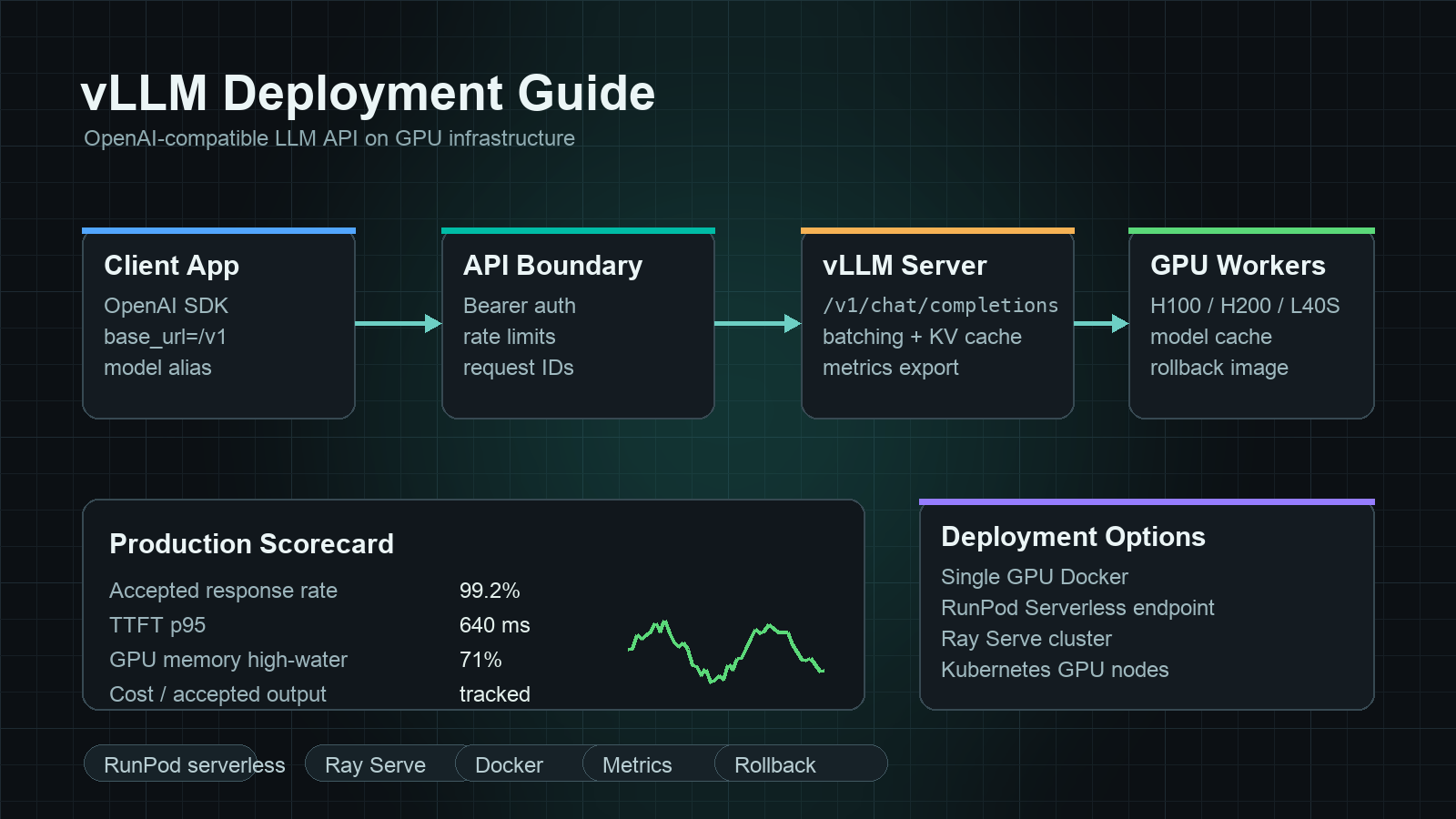
A vLLM deployment guide should answer one practical question: how do you turn GPU capacity into an OpenAI-compatible LLM API that application teams can call, observe, roll back, and compare against managed model APIs?
The short answer is to start with one model, one GPU shape, one OpenAI-compatible route, and one measurement plan. vLLM can expose familiar /v1/models, /v1/chat/completions, and related OpenAI-style endpoints, but a production deployment is more than the first vllm serve command. You need a container image, model cache, authentication boundary, health checks, metrics, request limits, a load test, and a cost-per-accepted-output scorecard.
This vLLM deployment guide gives AI developers and platform teams a deployment path from a single GPU server to RunPod Serverless, Ray Serve, and Kubernetes-style production patterns. It also explains when a model API or router such as Flatkey may be simpler than owning the GPU serving layer.
Quick vLLM deployment guide
Use this sequence before adding orchestration complexity.
| Step | Decision | Practical default |
|---|---|---|
| 1. Pick the model | Choose one supported model and exact revision | Start with the smallest model that proves the API contract, then scale up |
| 2. Pick the GPU | Confirm memory fit before throughput tuning | Use the same GPU class in testing and production |
| 3. Start vLLM | Expose an OpenAI-compatible API | Use vllm serve first, then containerize |
| 4. Lock request limits | Bound context length, concurrency, and output size | Protect the GPU from unbounded prompts |
| 5. Add auth and network controls | Do not expose a raw GPU worker directly | Put a gateway, ingress, or private endpoint in front |
| 6. Measure accepted output | Track successful responses, latency, retries, and cost | Compare against model API cost per accepted output |
| 7. Add rollout mechanics | Canary, rollback, and versioned model aliases | Keep client code stable while serving changes |
The goal is not to make every workload self-hosted. The goal is to know when self-hosted vLLM is worth the operational surface.
What vLLM gives you
vLLM is an open-source inference and serving engine for large language models. Its documentation covers OpenAI-compatible serving, Docker deployment, metrics, prefix caching, quantization, speculative decoding, parallelism, and supported model architectures. Those pieces make vLLM a strong default when you want to serve open-weight models behind a familiar API contract.
The useful production property is the API boundary. If your application already calls an OpenAI-compatible client, a vLLM endpoint can reduce application rewrite work. The serving layer may change, the model weights may change, and the GPU host may move, while client code still sends chat-completion requests to one base URL.
That does not remove the platform work. It moves the hard work from app integration to inference operations: GPU allocation, model loading, batching, observability, rate limits, incident response, and cost management.
Single-GPU vLLM deployment
Start locally or on one cloud GPU before you add serverless, Ray, or Kubernetes.
pip install vllm

vllm serve meta-llama/Llama-3.1-8B-Instruct \
  --host 0.0.0.0 \
  --port 8000
Then test the OpenAI-compatible endpoint.
curl http://localhost:8000/v1/models
Use a chat request that looks like the request your application will actually send.
curl http://localhost:8000/v1/chat/completions \
  -H "Content-Type: application/json" \
  -d '{
    "model": "meta-llama/Llama-3.1-8B-Instruct",
    "messages": [
      {"role": "user", "content": "Write a three-bullet deployment checklist."}
    ],
    "temperature": 0.2,
    "max_tokens": 300
  }'
This first deployment is not production. It answers four questions:
- Does the model load on the selected GPU?
- Does your client understand the response shape?
- Does streaming, tool calling, or structured output work for your specific request?
- What are the rough time-to-first-token and end-to-end latency numbers?
Keep the first test boring. Do not tune batching, quantization, or parallelism until the base endpoint works.
Docker deployment for a repeatable GPU server
For a repeatable server, use the official vLLM Docker path or a pinned container image in your own registry. The important production controls are not only the image tag. They are also the driver stack, CUDA compatibility, model cache, volume mount, network port, and process flags.
Example shape:
docker run --gpus all \
  -p 8000:8000 \
  -v ~/.cache/huggingface:/root/.cache/huggingface \
  --env HUGGING_FACE_HUB_TOKEN=$HUGGING_FACE_HUB_TOKEN \
  vllm/vllm-openai:latest \
  --model meta-llama/Llama-3.1-8B-Instruct \
  --host 0.0.0.0 \
  --port 8000
Before using this pattern in production, pin versions:
- vLLM image tag.
- NVIDIA driver and container runtime.
- CUDA stack, if managed separately.
- Model revision or commit hash.
- Tokenizer and chat template behavior.
- Quantization mode, if used.
A vLLM deployment guide is incomplete if it only says "run Docker." The runbook also needs restart behavior, logging, model cache warmup, readiness probes, and a rollback path to the previous image and model revision.
Make the endpoint OpenAI-compatible, but not unauthenticated
vLLM can speak an OpenAI-compatible API, but your raw vLLM worker should not usually be the public internet boundary. Put something in front of it:
- A private VPC endpoint for internal services.
- An API gateway with bearer-token validation.
- A service mesh or ingress controller with mTLS.
- A thin app-level proxy that enforces model aliases, request IDs, and per-team budgets.
- A router layer when you need fallback to managed model APIs.
Use environment-specific base URLs:
VLLM_BASE_URL_DEV=http://localhost:8000/v1
VLLM_BASE_URL_STAGING=https://staging-inference.example.com/v1
VLLM_BASE_URL_PROD=https://inference.example.com/v1
Then keep the application client reversible:
from openai import OpenAI

client = OpenAI(
    api_key="not-used-by-raw-vllm",
    base_url="https://inference.example.com/v1",
)

response = client.chat.completions.create(
    model="llama-3-1-8b-instruct",
    messages=[{"role": "user", "content": "Summarize the deployment plan."}],
)
If you later route some requests to Flatkey's OpenAI-compatible model API layer, the same client pattern stays useful: change the base URL, API key, and model alias while keeping the application contract stable.
Production settings to decide before traffic
The deployment flags depend on model, GPU, and workload, but every team should decide these controls before production traffic:
| Control | Why it matters |
|---|---|
| Maximum model length | Prevents a few long prompts from consuming all KV-cache memory |
| Maximum output tokens | Keeps runaway generations from tying up decode capacity |
| Concurrency limit | Protects p95 and p99 latency under bursty traffic |
| Request timeout | Stops stalled requests from hiding overload |
| Queue policy | Decides whether excess demand waits, fails fast, or falls back |
| Model alias | Lets clients use a stable name while the served revision changes |
| Auth boundary | Prevents an expensive GPU endpoint from becoming an open proxy |
| Logging policy | Balances debugging with data retention and privacy requirements |
| Metrics export | Makes latency, errors, cache behavior, and throughput observable |
Do not copy another team's flags. Copy their measurement method.
Metrics for vLLM production deployments
Track metrics at three layers.
| Layer | Metrics to track |
|---|---|
| API layer | Request count, accepted response rate, 4xx/5xx rate, timeout rate, retry rate |
| Serving layer | Time to first token, inter-token latency, end-to-end latency, queue wait, tokens per second |
| GPU layer | GPU utilization, memory utilization, OOM events, model load time, restart count |
Then add the finance metric:
cost per accepted output =
  (GPU rental + storage + bandwidth + retries + operator time)
  / accepted responses that pass quality checks
This keeps the vLLM deployment guide tied to production economics. A faster endpoint is not cheaper if it fails more often, needs more manual intervention, or sits idle for most of the day.
For broader cost context, compare your measured endpoint with GPU rental prices, best GPU for LLM inference, GPU cloud vs model API, and GPU cluster TCO.
RunPod serverless vLLM deployment guide
A RunPod serverless vLLM deployment guide has a different operating model from a long-running GPU VM. You package a handler or container, define the serverless endpoint, and let the platform scale workers around requests. This can be useful when traffic is spiky or when you want a managed GPU execution surface without owning every VM lifecycle detail.
Use RunPod Serverless when:
- You want endpoint-style GPU execution without managing persistent hosts.
- Traffic is bursty enough that always-on GPU capacity would sit idle.
- Cold start and model load behavior are acceptable for the workload.
- Your app can tolerate the platform's async or endpoint-specific request pattern.
- You can test concurrency, queueing, and timeout behavior before launch.
Be careful with serverless for latency-sensitive chat. Large models can have material cold-start and load-time behavior. Measure first-token latency after idle periods, not only during a warm benchmark.
For a RunPod serverless endpoint vLLM deployment guide, your acceptance test should include:
| Check | Why it matters |
|---|---|
| Container image pull time | Large images can dominate cold starts |
| Model weight download or volume mount | Repeated downloads can erase serverless savings |
| Max worker count | Prevents surprise spend during bursts |
| Queue timeout | Defines user-facing failure behavior |
| Warm-worker policy | Changes latency and idle cost |
| Request and response shape | Confirms OpenAI-compatible clients can be adapted cleanly |
If your exact search query is runpod serverless endpoints vllm deployment guide, treat "endpoints" as an operations topic: build the endpoint, but also test cold starts, worker scaling, request limits, and rollback.
Ray Serve vLLM deployment guide
A Ray Serve vLLM deployment guide is useful when the deployment is no longer just one model on one worker. Ray Serve can help teams build a serving application that composes deployments, scales replicas, and runs on a Ray cluster. That is valuable when you need Python-level serving logic around the model, custom routing, multi-model applications, or a cluster that already standardizes on Ray.
Use Ray Serve when:
- You already run Ray for ML infrastructure.
- You need multiple deployments in one serving graph.
- You want application-level routing around one or more vLLM engines.
- You need a path from local testing to a Ray cluster.
- Your platform team can operate Ray, not just vLLM.
The tradeoff is operational surface. Ray gives orchestration power, but it also adds Ray cluster operations, autoscaling behavior, object-store considerations, logs, dashboards, and another upgrade path. For a single model behind one endpoint, a direct vLLM deployment may be simpler.
Kubernetes deployment pattern
Kubernetes is a good fit when your organization already operates GPU nodes, ingress, secrets, metrics, and rollout policies in Kubernetes. It is not automatically the right first deployment for a small team.
The Kubernetes checklist:
| Area | Checklist |
|---|---|
| GPU scheduling | Node labels, taints, resource requests, device plugin, and GPU isolation |
| Model storage | Persistent volume, object-store sync, or baked image strategy |
| Startup | Model cache warmup and realistic readiness probe |
| Health | Liveness probe that does not kill slow-but-healthy model loads |
| Rollout | Canary or blue-green deployment with fast rollback |
| Autoscaling | Scale on queue, latency, or GPU metrics, not CPU alone |
| Networking | Internal-only by default; public ingress only through auth controls |
| Observability | Per-route latency, error rate, GPU memory, and cost attribution |
If your platform does not already have GPU Kubernetes maturity, start with one GPU host or a managed endpoint first. Kubernetes should reduce operational risk, not turn a simple endpoint into a cluster project.
Load test plan for a vLLM deployment
Do not load test with one prompt. Create a representative request set.
Use at least three traces:
- Short chat: short prompt, short output, high concurrency.
- Long-context RAG: long prompt, medium output, repeated system and retrieval template.
- Agent or tool loop: repeated schema, structured output, cancellation, retries, and multi-turn context.
Record:
| Metric | Target |
|---|---|
| Accepted requests per minute | Measures useful throughput |
| Time to first token p50/p95/p99 | Shows interactive latency |
| End-to-end latency p50/p95/p99 | Shows user-visible task time |
| Error and timeout rate | Shows reliability under load |
| Retry-adjusted latency | Shows real experience after failures |
| GPU memory high-water mark | Shows headroom |
| Cost per accepted output | Shows economics |
Run two benchmarks:
- Default run: minimal tuning, so you know time-to-production.
- Tuned run: tuned batching, cache, quantization, and request limits, so you know ceiling.
If the tuned run is faster but fragile, do not deploy it as the default. Deploy the configuration your on-call team can explain.
When not to deploy vLLM yourself
Self-hosting is valuable when you need hardware control, custom weights, strict data locality, or high sustained utilization on a stable workload. It is less attractive when traffic is uncertain, model choice changes often, frontier proprietary models are required, or the team lacks inference operations capacity.
Choose a managed model API or router first when:
- You are still testing model quality.
- You need frequent model swaps.
- Traffic is spiky or hard to forecast.
- Fallback across providers matters more than GPU control.
- You need a usage ledger, budgets, invoices, and team governance before GPU tuning.
Flatkey fits this layer when API-side workloads need one key, one balance, one invoice, usage records, and access to official model routes. If a workload later proves stable enough for dedicated GPU serving, keep comparing the self-hosted vLLM endpoint against AI model pricing comparison, AI API pricing comparison, and your measured GPU cost per accepted output.
Deployment runbook template
Copy this before launch.
Service:
  Owner:
  On-call:
  Model alias:
  Served model revision:
  vLLM version:
  Container image:
  GPU type and count:
  Base URL:

Request policy:
  Max model length:
  Max output tokens:
  Max concurrency:
  Queue timeout:
  Request timeout:
  Auth method:

Observability:
  Metrics dashboard:
  Log location:
  Trace/request ID field:
  Alert thresholds:

Rollout:
  Canary percentage:
  Rollback image:
  Rollback model revision:
  Fallback route:

Cost:
  GPU cost source:
  Storage/bandwidth assumptions:
  Accepted-output denominator:
  Weekly cost review owner:
This template matters more than a perfect first command. A vLLM deployment guide that cannot be handed to on-call is still a prototype.
Frequently asked questions
Is it vLLM deployment guide content if I use a managed GPU endpoint?
Yes. If vLLM is the serving engine and you are deciding how to expose, scale, observe, and secure it, it still belongs in a vLLM deployment guide. The operational details differ between a raw VM, RunPod Serverless, Ray Serve, and Kubernetes, but the acceptance tests are similar: endpoint contract, latency, errors, concurrency, rollback, and accepted-output cost.
Should I use RunPod Serverless or a persistent GPU VM for vLLM?
Use RunPod Serverless when burst handling and managed endpoint operations matter more than always-warm latency. Use a persistent GPU VM when you need predictable warm performance, direct control of the host, or a simpler debugging path. Benchmark both if latency and utilization drive the decision.
When does Ray Serve make sense with vLLM?
Ray Serve makes sense when vLLM is part of a larger serving application, especially if you already operate Ray. For one model behind one endpoint, direct vLLM serving may be easier to run.
Can vLLM replace the OpenAI API?
vLLM can expose an OpenAI-compatible interface for supported self-hosted models, but it does not make open-weight models identical to proprietary frontier APIs. Treat it as an endpoint contract and serving option, then validate model quality, latency, and operational cost against your workload.
What should I measure first?
Measure accepted response rate, time to first token, p95 and p99 latency, timeout rate, GPU memory pressure, and cost per accepted output. Raw tokens per second is useful, but it is not enough for production decisions.
Where does Flatkey fit with vLLM?
Use vLLM when you need to own the GPU serving layer. Use Flatkey when you want one OpenAI-compatible model API layer, unified billing, usage records, and governance across official model routes and tools. Many teams will use both: vLLM for stable self-hosted workloads and Flatkey for frontier models, fallback, experiments, and API-side governance.
Final checklist
Before launch, your vLLM deployment guide should produce these artifacts:
- A pinned model revision and container version.
- A tested OpenAI-compatible base URL.
- An auth and network boundary.
- Request limits for context, output, timeout, and concurrency.
- Metrics for latency, errors, queueing, throughput, and GPU memory.
- A rollback route and previous known-good image.
- A cost-per-accepted-output worksheet.
- A decision record explaining why self-hosted vLLM beats a managed model API for this workload.
If those artifacts exist, you are not just running vLLM. You are operating an LLM API on GPUs.


