
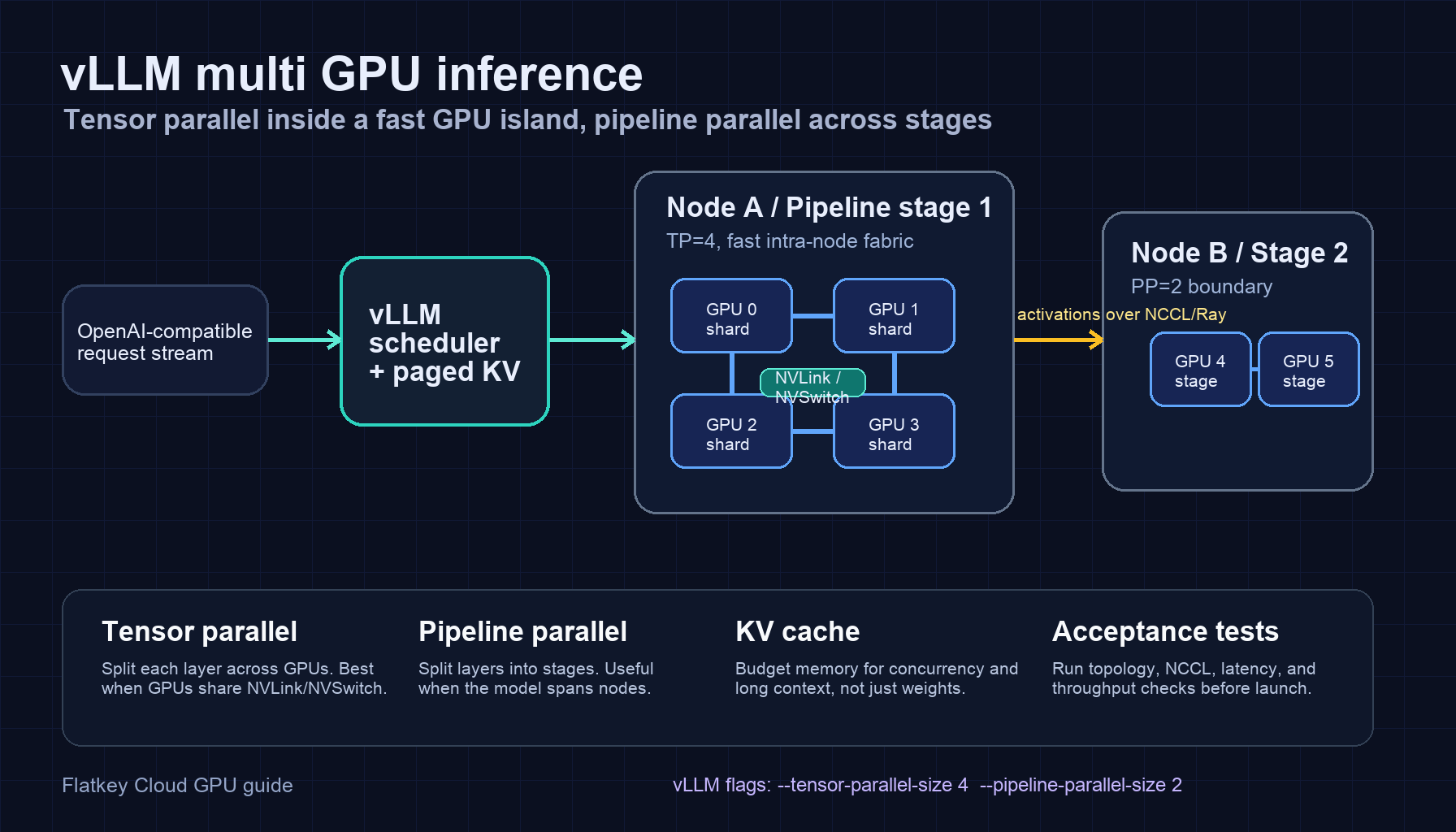
vLLM multi gpu inference usually starts for one of three reasons: the model weights do not fit on one GPU, the KV cache for the required context and concurrency does not fit on one GPU, or one GPU cannot deliver the tokens-per-second and time-to-first-token target you need. The setup is not only a --tensor-parallel-size decision. You also need to match tensor parallelism, pipeline parallelism, the executor backend, and the physical GPU topology.
The short version:
- Use tensor parallelism first when the model fits across GPUs in the same fast GPU island, especially an 8-GPU H100/H200/B200 node with NVLink or NVSwitch.
- Add pipeline parallelism when the model must span multiple nodes or when tensor parallel alone creates too much cross-node communication.
- Treat
tp * ppas the number of GPU workers used by one vLLM replica. - Benchmark with your real prompt length, output length, batch shape, and model quantization before calling the setup production-ready.
- If your team only needs an OpenAI-compatible endpoint and not direct hardware control, compare the GPU path against a managed model/API baseline such as Flatkey before you rent and operate a cluster.
This guide gives a practical vLLM multi gpu inference example, an architecture diagram, launch commands, and the checks that usually catch bad multi-GPU setups before users do.
vLLM multi GPU inference architecture
In vLLM, tensor parallelism splits the work for each transformer layer across multiple GPU workers. Pipeline parallelism splits the model layers into stages, so different GPU groups run different parts of the model. For production serving, those choices affect more than memory: they change collective communication, request scheduling, failure blast radius, and whether scale-out networking becomes the bottleneck.
A common starting architecture is:
| Layer | Practical choice | Why it matters |
|---|---|---|
| API surface | vllm serve with the OpenAI-compatible server |
Lets application teams keep OpenAI-style clients while changing the serving backend. |
| Tensor parallel group | One node or one NVLink/NVSwitch island | Tensor parallel layers communicate frequently, so slow cross-node links hurt quickly. |
| Pipeline stages | Node-level or rack-level split when the model cannot fit in one node | Pipeline parallelism can reduce the amount of cross-node communication compared with putting one tensor-parallel group across every GPU. |
| Distributed backend | Multiprocessing for one node, Ray when you need multi-node orchestration | Keep single-node serving simple; use Ray when workers must span machines. |
| KV cache plan | Budget for prompt length, output length, and concurrency | Weights are only the starting point; long-context serving can be KV-cache-bound. |
| Acceptance test | Topology, NCCL, cold load, TTFT, throughput, and failure restart | Most bad deployments look fine until realistic traffic arrives. |
For an adjacent infrastructure view, see the GPU cluster architecture guide. For memory sizing, use the LLM GPU memory requirements worksheet once it is live.
Tensor parallel vs pipeline parallel in vLLM
The most useful decision rule is simple:
Use tensor parallelism inside a fast GPU island. Use pipeline parallelism to cross slower boundaries.
Tensor parallelism is a good first move when:
- the model is too large for one GPU, but fits across 2, 4, or 8 GPUs in one node;
- your GPU node has high-bandwidth GPU-to-GPU links;
- latency matters and you want every request to move through one logical model replica without a long pipeline bubble;
- the model family is well supported by vLLM tensor parallel execution.
Pipeline parallelism becomes useful when:
- the model cannot fit in a single node even after quantization or lower precision;
- a tensor-parallel group would otherwise cross Ethernet or InfiniBand too often;
- you want each node to own a stage of the model rather than every layer participating in cross-node collectives;
- you can tolerate the scheduling and bubble overhead that comes with pipeline stages.
Do not assume that tp=8 is always better than tp=4, or that pp=2 automatically improves throughput. For vLLM multi gpu inference, the right shape depends on model size, memory pressure, interconnect, sequence lengths, and how much batch concurrency your workload can sustain.
Single-node vLLM multi GPU inference example
Start with a single node when you can. It is easier to debug, cheaper to benchmark, and avoids multi-node networking as the first failure domain.
Example: one 4-GPU server, one vLLM replica, tensor parallel size 4.
CUDA_VISIBLE_DEVICES=0,1,2,3 \
vllm serve meta-llama/Llama-3.1-70B-Instruct \
  --host 0.0.0.0 \
  --port 8000 \
  --tensor-parallel-size 4
Use this shape when a model fits cleanly across four GPUs and the node has fast GPU-to-GPU communication. For an 8-GPU node, test both --tensor-parallel-size 4 and --tensor-parallel-size 8; the larger group may improve memory headroom but can add communication overhead.
Basic smoke test:
curl http://localhost:8000/v1/chat/completions \
  -H "Content-Type: application/json" \
  -d '{
    "model": "meta-llama/Llama-3.1-70B-Instruct",
    "messages": [{"role": "user", "content": "Give me a one-sentence GPU health check."}],
    "max_tokens": 64
  }'
If this fails, do not move to multi-node yet. Fix model download, CUDA visibility, NCCL visibility, driver/runtime compatibility, and GPU memory pressure first.
Multi-node example with tensor and pipeline parallelism
When you need more GPUs than one node can provide, keep the tensor-parallel group within each node if possible, then use pipeline parallelism across nodes.
Example target shape:
- two nodes;
- four GPUs per node;
- tensor parallel size 4;
- pipeline parallel size 2;
- total workers:
4 * 2 = 8.
Conceptual launch:
vllm serve meta-llama/Llama-3.1-405B-Instruct \
  --host 0.0.0.0 \
  --port 8000 \
  --tensor-parallel-size 4 \
  --pipeline-parallel-size 2 \
  --distributed-executor-backend ray
In a real cluster, start Ray on the head node, join worker nodes to that Ray cluster, make the model storage reachable by all nodes, and confirm that all workers see the intended GPU count before launching the vLLM server. Pin your exact vLLM version, CUDA image, driver branch, and model revision in the runbook so a later rebuild does not silently change behavior.
This is the point where infrastructure quality becomes product quality. If the second node is connected through weak networking, if NCCL chooses the wrong interface, or if the model cache path is slow, users see it as latency variance, long cold starts, or request failures.
Backend choice: multiprocessing or Ray
For vLLM multi-gpu inference support, use the simplest executor backend that fits the deployment:
| Deployment | Suggested backend | Notes |
|---|---|---|
| One machine, multiple GPUs | Multiprocessing or the vLLM default for your version | Easier to operate; fewer moving parts. |
| Multiple machines | Ray | Needed when workers span nodes and need cluster-level coordination. |
| Kubernetes multi-node serving | Ray plus explicit pod/network/storage planning | Make scheduling, placement, and health checks visible instead of hoping the serving process finds the right GPUs. |
Backend choice should not be isolated from topology. If you need Ray only because the model is too large for one server, the next question is whether pipeline parallelism can keep most high-frequency communication within each node.
Memory sizing before you choose TP and PP
A vLLM multi gpu inference plan should budget memory in this order:
- Weights: model parameters after dtype or quantization.
- KV cache: prompt length, output length, batch concurrency, and cache dtype.
- Runtime overhead: CUDA graphs, allocator behavior, communication buffers, tokenizer/server overhead, and safety headroom.
- Operational headroom: rolling restarts, model reloads, telemetry, and occasional prompt spikes.
Tensor parallelism spreads model weights and some compute work across GPUs, but it does not make traffic free. Pipeline parallelism can reduce memory pressure per stage, but it introduces stage balance questions. A pipeline stage with more memory pressure or slower kernels becomes the throughput limiter for the whole replica.
Practical first-pass choices:
| Model/runtime situation | First TP/PP shape to test |
|---|---|
| 7B or 8B model, ordinary context | tp=1, one GPU, scale replicas horizontally |
| 32B model, high concurrency | tp=2 or tp=4 on one node |
| 70B class model, BF16/FP16 | tp=4 or tp=8 on one high-memory node |
| Very large dense model spanning nodes | tp=4, pp=2 or tp=8, pp=2, depending on node size |
| MoE model | Check vLLM expert-parallel guidance separately; do not treat MoE like a dense model by default |
The table is a starting point, not a benchmark result. Your accepted output cost depends on real prompts, real outputs, retry rate, queueing behavior, and quality acceptance.
Topology checks that matter
Before you publish a multi-GPU endpoint, collect these facts from the provider or from the machine:
nvidia-smi topo -moutput for each node;- whether GPUs share NVLink or NVSwitch inside the node;
- network fabric between nodes, including InfiniBand, RoCE, EFA, or Ethernet;
- NCCL-visible interfaces and whether traffic is using the intended path;
- storage path for model weights and whether multiple nodes load from a slow shared disk;
- GPU memory, MIG status, power caps, and driver/CUDA versions.
NVIDIA DGX H100/H200 systems, for example, are documented as eight-GPU systems with NVSwitch/NVLink GPU-to-GPU connectivity and 400 Gb/s networking options. Commodity PCIe nodes can still serve vLLM well, but you should expect a different communication profile and benchmark accordingly.
For interconnect background, see NVLink vs NVSwitch. For cluster buying and topology language, the GPU cluster rental guide is a useful companion.
Production acceptance test
Run a staged test instead of a single happy-path prompt.
- Topology test: save
nvidia-smi topo -m, NIC inventory, and NCCL environment. - Cold load test: measure time from container start to first successful token.
- Short prompt test: low prompt length, moderate output length, expected chat workload.
- Long prompt test: realistic context length near your product requirement.
- Concurrency sweep: increase concurrent requests until p95 time-to-first-token or p95 inter-token latency crosses your limit.
- Output-heavy test: use workloads that generate long completions, not only classification prompts.
- Failure test: kill one worker process or one node and verify the load balancer removes the replica.
- Restart test: roll the vLLM process and confirm model cache, Ray state, and health checks recover cleanly.
Track at least these metrics:
| Metric | Why it matters |
|---|---|
| Time to first token | Users feel this immediately in chat and agent workflows. |
| Inter-token latency | Shows decode stability after generation starts. |
| Tokens per second per replica | Helps compare TP/PP shapes. |
| GPU memory headroom | Predicts whether long-context spikes will OOM. |
| Queue time | Separates serving capacity from application latency. |
| Error and retry rate | Converts infrastructure instability into real cost. |
| Accepted output rate | Avoids optimizing for cheap tokens that users reject. |
Troubleshooting patterns
The model loads, but throughput is worse with more GPUs.
The TP group may be too large for the topology, or the workload may not have enough concurrency to amortize communication. Test smaller TP, more replicas, or a different batch/concurrency shape.
Multi-node launch hangs.
Check Ray membership, firewall rules, NCCL interface selection, container networking, and whether every node can reach the same model path. Do not debug this from the API layer first.
One GPU OOMs while others have headroom.
Look for uneven pipeline stages, different GPU SKUs, memory fragmentation, or a rank assignment issue. Confirm that each worker is using the intended visible GPU.
Latency spikes under long prompts.
KV cache pressure, prefill cost, and scheduler queueing are likely suspects. Test separate prompt-length buckets before changing hardware.
The endpoint works in a terminal but fails behind a load balancer.
Check streaming timeout, idle timeout, health-check path, request body limits, and whether the load balancer sends traffic to a replica before the model is warm.
When not to run vLLM multi GPU inference yourself
Running vLLM is the right choice when you need model-level control, private weights, custom kernels, custom quantization, or hardware-level experiments. It is not automatically the right choice when the business requirement is simply "give our app a reliable OpenAI-compatible API."
Before renting a multi-node GPU cluster, compare the self-hosted path against a managed model/API path:
| Requirement | Self-host vLLM on GPUs | Managed model/API baseline |
|---|---|---|
| Custom/private weights | Strong fit | Usually not enough |
| Hardware experiments | Strong fit | Not the point |
| Fast product integration | More operational work | Strong fit |
| Multi-model switching | You operate each stack | One gateway can simplify access |
| Billing and usage visibility | Build or integrate it | Often included |
| Failure handling | You own it | Provider/gateway handles more of it |
Flatkey is the comparison point when you want one OpenAI-compatible key, one balance, and access to official model endpoints without operating the GPU serving layer yourself. If direct hardware control is not the product requirement, benchmark against a model/API baseline before committing to cluster operations.
FAQ
Does vLLM support multi-GPU inference?
Yes. vLLM supports multi-GPU inference through tensor parallelism and pipeline parallelism, with executor choices that cover single-node and multi-node serving. The exact support path depends on your vLLM version, model architecture, GPU topology, and deployment backend.
What is the best tensor parallel size for vLLM?
The best tensor parallel size is the smallest TP value that gives enough memory headroom and throughput for your workload. Start with the GPUs in one fast node, then benchmark tp=2, tp=4, or tp=8 against real prompt and output lengths.
When should I use pipeline parallelism in vLLM?
Use pipeline parallelism when the model or KV-cache requirement forces you beyond one node, or when keeping tensor-parallel communication inside each node is better than building one cross-node TP group.
Is Ray required for vLLM multi-GPU serving?
Ray is typically the practical choice for multi-node vLLM serving. For one node, a multiprocessing backend or the default backend for your vLLM version may be simpler.
How do I know whether a vLLM multi GPU inference setup is production-ready?
It is production-ready only after topology checks, cold-load tests, realistic prompt/concurrency benchmarks, health checks, restart tests, and failure behavior are documented. A single successful curl request is not enough.


