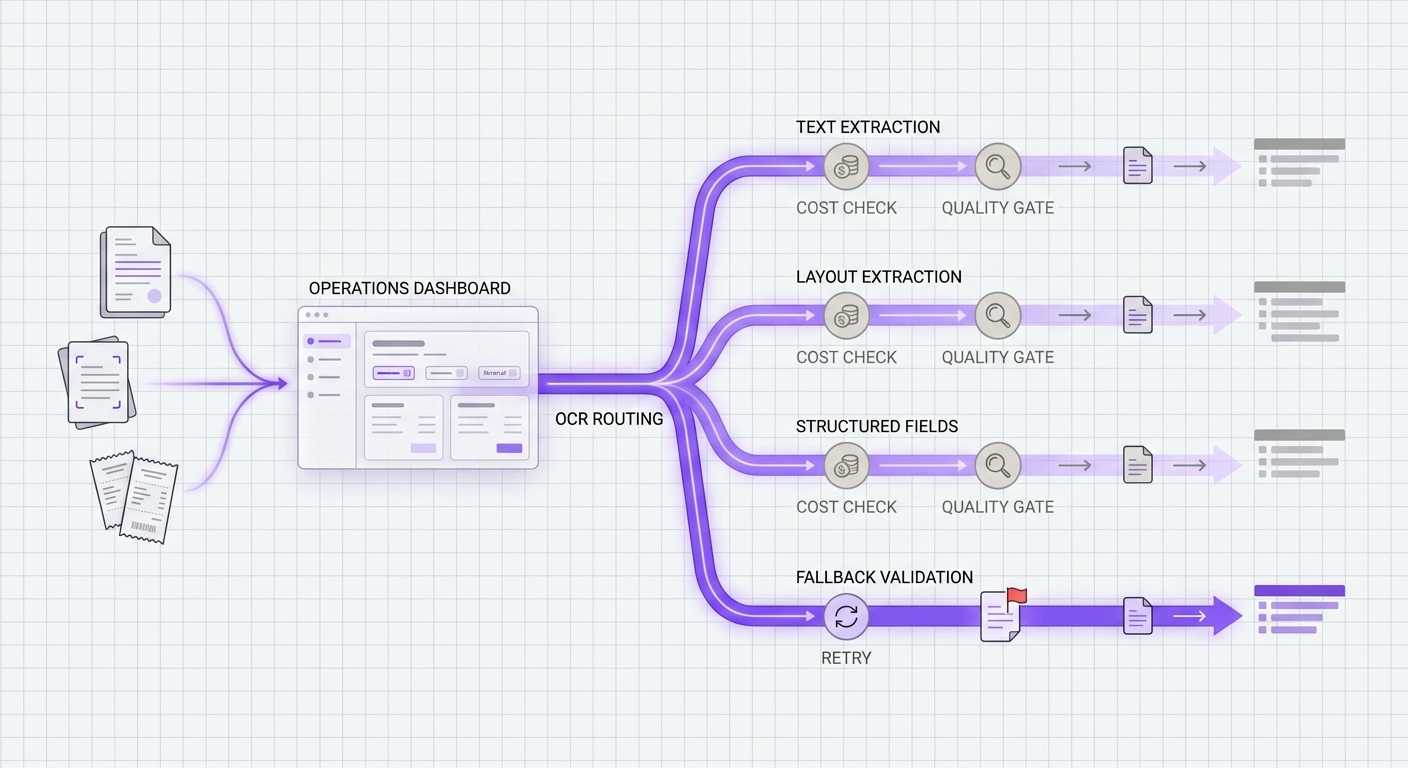
If you are planning OCR model routing, the risky part is not finding an OCR model that can read text from a scan. The risky part is deciding which route should handle simple images, which route should handle multi-page PDFs, which route should extract structured fields, and which fallback is allowed to touch the same document class when the first route fails.
That is why OCR model routing should start with workload policy, not a vendor leaderboard. A cheap text OCR path can be the wrong choice for invoices. A high-quality structured extractor can be wasteful for bulk archive text. A fallback can look reliable until it silently drops tables, exceeds page limits, or doubles the cost of a retry storm.
This guide gives media, product, and engineering teams a practical way to balance text extraction cost, quality, and fallback checks before they standardize document traffic. It treats AI OCR API routing and document AI model routing as operating decisions, not one-off benchmark exercises.
The Quick Answer
The safest OCR model routing policy separates document jobs into four classes:
| Route class | Use it for | Primary decision | Fallback rule |
|---|---|---|---|
| Plain text OCR | Screenshots, scanned notes, simple image text, searchable archives | Lowest approved cost per accepted page | Fallback only to another route that preserves text completeness and language coverage |
| Layout-aware OCR | PDFs, receipts, reports, catalogs, slide exports | Reading order, tables, paragraphs, and downstream chunk quality | Fallback only when layout quality remains acceptable |
| Structured extraction | Invoices, tax forms, contracts, IDs, claims, applications | Field accuracy and schema stability | Fallback only to a route that can return the same required fields |
| Restricted documents | Regulated or contract-sensitive files | Data handling, retention, region, and vendor approval | Fallback only inside the same approved provider set |
This is the core of OCR model routing: pick the route that fits the document and output shape, then allow fallback only when the backup can satisfy the same cost, quality, and control requirements.
Why Text Extraction Cost Is Easy To Misread
OCR API cost is rarely one clean number. Providers may price basic OCR, layout analysis, forms, tables, queries, custom extraction, or batch processing differently. Some pages are billed per page. Some workflows pay more when the same page needs structured fields. Some limits push traffic from a synchronous call into an asynchronous job.
Before comparing OCR routes, normalize every candidate to the same operating unit:
| Metric | Why it belongs in the routing table |
|---|---|
| Cost per accepted page | Raw page price is not enough if a route creates more rejected outputs or retries. |
| Cost per accepted structured document | Invoices and forms should be measured by usable field output, not just OCR text. |
| Synchronous page/file limits | A route that cannot accept the file shape is not a valid fallback. |
| Asynchronous job limits | Large PDFs and archive batches need queue-aware routing. |
| Feature tier | Forms, tables, queries, signatures, and layout can change the effective price. |
| Quota and throttle behavior | A route that is cheap at low volume can fail under batch load. |
Official pricing pages show why unit normalization matters. Amazon Textract pricing lists separate APIs and features for Detect Document Text, Analyze Document, Analyze Expense, Analyze ID, and Analyze Lending. Its examples show Detect Document Text at $0.0015 per page for the first one million pages in US West (Oregon), while an Analyze Document example for forms and tables combines $0.015 per table page and $0.05 per form page. Google Document AI pricing lists Enterprise Document OCR, OCR add-ons, Layout Parser, Custom Extractor, and Form Parser as separate priced surfaces. Azure Document Intelligence says billing is calculated monthly based on model type and pages analyzed, and its service limits page ties routing behavior to file size, page count, and transaction-per-second limits.
The lesson for OCR model routing is simple: do not compare provider headline prices until the workload, output shape, billing unit, and retry policy are normalized.
Build The Route Table Before You Benchmark Models
Teams often run a few test documents through several OCR models and pick the one that "looks best." That can work for a demo, but it does not produce a durable routing policy.
Build the route table first. For document AI model routing, this table is the contract that keeps simple OCR, layout extraction, and structured extraction from collapsing into one default route. If you already track routing quality in a gateway, pair this table with an AI routing API metrics scorecard:
| Workload | Example input | Required output | Default route behavior | Reject condition |
|---|---|---|---|---|
| Searchable archive OCR | Scanned PDFs, screenshots, legacy reports | Plain text with acceptable reading order | Lowest-cost approved route | Missing pages, wrong language, broken ordering |
| Receipt or invoice ingestion | Receipts, invoices, payment docs | Fields, totals, dates, line items | Structured extraction route | Required field missing or low confidence |
| Catalog or report understanding | Product catalogs, dense reports, slide decks | Layout-aware text and tables | Layout route with table checks | Tables merged, columns lost, section order broken |
| ID or application review | IDs, applications, onboarding forms | Specific fields plus audit trail | Approved restricted route | Provider not cleared, retention unknown, field mismatch |
| Batch migration | Large PDFs or image archives | Complete page coverage | Async route with page-cap headroom | Job too large, throttling, partial completion |
Once this table exists, model evaluation becomes more useful. You are no longer asking "Which OCR model is best?" You are asking "Which route is acceptable for this exact document class at this cost and fallback risk?" That is the practical difference between a demo and AI OCR API routing that can survive production traffic.
Quality Gates Should Match The Output, Not The Demo
OCR quality needs different gates for different workloads.
For plain text OCR, measure:
- Page coverage.
- Character and word completeness.
- Reading order.
- Language and handwriting tolerance.
- The share of pages that require human review.
For layout-aware OCR, measure:
- Paragraph grouping.
- Heading hierarchy.
- Table boundaries.
- Column order.
- Whether downstream search, retrieval, or review UI quality improves.
For structured extraction, measure:
- Required field precision.
- Required field recall.
- Normalization stability for dates, amounts, names, and IDs.
- Confidence calibration.
- Schema compatibility across primary and fallback routes.
This is where many OCR model routing projects fail. A fallback that returns plain text is not equivalent to a structured invoice extractor. A route that preserves most words but loses table boundaries can still break retrieval or review workflows. A high-accuracy model that cannot handle the same page count is not a safe fallback for batch PDFs.
Fallback Checks Are A Product Requirement
Fallback should not mean "try another OCR provider." It should mean "try another approved route that can satisfy the same workload contract."
Use this checklist before a route can become a fallback:
| Fallback check | Pass condition |
|---|---|
| Same document class | The fallback accepts the same file type, page count, and size. |
| Same output contract | The fallback returns the same required text, layout, or fields. |
| Same data controls | The fallback meets the same retention, region, and customer-contract rules. |
| Same observability | The fallback logs route, cost, latency, errors, confidence, and rejection reason. |
| Bounded retry cost | Retry and fallback budgets are capped per job, tenant, and batch. |
| Manual review path | Non-equivalent failures go to review instead of silent degradation. |
Amazon Textract is a useful example of why fallback eligibility must include document limits: its document limits say synchronous PDF and TIFF operations are limited to one page, while asynchronous PDF and TIFF operations allow up to 3,000 pages. Azure Document Intelligence service limits document a default 15 TPS limit on Standard tier analyze transactions, a 500 MB max document size, and a 2,000-page analysis limit. Google Document AI quotas document processor quotas, online request limits, and pages-per-minute quotas for generative processor versions.
Those constraints are not edge cases. They decide whether a fallback is valid.
A Practical OCR Model Routing Decision Tree
Use this decision tree when a new document job enters the pipeline:
- Classify the document before calling an OCR route.
- Decide whether the output needs plain text, layout, or structured fields.
- Exclude routes that fail retention, region, contract, file-type, page-count, or quota requirements.
- Estimate cost per accepted output, not just cost per raw page.
- Run the primary route.
- Apply workload-specific quality gates.
- Retry only for transient errors or safe idempotent failures.
- Fall back only within the same route class.
- Send non-equivalent failures to review or a batch queue.
- Log the route decision, cost, confidence, fallback reason, and final accepted/rejected state.
Here is the routing policy in a compact form:
document_job:
  classify:
    inputs: [file_type, page_count, document_type, customer_tier, data_region]
  exclude:
    - route_not_approved_for_data_policy
    - route_page_limit_below_job_size
    - route_missing_required_output_contract
  choose_primary:
    optimize_for: cost_per_accepted_output
    guardrails: [quality_gate, latency_budget, quota_headroom]
  fallback:
    allowed_only_when:
      - transient_error
      - same_route_class
      - same_output_contract
      - retry_budget_remaining
    otherwise: manual_review
  observe:
    log: [route, model, cost, latency, confidence, error_class, fallback_reason]
The policy matters more than the model list. New OCR models can be added later without rewriting the document workflow.
Where Flatkey Fits In OCR Model Routing
Flatkey is useful in OCR model routing when the team wants one operational layer for model access, spend visibility, and route review instead of scattering provider keys across agents, jobs, and services. If your team is still wiring direct provider accounts, start with the unified AI API workflow and then map OCR-specific fallback rules against the model fallback strategy playbook.
Flatkey's current public site positions the product around one key, one balance, model and tool usage, successful-call billing, a shared ledger, and a public model directory with live availability, pricing, endpoint support, and model detail pages. For OCR workflows, that makes the gateway most relevant as a control plane: validate available multimodal or document-capable routes, define which workloads can use them, and review route-level cost and failures in one place.
Do not treat any gateway catalog as a substitute for your own OCR quality test. Treat it as the place where approved routes, usage data, fallback policy, and cost controls become easier to operate. When you are ready to compare route economics, use the current Flatkey pricing surface rather than stale model names from old implementation notes.
Launch Checklist
Before moving OCR model routing into production, confirm these items:
- Every document class has a default route and an allowed fallback class.
- Every route has a normalized cost per accepted page or accepted structured document.
- Every structured workflow has field-level quality gates.
- Sync and async page limits are tested with real files, not assumed from examples.
- Quota and throttling behavior is represented in load tests.
- Restricted documents can only use approved routes.
- Failed jobs record why fallback happened and whether the output was accepted.
- Finance can trace spend by route, workload, tenant, and fallback reason.
- Product has a manual review path for non-equivalent failures.
OCR model routing works when it is boring to operate: the cheap work stays cheap, the structured work gets the right model, and fallback never changes the document contract without being noticed.
FAQ
What is OCR model routing?
OCR model routing is the policy layer that sends each document job to an OCR or document AI route based on document type, required output, cost, quality requirements, and fallback constraints.
How should teams compare OCR API cost?
Compare OCR API cost by accepted output. For plain OCR, that is usually cost per accepted page. For invoices, forms, contracts, and IDs, it is usually cost per accepted structured document after retries and review rejects.
When does fallback become unsafe for OCR?
Fallback becomes unsafe when the backup route cannot accept the same file shape, page count, data policy, or output contract. A plain text OCR route is not a safe fallback for a workflow that requires structured invoice fields.
Should one OCR model handle every document type?
Usually no. Simple OCR, layout extraction, structured extraction, large batch PDFs, and restricted documents have different cost, quality, and control requirements.
How does Flatkey help with OCR model routing?
Flatkey can help teams operate OCR model routing through one key, one balance, model availability checks, usage visibility, and route-level review. Teams still need to run their own document-quality tests before production traffic moves.