
AI GPU Selection Guide: Match Training and Inference Workloads to the Right GPU
An AI GPU selection guide should start with the workload, not the newest accelerator name. Training, fine-tuning, batch inference, real-time inference, retrieval pipelines, media generation, and evaluation jobs stress GPUs in different ways. The wrong GPU can look attractive on a rate card and still lose once you include memory fit, network topology, idle time, queueing, serving-stack work, and accepted-output quality.
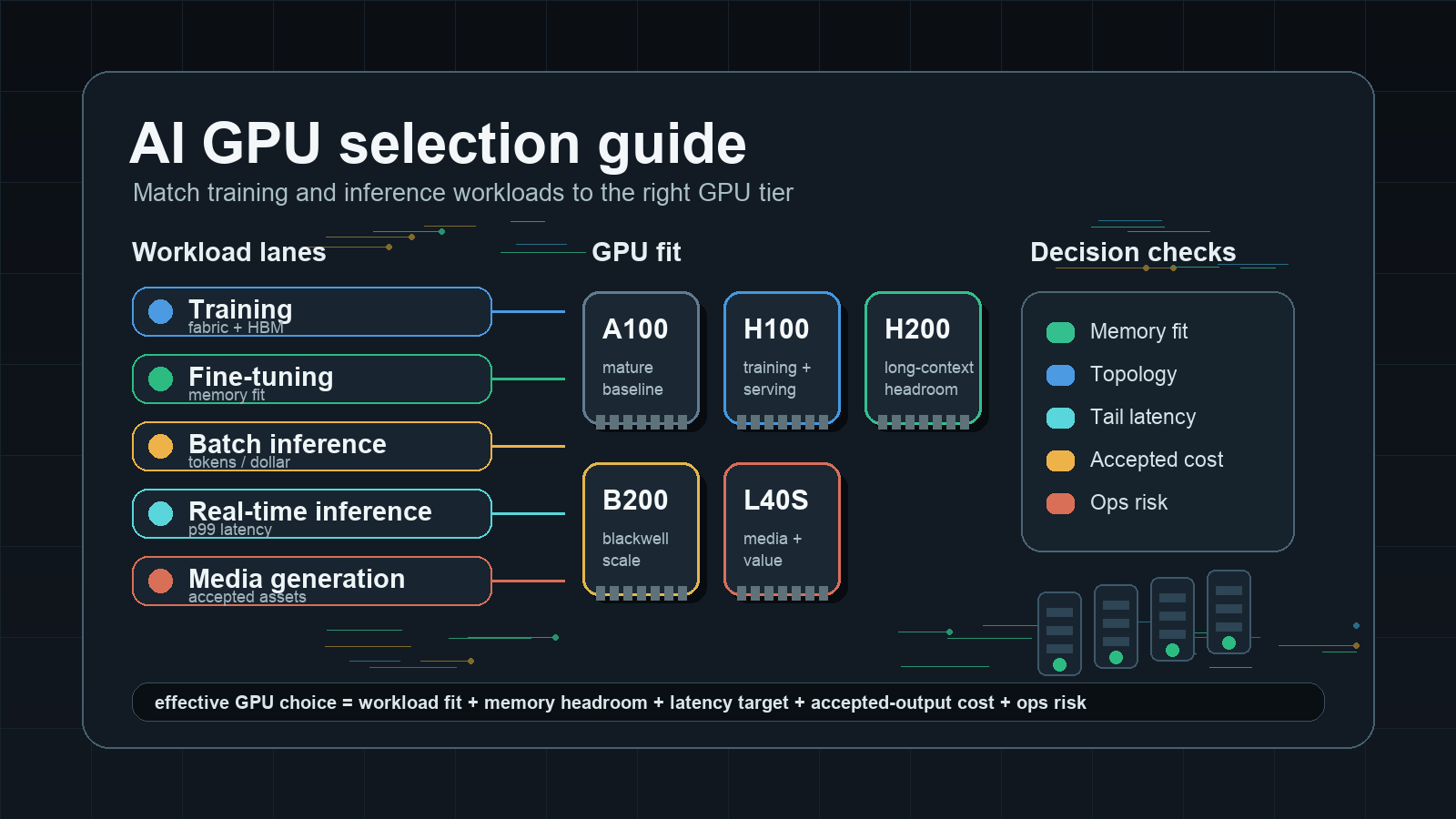
Use this AI GPU selection guide as a procurement and architecture checklist. It maps common AI workloads to the GPU traits that matter, explains when H100, H200, B200, A100, L40S, GB200-class systems, and local RTX-class GPUs make sense, and gives a benchmark plan that keeps the buying decision tied to completed work instead of synthetic peak numbers.
Flatkey's practical rule: choose GPUs by cost per completed training run, cost per accepted token, cost per accepted image or video, and the operational risk you are willing to own. If you only need model access, governance, fallback, and a single usage ledger, compare GPU rental against model/API routes before committing to hardware.
AI GPU Selection Guide Quick Answer
Start with this matrix before comparing provider quotes.
| Workload | Usually prioritize | GPU direction | Watch-outs |
|---|---|---|---|
| Pretraining or large-scale training | Multi-node fabric, HBM capacity, memory bandwidth, BF16/FP8 throughput, checkpoint I/O | H100/H200, B200/GB200-class systems, managed training clusters | Hourly price is secondary to completed-run time and restart risk |
| Full fine-tuning | Memory headroom, optimizer-state fit, tensor parallelism, storage locality | H100, H200, B200, A100 for smaller models | VRAM shortage can force slower sharding or smaller batch sizes |
| LoRA/QLoRA fine-tuning | VRAM fit, CUDA compatibility, throughput per dollar | A100, L40S, H100, H200, high-end local GPUs for small jobs | Dataset and context length can change the memory answer |
| Batch LLM inference | Memory fit, batching efficiency, tokens per dollar, queue tolerance | L40S, A100, H100, H200, B200 depending on model size | Low utilization can erase cheaper GPU rates |
| Real-time LLM inference | p95/p99 latency, KV cache capacity, streaming stability, serving framework support | H100/H200/B200 for large or long-context models; L40S/A100 for smaller models | Tail latency and retries matter more than peak tokens/sec |
| Embeddings and reranking | Throughput per dollar, CPU/GPU balance, batch size, service simplicity | L40S, A100, smaller cloud GPUs, sometimes CPU for low volume | GPU overkill is common at low traffic |
| Image and video generation | VRAM, media kernels, storage throughput, queue tolerance | L40S, H100/H200/B200 for heavier pipelines, RTX-class local workstations for creators | End-to-end accepted image/clip cost beats raw render speed |
| Evaluation and synthetic data | Burst capacity, cost controls, model variety | Spot/marketplace GPUs, batch APIs, or model/API routes | Avoid owning idle capacity for occasional spikes |
The quick answer is intentionally not "buy the fastest GPU." For enterprise AI teams, the best GPU is the one that fits the model, context length, latency target, concurrency, data boundary, and team operating model.
Step 1: Classify the Workload
The first step in any AI GPU selection guide is workload classification. Without it, every later comparison collapses into a generic accelerator debate.
Every GPU discussion should start with a workload brief. Write it down before asking providers for quotes.
| Field | What to capture |
|---|---|
| Workload type | Training, fine-tuning, batch inference, online inference, media generation, embeddings, evaluation, or notebooks |
| Model shape | Parameter count, architecture, precision, quantization, context window, modality, and tokenizer behavior |
| Request shape | Average and p95 input tokens, output tokens, image size, video length, batch size, concurrent sessions, or records per job |
| Success unit | Completed training run, accepted patch, accepted response, accepted token, accepted image, accepted clip, or accepted record |
| Latency target | Offline, minutes, seconds, sub-second, p95/p99 requirement, or streaming requirement |
| Duty cycle | Always-on, scheduled batch, seasonal burst, experimental, or developer notebook |
| Operating boundary | Public cloud, private network, dedicated cluster, on-prem, data residency, or managed API |
| Tooling | vLLM, SGLang, TensorRT-LLM, Triton, Ray, Slurm, Kubernetes, ComfyUI, or provider-managed endpoints |
If you cannot fill this table, pause the GPU selection. You are still buying possibility, not capacity.
Step 2: Choose the Right Decision Metric
The second step in an AI GPU selection guide is choosing the denominator. A good denominator ties the GPU decision to completed work, not to a vendor spec sheet.
Peak FLOPS, Tensor Core numbers, and hourly GPU price are useful inputs, but they are not the decision metric. Use a denominator tied to business output.
| Workload | Better metric |
|---|---|
| Training | Cost per completed training run that reaches the target eval score |
| Fine-tuning | Cost per accepted fine-tuned checkpoint |
| Online inference | Cost per accepted response at the p95/p99 latency target |
| Batch inference | Cost per accepted record or accepted output token |
| Code agents | Cost per accepted task, accepted patch, or resolved issue |
| Image generation | Cost per accepted image after quality filters |
| Video generation | Cost per accepted second or accepted clip |
| Evaluation | Cost per completed eval suite and time to answer |
Use this base formula:
effective_unit_cost =
  all_in_workload_cost
  / accepted_outputs_after_retries_failures_and_quality_filters
For training:
training_run_cost =
  gpu_hours
  + storage
  + network
  + checkpointing
  + failed_run_waste
  + platform_labor
For inference:
inference_cost_per_accepted_output =
  gpu_compute
  + storage
  + serving_stack
  + idle_capacity
  + retry_waste
  + observability
  + platform_labor
  / accepted_outputs
This is where GPU choices change. A GPU that wins a throughput benchmark can lose if it requires expensive topology, runs at low utilization, misses the latency target, or forces additional operational work.
Training GPU Selection
For training, an AI GPU selection guide should behave like a cluster guide. The individual GPU matters, but placement, interconnect, storage, and restart behavior often decide the completed-run cost.
Training wants large memory, high memory bandwidth, high-speed GPU-to-GPU networking, stable multi-node placement, and checkpoint reliability. It is less forgiving than inference because a failed node can waste hours or days of compute.
What matters most for training
- HBM capacity: model parameters, gradients, optimizer states, activations, sequence length, and batch size all compete for memory.
- Memory bandwidth: large matrix operations and optimizer steps can be bandwidth constrained.
- Interconnect: NVLink, NVSwitch, InfiniBand, RoCE, EFA, or provider-specific AI fabric can decide whether scaling is efficient.
- Precision support: BF16, FP8, and newer low-precision paths matter only if your framework and model recipe use them safely.
- Storage and checkpoint I/O: checkpoint write time and recovery time are part of completed-run cost.
- Placement reliability: the right GPUs scattered across weak fabric are not the same as a coherent training cluster.
Training GPU direction
Use H100 or H200 when you need proven Hopper-class training support and broad framework maturity. H200 adds more HBM capacity and bandwidth than H100, which is useful for memory-heavy training and fine-tuning. Use B200 or GB200-class systems when the workload can benefit from Blackwell-class throughput, lower precision paths, and a provider can actually deliver the topology, framework support, and acceptance tests you need. Use A100 when the model is smaller, the training recipe is mature, budget is constrained, or availability matters more than peak performance.
Do not pick a training GPU from a single benchmark. Run your exact recipe or a close proxy. Measure time to target eval score, restart behavior, checkpoint time, and total cost. The H100 vs A100 and H200 vs H100 decisions are usually completed-run decisions, not hourly-rate decisions.
Useful companion reads: H100 vs A100, H200 vs H100, B200 vs H200, and B300 vs B200.
Fine-Tuning GPU Selection
Fine-tuning sits between training and inference. Full fine-tuning behaves like training, while LoRA and QLoRA can fit on smaller hardware if model size, context length, batch size, and precision are controlled.
Full fine-tuning
For full fine-tuning, prioritize memory and topology first. The GPU must hold the training state or shard it efficiently. H100, H200, B200, and multi-GPU A100 clusters are common directions depending on model size and budget. H200 and B200-class GPUs can reduce sharding pressure for memory-heavy jobs, but only if the provider stack and framework version are ready.
Questions to ask:
- What is the largest model and context length you must fine-tune?
- Are optimizer states fully loaded, sharded, offloaded, or quantized?
- Does the job need tensor parallelism, pipeline parallelism, FSDP, DeepSpeed, or another distributed approach?
- Is the dataset local to the GPU region?
- How expensive is a failed checkpoint?
Adapter fine-tuning
For LoRA, QLoRA, instruction tuning, and smaller domain adaptation, the answer can be more flexible. A100, L40S, H100, H200, and local RTX-class GPUs may all fit different parts of the workflow. The risk is assuming that a small demo means the production job will fit. Longer contexts, larger batch sizes, more examples, and validation runs can push the job into a different class.
This is a good place to run a two-stage benchmark: first prove memory fit, then prove time-to-checkpoint and cost per accepted fine-tuned model.
LLM Inference GPU Selection
For inference, an AI GPU selection guide should separate memory fit from latency fit. A GPU can load the model and still miss the production p99 target.
Inference is not one workload. The right GPU changes depending on model size, context length, concurrency, latency target, and whether requests are batch or real time.
Memory fit comes first
For LLM inference, GPU memory must fit model weights and KV cache with enough room for the serving framework. Long context and high concurrency can make KV cache the dominant memory pressure. A GPU that fits a model for one user may fail at production concurrency.
Use this checklist:
- Weight size at your precision: FP16, BF16, FP8, INT8, INT4, or another quantized format.
- Context window and expected p95 input length.
- Output length and streaming behavior.
- Concurrent sessions and batch size.
- KV cache strategy, prefix cache, and eviction behavior.
- Serving framework overhead.
- Safety margin for spikes and fragmentation.
If memory is tight, a larger-memory GPU can beat a theoretically faster smaller-memory GPU because it avoids sharding, offload, or lower-quality quantization.
Real-time inference
Real-time inference cares about p95 and p99 latency, not just average throughput. H100, H200, and B200-class GPUs are usually the stronger fit for large models, long context, and latency-sensitive workloads. L40S and A100 can be cost-effective for smaller models, lower concurrency, or workloads where p99 targets are looser.
Measure:
- Time to first token.
- Inter-token latency.
- p95/p99 end-to-end latency.
- Tokens per second per GPU.
- Accepted tokens per dollar.
- Error rate under burst traffic.
- Retry amplification under rate limits, OOMs, or deploys.
For serving-stack choice, use vLLM vs SGLang and the vLLM deployment guide.
Batch inference
Batch inference can trade latency for throughput. That opens more GPU choices. L40S, A100, H100, H200, and B200 can all make sense if the model fits and utilization is high. The deciding metric is usually accepted outputs per dollar over the batch window.
Batch workloads are also a good fit for spot, reserved windows, or serverless GPU capacity when retry behavior is controlled. If the same batch can be sent to a model API with less operational burden, compare both paths with the GPU cloud vs model API worksheet.
Media Generation GPU Selection
Image and video generation often behave differently from text inference. VRAM, model pipeline complexity, storage I/O, and queueing tolerance matter more than conversational latency.
L40S is often attractive for image and smaller media workloads because it has strong inference and graphics-oriented characteristics at a lower procurement tier than H100-class GPUs. H100, H200, and B200 become more relevant when workloads are heavier, larger, multimodal, or tightly latency constrained. Local RTX-class workstations can be useful for creators, prototyping, and low-volume pipelines, but production teams still need queueing, storage, retries, and observability.
Use accepted-image or accepted-clip cost, not raw render time:
media_accepted_cost =
  gpu_cost
  + storage
  + failed_renders
  + moderation_or_quality_filtering
  + queue_overhead
  + operator_review
  / accepted_assets
If your team only needs access to multiple image or video models, a model/API route can be simpler than running GPU media pipelines. Use the same procurement discipline you would use for text: cost per accepted result, not list price alone.
GPU Model Cheat Sheet
Use this table as a starting point, then verify current specs and availability on official provider pages. Do not treat it as a price table.
| GPU family | Practical role | Best-fit signals | Common caveats |
|---|---|---|---|
| NVIDIA A100 | Mature baseline for training and inference | Existing recipes, 40GB/80GB variants, broad cloud availability, budget-sensitive workloads | Older generation; lower memory bandwidth and newer precision paths than H100/H200/B200 |
| NVIDIA H100 | Hopper-class training and inference workhorse | Strong framework maturity, FP8 Transformer Engine support, high memory bandwidth, NVLink/NVSwitch options | Supply and price can still be constrained; memory may be tight for very long-context/high-concurrency inference |
| NVIDIA H200 | Higher-memory Hopper option | Larger HBM capacity and bandwidth than H100; useful for long-context inference and memory-heavy jobs | Availability and price vary; benchmark against H100 for your exact workload |
| NVIDIA B200 | Blackwell-class accelerator | Heavy training and inference, newer low-precision paths, large memory and bandwidth | Requires stack readiness, provider availability, and topology validation |
| NVIDIA GB200 / rack-scale systems | Large training and high-density inference | Cluster-scale jobs where system architecture matters as much as GPU silicon | Procurement and operations are system decisions, not single-GPU decisions |
| NVIDIA L40S | Cost-sensitive inference and media | 48GB-class memory, image/video pipelines, smaller LLM inference, batch jobs | No universal substitute for H100/H200 on large training or strict p99 LLM inference |
| RTX-class local GPUs | Local experimentation and creator workflows | Prototyping, small models, private workstation iteration | Limited memory, weaker datacenter operations story, not a production cluster by itself |
The table hides an important procurement truth: GPU model is only one part of the answer. Node shape, storage, scheduler, interconnect, quota model, and support quality can decide whether the GPU is useful.
The Procurement Checklist
Before buying or renting, ask providers for these details.
Hardware and topology
- Exact GPU model, memory capacity, node shape, and GPUs per node.
- Interconnect inside the node and between nodes.
- CPU, RAM, local NVMe, storage bandwidth, and network bandwidth.
- Region, zone, placement group, rack, or dedicated cluster assumptions.
- Replacement process for failed GPUs, nodes, storage, and network devices.
Software stack
- Driver, CUDA, cuDNN, NCCL, container runtime, and supported framework versions.
- Kubernetes, Slurm, managed endpoint, or bare-metal access model.
- vLLM, SGLang, TensorRT-LLM, Triton, Ray, or media pipeline support.
- Observability fields for GPU utilization, memory, queue wait, latency, errors, and spend.
- Upgrade and rollback process.
Commercial model
- On-demand, spot, reserved, marketplace, dedicated cluster, private cloud, or managed endpoint.
- Minimum commitment, cancellation rights, overage rates, and support tiers.
- Storage, egress, snapshots, public IP, load balancer, and private networking costs.
- Usage export format and invoice granularity.
- Whether idle capacity is billed and how shutdown automation works.
Security and governance
- Network boundary, VPC/VNet model, private endpoint support, and egress policy.
- IAM, secret handling, audit logs, support access, and incident notification.
- Data storage, checkpoint retention, backup, deletion, and legal hold.
- Compliance evidence and vendor review support.
- Per-team budgets, quotas, tags, and chargeback/showback support.
This checklist applies to public GPU cloud, private GPU cloud, and GPU cluster rental. The deeper the commitment, the more evidence you should require.
Benchmark Plan: How to Test Before You Commit
This is the part of the AI GPU selection guide that should become your procurement evidence. Save the inputs, outputs, and acceptance criteria so finance and platform teams can review the decision later.
Run a benchmark that looks like your workload. Do not rely only on public benchmark tables.
Phase 1: Memory-fit test
- Load the exact model or closest proxy.
- Use the intended precision and quantization.
- Set target context length and batch size.
- Run representative prompts or records.
- Record peak memory, fragmentation, OOM rate, and safe headroom.
Phase 2: Throughput and latency test
- Test steady traffic and burst traffic.
- Measure p50, p95, and p99 latency.
- Measure time to first token for streaming LLM workloads.
- Measure tokens/sec, images/hour, clips/hour, or records/hour.
- Record accepted outputs, not just generated outputs.
Phase 3: Failure and operations test
- Kill a worker, drain a node, restart the serving stack, and simulate a bad deploy.
- Verify checkpoint recovery for training and fine-tuning.
- Check cold-start time and model-load time.
- Confirm logs and metrics are available to platform, security, and finance teams.
- Validate that cost attribution survives retries and failures.
Phase 4: Finance normalization
Create a row for every candidate:
| Candidate | GPU cost | Storage/network | Platform labor | Failure waste | Accepted outputs | Effective unit cost | Notes |
|---|---|---|---|---|---|---|---|
| Provider A H100 | Input from quote | Add source-checked extras | Estimate | Measured | Measured | Computed | Include p95 latency |
| Provider B H200 | Input from quote | Add source-checked extras | Estimate | Measured | Measured | Computed | Include memory headroom |
| Model/API route | Source-checked API cost | Gateway/ops cost | Lower ops estimate | Measured retries | Measured | Computed | Include quality acceptance |
This turns the AI GPU selection guide into a decision record that finance, platform, and product can inspect.
Rent, Reserve, Buy, or Use a Model API?
The final step in this AI GPU selection guide is deciding whether the capacity should be rented, reserved, bought, or avoided through a model API.
GPU model selection and capacity model selection are separate decisions.
| Situation | Better starting point |
|---|---|
| Uncertain demand, changing models, or prototypes | Model API or short-term rental |
| Bursty experiments and evaluation jobs | Spot/marketplace GPU or batch model API |
| Stable high-volume inference on one model | Reserved GPU, dedicated endpoint, or committed cluster |
| Multi-node training with topology requirements | Dedicated training cluster or reserved high-speed fabric |
| Strict private network or hardware isolation | Private GPU cloud or dedicated cluster |
| Need many official models, one invoice, and fallback | Flatkey-governed model/API routes |
If the argument for GPUs is mostly "we need access to AI models," start with model/API routing. If the argument is "we need to control topology, runtime, weights, data boundary, or custom kernels," keep the GPU path open. The difference matters because GPU infrastructure brings scheduler, runtime, security, FinOps, and incident ownership.
Flatkey helps with the API side of that decision: one key, one balance, one invoice, usage ledger controls, and official model/tool routes. It is not a replacement for hardware control when hardware control is the requirement. It is the simpler alternative when the real requirement is governed model access and cost visibility.
Common Mistakes in GPU Selection
Mistake 1: Choosing by hourly rate
Hourly rate ignores utilization, retries, idle time, storage, network, support, and engineer time. Use completed-workload cost instead. The GPU rental prices guide covers the hidden cost lines.
Mistake 2: Treating memory fit as a yes/no question
Memory fit at one prompt length or batch size does not prove production fit. Long context, high concurrency, model swaps, and serving framework overhead can change the answer.
Mistake 3: Ignoring interconnect
For multi-GPU and multi-node jobs, topology is part of the GPU. A cheaper GPU pool with weak placement can lose to a more expensive but coherent cluster.
Mistake 4: Benchmarking generated outputs instead of accepted outputs
AI workloads have quality filters, safety filters, retries, failed generations, failed patches, and failed evals. Measure accepted output cost.
Mistake 5: Forgetting platform ownership
Someone has to run drivers, CUDA, containers, model servers, autoscaling, quota, logging, alerts, incidents, and spend reporting. If that team does not exist, account for it.
Mistake 6: Buying for today's model only
Model choice changes. Context windows grow. Quantization improves. Provider availability shifts. Keep the decision record flexible and avoid commitments that assume one model will stay dominant.
Official Sources to Check
Use official pages for volatile or vendor-specific details:
- NVIDIA H100 overview for Hopper-class GPU context: NVIDIA H100 Tensor Core GPU.
- NVIDIA H200 overview for larger HBM3e memory and bandwidth context: NVIDIA H200 Tensor Core GPU.
- NVIDIA Blackwell/DGX B200 and GB200 materials for Blackwell system context: NVIDIA DGX B200 and NVIDIA GB200 NVL72.
- NVIDIA A100 overview for mature Ampere baseline context: NVIDIA A100 Tensor Core GPU.
- NVIDIA L40S page for inference and graphics/media workload context: NVIDIA L40S.
- NVIDIA MIG documentation when partitioning supported GPUs: NVIDIA Multi-Instance GPU User Guide.
- Serving framework docs for runtime fit: vLLM OpenAI-compatible server, SGLang documentation, and NVIDIA TensorRT-LLM.
- Provider quote and pricing pages for current availability and cost. Time-stamp every price you copy into a procurement worksheet.
Frequently Asked Questions
What is the best GPU for AI training?
The best GPU for AI training depends on model size, training recipe, memory requirement, interconnect, checkpoint behavior, and time-to-target eval score. H100, H200, B200, and GB200-class systems are strong candidates for large training jobs, while A100 can still be viable for smaller or budget-sensitive workloads. Benchmark completed-run cost before choosing.
What is the best GPU for LLM inference?
The best GPU for LLM inference is the one that fits model weights and KV cache while meeting p95/p99 latency and accepted-token cost targets. H100, H200, and B200 are strong for large or long-context workloads. L40S and A100 can be efficient for smaller models, batch inference, and looser latency targets. Use the deeper guide on best GPU for LLM inference for inference-specific math.
Is H200 always better than H100?
No. H200 offers more memory headroom and bandwidth than H100, which can help memory-heavy inference and training. But the better choice depends on price, availability, framework maturity, batch size, latency, and whether the workload is actually memory constrained. If H100 meets the target at lower effective cost, H100 can still win.
When should I choose L40S instead of H100?
Choose L40S when the model fits, latency targets are moderate, media/inference throughput per dollar matters, and H100-class capacity would be underutilized. Choose H100 when larger models, stricter p99 latency, training, or high-concurrency inference require stronger datacenter accelerator performance.
Should I rent GPUs or use a model API?
Rent GPUs when you need hardware control, custom runtimes, private topology, or sustained utilization on a stable model. Use a model API when demand is uncertain, models change often, frontier model access matters, or your team needs governance, fallback, ledgers, and one invoice more than hardware control. Compare with GPU cloud vs model API.
How do I avoid overbuying GPUs?
Avoid overbuying by benchmarking the exact workload, measuring accepted outputs, including idle time and operations, and testing smaller or managed alternatives first. Reserve or buy only after traffic, model choice, and utilization are proven.
Bottom Line
This AI GPU selection guide is not a ranking of accelerators. It is a way to make GPU decisions defensible. Start with the workload, choose a business-aligned metric, prove memory fit, test throughput and tail latency, include operations and failure waste, and compare against model/API routes before signing a commitment.
For many teams, the right answer is a hybrid: GPUs for workloads that truly need hardware control, and Flatkey-governed model/API access for overflow, frontier models, fallback, usage ledgers, and teams that should not operate a serving stack. The winning GPU choice is the one that delivers accepted work at the right cost without forcing your team to own infrastructure it does not need.


