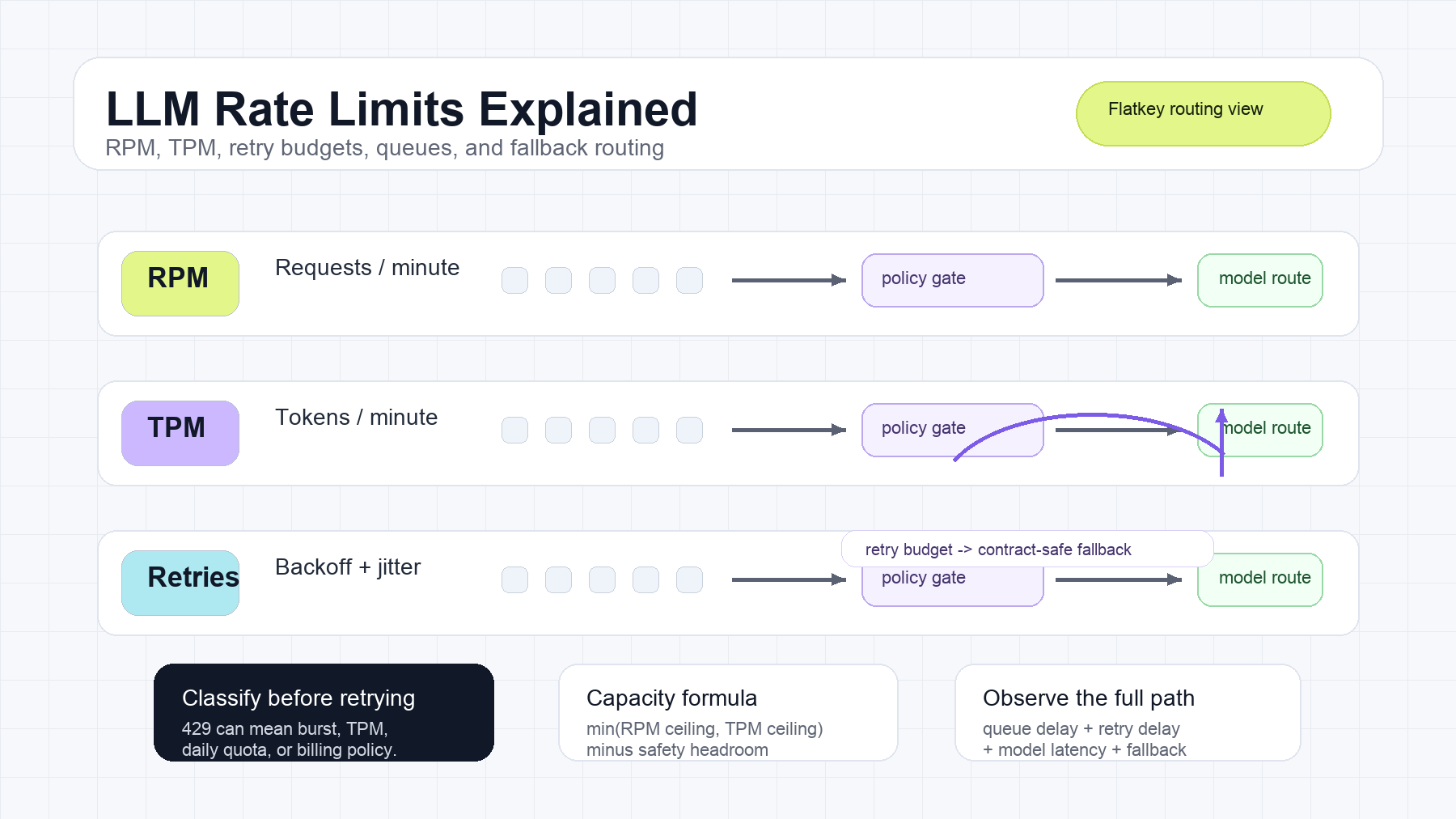
Quick answer: RPM is requests per minute; TPM is tokens per minute. You can stay under one limit and still hit the other. For example, many short calls can exhaust RPM while barely using TPM, while a few long-context calls can exhaust TPM first.
Last verified: October 12, 2026 against OpenAI's official rate-limit guide.
RPM vs TPM is a production reliability topic before it is an SDK setting. Rate limits decide how many requests, tokens, jobs, or concurrent generations your application can push through a provider or gateway in a time window. Retries decide what happens when a limit is hit. The wrong retry policy can turn a small burst into a sustained outage.
The practical rule is simple: RPM controls request frequency, TPM controls token throughput, concurrency controls in-flight work, and retries spend the same scarce capacity unless they are bounded. A production system should classify the constrained resource first, then choose between pacing, queueing, reducing tokens, retrying briefly, or routing to another contract-compatible model.
This RPM vs TPM guide is an operating playbook for AI product and platform teams. It covers the terms, the capacity math, the retry policy, the observability fields, and the Flatkey-style gateway controls that keep LLM API rate limits from becoming a customer incident.
RPM vs TPM quick answer
Use this table when you are triaging an LLM rate-limit incident.
| Signal | What It Measures | Typical Symptom | First Control |
|---|---|---|---|
| RPM | Requests admitted per minute or provider-defined window | Many small calls fail with 429 |
Pace requests, queue bursts, batch small tasks |
| TPM | Input and/or output tokens admitted per minute or window | Long prompts, long outputs, or eval runs throttle | Reserve tokens, shorten context, cap output |
| RPD / TPD | Requests or tokens admitted per day | Work stops until quota resets | Stop retries, reschedule, request higher tier |
| Concurrency | Requests or jobs in flight at once | Slow generations pile up even at modest RPM | Bound workers, add backpressure |
| Retry budget | How much extra work a caller may spend after failure | Retry storm, inflated latency, duplicate side effects | Cap attempts, elapsed time, and retryable statuses |
| Fallback route | Eligible alternative model or provider | Primary route constrained but product still needs output | Route only when capability, policy, and cost fit |
Reliable 429 handling comes down to one operating decision: do not retry blindly. A 429 is not a command to send the same request again immediately. It is a signal that one capacity bucket, quota policy, billing state, or provider protection mechanism rejected the request.
Why Rate Limits Exist
Providers enforce LLM API rate limits to protect shared capacity, prevent runaway accounts, and keep billing or service-tier policy consistent. OpenAI, Anthropic, and Gemini all document rate-limit concepts, but they expose different bucket names, scopes, headers, and dashboards. OpenAI documents rate limits and advises clients to handle limit errors with backoff. Anthropic documents organization and workspace spend limits plus model-level rate limits that can include requests and tokens. Gemini documents tiers with request, token, and daily limit concepts.
Those provider controls are necessary, but they are not a complete product policy. They usually answer the provider-side question: “Can this project send more traffic right now?” Your application still needs to answer product-side questions:
- Which customer, workspace, team, or feature caused the burst?
- Was the constrained resource requests, input tokens, output tokens, concurrency, daily quota, or spend?
- Should this workload wait, degrade, downshift, or fail fast?
- Is a fallback route allowed by capability, data policy, price, and customer contract?
- Are retries making the limit worse?
For adjacent quota controls, pair this article with AI API quota management and AI API spend management.
RPM, TPM, And Concurrency Are Different Limits
Teams often treat rate limits as one number. That hides the real bottleneck.
RPM: Requests Per Minute
RPM limits the number of requests admitted during a provider-defined time window. Small prompts, health checks, agent tool loops, and high-fanout evaluation jobs usually pressure RPM first. A workload can be well below TPM and still hit RPM if it sends too many small calls.
TPM: Tokens Per Minute
TPM limits token throughput. Depending on the provider and model, the limit may consider input tokens, output tokens, cached tokens, or separate input and output buckets. Long-context retrieval, conversation history, verbose outputs, multi-candidate generation, and parallel evals usually pressure TPM before RPM.
Concurrency: In-Flight Work
Concurrency is not RPM. A system can send only 60 requests per minute and still have high concurrency if each generation takes 20 seconds. Streaming and long-running tool calls make this visible. Bound worker pools and queue depth are usually better controls than more retries.
Daily Limits And Spend Limits
Some limits do not recover after a short sleep. Daily request limits, daily token limits, monthly spend limits, and billing restrictions should usually stop retries. The correct action is reschedule, raise the tier, adjust budget, or tell the user the capacity is exhausted.
Why You Can Get 429 Below The Headline Limit
A published limit such as “1,000 RPM” rarely means a client can send 1,000 requests in the first second of a minute. Providers can enforce rolling windows, token buckets, model pools, tier-specific burst rules, acceleration limits, or shared project quotas.
A request may receive 429 Too Many Requests even when a local counter looks safe because:
- Multiple workers, users, services, or environments share the same account limit.
- Input and output tokens are counted in different buckets.
- One model has a narrower pool than another model.
- Retries from earlier failures are still consuming request capacity.
- The traffic ramp is too steep for acceleration controls.
- A daily, spend, workspace, or service-tier rule is active.
- The provider returns a generic
429for multiple capacity policies.
This is why rate-limit troubleshooting should start with classification, not code. Log the status code, provider error type, response headers, model, account or project, token estimate, actual tokens, attempt number, queue delay, and provider request ID when available.
Capacity Planning Formula
Start with independent ceilings for requests and tokens, then operate below the maximum.
request_ceiling = RPM * safety_factor

token_ceiling = (TPM * safety_factor) / average_total_tokens_per_request

safe_requests_per_minute = min(request_ceiling, token_ceiling)
Use a safety factor such as 0.70 to 0.90 depending on token variance, shared consumers, retry behavior, and how expensive missed latency targets are.
Example:
RPM = 1,000
TPM = 2,000,000
average_total_tokens_per_request = 4,000
safety_factor = 0.80

request_ceiling = 1,000 * 0.80 = 800 requests/minute

token_ceiling = (2,000,000 * 0.80) / 4,000 = 400 requests/minute

safe_requests_per_minute = min(800, 400) = 400 requests/minute
In this example, TPM is the binding constraint. Adding more workers will not increase sustainable throughput. It will create more queueing, more retries, or more 429 errors.
For online systems, translate the safe request rate into a concurrency starting point:
target_concurrency ~= requests_per_second * average_request_seconds
If the safe rate is 400 requests per minute, that is about 6.67 requests per second. If average model latency is 3 seconds, a starting concurrency is about 20. Tune against p95 and p99 latency, not only averages.
Token Reservation For TPM Safety
TPM incidents often come from optimistic scheduling. The application admits work based on expected tokens, but the model produces a longer output than planned.
A safer scheduler reserves tokens before sending the request:
reservation:
  workload: support_answer
  model_route: primary_chat_route
  request_id: req_8f3a
  estimated_input_tokens: 3200
  max_output_tokens: 900
  reserved_total_tokens: 4100
  reservation_expires_at: 2026-10-10T11:03:00Z
After the response, reconcile reserved tokens with actual tokens:
actual_usage:
  input_tokens: 3014
  output_tokens: 622
  total_tokens: 3636
  retry_attempts: 0
  accepted_result: true
Reserve against p95 or workload-specific estimates for production. Use actual usage for cost attribution and forecasting. That separation makes LLM API rate limits easier to operate: admission control uses a safe estimate, while finance and product review actual cost per accepted result.
A Rate-Limit Decision Tree
When a request is rejected or a queue grows, decide the control from the cause.
Did the provider return Retry-After or a reset header?
  yes -> wait for the hint if it fits the caller latency budget
  no  -> use bounded exponential backoff with jitter for transient classes

Is the cause daily quota, billing, permission, or hard spend limit?
  yes -> do not retry; fail, reschedule, or request capacity
  no  -> continue

Is RPM the binding constraint?
  yes -> pace requests, batch small work, or queue low priority traffic
  no  -> continue

Is TPM the binding constraint?
  yes -> shorten context, cap output, reserve tokens, or delay long jobs
  no  -> continue

Is concurrency the binding constraint?
  yes -> reduce workers, set queue deadlines, and apply backpressure
  no  -> continue

Is an eligible fallback route healthy and policy-approved?
  yes -> route after the retry budget is spent
  no  -> return a controlled failure
This decision tree is the value asset for LLM Rate Limits Explained: RPM, TPM, and Retries. It keeps 429 handling from becoming an unbounded loop, and it turns 429 handling from a definitions topic into an incident-response workflow.
How To Use Retry-After
HTTP Retry-After tells the client how long to wait before making another request. The RFC defines it as either a delay in seconds or an HTTP date. MDN’s 429 Too Many Requests reference also describes using Retry-After to indicate when the client may retry.
Practical rules:
- Honor a valid
Retry-Afterwhen it fits the caller’s latency budget. - Cap very long values for interactive calls; do not keep a user request open forever.
- Treat invalid or missing values as a reason to use client-side backoff.
- Do not retry non-retryable causes just because
Retry-Afteris absent. - Record the provider hint and the actual delay used.
For interactive user flows, the retry budget is often smaller than the provider hint. In that case, fail fast with useful messaging or route elsewhere. For batch work, queueing may be better than returning an error.
Exponential Backoff With Jitter
Exponential backoff increases the delay after each failed attempt. Jitter randomizes that delay so workers do not synchronize and retry together. AWS’s backoff and jitter guidance is useful because it explains why plain capped exponential backoff can still cluster retries without randomness.
A common full-jitter formula:
delay_ms = random(0, min(cap_ms, base_ms * 2^attempt))
A production retry policy needs more than the delay formula:
| Policy Field | Recommended Control |
|---|---|
| Retryable statuses | 429, selected 5xx, and transient network failures |
| Non-retryable statuses | validation errors, auth errors, permission errors, billing errors, daily quota exhaustion |
| Max attempts | Small number for interactive calls; larger only for offline jobs |
| Max elapsed time | Bound by user-visible latency budget or job deadline |
| Jitter | Required for multi-worker systems |
| Retry-After | Use when valid and affordable |
| Cancellation | Stop immediately when caller aborts |
| Observability | Attempt count, wait time, final status, request ID, queue delay |
Unsuccessful requests can still consume rate-limit capacity. That is why retries must be part of rate-limit planning, not an afterthought.
TypeScript Retry Helper For OpenAI-Compatible APIs
This helper uses Retry-After when present, otherwise full jitter. It stops when attempts or elapsed time are exhausted.
type ChatRequest = {
  model: string;
  messages: Array<{ role: "system" | "user" | "assistant"; content: string }>;
  max_tokens?: number;
};

const sleep = (milliseconds: number) =>
  new Promise((resolve) => setTimeout(resolve, milliseconds));

function retryAfterMilliseconds(response: Response): number | null {
  const value = response.headers.get("retry-after");
  if (!value) return null;

  const seconds = Number(value);
  if (Number.isFinite(seconds)) return Math.max(0, seconds * 1_000);

  const date = Date.parse(value);
  return Number.isNaN(date) ? null : Math.max(0, date - Date.now());
}

export async function createChatCompletion(
  apiKey: string,
  request: ChatRequest,
  options: { maxAttempts?: number; maxElapsedMs?: number } = {},
) {
  const maxAttempts = options.maxAttempts ?? 4;
  const maxElapsedMs = options.maxElapsedMs ?? 30_000;
  const startedAt = Date.now();

  for (let attempt = 0; attempt < maxAttempts; attempt += 1) {
    const response = await fetch("https://router.flatkey.ai/v1/chat/completions", {
      method: "POST",
      headers: {
        Authorization: `Bearer ${apiKey}`,
        "Content-Type": "application/json",
      },
      body: JSON.stringify(request),
    });

    if (response.ok) return response.json();

    const retryable = response.status === 429 || response.status >= 500;
    const finalAttempt = attempt === maxAttempts - 1;
    if (!retryable || finalAttempt) {
      throw new Error(`LLM request failed with ${response.status}: ${await response.text()}`);
    }

    const serverDelay = retryAfterMilliseconds(response);
    const exponentialCap = Math.min(8_000, 500 * 2 ** attempt);
    const jitteredDelay = Math.random() * exponentialCap;
    const delayMs = serverDelay ?? jitteredDelay;

    if (Date.now() + delayMs - startedAt >= maxElapsedMs) {
      throw new Error("LLM retry budget exhausted");
    }

    await sleep(delayMs);
  }

  throw new Error("Unreachable retry state");
}
Add request timeouts, structured error classes, telemetry, and cancellation before production use. If the call can create external side effects, make the business operation idempotent before retrying.
Retry, Queue, Reduce, Or Route?
A resilient system has more than one response to throttling.
| Situation | Retry | Queue | Reduce Tokens | Route Elsewhere |
|---|---|---|---|---|
One short transient 429 |
Yes, bounded | Optional | No | Usually no |
| Sustained RPM exhaustion | Very limited | Yes | Usually no | Sometimes |
| Sustained TPM exhaustion | Very limited | Yes | Yes | Sometimes |
| Daily quota exhausted | No | Only if later reset is acceptable | No | Maybe |
| Billing or permission error | No | No | No | No, fix access first |
| Provider overload with healthy fallback | Briefly | Optional | No | Yes, after policy check |
| Partial stream already delivered | Usually no replay | Maybe continue or restart explicitly | Maybe | Only with clear semantics |
Queueing protects the provider and the user experience when work can wait. Token reduction protects TPM. Routing protects availability only when the alternate route satisfies the same product contract.
For overload-specific patterns, use the API Error 529 overloaded playbook. For cost implications, connect retry and fallback behavior to AI gateway pricing and how to compare AI model prices.
Rate Limits In Model Evaluations
Rate limits can invalidate a model comparison.
If model A is tested with 10 workers and model B with 100 workers, model B may look slower because the harness caused queueing and retries. That measurement says more about the test configuration than model latency.
For defensible evaluations:
- Separate model latency, queue delay, and retry delay.
- Use the same arrival process or normalized utilization level for each route.
- Warm traffic gradually when providers use acceleration controls.
- Record tokens and attempts per completed task.
- Report first-attempt success rate and eventual success rate separately.
- Compare cost per accepted task, not only token price.
- Run overload tests separately from quality tests.
This is especially important for free or low-tier accounts. The free LLM APIs article is useful context because free limits are often designed for exploration, not production load.
Metrics To Alert On
Track these by provider, model, route, tenant, workload, and environment:
- Requests per minute.
- Input tokens per minute and output tokens per minute.
- Estimated tokens reserved versus actual tokens used.
- Queue depth and oldest queued item age.
- Time waiting for rate capacity.
- First-attempt success rate.
- Retry attempts per successful request.
429rate by classified cause.- Retry amplification: total attempts divided by successful results.
- Fallback rate and fallback outcome.
- End-to-end p50, p95, and p99 latency.
- Cost per successful or accepted task.
OpenTelemetry’s generative AI semantic conventions can help standardize model, operation, token, response, and error telemetry. Keep product-specific dimensions too: customer, workspace, traffic class, environment, feature, and owner.
An alert on total 429 count alone is noisy. A better signal combines throttling rate, queue age, retry amplification, and final failure rate.
A Production Rate-Limit Architecture
A robust request path usually has seven control layers:
client
  -> admission control
  -> priority queue
  -> token reservation
  -> RPM + TPM limiter
  -> provider/model route
  -> bounded retry controller
  -> contract-safe fallback
  -> usage, cost, and latency ledger
Use admission control when the queue cannot meet the caller’s deadline. Use priority queues so non-critical evals do not crowd out production traffic. Use token reservation to keep TPM honest. Use a centralized retry controller so SDK, queue, gateway, and worker layers do not all retry independently.
The usage ledger should record:
rate_limit_event:
  request_id: req_8f3a
  workspace_id: ws_42
  environment: production
  workflow: support_answer
  route_requested: primary_chat_route
  route_final: fallback_chat_route
  estimated_input_tokens: 3200
  max_output_tokens: 900
  actual_input_tokens: 3014
  actual_output_tokens: 622
  attempt_count: 2
  retry_delay_ms: 740
  queue_delay_ms: 1180
  final_status: success
  classified_limit: transient_rpm_burst
  accepted_result: true
This makes LLM API rate limits reviewable after the incident. It also gives finance and product teams the evidence they need when retries or fallbacks change cost per accepted result.
How Flatkey Fits
Flatkey gives teams one API key and an OpenAI-compatible base URL for supported model routes. That does not remove upstream LLM rate limits. It gives teams one integration surface where routing, usage review, and policy can be made consistent across providers.
For this rate-limit workflow, a gateway layer helps when:
- Your application needs a single retry, queue, and fallback policy instead of per-provider logic scattered across services.
- Product teams need to compare route health, latency, tokens, and accepted-result cost in one ledger.
- Platform teams need model allowlists, sub-key budgets, and usage controls by environment or workflow.
- Finance needs one balance, invoice, and request-level evidence instead of disconnected provider dashboards.
- Operators need to move eligible traffic when a route is constrained, without rewriting the application SDK.
The gateway should still preserve model-specific contracts. Do not route from one model to another unless context window, tool behavior, structured output, safety policy, data controls, latency, and cost are acceptable for that workload. Check current route availability and pricing in the Flatkey model directory and Flatkey pricing before production launch.
Common Mistakes
Treating RPM As Concurrency
RPM measures admissions over time. Concurrency measures in-flight work. Slow generations can create high concurrency at modest RPM.
Retrying Every 429 Immediately
Immediate retries synchronize workers and consume more capacity. Honor Retry-After when valid, add jitter, and cap the retry budget.
Using One Limiter For Every Model
Providers may use separate model pools or shared account pools. The limiter should follow documented quota scope and observed response headers.
Ignoring Shared Consumers
A dashboard, evaluation runner, coding agent, and production API may share one project. Reserve capacity by workload and isolate critical traffic where possible.
Retrying Partial Streams
Once tokens have reached the user or a tool action has been executed, a silent replay can duplicate output or side effects. Define continuation, restart, or idempotency semantics explicitly.
Measuring Only Provider Latency
End-user latency includes queue delay, retry delay, fallback delay, and model latency. Alert on the whole path and keep the components separate.
When a provider returns HTTP 429, our API rate limit exceeded guide walks through causes, provider limits, and retry code.
FAQ
What is the difference between RPM and TPM?
RPM limits how many requests are admitted over time. TPM limits how many input and/or output tokens are admitted. Small prompts usually hit RPM first; long-context or high-output workloads often hit TPM first.
Why do I get 429 errors below my RPM limit?
The provider may enforce rolling windows, token buckets, shared account quotas, separate token limits, model-specific pools, daily limits, or acceleration controls. Your local request counter may not represent the full quota scope.
Should I retry every 429?
No. Retry short-lived throttling with a small budget and jitter. Do not repeatedly retry daily quota exhaustion, billing restrictions, permission errors, validation errors, or sustained overload that has no realistic recovery window.
Does exponential backoff guarantee success?
No. Backoff reduces collision and gives transient capacity time to recover. It cannot create quota. Persistent exhaustion requires lower demand, more capacity, delayed work, or another eligible route.
Do retries count against rate limits?
They can. Providers may count unsuccessful requests or attempts toward active limits, so retry amplification must be monitored and bounded.
How many retries should an LLM request use?
There is no universal number. Set attempts from the user-visible latency budget and failure mode. Interactive applications usually need only a few short attempts before failing or routing; offline jobs can tolerate longer queues.
Final Checklist
Use this checklist when implementing an RPM/TPM policy in production:
- Model RPM, TPM, daily limits, spend limits, and concurrency separately.
- Calculate capacity from the minimum of request and token ceilings.
- Operate below the published maximum with a safety factor.
- Reserve tokens before sending high-variance requests.
- Use queues and pacing for sustained load.
- Honor
Retry-Afterwhen valid and affordable. - Use exponential backoff with jitter when no valid server hint exists.
- Cap attempts and total retry time.
- Stop retries for quota, billing, permission, and validation errors.
- Avoid replaying partial streams or non-idempotent side effects.
- Route only to models that preserve the required product contract.
- Separate queue delay and retry delay from model latency in evaluations.
- Alert on retry amplification and queue age, not only raw
429count. - Record request IDs, token estimates, actual tokens, attempts, fallback route, and final outcome in the usage ledger.
Rate limits are capacity-planning controls before they are error messages. The durable takeaway from this RPM vs TPM guide is to measure request frequency, token throughput, concurrency, retries, and fallback outcomes independently so 429 becomes an actionable signal instead of production noise.
Sources
- OpenAI rate-limit documentation: https://developers.openai.com/api/docs/guides/rate-limits
- OpenAI Cookbook, handling rate limits: https://cookbook.openai.com/examples/how_to_handle_rate_limits
- Anthropic rate limits: https://docs.anthropic.com/en/api/rate-limits
- Gemini API rate limits: https://ai.google.dev/gemini-api/docs/rate-limits
- RFC 9110 Retry-After: https://www.rfc-editor.org/rfc/rfc9110.html#name-retry-after
- MDN 429 Too Many Requests: https://developer.mozilla.org/en-US/docs/Web/HTTP/Reference/Status/429
- AWS Architecture Blog, exponential backoff and jitter: https://aws.amazon.com/blogs/architecture/exponential-backoff-and-jitter/
- OpenTelemetry generative AI semantic conventions: https://opentelemetry.io/docs/specs/semconv/gen-ai/
- Flatkey pricing: https://flatkey.ai/pricing
- Flatkey model directory: https://flatkey.ai/models