What Is an LLM Gateway? How It Works, Key Features, and 7 Options Compared (2026)
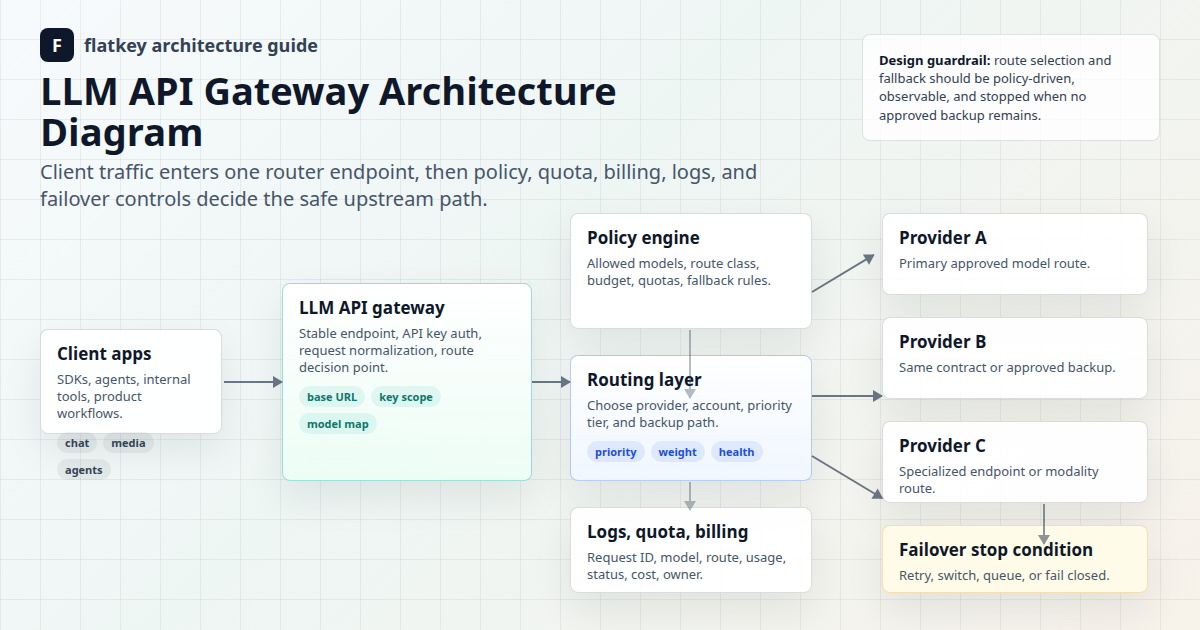
An LLM gateway is a single API layer between your application and one or more model providers. It handles authentication, routing, fallback, rate limits, cost tracking, and logging, so your code calls one endpoint instead of integrating with every provider separately. Most gateways expose an OpenAI-compatible API. Switching from GPT to Claude, Gemini, or Qwen then means changing one model string instead of shipping a new SDK integration.
This guide explains how an LLM gateway works step by step, the nine features that matter, how it differs from an API gateway, a model router, and an MCP gateway, when you do and don't need one, and how seven popular gateways compare. Product details were checked against each vendor's official docs on October 20, 2026.
LLM gateway definition
An LLM gateway (also called an AI gateway or LLM API gateway) receives model requests from applications, applies shared controls, forwards each request to an appropriate model endpoint, and returns the response in a consistent format.
Your apps ──► LLM gateway ──┬──► OpenAI
                            ├──► Anthropic
  one key                   ├──► Google
  one API shape             ├──► Alibaba (Qwen)
  one usage ledger          └──► fallback provider
The gateway doesn't host the models. It controls access to them.
Why teams adopt an LLM gateway
Without a gateway, every service stores its own provider keys, implements its own retries, and logs usage in its own format. The problems grow with each new provider:
| Without a gateway | With a gateway |
|---|---|
| One key per provider per service | One gateway key per service, rotated centrally (key rotation guide) |
| Different SDKs and error shapes | One API shape, usually OpenAI-compatible |
| Outage means a code change | Fallback is configuration |
| Spend scattered across invoices | One usage ledger per team, key, and model |
| No shared rate limits | Quotas and budgets per key |
Provider pricing is also spread widely enough to make routing valuable. On October 20, 2026, list output prices on the Flatkey model pages ranged from $0.47 per 1M tokens (qwen3.8-flash) to $10.00 (gpt-6-sol, claude-sonnet-5-5) and $15.00 (kimi-k3). A gateway lets you use that spread without rewriting code.
How an LLM gateway works, step by step
- The app sends a request to the gateway's base URL with a gateway key.
- Authentication: the gateway validates the key and loads its policy (allowed models, budget, rate limit).
- Pre-request policy: it checks quotas and may redact or block content and attach metadata such as team, environment, or feature.
- Routing: it picks the provider endpoint for the requested model, or the next healthy route in a fallback chain.
- Provider call: it translates the request into the provider's format if needed and streams the response back.
- Recording: it logs model, latency, tokens, cost, status, and request ID for observability and billing.
The 9 LLM gateway features that matter
| Feature | What to check |
|---|---|
| Unified API | OpenAI-compatible /v1/chat/completions, plus Responses or Messages if you use them |
| Model catalog | Which models are live, and how fast new releases arrive |
| Fallback and failover | Ordered chains and what triggers them (429, 5xx, timeout) |
| Load balancing | Across keys, regions, or providers |
| Rate limits and budgets | Per key, team, and model, with hard caps |
| Observability | Request logs, token usage, latency, and errors, ideally exportable via OpenTelemetry GenAI conventions |
| Cost tracking | Per key, team, and environment (cost attribution guide) |
| Caching | Exact or semantic response caching, and provider prompt caching pass-through |
| Security and policy | Key scoping, PII redaction, data-retention terms, SOC 2 or DPA evidence |
LLM gateway vs API gateway vs model router vs MCP gateway
| Layer | Controls | Understands tokens and models? | Example |
|---|---|---|---|
| API gateway | Generic HTTP APIs | No | Kong, AWS API Gateway |
| LLM gateway | Model traffic across providers | Yes | LiteLLM, Portkey, Flatkey |
| Model router | Which model answers each prompt | Yes | RouteLLM, a rules engine |
| MCP gateway | Agent tool calls over the Model Context Protocol | Tool-level | MCP proxies and registries |
What is the difference between an MCP gateway and an LLM gateway? An LLM gateway governs calls to models. An MCP gateway governs calls from agents to tools and data sources over the Model Context Protocol. Agent platforms often need both: an LLM gateway for model spend and an MCP gateway for tool permissions. See AI agent gateway controls and AI API gateway vs API management.
7 LLM gateways compared (2026)
| Gateway | Deployment | Open source | Strength | Watch out for |
|---|---|---|---|---|
| LiteLLM | Self-hosted proxy or SDK | Yes | 100+ providers, routing, budgets | You run, scale, and patch it |
| Portkey | Hosted or self-hosted | Gateway core is open source | Guardrails, observability | Advanced features on paid tiers |
| Cloudflare AI Gateway | Hosted at the edge | No | Caching, analytics, rate limiting | You still manage provider keys |
| Kong AI Gateway | Self-hosted or Konnect | Core is open source | Fits existing Kong API management | Plugin configuration overhead |
| Vercel AI Gateway | Hosted | No | Tight Vercel and AI SDK integration | Best inside the Vercel ecosystem |
| OpenRouter | Hosted | No | Very wide model catalog, credits | Shared marketplace routing |
| Flatkey | Hosted | No | One key and balance for GPT, Claude, Gemini, Qwen, DeepSeek, Kimi, GLM, plus image and video | Check the catalog for niche models |
Deeper comparisons: best LLM gateway selection guide, OpenRouter alternatives, Portkey alternatives, Vercel AI Gateway alternatives, and managed gateway vs self-hosted proxy.
What an LLM gateway looks like in code
With an OpenAI-compatible gateway, your app keeps the OpenAI SDK and changes two values, the base URL and the key. Switching providers is then a string change.
curl
curl https://router.flatkey.ai/v1/chat/completions \
  -H "Authorization: Bearer $FLATKEY_API_KEY" -H "Content-Type: application/json" \
  -d '{"model": "claude-sonnet-5-5", "messages": [{"role": "user", "content": "What is an LLM gateway?"}]}'
Python: one client, several providers, automatic fallback
import os
from openai import OpenAI, APIError

gw = OpenAI(api_key=os.environ["FLATKEY_API_KEY"], base_url="https://router.flatkey.ai/v1")

def complete(prompt, chain=("gpt-6-sol", "claude-sonnet-5-5", "gemini-3.5-flash")):
    for model in chain:
        try:
            r = gw.chat.completions.create(model=model, messages=[{"role": "user", "content": prompt}])
            return model, r.choices[0].message.content, r.usage.total_tokens
        except APIError as err:
            print(f"{model} -> {err.__class__.__name__}, trying next")
    raise RuntimeError("no route available")

print(complete("Give me one sentence on why gateways log token usage."))
Node.js
import OpenAI from "openai";
const gw = new OpenAI({ apiKey: process.env.FLATKEY_API_KEY, baseURL: "https://router.flatkey.ai/v1" });

const models = ["qwen3.8-max", "gpt-6-luna"];
const results = await Promise.all(models.map((model) =>
  gw.chat.completions.create({ model, messages: [{ role: "user", content: "Define 'fallback' in 8 words." }] })
));
results.forEach((r, i) => console.log(models[i], r.usage.total_tokens, r.choices[0].message.content));
Without a gateway, this would take three SDKs, three keys, and three error formats. For a first call, follow the Flatkey quickstart.
OpenAI compatibility: what it does and doesn't guarantee
"OpenAI-compatible" means the request and response shape match OpenAI's Chat Completions API. It doesn't guarantee that every model supports every feature. Before you migrate, test these per model:
- Streaming chunks and
finish_reasonvalues - Tool or function calling and parallel tool calls
- Structured output or JSON mode
- Vision and file inputs
usagefields, including cached tokens- Error codes for rate limits and context overflow (error taxonomy)
When you need an LLM gateway (and when you don't)
You likely need one if: - You call two or more model providers, or plan to. - Several teams or services share AI spend and need per-team budgets. - You need failover during provider outages. - Finance needs one ledger instead of five invoices.
You may not need one yet if: - You have one prototype on one model with low traffic. - Your provider contract requires direct, unmediated access.
How to evaluate an LLM gateway in one afternoon
- Contract test: run your 20 most common requests (streaming, tools, JSON) through it.
- Failure test: force a bad model ID and a timeout. Does fallback fire, and is the error clear?
- Overhead test: compare P50 and P95 latency against calling the provider directly.
- Ledger test: do the logged tokens match the provider's
usage? Is cost visible per key? - Security review: check key scoping, log retention, and data-processing terms (DPA checklist).
- Exit test: can you move off it by changing the base URL back?
Buying for a large organization? See our enterprise AI gateway checklist for must-have features and tests to run before you sign.
FAQ
What is an LLM gateway?
An LLM gateway is a middleware API that sits between applications and model providers. It centralizes authentication, routing, fallback, rate limits, logging, and cost tracking behind one, usually OpenAI-compatible, endpoint.
What are the most popular LLM gateways?
Widely used options in 2026 include LiteLLM (open-source, self-hosted), Portkey, Cloudflare AI Gateway, Kong AI Gateway, Vercel AI Gateway, OpenRouter, and hosted routers such as Flatkey.
Is the LLM gateway free?
Open-source gateways such as LiteLLM are free to run, but you pay for hosting and operations. Hosted gateways either charge platform fees or bill model usage through their own pricing. Either way, model tokens still cost money.
What is the difference between an MCP gateway and an LLM gateway?
An LLM gateway manages requests to language models. An MCP gateway manages agent requests to tools and data sources over the Model Context Protocol. They solve different problems and are often deployed together.
Is an LLM gateway the same as an AI gateway?
Usually yes. "AI gateway" is the broader marketing term and often also covers image, video, and audio models. "LLM gateway" emphasizes text models.
Does an LLM gateway add latency?
A small amount: one extra network hop plus policy checks. Measure P95 overhead in your own region. During an outage, failover usually saves far more time than the hop costs.
Can an LLM gateway reduce costs?
Yes, indirectly. It makes routing to cheaper models, caching, and budget caps easy to apply consistently. It can't make a given model's tokens cheaper unless the gateway itself offers discounted rates.
Conclusion
An LLM gateway turns many provider integrations into one controlled endpoint: one key, one API shape, one ledger, and fallback as configuration. Choose self-hosted (LiteLLM, Kong) if you want full control and can run it. Choose hosted (Portkey, Cloudflare, Vercel, OpenRouter, Flatkey) if you'd rather not operate infrastructure. To try the hosted path, see the Flatkey model directory and pricing page.
Last updated: October 20, 2026 · Flatkey Team. Product details are summarized from the official documentation linked inline.