
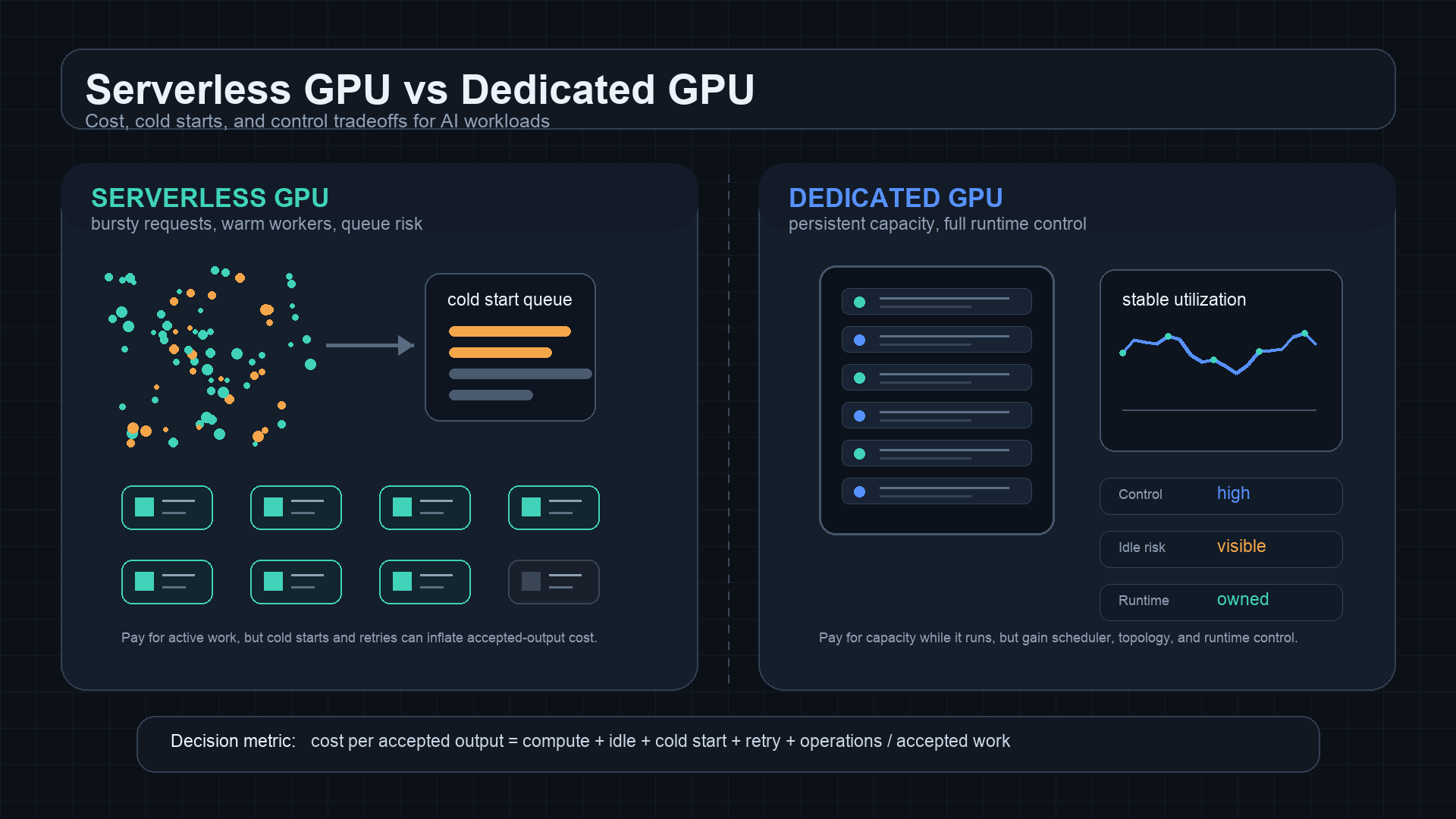
Serverless GPU vs Dedicated GPU: Cost, Cold Starts, and Control
Choosing between serverless GPU vs dedicated GPU capacity is mostly a question of workload shape. Serverless GPUs are attractive when traffic is bursty, experiments are uneven, or the team wants to avoid idle hardware. Dedicated GPUs are attractive when demand is steady, startup latency matters, or the team needs control over drivers, schedulers, networking, model caches, and serving runtimes.
The mistake is comparing a serverless GPU request price with a dedicated GPU hourly price as if they describe the same thing. They do not. A serverless endpoint can hide cold starts, queue delay, concurrency limits, retry cost, and per-request overhead. A dedicated GPU can hide idle time, reserved-capacity risk, storage, support, and platform-engineering work.
For independent developers and small AI teams, the practical rule is:
serverless GPU vs dedicated GPU should be compared by cost per accepted output,
not by the lowest visible GPU rate.
If you are still deciding whether direct GPU rental is necessary at all, also read Flatkey's GPU cloud vs model API, GPU rental prices, and cloud GPU hidden costs guides. This article focuses on the serverless GPU vs dedicated GPU choice after GPUs are already in the evaluation set.
Serverless GPU vs dedicated GPU: the quick answer
Use this table as the first filter.
| Decision point | Serverless GPU usually fits | Dedicated GPU usually fits |
|---|---|---|
| Traffic pattern | Bursty, queued, experimental, or uneven | Steady, high-volume, latency-sensitive, or capacity-planned |
| Billing shape | Pay mainly when workers run or requests execute, depending on provider | Pay while the instance, pod, node, cluster, or reservation exists |
| Startup risk | Cold starts, model loading, container pull, worker warmup, and queue delay | Less cold-start exposure after warmup, but idle capacity is billable |
| Operational control | Lower control over host, scheduler, runtime, topology, and caching | More control over drivers, serving stack, caches, topology, and observability |
| Reliability model | Provider-managed scaling with endpoint limits and possible cold paths | Team-managed uptime, autoscaling, failover, patches, and incident response |
| Best first use | Demos, image/video jobs, batch inference, sporadic APIs, prototypes | Stable inference endpoints, long-running services, custom runtimes, multi-node work |
The best answer is often staged:
- Start with serverless GPU for unknown demand.
- Measure cold starts, queue delay, retry rate, and accepted-output cost.
- Move only stable, high-volume workloads to dedicated GPU capacity.
- Keep a model API path open when the product needs many models or does not need hardware control.
That sequence is safer than reserving dedicated GPUs before you know whether the workload can keep them busy.
What "serverless GPU" means in practice
Serverless GPU usually means the provider abstracts away long-running server ownership. You package a model, container, function, or endpoint; the platform starts GPU workers when requests arrive; and the platform may scale workers up or down based on demand.
Provider implementations vary. RunPod describes Serverless around endpoints and workers, with separate serverless pricing from pod pricing. Modal documents GPU functions, cold starts, and container lifecycle. Google Cloud Run supports services with GPUs and has its own Cloud Run pricing model. Replicate deployments expose configurable production inference endpoints. These are not identical products, so the source checklist matters.
From a buyer's perspective, serverless GPU capacity is useful when:
- Request volume is low, bursty, or still being discovered.
- Jobs can wait in a queue without hurting user experience.
- Cold starts are acceptable or can be masked.
- The team wants less infrastructure ownership.
- The workload is packaged as repeatable jobs rather than a permanently warm service.
- The business prefers usage-shaped spend over a fixed monthly capacity bet.
The hidden tradeoff is that serverless GPU does not remove physics. Model weights still need to load. Containers still need to start. GPUs still need available capacity. Queue delay still affects users. Retries still cost money.
What "dedicated GPU" means in practice
Dedicated GPU capacity means you control a running instance, pod, server, node, or cluster for a period of time. It may be on-demand, reserved, committed, bare metal, marketplace capacity, or a private cluster. The common feature is that the GPU is allocated to your workload rather than being started only around a request.
Dedicated GPU capacity is useful when:
- The endpoint must stay warm.
- Traffic is predictable enough to keep the GPU busy.
- You need custom drivers, CUDA versions, kernels, model servers, or networking.
- You need consistent benchmark conditions.
- A cold start would break latency or user experience.
- The workload is multi-node, topology-sensitive, or data-locality-sensitive.
- You want to operate vLLM, SGLang, TensorRT-LLM, Triton, Ray Serve, Kubernetes, Slurm, or custom serving infrastructure directly.
The hidden tradeoff is idle capacity. If a dedicated GPU runs for 730 hours in a month but does useful work for only 180 hours, the listed hourly price is not the real useful-hour price. The idle hours are part of the workload cost.
The cost formula that makes the comparison fair
Use one denominator for both sides:
cost per accepted output =
  compute
  + storage
  + bandwidth
  + idle time
  + cold start waste
  + retry and failed-job waste
  + support
  + engineering overhead
  / accepted outputs, records, tokens, images, clips, or jobs
For serverless GPU:
serverless GPU cost per accepted output =
  billed worker/request cost
  + cold start and queue waste
  + failed request and retry cost
  + storage and artifact transfer
  + platform integration overhead
  / accepted outputs
For dedicated GPU:
dedicated GPU cost per accepted output =
  running GPU capacity cost
  + storage and networking
  + idle capacity
  + serving stack operations
  + support and incident work
  + failure and redeploy waste
  / accepted outputs
This is where serverless GPU vs dedicated GPU comparisons often flip. Serverless can look expensive per second but cheaper overall if it avoids idle GPUs. Dedicated can look expensive per month but cheaper overall if the workload keeps the accelerator busy and avoids cold-start waste.
Cold starts are the serverless GPU tax
Cold starts are the most important serverless GPU risk. A cold start can include:
- Finding GPU capacity.
- Pulling or mounting a container image.
- Importing dependencies.
- Loading model weights.
- Moving the model to GPU memory.
- Warming kernels or compilation paths.
- Rebuilding caches.
- Waiting behind earlier queued requests.
Modal's cold-start documentation is useful because it separates container startup work, imports, and application initialization. The exact mechanics differ by provider, but the lesson generalizes: startup time is part of the user experience and the cost model.
Cold starts matter most when:
| Workload | Why cold starts hurt |
|---|---|
| Interactive chat or agents | Users notice slow first-token latency. |
| Realtime image editing | The first request can feel broken even if later requests are fast. |
| Webhooks or user-facing APIs | Upstream timeouts can turn cold starts into failed jobs. |
| Batch queues with strict SLA | Queue delay can violate delivery windows. |
| Large models | Weight loading can dominate the request path. |
Serverless GPU can still be the right choice if the application can absorb this delay. For example, offline image jobs, nightly evaluation queues, async batch inference, and internal experiments often tolerate warmup better than customer-facing chat.
Dedicated GPUs trade cold starts for idle risk
Dedicated GPUs usually reduce cold-start exposure because the service can stay warm. Model weights stay loaded, caches remain hot, and request routing can hit a known endpoint.
But dedicated capacity creates a different tax:
idle waste share =
  1 - useful GPU-active time / billable running time
If the useful GPU-active share is 30%, a lower listed hourly rate can still become expensive. The dedicated GPU may be technically ready, but financially idle.
Dedicated GPUs work best when you can prove:
- Baseline request volume.
- High GPU utilization after batching and queueing.
- Stable model choice.
- Predictable memory requirements.
- A serving stack the team can operate.
- A plan for rolling deploys, monitoring, alerts, and fallback.
If those inputs are unknown, serverless GPU or a model API is often the cleaner first step.
Control: what dedicated GPUs give back
The strongest argument for dedicated GPU capacity is not always price. It is control.
Dedicated capacity gives the team more say over:
- GPU model, memory, and count.
- Region and data locality.
- CUDA, driver, kernel, and image versions.
- vLLM, SGLang, TensorRT-LLM, Triton, Ray Serve, or custom runtime settings.
- Continuous batching, KV cache behavior, quantization, speculative decoding, and scheduler tuning.
- Local model caches and preloaded weights.
- Network topology, private links, VPC design, load balancers, and ingress.
- Observability, traces, logs, and incident response.
That control is valuable when the workload is important enough to justify ownership. It is expensive when the team only needs reliable model outputs.
This is the same boundary covered in Flatkey's best GPU for LLM inference, vLLM deployment guide, and vLLM vs SGLang articles. If you are tuning the runtime itself, dedicated GPU capacity may be the right layer. If you are shipping product features across many models, a managed API path may be faster.
Workload decision matrix
Use this matrix before building a spreadsheet.
| Workload | Better starting point | Why |
|---|---|---|
| New AI product feature with unknown demand | Serverless GPU or model API | Avoids buying idle capacity before traffic is known. |
| Async image generation queue | Serverless GPU | Queue delay may be acceptable, and bursts do not require always-on GPUs. |
| Short demo or prototype | Serverless GPU | Fast setup and usage-shaped billing usually matter more than runtime control. |
| High-volume stable LLM inference | Dedicated GPU | Sustained utilization can amortize the serving stack. |
| Latency-sensitive customer endpoint | Dedicated GPU or model API | Cold starts and queue delay are harder to hide. |
| Large model with slow weight loading | Dedicated GPU | Keeping weights warm may beat repeated serverless startup. |
| Periodic evaluation suite | Serverless GPU, spot GPU, or batch model API | Jobs are retryable and can run behind a queue. |
| Custom CUDA kernels or runtime research | Dedicated GPU | The team needs low-level control. |
| Multi-node training or distributed inference | Dedicated cluster | Topology, network fabric, and failure domains dominate. |
| Product needing many frontier models | Model API or gateway | Direct GPU ownership does not solve multi-provider model access. |
For broader capacity planning, pair this with Flatkey's on-demand vs spot GPU, GPU cluster TCO, and GPU cluster rental guides.
Serverless GPU cost traps
Serverless GPU economics can disappoint when teams ignore these fields.
| Trap | What happens | Control |
|---|---|---|
| Slow model loading | Every cold worker spends billable time before useful work starts | Prepackage artifacts, shrink images, cache weights, measure warmup separately |
| Timeout mismatch | Cold starts trigger upstream timeouts and retries | Set realistic timeouts, async queues, idempotent job IDs |
| Queue opacity | Users see delay but dashboards only show completed requests | Track queue wait, cold start time, worker active time, and accepted-output latency |
| Small jobs on large GPUs | Per-request overhead dominates useful compute | Batch work or use a smaller model/API route |
| Burst concurrency limits | Requests back up during launch windows | Load test endpoint concurrency before launch |
| Retry amplification | Failed jobs multiply billed attempts | Track accepted outputs, not attempted outputs |
| Data transfer | Inputs, weights, and outputs move repeatedly | Keep artifacts close to workers and expire temporary files |
The procurement question is not "does the provider support serverless GPU?" It is "what happens to accepted-output cost when workers are cold, queues are full, and retries happen?"
Dedicated GPU cost traps
Dedicated GPU economics can disappoint in the opposite direction.
| Trap | What happens | Control |
|---|---|---|
| Idle endpoint | GPU stays warm for rare requests | Autoscale, consolidate workloads, or use serverless/model API for low volume |
| Overprovisioned memory | A large GPU runs a workload that fits smaller hardware | Benchmark model memory and throughput before committing |
| Reservation mismatch | Contract assumes demand that never appears | Reserve against measured baseline, not launch forecasts |
| Serving stack ownership | Engineers maintain runtime instead of product features | Count platform work in TCO |
| Hidden cloud lines | Storage, egress, support, and networking sit outside the GPU rate | Use a full GPU cloud hidden-cost worksheet |
| Model churn | New model family changes memory, precision, or runtime needs | Keep exit paths open |
| Incident burden | Uptime becomes your team's problem | Define alerts, fallback, and provider support scope |
Dedicated GPU control is valuable only when the team can use it. If the workload is not stable enough to tune, the extra control may become operational drag.
Worked example: why the answer changes with utilization
Assume a team runs an async media generation feature. The exact rates are hypothetical; replace them with checked provider prices before buying.
| Field | Serverless GPU | Dedicated GPU |
|---|---|---|
| Accepted jobs per month | 120,000 | 120,000 |
| Listed compute | Usage-shaped | Fixed monthly capacity |
| Cold start and queue waste | Higher | Lower |
| Idle capacity | Lower | Higher |
| Runtime control | Lower | Higher |
| Best risk | Demand is unknown | Demand is steady |
If most jobs arrive in short bursts and the rest of the day is quiet, serverless GPU may win because it avoids idle dedicated capacity. If jobs arrive steadily all day and the model has a slow warmup path, dedicated GPU may win because workers stay hot and throughput is easier to tune.
Now change the workload to customer-facing LLM inference with strict latency. The decision may flip even if serverless looks cheaper on light traffic, because cold-start paths and queue delay create product risk. In that case, dedicated GPU or a managed model API with established latency controls may be safer.
The point is not that one model always wins. The point is that serverless GPU vs dedicated GPU should be decided by measured workload shape.
Benchmark plan before choosing
Run the same workload through both paths for a representative test window. Track these metrics.
| Metric | Serverless GPU path | Dedicated GPU path |
|---|---|---|
| Accepted outputs | Count successful outputs after quality filters | Same denominator |
| Attempted outputs | Include failed and retried jobs | Include failed and retried jobs |
| p50 / p95 / p99 latency | Include queue and cold-start time | Include routing and batching time |
| Time to first useful work | Worker startup, model load, warmup | Deploy start, model load, rollout |
| Cold start share | Percent of requests hitting cold workers | Usually lower after warmup |
| Queue wait | Endpoint queue delay and concurrency pressure | Scheduler queue and batch wait |
| GPU utilization | Worker active time if exposed | GPU compute and memory utilization |
| Idle cost | Usually lower, but check minimums | Main cost risk |
| Retry rate | Timeout, worker errors, capacity errors | OOM, deploy, runtime, host errors |
| Engineering hours | Integration and endpoint debugging | Platform operations and incident work |
The test should include cold conditions, warm conditions, burst traffic, normal traffic, and failure recovery. A benchmark that only measures warm throughput is not a serverless GPU vs dedicated GPU decision; it is a partial speed test.
Provider source checklist
Use official pages as source checklists, not frozen rate cards. Re-check them on the day you approve spend.
| Provider/category | Official source to check | What to capture |
|---|---|---|
| RunPod Serverless | RunPod Serverless overview, RunPod Serverless pricing | Endpoint model, worker behavior, billing basis, cold-start behavior, storage, networking, concurrency, logs, limits |
| RunPod Pods / dedicated style | RunPod Pods overview, RunPod Pods pricing, RunPod pricing | GPU model, secure/community mode, pod billing, storage, network volume, uptime expectations |
| Modal | Modal GPU docs, Modal cold starts, Modal pricing | GPU type, function lifecycle, cold-start controls, container image strategy, active usage billing |
| Google Cloud Run with GPUs | Cloud Run GPU configuration, Cloud Run pricing | GPU service constraints, min instances, concurrency, CPU/memory/GPU billing, request latency impact |
| Google Compute Engine GPUs | Compute Engine GPU pricing | GPU type, region, VM cost, disk, network, reservations, committed use discounts |
| AWS EC2 GPU instances | Amazon EC2 pricing | On-Demand, Spot, Savings Plans, Reserved Instances, capacity blocks, storage, data transfer, support |
| Lambda Cloud | Lambda GPU Cloud | Instance type, availability, on-demand/reserved terms, storage, networking, support scope |
| Replicate deployments | Replicate deployments docs | Deployment settings, scaling behavior, hardware options, minimum/maximum instances, production endpoint fit |
For this article, the source checklist was reviewed on October 13, 2026.
Procurement questions before you commit
Ask these before choosing serverless GPU vs dedicated GPU.
| Question | Why it matters |
|---|---|
| What is the accepted-output denominator? | Prevents comparing request attempts with successful business results. |
| How often will the endpoint be cold? | Cold starts can dominate latency and cost for sporadic workloads. |
| How long does model loading take? | Large weights can erase serverless savings. |
| What happens at burst concurrency? | Serverless queues and dedicated autoscalers both need stress tests. |
| What is the dedicated GPU idle rate? | Idle capacity is the main fixed-cost leak. |
| Can jobs retry safely? | Serverless and spot-like workflows need idempotency. |
| Do we need custom runtime control? | If not, dedicated GPU ownership may be unnecessary. |
| Are storage, egress, logs, and support included? | GPU compute is only one part of the invoice. |
| Can the workload move to a model API? | Low-utilization or multi-model products may not justify GPU operations. |
| What is the exit path if the model changes? | Hardware commitments become risky when model architecture shifts. |
The best procurement packet includes a benchmark result, a cost-per-accepted-output worksheet, and a clear reason why the team needs either usage-shaped serverless GPU capacity or controlled dedicated GPU capacity.
When a model API beats both
Both serverless GPU and dedicated GPU assume that operating at the GPU layer is useful. Sometimes it is not.
A managed model API or gateway can be better when:
- Demand is unknown or bursty.
- The product needs several models, not one stable self-hosted model.
- The team needs frontier or proprietary models.
- Reliability, fallback, and provider diversity matter more than host control.
- Finance needs usage ledgers, budgets, and one invoice.
- Engineering time is better spent on product behavior than GPU operations.
Flatkey fits this side of the decision. It gives teams one OpenAI-compatible route, one key, one balance, one invoice, usage visibility, and access to official model endpoints across providers. If the serverless GPU vs dedicated GPU worksheet shows low utilization, high cold-start waste, or too much operational overhead, compare that path with AI model pricing comparison, AI API pricing comparison, and AI API spend management before committing to GPU infrastructure.
Final recommendation
Use this sequence for serverless GPU vs dedicated GPU decisions:
- Use serverless GPU for prototypes, bursty jobs, async queues, and unknown demand.
- Measure cold starts, queue delay, retry rate, and cost per accepted output.
- Move stable, high-volume, latency-sensitive workloads to dedicated GPU capacity only after utilization is proven.
- Keep a model API route open when model choice changes often, hardware control is not required, or the team needs cleaner billing and fallback.
Serverless GPU vs dedicated GPU is not a universal winner-takes-all choice. Serverless GPU buys flexibility and lower idle risk. Dedicated GPU buys control and warmer capacity. The right answer is the one that gives your team the lowest cost per accepted output while putting latency, reliability, and operational risk where you can actually manage them.
Frequently asked questions
Is serverless GPU cheaper than dedicated GPU?
Serverless GPU is cheaper when traffic is low, bursty, or uncertain enough that dedicated GPUs would sit idle. Dedicated GPU is cheaper when utilization is high, the model stays warm, and the team can operate the serving stack efficiently.
Does serverless GPU always have cold starts?
Not every request will be cold, and providers offer different controls for warm capacity, minimum workers, image optimization, and scaling. But cold starts are a core risk in serverless GPU evaluation because large models and containers can take meaningful time to become useful.
When should I move from serverless GPU to dedicated GPU?
Move when you can prove stable demand, high utilization, unacceptable cold-start latency, a need for custom runtime control, or a cost-per-accepted-output advantage after counting operations and idle time.
Is dedicated GPU better for LLM inference?
Dedicated GPU can be better for stable high-volume LLM inference, especially when you tune vLLM, SGLang, TensorRT-LLM, batching, cache behavior, and model loading. For low-volume, multi-model, or fast-changing products, a model API can be simpler and cheaper.
What should I measure first?
Measure accepted outputs, cold start share, queue wait, p95/p99 latency, retry rate, useful GPU utilization, idle cost, storage/egress, and engineering hours. Those metrics make the serverless GPU vs dedicated GPU decision defensible.


